
Verbesserung des zahnärztlichen Lächelns
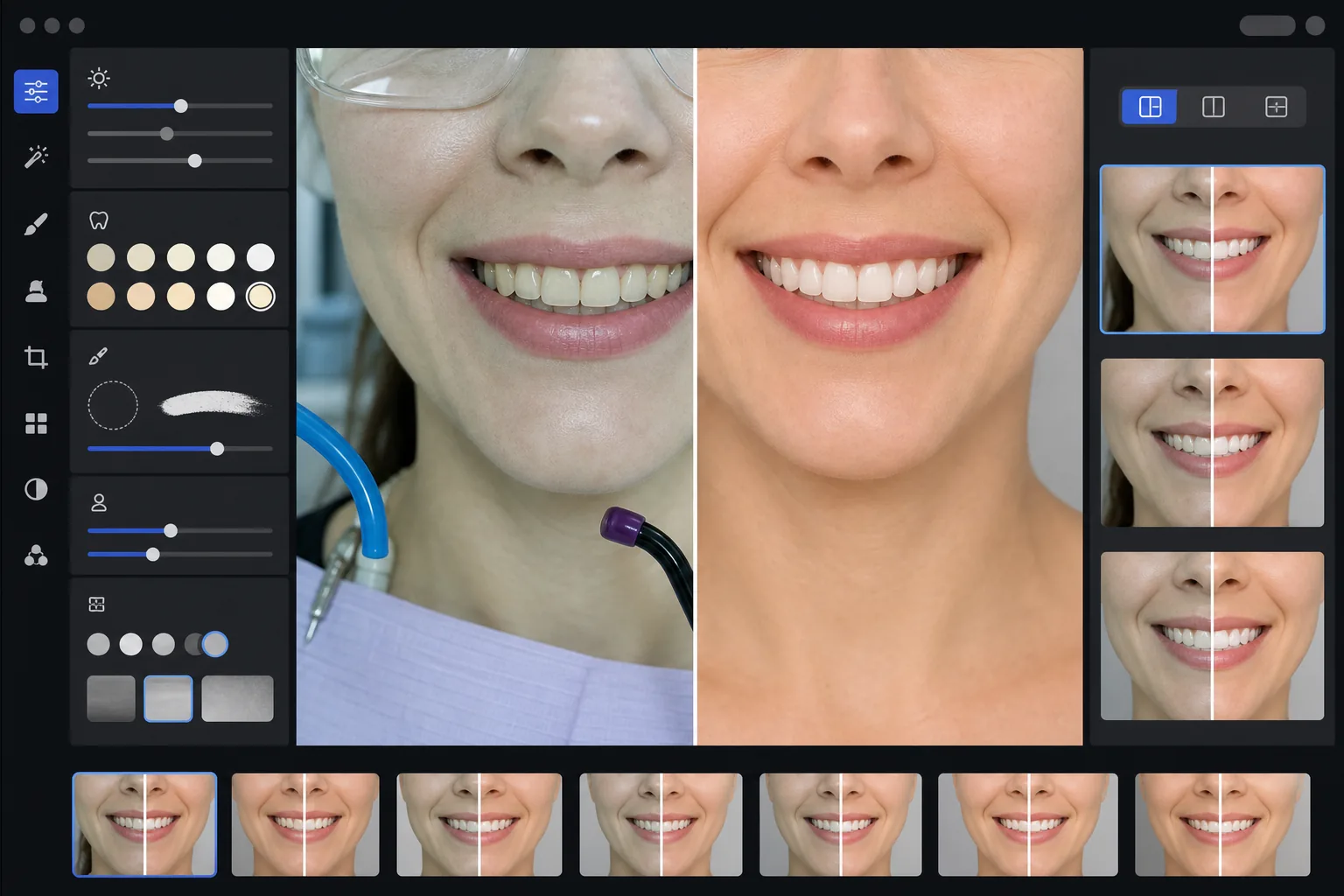
Erstellen Sie professionelle Vorher-Nachher-Marketingbilder, die die Arbeit Ihrer Praxis präsentieren. Diese Vorlage wendet eine natürlich aussehende Zahnaufhellung an, entfernt klinisches Hintergrunddurcheinander, vereinheitlicht die Porträthintergründe der Patienten und gleicht das harte Deckenlicht aus, das auf Behandlungsraumfotos häufig vorkommt.
Diese Vorlage kostenlos testenProfessional template preview
Was diese Vorlage leistet
Verwandelt klinische Zahnfotos in ausgefeilte Marketingbilder für Praxis-Websites, soziale Medien und Patientenaufklärungsmaterialien. AI Enhance korrigiert den unvorteilhaften grün-weißen Farbstich der zahnärztlichen Behandlungsraumbeleuchtung und wendet eine subtile, natürlich wirkende Zahnaufhellung an – die Zähne werden um 2-3 Farbstufen aufgehellt, ohne künstlich zu wirken. Magic Eraser entfernt klinische Hintergrundelemente wie Saugschläuche, Polymerisationslampen, Okklusionspapierspuren auf den Lippen und Schutzbrillen. Die Porträthintergründe der Patienten werden über Ihre gesamte Fallgalerie hinweg auf einen sauberen, einheitlichen Hintergrund standardisiert.
Vorlageneinstellungen
| Zahnaufhellung | Natürliche Aufhellung um +2 bis +3 Farbstufen (bewahrt Transluzenz und Schmelztextur) |
| Lichtkorrektur | Tageslichtabgleich für den Behandlungsraum (entfernt den grün-weißen klinischen Farbstich) |
| Hintergrund | Einheitlicher neutralgrauer oder weißer Hintergrund mit sanfter Vignette |
| Hautton | Wärmekorrektur im Mundbereich (reduziert die Blässe durch zahnärztliche Beleuchtung) |
| Lippenfarbe | Natürliche Sättigungswiederherstellung (gleicht ausgewaschene klinische Beleuchtung aus) |
So verwenden Sie diese Vorlage
Klinische Fotos hochladen
Laden Sie Lächeln-Nahaufnahmen, Vorher-Nachher-Fotos im Porträtstil oder intraorale Aufnahmen aus Ihrem Behandlungsraum hoch. Die Vorlage funktioniert mit Fotos von zahnmedizinischen Spezialkameras, Spiegelreflexkameras mit Ringblitz und Smartphone-Fotos, die unter Behandlungsraumlicht aufgenommen wurden.
Klinische Beleuchtung korrigieren
AI Enhance neutralisiert den grün-weißen Farbstich der Behandlungseinheitslampen über dem Kopf, wärmt die Hauttöne rund um den Mund auf und stellt die natürliche Lippenfarbe wieder her. Die Zahnfarbe wird subtil aufgehellt, um das Ergebnis im besten Licht zu zeigen, während es realistisch und ehrlich bleibt.
Hintergründe und Ablenkungen bereinigen
Magic Eraser entfernt sichtbare Schläuche, Spitzen von Polymerisationslampen, Lätzchenclips, Okklusionspapierflecken auf den Lippen und klinische Geräte im Hintergrund. Der Hintergrund wird durch einen einheitlichen neutralen Hintergrund ersetzt, der über alle Ihre Vorher-Nachher-Paare hinweg übereinstimmt.
Für die Marketingnutzung exportieren
Laden Sie einzelne verbesserte Bilder oder nebeneinander angeordnete Vorher-Nachher-Montagen herunter. Die Ausgabe ist auf Website-Galerien, Instagram-Beiträge, Google Business Profile und gedruckte Patientenbroschüren zugeschnitten, mit einer Auflösung, die für Drucke im Format 8x10 Zoll geeignet ist.
Profi-Tipps für beste Ergebnisse
- ✓Fotografieren Sie bei Vorher-Nachher-Paaren sowohl die Bilder vor als auch nach der Behandlung aus demselben Winkel, derselben Entfernung und derselben Lichtposition. Die Vorlage kann Belichtungsunterschiede zwischen beiden korrigieren, aber das Beibehalten des ursprünglichen Kamerawinkels erzeugt den überzeugendsten Vergleich.
- ✓Die Zahnaufhellung ist bewusst zurückhaltend – sie hellt um 2-3 Vita-Farbstufen auf, anstatt die Zähne papierweiß zu machen. Das wirkt auf potenzielle Patienten natürlicher und glaubwürdiger. Wenn Ihr tatsächliches klinisches Ergebnis dramatisch ist, ist das ehrliche Foto mit leichter Verbesserung überzeugender als ein überbearbeitetes Bild.
- ✓Verwenden Sie für intraorale Lächelnaufnahmen einen Wangenhalter, um die vollständigste Ansicht der Zahnarbeit zu erhalten. Die Vorlage bewältigt den leicht klinischen Look von mit Wangenhalter aufgenommenen Fotos, indem sie die Hauttöne aufwärmt und den Bildausschnitt auf die Lächelzone fokussiert.
- ✓Verarbeiten Sie Ihre gesamte Fallgalerie in einem Stapel, um eine einheitliche Hintergrundfarbe, Helligkeit und Wärme über alle Vorher-Nachher-Paare hinweg sicherzustellen. Nicht übereinstimmende Beleuchtung zwischen Fällen auf Ihrer Website untergräbt den professionellen Eindruck.
Häufige Fragen
Gilt dies als irreführende zahnärztliche Werbung?
+
Die Aufhellungsverbesserung ist auf 2-3 Vita-Farbstufen begrenzt und bewahrt die natürliche Transluzenz und Oberflächentextur des Zahnschmelzes. Dies liegt deutlich innerhalb dessen, was professionelle Fotobeleuchtung und Weißabgleich auf natürliche Weise beeinflussen. Die Vorlage verändert weder Zahnform, Ausrichtung noch Zahnfleischkontur – sie korrigiert lediglich die unvorteilhaften Farbeffekte der klinischen Beleuchtung, durch die Ergebnisse auf Fotos schlechter aussehen als in Wirklichkeit.
Kann dies nebeneinander angeordnete Vorher-Nachher-Montagen erstellen?
+
Ja. Die Vorlage kann einzelne verbesserte Bilder ausgeben oder eine nebeneinander angeordnete Montage mit mittiger Trennlinie, einheitlichem Hintergrund und Vorher/Nachher-Beschriftungen erzeugen. Beide Bilder des Paares erhalten dieselbe Hintergrundbehandlung, sodass der Vergleich optisch sauber und professionell ist.
Funktioniert dies mit Fotos von Intraoralkameras?
+
Ja. Bilder von Intraoralkameras weisen in der Regel eine sehr harte, direkte Beleuchtung auf, die die Oberflächentextur ausbleicht. Die Vorlage stellt die Schmelzdetails wieder her, korrigiert den extremen Weißstich und passt den Kontrast an, um die Zahnanatomie natürlich darzustellen. Das Ergebnis ist detaillierter und natürlicher als die rohe Intraoralaufnahme.
Präsentieren Sie Ihre Zahnarbeit mit professionellen Marketingfotos
Laden Sie klinische Fotos hoch und erhalten Sie natürlich verbesserte, einheitlich gestaltete Vorher-Nachher-Bilder, die bereit sind für Ihre Website, soziale Medien und Patientenbroschüren.
Kostenlos testenRelated templates
More professional templates for your workflow.
Professionelle LinkedIn-Headshot-Vorlage. Sauberer Hintergrund, natürliche Hautverschönerung und der polierte Look, der 14x mehr Profilaufrufe ermöglicht.
Erstellen Sie zu Hause konforme Pass- und Visafotos. Weißer Hintergrund, korrektes Kopfgrößenverhältnis, 2×2 Zoll US-Standard und 600-DPI-Ausgabe, die den Anforderungen des Außenministeriums entspricht.
Professionelle Headshot-Vorlage für Schauspieler und Models. Erfüllen Sie die Standards von Casting-Direktoren mit druckfertiger 8×10-Ausgabe, natürlicher Retusche und sauberen Hintergründen für Agentureinreichungen.