
Food-Fotografie, die einem das Wasser im Mund zusammenlaufen lässt
Appetitliche Bilder steigern die Bestellungen und den Fußgängerverkehr. Magic Eraser hilft Restaurants, Cafés und Lebensmittelmarken dabei, Food-Fotografie aufzuräumen, Tischunordnung zu beseitigen und die Präsentation von Gerichten für Menüs, Liefer-Apps und Social-Media-Marketing zu verbessern.
Last updated
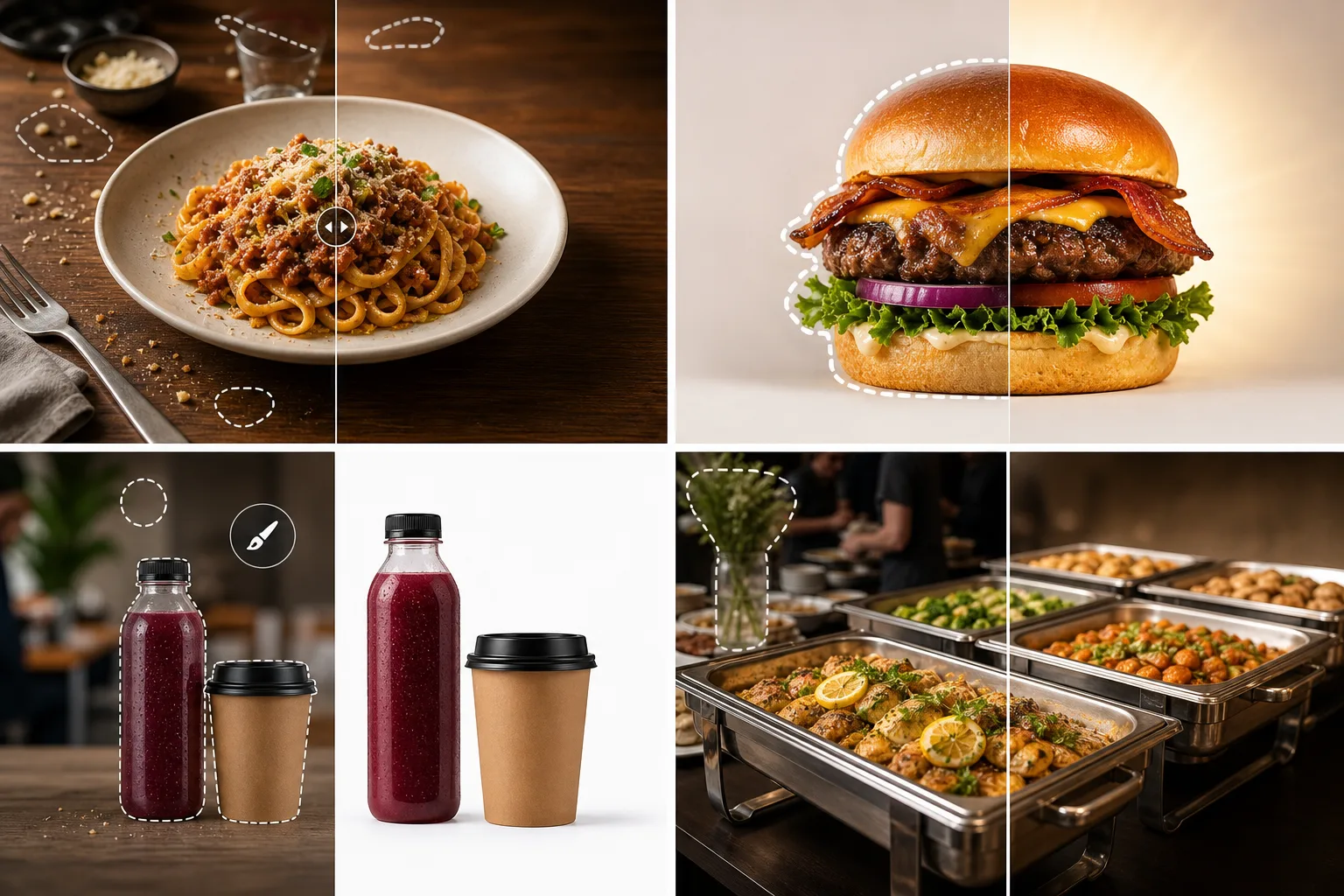
Warum sich Lebensmittel- und Getränkeprofis für Magic Eraser entscheiden
Kunden essen zuerst mit den Augen. Mit Magic Eraser können Sie ungezwungene Küchenfotos in menüwürdige Bilder verwandeln, indem Sie unordentliche Hintergründe entfernen, störendes Geschirr entfernen und die Farben und Texturen hervorheben, die das Essen unwiderstehlich aussehen lassen. Food-Fotografie bringt einzigartige Herausforderungen mit sich: begrenzte Zeit, bevor Gerichte ihr frisches Aussehen verlieren, inkonsistente Restaurantbeleuchtung und unübersichtliche Küchenhintergründe. Magic Eraser übernimmt die Reinigung, sodass Sie schnell Aufnahmen machen und anschließend polieren können. So bleibt die Frische erhalten, die die Food-Fotografie wirkungsvoll macht.
Hauptvorteile für Lebensmittel- und Getränkeunternehmen
Lassen Sie Ihre Menüpunkte und Verpackungen mit KI-gestützter Fotobearbeitung unwiderstehlich aussehen.
Appetitliche Menüfotografie
Entfernen Sie Tellerflecken, störende Unordnung auf dem Tisch und Hintergrundgeräusche von Essensfotos, damit das Gericht selbst im Mittelpunkt steht. Klare Bilder machen Kunden hungrig und bestellungsbereit.
Optimierung der Liefer-App
Erstellen Sie gestochen scharfe, klare Menüpunktfotos, die in Miniaturbildrastern auf DoorDash, Uber Eats, Grubhub und anderen Lieferplattformen hervorstechen, bei denen sich die Bildqualität direkt auf das Bestellvolumen auswirkt.
Verpackungs- und Etikettenaufnahmen
Fotografieren Sie Flaschen, Dosen und Kartons in jeder Umgebung und entfernen Sie dann den Hintergrund für saubere Produktaufnahmen, die sich für Großhandelskataloge, Pitch-Decks und Einreichungen von Einzelhandelspartnern eignen.
Social-Ready-Food-Inhalte
Verwandeln Sie alltägliche Küchenfotos in ausgefeilte Social-Media-Beiträge. Verbessern Sie die Farben, entfernen Sie Hintergrundunordnung und heben Sie die Textur und Frische Ihrer Gerichte hervor.
Saisonale Menüaktualisierungen
Fotografieren und bearbeiten Sie schnell neue saisonale Artikel, ohne für jede Menüänderung einen professionellen Food-Fotografen zu beauftragen. Halten Sie Ihr visuelles Marketing mit minimalem Aufwand auf dem neuesten Stand.
Konsistente Markenbilder
Stellen Sie sicher, dass jeder Menüpunkt, jedes Werbebanner und jeder Social-Media-Beitrag die gleiche visuelle Qualität und den gleichen Stil behält und so die Identität Ihres Restaurants oder Ihrer Marke an allen Kundenkontaktpunkten stärkt.
Häufige Anwendungsfälle
Menü- und Druckmaterialfotos
Bereinigen Sie Geschirrfotos für gedruckte Menüs, Tischkarten und Werbeflyer, indem Sie fleckige Servietten, verlegte Utensilien und Unordnung im Hintergrund entfernen.
Liefer-App-Einträge
Erstellen Sie appetitliche Bilder für DoorDash-, Uber Eats- und Grubhub-Einträge, bei denen sich die Qualität der Miniaturansichten direkt auf das Bestellvolumen auswirkt.
Restaurant-Social-Media
Polnische Küchenaufnahmen hinter den Kulissen und Tellergerichte für Instagram, Facebook und Google Business Profile, um lokale Gäste anzulocken.
Getränke- und Verpackungsaufnahmen
Isolieren Sie Flaschen, Dosen und Becher auf sauberen Hintergründen für Etikettendesign-Modelle, E-Commerce-Angebote und Großhandels-Pitch-Decks.
Catering und Event-Food-Präsentation
Bereinigen Sie Fotos von Catering-Events, Buffets und Food-Festivals, indem Sie Serviergeräte, Veranstaltungsbeschilderungen und Ablenkungen im Hintergrund entfernen, um Ihre Küche zu präsentieren.
Magic Eraser Werkzeuge für Lebensmittel und Getränke
| Tool | How It Helps |
|---|---|
| Objektentfernung | Entfernen Sie Krümel, verstreute Utensilien, Finger und Unordnung auf dem Tisch, damit Sie sich ganz auf das Gericht konzentrieren können. |
| Background Eraser | Isolieren Sie Gerichte und Getränke auf sauberen Hintergründen für Menülayouts, Miniaturansichten der Liefer-App und Werbegrafiken. |
| KI-Füllung | Ersetzen Sie unordentliche Tischoberflächen durch saubere Marmor-, Holz- oder Leinenstrukturen, die das Essensdesign ergänzen. |
| Bildverbesserer | Boost Farbsättigung, Schärfe und warme Töne sorgen dafür, dass Gerichte wie frisch serviert und für die Kamera bereit aussehen. |
Wie es funktioniert
Hochladen
Machen Sie ein Foto Ihres Gerichts oder Getränks und laden Sie es von Ihrem Telefon oder Computer auf Magic Eraser hoch.
Bearbeiten
Entfernen Sie störende Elemente aus dem Rahmen, bereinigen Sie den Hintergrund und verbessern Sie die Farben, damit das Essen optimal aussieht.
Export
Laden Sie das fertige Bild herunter und verwenden Sie es in Ihrer Speisekarte, Ihrem Liefer-App-Eintrag, Ihrer Website oder Ihrem Social-Media-Konto.
Häufig gestellte Fragen
Kann Magic Eraser dafür sorgen, dass Lebensmittel appetitlicher aussehen?
+
Ja. Der Bildverstärker Boosts Farbbrillanz, Wärme und Schärfe, die wichtigsten visuellen Hinweise, die Food-Fotografie appetitlich aussehen lassen, ohne das eigentliche Gericht zu verändern.
Ist dies für die Fotoanforderungen der Liefer-App geeignet?
+
Absolut. Magic Eraser kann saubere, gut beleuchtete Bilder erstellen, die den Größen- und Qualitätsrichtlinien für DoorDash, Uber Eats, Grubhub und ähnliche Plattformen entsprechen.
Benötige ich professionelle Fotoausrüstung?
+
Nein. Magic Eraser wurde entwickelt, um Smartphone-Fotos zu verbessern. Machen Sie schnell eine Aufnahme mit Ihrem Telefon, laden Sie sie hoch und nutzen Sie die Bearbeitungstools, um professionelle Ergebnisse zu erzielen.
Kann Magic Eraser Lebensmittelfarben verstärken, ohne unnatürlich zu wirken?
+
Ja. Der Bildverstärker passt Sättigung, Wärme und Schärfe an, damit Gerichte appetitlich aussehen und gleichzeitig realistische Farben erhalten bleiben. Das Ergebnis sieht professionell beleuchtet und nicht künstlich gefiltert aus.
Funktioniert es für die Getränke- und Flaschenfotografie?
+
Ja. Magic Eraser verarbeitet reflektierende Oberflächen wie Glasflaschen, Dosen und Metallverpackungen. Entfernen Sie Hintergrundunordnung und Reflexionen, um saubere Produktaufnahmen zu erstellen.
Kann ich Magic Eraser für die Menügestaltung verwenden?
+
Ja. Bereinigen Sie Lebensmittelfotos und exportieren Sie sie in genau den Abmessungen, die für gedruckte Speisekarten, digitale Menütafeln und Liefer-App-Einträge erforderlich sind.
Bieten Sie bessere Food-Fotografie
Probieren Sie Magic Eraser kostenlos aus, um Fotos von Gerichten zu bereinigen, das Essens-Styling zu verbessern und Bilder zu erstellen, die Bestellungen und Reservierungen fördern.
Testen Sie Magic Eraser kostenlosMore Industries
See how Magic Eraser helps professionals in other industries.
Fotografen verbringen Stunden mit der Nachbearbeitung, indem sie Ablenkungen entfernen, Porträts retuschieren und Hintergründe perfektionieren. Magic Eraser beschleunigt Ihren Bearbeitungsworkflow, sodass Sie Ihren Kunden schneller und ohne Qualitätseinbußen ausgefeilte Bilder liefern können.
Magic Eraser hilft Maklern und Immobilienfotografen, störende Objekte und visuelle Unordnung zu entfernen und Aufnahmen zu optimieren. Prüfen Sie jede Bearbeitung und beachten Sie die Offenlegungsregeln Ihrer lokalen Plattform, damit die Bilder die Immobilie korrekt darstellen.
Online-Käufer beurteilen Produkte anhand ihrer Bilder. Magic Eraser entfernt unordentliche Hintergründe, löscht störende Elemente und erstellt marktfähige Produktfotos, die das Vertrauen der Käufer stärken und die Konversionsraten erhöhen.
Soziale Medien entwickeln sich schnell und Ihre Bilder müssen mithalten. Magic Eraser hilft YouTubern, Vermarktern und Marken, Ablenkungen zu entfernen, Hintergründe auszutauschen und Bilder aufzupolieren, damit jeder Beitrag in überfüllten Feeds auf Instagram, TikTok und Twitter hervorsticht.
Von Lookbooks bis hin zu Produktseiten benötigen Modemarken makellose visuelle Darstellungen in großem Maßstab. Magic Eraser hilft Designern, Stylisten und Modevermarktern, Hintergründe zu entfernen, Modelaufnahmen zu retuschieren und polierte, flache Lagen zu erstellen, die jedes Kleidungsstück von seiner besten Seite zeigen.
Reisemarketing lebt und stirbt von Bildern. Magic Eraser hilft Hotels, Reiseveranstaltern und Reisezielvermarktern dabei, Menschenmassen von Sehenswürdigkeiten zu entfernen, Immobilienfotos zu bereinigen und Landschaftsaufnahmen zu verbessern, die Browser zu Buchern machen.
Von Jahrbuchporträts bis hin zum Campus-Marketing benötigen Bildungseinrichtungen klare, professionelle Bilder. Magic Eraser hilft Schulen, Hochschulen und E-Learning-Plattformen, Ablenkungen von Fotos zu entfernen, Campusbilder zu verbessern und für jedes Publikum ansprechende Bilder zu erstellen.
Autokäufer beginnen online und Angebotsfotos sind Ihr Ausstellungsraum. Magic Eraser hilft Händlern und Privatverkäufern, Reflexionen zu entfernen, Grundstückshintergründe zu bereinigen und Fahrzeugbilder zu verbessern, damit jedes Angebot ausstellungsraumtauglich aussieht und Probefahrten ermöglicht.