
So entfernen Sie Reflexionen aus einem Foto
Fensterreflexionen, die eine Schaufensterauslage verdecken, Glasreflexionen, die ein Museumsfoto ruinieren, Spiegelreflexionen, die den Fotografen offenbaren – unerwünschte Reflexionen lenken von Ihrem Motiv ab und lassen Bilder amateurhaft wirken. Die KI von Magic Eraser entfernt auf intelligente Weise Reflexionen und bewahrt gleichzeitig die Szene dahinter.
Last updated
Jetzt Reflexionen entfernen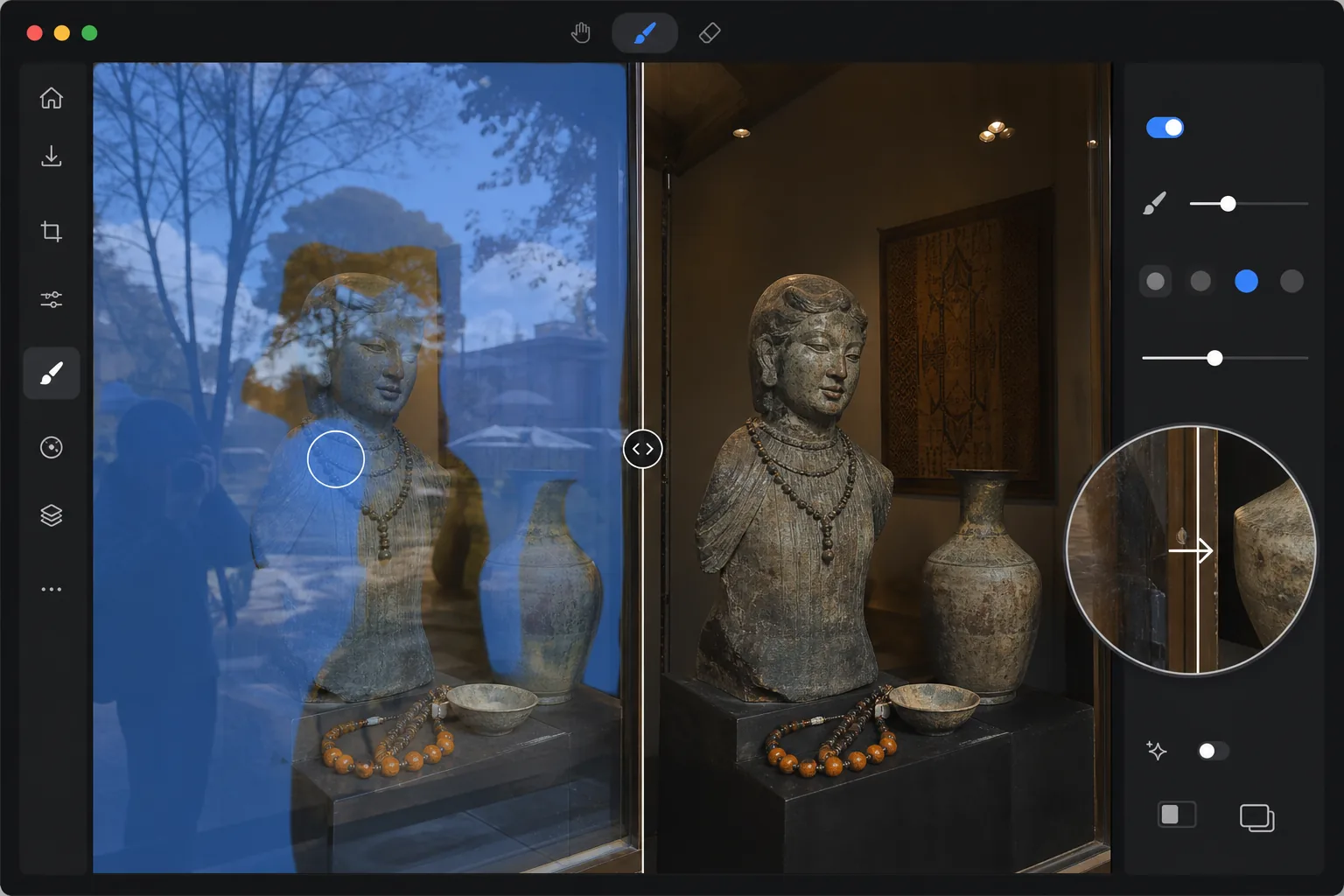
Warum Reflexionen manuell schwer zu entfernen sind
Um eine Spiegelung aus einem Foto zu entfernen, öffnest du Magic Eraser im Web, auf iOS oder Android, lädst das Bild hoch, übermalst die gesamte Spiegelung großzügig mit dem Pinsel – das Glänzen auf dem Glas, die durchscheinende Szene oder den Fotografen im Spiegel – und tippst auf Erase. Die KI trennt die gespiegelte Ebene von der dahinterliegenden Szene und rekonstruiert das saubere Bild darunter. Das Ganze ist kostenlos und ohne Anmeldung. Am besten funktioniert es, wenn sich die Spiegelung deutlich von dem abhebt, was hinter dem Glas liegt; bei einer sehr starken Spiegelung, die fast so hell ist wie das eigentliche Motiv, beseitigt ein zweiter Durchgang das, was der erste übrig lässt. Reflexionen sind komplex, weil sie ein halbtransparentes Geisterbild über das eigentliche Motiv legen. Im Gegensatz zu einfachen Schönheitsfehlern enthält eine Spiegelung kohärente visuelle Informationen – eine umgekehrte Szene, eine Lichtquelle oder den Fotografen selbst – vermischt mit dem tatsächlichen Inhalt hinter dem Glas. Die manuelle Entfernung in Photoshop erfordert eine sorgfältige Trennung der reflektierten Ebene von der übertragenen Ebene, eine Frequenztrennung zur Isolierung des Reflexionsmusters und eine sorgfältige Rekonstruktion der verdeckten Details darunter. Selbst erfahrene Retuscheure verbringen 10 bis 20 Minuten pro Bild. Ein Polarisationsfilter hilft bei der Aufnahme, kann aber nicht nachträglich angewendet werden. Die KI von Magic Eraser erkennt Reflexionsmuster, trennt die Ebenen rechnerisch und rekonstruiert die saubere Szene in Sekunden.
Before you start
Entfernen Sie Reflexionen in drei Schritten
Start with laden sie das foto hoch. The result preview above and tips below use this guide's existing content; no separate before-and-after proof is assumed.
- 1
Laden Sie das Foto hoch
Öffnen Sie Magic Eraser im Web, iOS oder Android. Laden Sie das Foto mit unerwünschten Reflexionen hoch – eine Aufnahme durch ein Fenster, ein Vitrinenfoto oder ein Spiegel-Selfie, von dem Sie sich entfernen möchten. Die Formate JPEG, PNG, HEIC und WebP werden alle bis zu 50 MP unterstützt.
- 2
Streichen Sie über das Spiegelbild
Übermalen Sie den gesamten reflektierten Bereich einschließlich seiner weichen Kanten. Für Fensterreflexionen bürsten Sie das Geisterbild, das die Szene hinter dem Glas überlagert. Bei punktuellen Reflexionen von Blitz- oder Deckenlampen decken Sie den hellen Glanzlichter und den umgebenden Lichthof ab. Seien Sie bei der Auswahl großzügig, um das volle Ausmaß der Reflexion einzufangen.
- 3
Tippen Sie auf Löschen und überprüfen
Die KI trennt die Reflexion von der zugrunde liegenden Szene und rekonstruiert das saubere Bild. Stellen Sie sicher, dass der Bereich hinter der vorherigen Reflexion natürlich aussieht und eine einheitliche Farbe und Detailtreue aufweist. Wenn eine schwache Reflexion zurückbleibt, führen Sie einen zweiten Durchgang über den verbleibenden Bereich durch. Exportieren Sie in voller Auflösung für die Druck- oder Webnutzung.
Am besten für
- Fotografie von Schaufenstern und Schaufenstern, bei denen Innenauslagen durch Reflexionen im Freien verdeckt werden
- Museums- und Galeriefotografie, bei der Glasvitrinen ablenkende Reflexionen über Exponaten erzeugen
- Immobilienfotografie, bei der Fensterreflexionen den Fotografen oder die Ausrüstung zeigen
- Produktfotografie auf reflektierenden Oberflächen, bei denen unerwünschte Spiegelbilder entstehen
- Autofotografie, bei der Windschutzscheiben- oder Karosseriereflexionen vom Fahrzeug ablenken
Tipps für beste Ergebnisse
Decken Sie die gesamte Reflexion großzügig ab – eine teilweise Auswahl hinterlässt Geisterkanten, die schlechter aussehen als die ursprüngliche Reflexion. Starke Einzelreflexionen (Blitzreflexion, Lichtfleck über Kopf) lassen sich am einfachsten entfernen, da die KI eine klare Umgebungsreferenz hat. Diffuse Reflexionen über ein gesamtes Fenster funktionieren gut, wenn die Szene hinter dem Glas genügend Kontrast aufweist, damit die KI die Reflexion vom Motiv unterscheiden kann. Bei sehr starken Reflexionen, bei denen das Geisterbild fast so hell ist wie die reale Szene, führen zwei Durchgänge häufig zu besseren Ergebnissen als einer: Der erste Durchgang reduziert die Reflexion und der zweite bereinigt verbleibende Artefakte. Wenn Sie schräg zum Glas statt direkt darauf fotografieren, verringert sich die Reflexionsintensität zum Zeitpunkt der Aufnahme und die KI-Entfernung wird noch effektiver.
Häufig gestellte Fragen
- Kann es Reflexionen von Glasfenstern entfernen?
- Ja. Fensterreflexionen sind einer der häufigsten Anwendungsfälle. Die KI identifiziert die reflektierte Schicht – typischerweise eine Außenszene, die über einem Innenmotiv schimmert – und entfernt sie, während die Innendetails hinter dem Glas erhalten bleiben. Die besten Ergebnisse erzielen Sie, wenn Reflexion und Thema unterschiedliche Inhalte haben.
- Was ist mit Reflexionen auf glänzenden Oberflächen wie Autolack?
- Magic Eraser verarbeitet Reflexionen auf glänzenden Oberflächen, einschließlich Autolack, polierten Böden und lackierten Möbeln. Die KI unterscheidet die eigene Farbe und das Finish der Oberfläche von der reflektierten Umgebung und stellt das saubere Erscheinungsbild der Oberfläche wieder her, ohne den natürlichen Glanz zu verlieren.
- Ist das Entfernen von Reflexionen kostenlos?
- Ja. Das kostenlose Kontingent von Magic Eraser umfasst das Pinselwerkzeug zum Entfernen von Reflexionen mit täglichen Nutzungsbeschränkungen. Laden Sie Ihr Foto hoch, bürsten Sie die Spiegelung und exportieren Sie das saubere Ergebnis. Premium hebt Tageslimits auf und ermöglicht eine hochauflösende Stapelverarbeitung.
- Wie entferne ich eine Spiegelung aus einem Foto auf Android oder iPhone?
- Öffne Magic Eraser in einem beliebigen mobilen Browser oder in der iOS- bzw. Android-App, lade das Foto aus deiner Galerie und zoome mit zwei Fingern auf das Glänzen hinein. Übermale die gesamte Spiegelung mit dem Finger und tippe auf Erase. Die KI rekonstruiert die dahinterliegende Szene direkt auf deinem Handy und speichert das saubere Bild zurück in deine Galerie. Es funktioniert genauso wie die Desktop-Version – und wenn du den Browser nutzt, brauchst du keine App zu installieren, praktisch, um eine Fenster- oder Vitrinenaufnahme gleich nach dem Knipsen zu korrigieren.
- Wann funktioniert die Entfernung von Spiegelungen nicht gut?
- Die KI braucht etwas, woraus sie wieder aufbauen kann, deshalb hängt das Ergebnis davon ab, wie viel von der echten Szene unter der Spiegelung erhalten bleibt. Ein leichtes Glänzen über einem klaren Motiv wird sauber entfernt; aber wenn die Spiegelung genauso hell – oder heller – ist als das, was dahinterliegt, wurden die Details darunter nie wirklich erfasst, sodass die KI eine plausible Rekonstruktion erzeugt, die womöglich nicht der Realität entspricht. Spiegelglatte Oberflächen, die fast nichts außer der Spiegelung zeigen, sind am schwierigsten. Für das beste Ergebnis übermalst du die gesamte Spiegelung (eine teilweise Auswahl hinterlässt geisterhafte Ränder), und beim Fotografieren reduziert ein schräger Aufnahmewinkel zum Glas das Glänzen von vornherein.