
Remove Decorative Emoji Overlays From a Photo
Erfahren Sie, wie Sie mit Magic Eraser Emoji-Overlay entfernen können. Einfache Schritt-für-Schritt-Anleitung mit kostenlosem KI-Tool. Funktioniert im Web, auf iOS und Android.
Last updated
Jetzt ausprobieren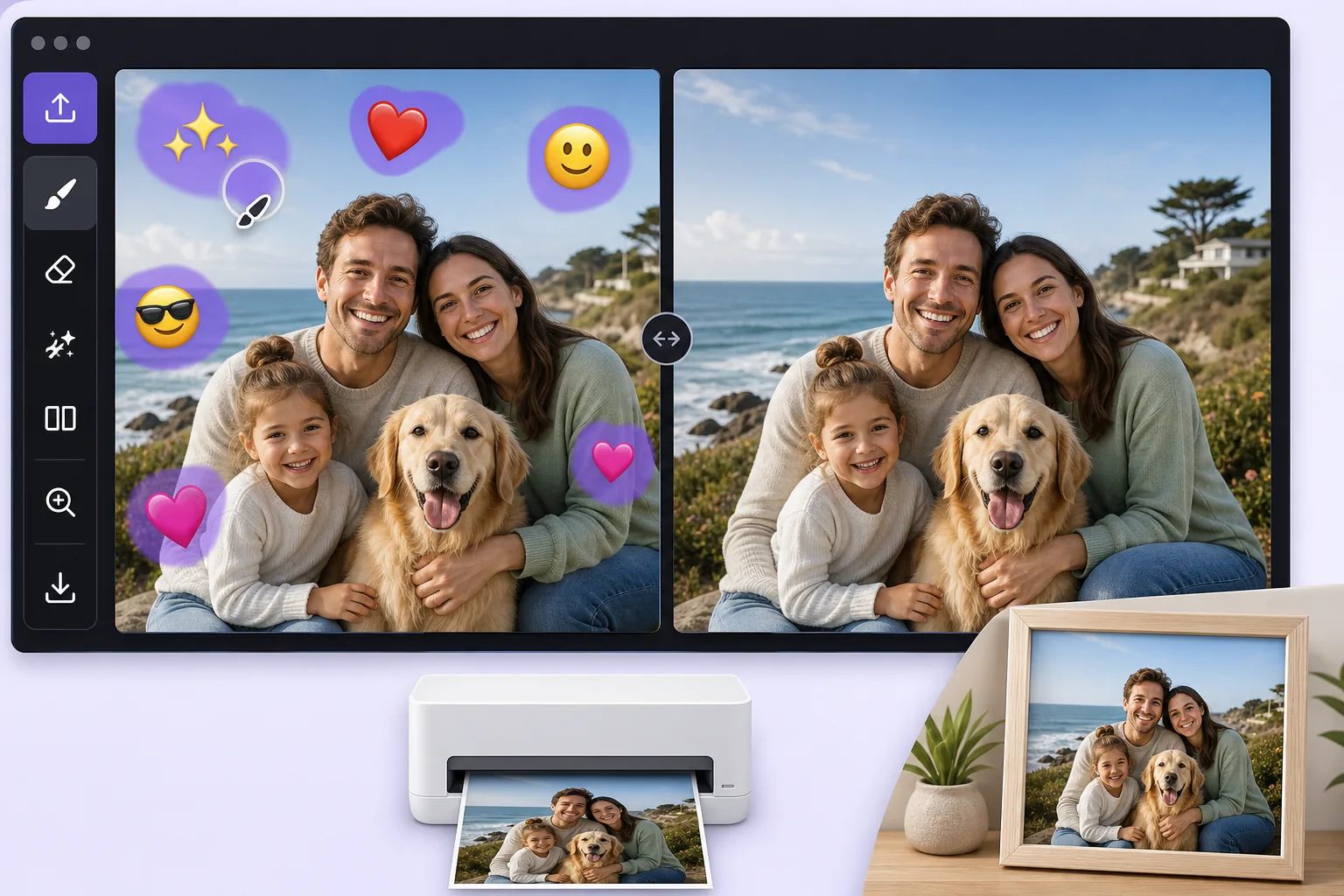
Turn a fun, sticker-covered photo into a clean print-ready image mit Magic Eraser
We all decorate photos with emoji overlays for laughs, a crown on a birthday selfie, sunglasses on the dog, a string of hearts across a couple shot. The problem comes later, when you want to print that photo as a framed gift, submit it for a professional profile, or hand it to a client, and the cartoon stickers suddenly look out of place. Re-shooting is rarely an option, and the original un-stickered file is often long gone. Magic Eraser solves this by removing the decorative emoji overlay and using AI inpainting to fill the gap with a believable continuation of the surrounding scene. Be clear on what this does: the AI synthesizes a plausible reconstruction of the area an emoji was covering, it does not recover the literal original pixels that were hidden, and it cannot reveal a face or detail that the sticker concealed. For most decorative overlays, though, what was behind them is ordinary background, wall, sky, clothing, hair, so the result is clean enough to print or use professionally. It runs free on web, iOS, and Android with no watermark, so you can clean up a photo on your phone right after the fun and have a print-ready version in seconds.
Before you start
Schritt-für-Schritt-Anleitung
Start with foto hochladen. The result preview above and tips below use this guide's existing content; no separate before-and-after proof is assumed.
- 1
Foto hochladen
Öffnen Sie Magic Eraser im Web, auf iOS oder Android. Ziehen Sie Ihr JPEG-, PNG-, HEIC- oder WebP-Foto per Drag & Drop hinein. Kein Konto erforderlich.
- 2
Tool und Bereich auswählen
Wählen Sie das passende Tool und markieren Sie den zu bearbeitenden Bereich. Die KI analysiert und wendet die Änderungen automatisch in Sekunden an.
- 3
Ergebnis herunterladen
Sehen Sie sich das Ergebnis in der Vorschau an und laden Sie das bearbeitete Foto herunter. Export als hochqualitatives PNG oder JPEG.
Am besten geeignet für
- Cleaning a birthday or holiday selfie before ordering it as a framed print or photo gift
- Turning a fun, sticker-decorated headshot into a usable photo for a resume or LinkedIn profile
- Removing playful emoji a friend added before you reuse the shot in a client deck or brochure
- Stripping heart and sparkle overlays off a couple or wedding photo destined for a printed album
- Prepping a casually decorated product or pet photo for a professional listing or store catalog
Tipps für beste Ergebnisse
Start from the largest version of the file you can find, the original camera roll image rather than a re-saved chat screenshot, because printing magnifies any softness in the reconstructed area. Emoji placed over flat, repeating backgrounds like a wall, sky, or solid shirt reconstruct most convincingly; an emoji sitting on top of a face or fine detail is harder, and the AI will invent a plausible fill rather than restore the true hidden feature, so treat those spots critically before printing. Work emoji-by-emoji on busy photos and review each erased patch zoomed in. If a result looks off, a slightly larger or smaller brush selection often gives the AI better context to rebuild the scene.
Häufig gestellte Fragen
- Ist die Funktion Emoji-Overlay entfernen kostenlos?
- Ja, Magic Eraser ermöglicht es Ihnen, kostenlos Emoji-Overlay entfernen mit täglichen Limits durchzuführen. Upgraden Sie auf Pro für unbegrenzte Bearbeitung und hochauflösende Exporte.
- Wie lange dauert es, Emoji-Overlay entfernen durchzuführen?
- Nur wenige Sekunden. Die KI von Magic Eraser verarbeitet Fotos schnell — die meisten Ergebnisse sind sofort nach dem Hochladen verfügbar.
- Kann ich es auf dem Handy verwenden?
- Ja, Magic Eraser funktioniert auf iOS, Android und allen Webbrowsern. Sie können nahtlos zwischen Geräten wechseln.
- Wird die Bildqualität beeinträchtigt?
- Nein, Magic Eraser bewahrt die ursprüngliche Fotoqualität. Die KI verarbeitet intelligent, um Details und Schärfe zu erhalten.