
Remove the Emoji Hiding One Face in Your Group Photo
Erfahren Sie, wie Sie mit Magic Eraser Emoji aus Gruppenfoto entfernen können. Einfache Schritt-für-Schritt-Anleitung mit kostenlosem KI-Tool. Funktioniert im Web, auf iOS und Android.
Last updated
Jetzt ausprobieren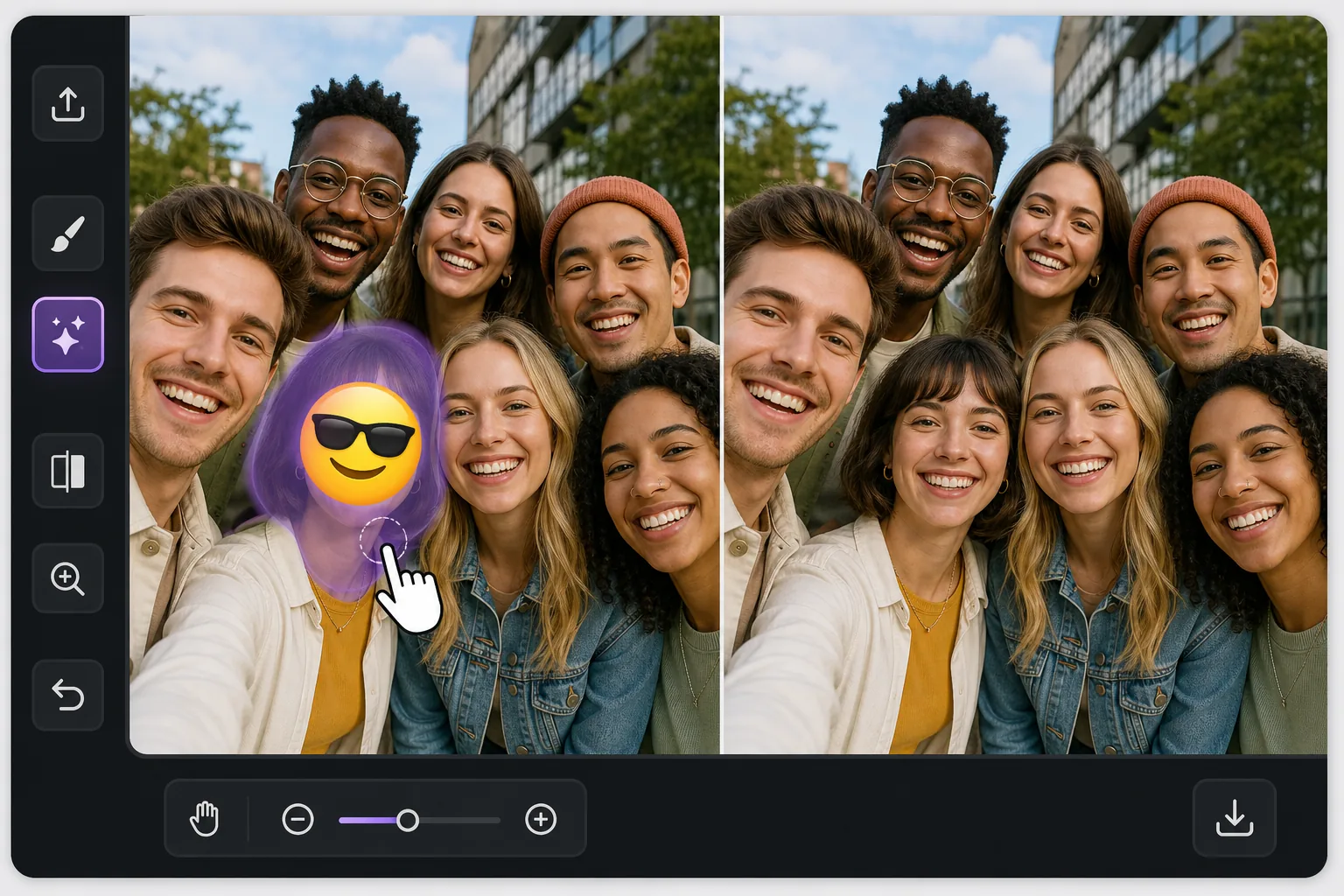
One face covered, everyone else fine mit Magic Eraser
In a busy group photo, an emoji over a single person is awkward in a specific way: the rest of the shot is perfect, so the one covered face stands out even more. Magic Eraser is built for exactly this kind of pinpoint fix. You brush only the emoji sitting on that one person, and the AI inpaints the small area it covered — matching the surrounding skin tone, hair edges, and the shoulder of the person tucked in next to them. Be clear about what happens here: the AI does not recover the real hidden face. It synthesizes a plausible reconstruction of that region based on the rest of the image. In a tight group shot where the covered head is small and partly framed by neighbors, that often reads as natural at a glance. Magic Eraser works free on web, iOS, and Android with no watermark, so you can fix the group photo on whatever device the picture lives on.
Before you start
Schritt-für-Schritt-Anleitung
Start with foto hochladen. The result preview above and tips below use this guide's existing content; no separate before-and-after proof is assumed.
- 1
Foto hochladen
Öffnen Sie Magic Eraser im Web, auf iOS oder Android. Ziehen Sie Ihr JPEG-, PNG-, HEIC- oder WebP-Foto per Drag & Drop hinein. Kein Konto erforderlich.
- 2
Tool und Bereich auswählen
Wählen Sie das passende Tool und markieren Sie den zu bearbeitenden Bereich. Die KI analysiert und wendet die Änderungen automatisch in Sekunden an.
- 3
Ergebnis herunterladen
Sehen Sie sich das Ergebnis in der Vorschau an und laden Sie das bearbeitete Foto herunter. Export als hochqualitatives PNG oder JPEG.
Am besten geeignet für
- A friend stamped a laughing or sunglasses emoji on one person in a shared group selfie
- A privacy sticker was placed over a single face but you now have permission to show them
- A meme reply covered one person's face and you want the clean original group shot back
- Restoring a reunion or team photo where one head got hidden behind a reaction emoji
- Reposting a group picture and needing the one covered face to blend in with everyone else
Tipps für beste Ergebnisse
The reconstruction is most convincing when the covered head is small relative to the group and partly bordered by neighbors — the AI has nearby skin, hair, and lighting to imitate. If the emoji covers a large front-and-center face, expect a softer, more invented result and consider cropping instead. Brush a touch beyond the emoji's edge so no colored fringe survives, but stop short of the people on either side. Match expectations honestly: this rebuilds the region plausibly, it does not restore the true expression or identity of the person who was hidden. For shared photos, get that person's okay before reposting a reconstructed version of their face.
Häufig gestellte Fragen
- Ist die Funktion Emoji aus Gruppenfoto entfernen kostenlos?
- Ja, Magic Eraser ermöglicht es Ihnen, kostenlos Emoji aus Gruppenfoto entfernen mit täglichen Limits durchzuführen. Upgraden Sie auf Pro für unbegrenzte Bearbeitung und hochauflösende Exporte.
- Wie lange dauert es, Emoji aus Gruppenfoto entfernen durchzuführen?
- Nur wenige Sekunden. Die KI von Magic Eraser verarbeitet Fotos schnell — die meisten Ergebnisse sind sofort nach dem Hochladen verfügbar.
- Kann ich es auf dem Handy verwenden?
- Ja, Magic Eraser funktioniert auf iOS, Android und allen Webbrowsern. Sie können nahtlos zwischen Geräten wechseln.
- Wird die Bildqualität beeinträchtigt?
- Nein, Magic Eraser bewahrt die ursprüngliche Fotoqualität. Die KI verarbeitet intelligent, um Details und Schärfe zu erhalten.