
إزالة مصارف العواصف من الصور
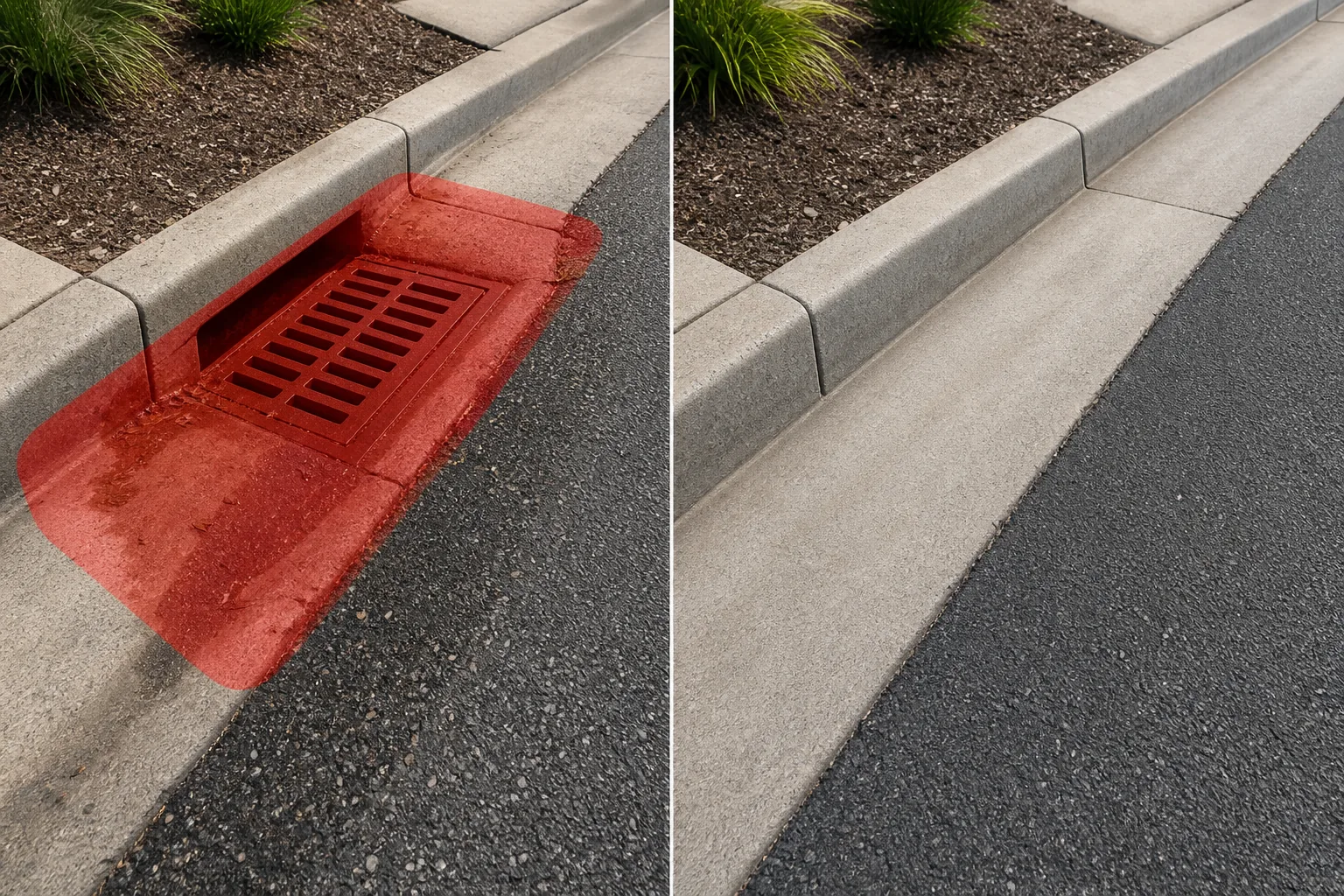
قم بمسح شبكات تصريف العواصف، ومداخل الرصيف، وأغطية أحواض الصيد، وقنوات الصرف من صور الشوارع والأرصفة والممتلكات. Magic Eraser يزيل الشبكة المعدنية والفتحة الداكنة، ثم يعيد بناء الرصيف المحيط أو حافة الرصيف أو الميزاب بملمس ولون متطابقين - لا حاجة إلى ختم استنساخ يدوي.
آخر تحديث
لماذا تخلق مصارف العواصف نقاط محورية غير مرغوب فيها في التصوير الفوتوغرافي في الشوارع
تم تصميم شبكات تصريف العواصف لتكون وظيفية وليست جذابة. تخلق فتحاتها المستطيلة أو الدائرية الداكنة ثقوبًا عالية التباين في سطح الشارع الموحد، مما يجذب عين المشاهد إلى الأسفل وبعيدًا عن الموضوع المقصود. في التصوير الفوتوغرافي للعقارات، يمكن لمدخل الرصيف البارز بالقرب من مدخل العقار أن يجعل منظر الشارع جذابًا ويبدو صناعيًا. بالنسبة للمصورين المعماريين الذين يلتقطون الصور الخارجية للمبنى من الجانب الآخر من الشارع، فإن مصارف العواصف في المقدمة تكسر مستوى الأرض النظيف الذي يجب أن يوجه العين نحو الهيكل. التحدي المتمثل في الإزالة اليدوية هو أن مصارف العواصف تقع عند تقاطع أسطح متعددة - طريق أسفلت، ورصيف خرساني، وقناة مزراب، وأحيانًا خط رصيف مطلي. تحتوي الشبكة نفسها على نمط معقد من الشقوق أو الثقوب فوق فراغ مظلم، وغالبًا ما تظهر الخرسانة المحيطة بها بقعًا مائية وتراكم الحطام. يتعامل Magic Eraser مع هذا التعقيد تلقائيًا: فهو يحدد حدود الصرف، ويزيل الشبكة والفتحة، ويملأ المنطقة بمادة السطح الصحيحة - سواء كانت أسفلت أو خرسانة أو رصف من الطوب أو مزيج من ذلك. يتم مزج زوايا الظل وتلطيخ السطح لتتناسب مع المنطقة المحيطة، مما ينتج سطحًا أرضيًا يُقرأ على أنه مستمر وغير منقطع.
قم بإزالة مصارف العواصف في ثلاث خطوات
- 1
قم بتحميل صورتك
افتح Magic Eraser على الويب أو iOS أو Android وقم بتحميل صورة الشارع أو الرصيف أو العقار الذي يحتوي على مصرف العواصف. يتم دعم كل من JPEG وPNG وHEIC وWebP. استخدم أعلى دقة متاحة حتى يتمكن الذكاء الاصطناعي من مطابقة حبيبات وملمس الرصيف المحيط بدقة.
- 2
قم بالفرشاة فوق شبكة التصريف
قم بطلاء مجموعة استنزاف العواصف بأكملها - الشبكة المعدنية والإطار الخرساني وأي فتحة داكنة مرئية أسفلها. قم بتضمين المنطقة المحيطة مباشرة حيث يمكن رؤية بقع الماء أو تراكم الحطام، حيث أن ترك هذه العلامات بعد إزالة الشبكة سيبدو غير طبيعي. بالنسبة لمداخل الرصيف، قم بتضمين فتحة الرصيف وأي قناة تؤدي إلى الفتحة.
- 3
مسح ومراجعة
اضغط على مسح وMagic Eraser لإزالة استنزاف العاصفة أثناء إعادة بناء سطح الشارع وخط الرصيف والميزاب. تأكد من أن حافة الرصيف تبدو متواصلة وأن نسيج الرصيف يتطابق مع المنطقة المحيطة. إذا بقيت أي بقع أو علامات حطام متبقية، فقم بإجراء تمريرة ثانية سريعة لتنظيفها، ثم قم بالتصدير بدقة كاملة.
الأفضل ل
- صور قائمة العقارات حيث تنتقص مصارف العواصف من جانب الرصيف من واجهة العقار
- التصوير الفوتوغرافي للشوارع والمدن حيث تخلق شبكات الصرف بقعًا داكنة غير مرغوب فيها في التكوين
- التصوير المعماري للواجهات الخارجية للمبنى حيث تكسر المصارف الأمامية المستوى الأرضي
- تسويق العقارات التجارية حيث توفر مواقف السيارات والأرصفة النظيفة صيانة عالية الجودة
- استكشاف مواقع الأفلام والتلفزيون حيث يلزم وجود أسطح شوارع دقيقة
نصائح لإزالة استنزاف العواصف بسلاسة
تأتي مصارف العواصف في العديد من الأشكال - شبكات ذات فتحات مستطيلة، وأغطية مستديرة على شكل غرف التفتيش، ومداخل مقطوعة على شكل حافة، ومصارف خندق طويلة - لذا اضبط منطقة الفرشاة لتتناسب مع النوع المحدد. بالنسبة للشبكات المستطيلة، قم بتضمين الإطار الخرساني الذي يقع فوق سطح الطريق قليلاً، حيث ستبدو هذه الحافة المرتفعة غريبة بدون الشبكة الموجودة بداخلها. بالنسبة لمداخل الرصيف، قم بالتتبع على طول فتحة الرصيف حتى يتمكن الذكاء الاصطناعي من إعادة بناء خط الرصيف المستمر. يعد تلطيخ الماء هو السبب الأكثر شيوعًا للصرف الذي تمت إزالته - وهي علامات داكنة على شكل مروحة حيث يتدفق الماء نحو المدخل. قم بتضمين هذه البقع في اختيار الفرشاة للحصول على نتيجة مقنعة. إذا كان الصرف عند نقطة منخفضة حيث تتقارب منحدرات الرصيف المتعددة، فسيعمل الذكاء الاصطناعي على مزج انتقال الصف بسلاسة. بالنسبة للصور التي تحتوي على مصارف مياه متعددة (شائعة في الشوارع الطويلة)، اعمل على كل صورة على حدة من المقدمة إلى الخلفية.
الأسئلة المتداولة
- هل يستطيع Magic Eraser التعامل مع أنواع مختلفة من شبكات تصريف العواصف؟
- نعم. يقوم الذكاء الاصطناعي بإزالة شبكات القضبان المستطيلة، وأغطية الصرف المستديرة، ومداخل الرصيف المشقوقة، وقنوات تصريف الخنادق، وشبكات الحديد الزهر المزخرفة. كل نوع له شكل ونمط إطار مختلفان، ولكن سير عمل الإزالة متطابق: قم بالفرشاة فوق المجموعة الكاملة ثم انقر فوق "مسح".
- ماذا عن الفتحة المظلمة المرئية أسفل الشبكة؟
- قم بإدراجه في منطقة الفرشاة الخاصة بك. يملأ الذكاء الاصطناعي الفراغ المظلم بالرصيف أو الخرسانة المتطابقة، مما يخلق سطحًا مستمرًا. إن التباين العالي بين الفتحة المظلمة والرصيف المشرق هو في الواقع ما يجعل النتيجة فعالة للغاية - حيث يكتشف الذكاء الاصطناعي بسهولة مكان انتهاء الصرف وبداية الطريق.
- هل سيبدو خط الرصيف طبيعيًا بعد إزالة مدخل الرصيف؟
- نعم. يقوم الذكاء الاصطناعي بإعادة بناء حافة الرصيف المستمرة باستخدام شكل وارتفاع أقسام الرصيف على جانبي المدخل. إذا كان للرصيف حافة مطلية (أحمر، أصفر، أو أبيض)، فسيتم تمديد خط الطلاء عبر المنطقة المملوءة للحفاظ على الاستمرارية البصرية.
- هل هو مجاني للاستخدام؟
- نعم. تتعامل الطبقة المجانية لـ Magic Eraser مع إزالة استنزاف العواصف مع حدود الاستخدام اليومي. يزيل Premium (29.99 دولارًا سنويًا) هذه القيود ويفتح صادرات عالية الدقة للتصوير الفوتوغرافي الاحترافي والمواد التسويقية عالية الجودة.