
إزالة الكائنات من الخلفيات المعقدة
تعامَل مع السيناريوهات الصعبة مثل الأسطح المنقوشة والسماوات المتدرجة والمشاهد المزدحمة.
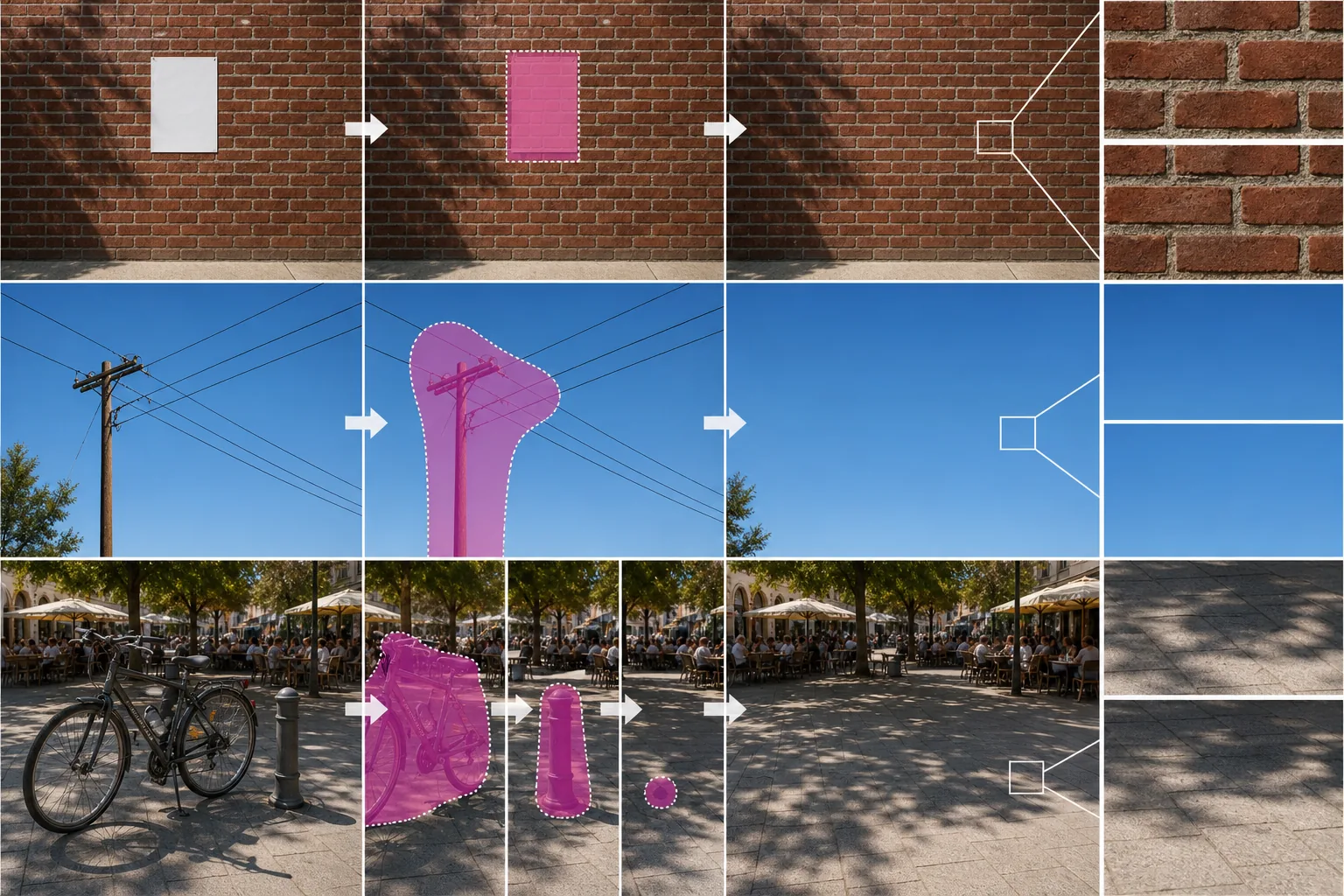
Lesson context before the long read
Review the result preview above, then scan the learning objectives below before reading the full lesson. Updated 2026-05-17.
Example visual uses an existing public asset: /content-images/complex-background-object-removal-academy.webp.
Learning Objectives
- 1التعامل مع الأنسجة المتكررة مثل الجدران الطوبية والأرضيات المبلّطة وأنماط القماش
- 2الحفاظ على التدرّجات السلسة في السماوات والمياه وخلفيات الاستوديو أثناء الإزالة
- 3إدارة الكائنات المتداخلة في المشاهد المزدحمة دون إدخال عيوب
لماذا تتحدى الخلفيات المعقدة أدوات الإزالة
يمكن للأنسجة المتكررة مثل الجدران الطوبية والأسوار الخشبية والأرضيات المبلّطة أن تربك أدوات التحرير الأبسط لأن الملء يجب أن يكمّل نمطًا دقيقًا. وتتعامل نماذج الطلاء الداخلي بالذكاء الاصطناعي مع هذا بشكل أفضل من الاستنساخ اليدوي، لكن يمكنك تحسين النتائج بجعل تحديدك يتبع حدود الكائن بإحكام بدلاً من الامتداد عبر مساحات كبيرة من النمط. وإذا أظهر التمرير الأول إزاحة طفيفة في النمط، تراجع وجرّب تحديدًا أصغر يمنح النموذج بيانات نمط سليمة أكثر للعمل بها. وغالبًا ما يؤدي تشغيل الإزالة في تمريرتين أصغر إلى نتيجة أنظف من تمريرة واحدة كبيرة.
تقنيات للأسطح المنسوجة والمنقوشة
تطرح التدرّجات تحديًا مختلفًا: فحتى انقطاع لوني صغير يكون مرئيًا فورًا في سماء سلسة أو جدار مضاء بنعومة. وللحصول على نتائج سلسة، مدّد تحديدك قليلاً إلى ما وراء الكائن حتى يتمكن الذكاء الاصطناعي من أخذ عينات كافية من التدرّج على الجانبين. ويطبّق Magic Eraser معالجة لاحقة لمطابقة الدرجات تنعّم الانتقال بين المنطقة المملوءة ومحيطها. وإذا ظللت ترى خطًا خافتًا، فإن ضبابية خفيفة متلاشية على منطقة الحدود فقط ستزيله دون التأثير على بقية الصورة.
التعامل مع الانعكاسات والكائنات الشفافة
تتطلّب المشاهد المزدحمة ذات الكائنات المتداخلة نهجًا طبقيًا. ابدأ بإزالة العائق الأمامي أولاً، ثم عالج أي عناصر ثانوية تصبح مرئية. ومحاولة محو عدة عناصر متداخلة في تمريرة واحدة قد ينتج عنها عيوب الظلال الشبحية لأن النموذج لا يستطيع تحديد ترتيب العمق الصحيح. اعمل من الأمام إلى الخلف، مراجعًا كل إزالة قبل المتابعة. وتحافظ هذه الطريقة التكرارية على نظافة كل طبقة وتمنحك أفضل صورة نهائية ممكنة.
Key Takeaways
- ✓التحديدات المحكمة والتمريرات الأصغر تحافظ على الأنسجة المتكررة بدقة أكبر
- ✓مدّد التحديدات إلى داخل التدرّجات حتى يتمكن الذكاء الاصطناعي من مزج الدرجة بسلاسة
- ✓أزِل الكائنات المتداخلة في طبقات، عاملاً من المقدمة إلى الخلفية