
تحرير عدة صور في آنٍ واحد
استخدم سير العمل المجمّع لتطبيق إزالة كائنات متسقة عبر مجموعات كبيرة من الصور بكفاءة.
Lesson context before the long read
Review the result preview above, then scan the learning objectives below before reading the full lesson. Updated 2026-05-17.
Example visual uses an existing public asset: /content-images/batch-object-removal-academy.webp.
Learning Objectives
- 1إعداد مهمة إزالة مجمّعة باستخدام ميزة قائمة الانتظار في Magic Eraser
- 2تطبيق قناع إزالة محفوظ على سلسلة من الصور ذات التركيب نفسه
- 3مراقبة تقدّم العملية المجمّعة وتعليم الصور التي تحتاج إلى اهتمام فردي
متى توفّر التحرير المجمّع الوقت
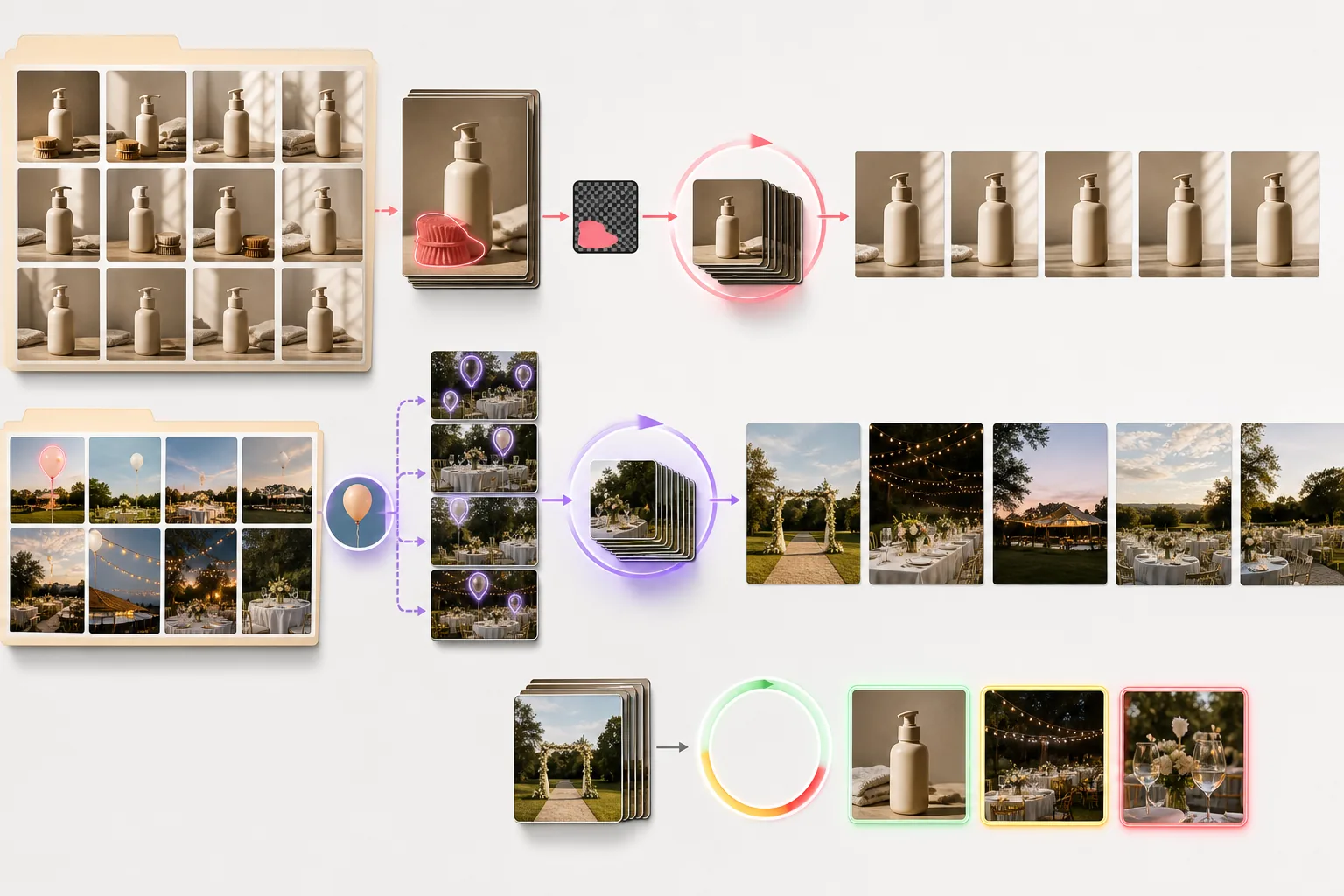
عندما تحتاج إلى معالجة عشرات أو مئات الصور ذات احتياجات إزالة متشابهة، يصبح التحرير اليدوي واحدة تلو الأخرى غير عملي. وتتيح لك قائمة الانتظار المجمّعة في Magic Eraser رفع مجلد كامل من الصور وتعريف قاعدة إزالة تنطبق عليها جميعًا. ويمكنك تحديد فئة كائن مثل «الأشخاص» أو «النص المتراكب»، وسيحدد الذكاء الاصطناعي العناصر المطابقة ويزيلها في كل صورة تلقائيًا. وهذا قيّم بشكل خاص لمصوري الفعاليات الذين يحتاجون إلى إزالة نفس اللافتة أو العلامة التجارية من مئات اللقطات.
إعداد سير عمل مجمّع
بالنسبة للصور التي تشترك في نفس التركيب تمامًا، مثل صور المنتجات الملتقطة على نفس المجموعة، يمكنك حفظ قناع إزالة من تعديلك الأول وتطبيقه على كل صورة لاحقة في الدفعة. ويضمن هذا النهج القائم على القوالب وضعًا متطابق البكسل لمنطقة الإزالة عبر كل إطار. اضبط القناع مرة واحدة إذا تحركت الكاميرا قليلاً، ثم أعِد تطبيقه. ويمكن لأقنعة القوالب مقترنةً بالتنفيذ المجمّع أن تختصر جلسة تحرير تستغرق عدة ساعات إلى مجرد بضع دقائق من الإعداد إضافةً إلى وقت المعالجة المؤتمتة.
مراقبة الجودة عبر صور متعددة
أثناء المعالجة المجمّعة، لن تنتج كل صورة نتيجة مثالية في التمريرة الأولى. ويعلّم Magic Eraser الصور التي تنخفض فيها درجات الثقة عن حد معين، مما يتيح لك مراجعة الملفات الإشكالية فقط بدلاً من فحص كل ناتج يدويًا. رتّب النتائج حسب درجة الثقة وركّز انتباهك على الصور ذات الدرجات الأدنى. ويضمن سير عمل الفرز هذا جودة عامة عالية مع إبقاء استثمارك للوقت متناسبًا مع تعقيد المجموعة.
Key Takeaways
- ✓قوائم الانتظار المجمّعة مع قواعد فئات الكائنات تؤتمت الإزالة عبر مجموعات صور كبيرة
- ✓قوالب الأقنعة المحفوظة تضمن تعديلات متسقة على الصور المركّبة بشكل متطابق
- ✓فرز درجات الثقة يتيح لك مراجعة الصور التي تحتاج إلى تنقيح يدوي فقط