
كيفية تحديد الكائنات بدقة
تعلّم أدوات التحديد المتاحة وكيفية استخدام كل واحدة منها لأنواع مختلفة من الكائنات والمشاهد.
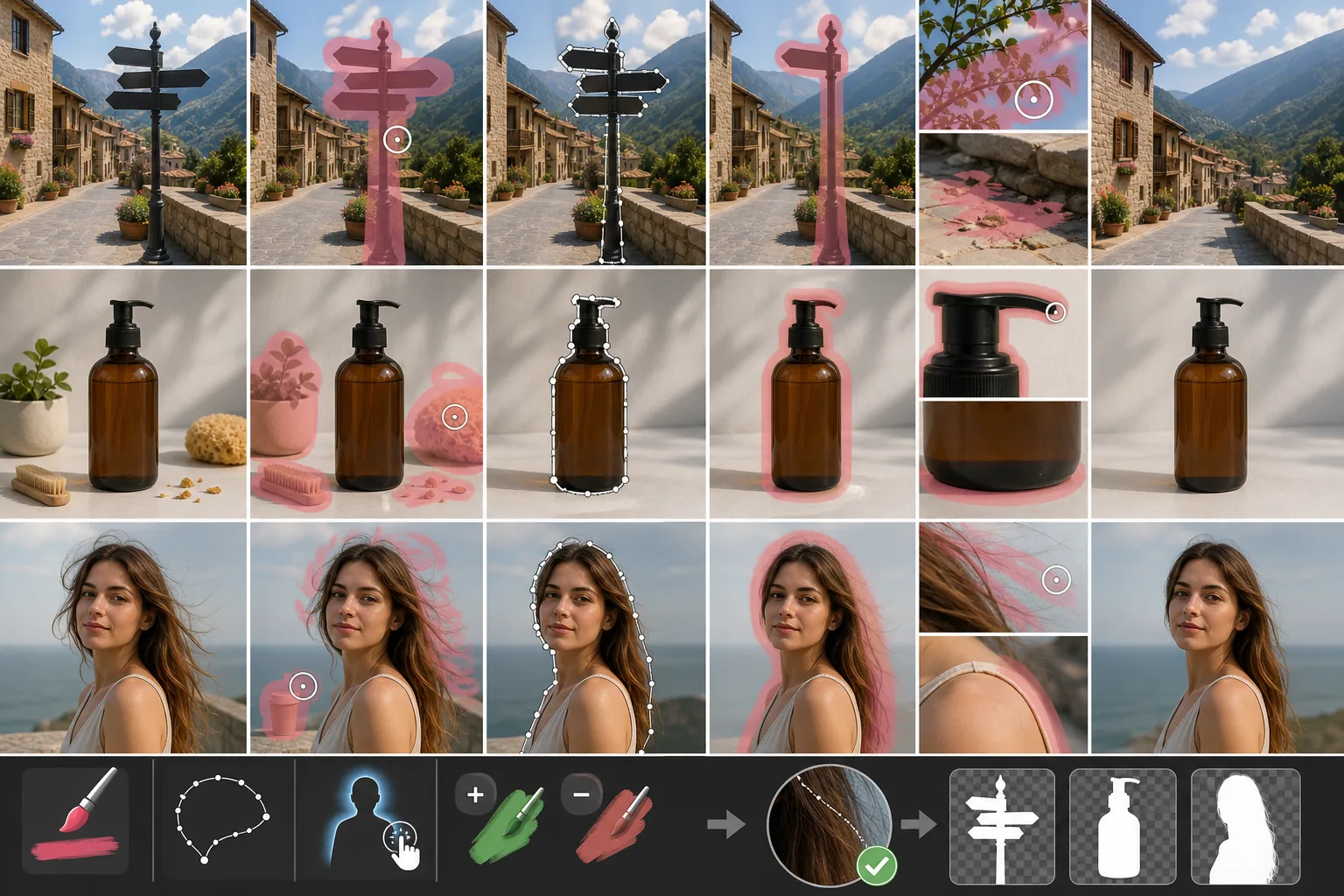
Lesson context before the long read
Review the result preview above, then scan the learning objectives below before reading the full lesson. Updated 2026-05-17.
Example visual uses an existing public asset: /content-images/object-selection-accuracy-academy.webp.
Learning Objectives
- 1استخدام أداة الفرشاة لرسم تحديدات دقيقة فوق الكائنات غير المنتظمة
- 2تطبيق أداة الحبل للتحديدات السريعة للأشكال المحددة جيدًا
- 3الاستفادة من الكشف التلقائي بالذكاء الاصطناعي لتحديد الكائنات بنقرة واحدة
أداة الفرشاة لدقة على مستوى البكسل
التحديد الدقيق هو الخطوة الأهم على الإطلاق في إزالة الكائنات لأن جودة صورتك النهائية تعتمد كليًا على ما تطلب من الذكاء الاصطناعي محوه. وتتيح لك أداة الفرشاة الرسم مباشرةً فوق المنطقة غير المرغوب فيها، مما يمنحك تحكمًا على مستوى البكسل في الكائنات ذات الأشكال غير المنتظمة مثل أغصان الأشجار أو الحطام المتناثر. اضبط قطر الفرشاة ليطابق الكائن وكبّر العرض للحواف الدقيقة. والتحديد الأكبر قليلاً عادةً ما يكون أفضل من التحديد الأصغر، لأن الذكاء الاصطناعي يحتاج إلى هامش صغير من السياق لمزج الملء بشكل طبيعي.
أداة الحبل للأشكال المحددة جيدًا
أداة الحبل أسرع للكائنات ذات الحدود الواضحة والمتصلة مثل سيارة متوقفة أو لافتة. انقر لوضع نقاط الارتساء حول الكائن وأغلق الحلقة لإنشاء تحديدك. ويقدّم Magic Eraser أيضًا نسخة حبل مغناطيسي تلتصق بالحواف عالية التباين تلقائيًا، وهي مفيدة بشكل خاص للكائنات المظللة على خلفيات أفتح. وللحصول على أفضل النتائج، أبقِ نقاط الارتساء قريبة من بعضها على المنحنيات وأبعد على الحواف المستقيمة.
الكشف التلقائي بالذكاء الاصطناعي للتحديد بنقرة واحدة
الكشف التلقائي بالذكاء الاصطناعي هو أسرع طريقة للتحديد ويعمل جيدًا مع الأشخاص والحيوانات والكائنات الشائعة. ما عليك سوى النقر على العنصر الذي تريد إزالته، فيحدد النموذج إطاره على الفور. ويمكنك تنقيح القناع المكتشف تلقائيًا بإضافة مناطق أو طرحها بأداة الفرشاة. ويمنحك الجمع بين الكشف التلقائي والتعديلات اليدوية السرعة والدقة معًا، مما يجعله سير العمل الموصى به لمعظم التعديلات اليومية.
Key Takeaways
- ✓استخدم أداة الفرشاة للأشكال غير المنتظمة والتفاصيل الدقيقة، مع تجاوز الحافة قليلاً بالطلاء
- ✓يتفوق الحبل والحبل المغناطيسي في الكائنات ذات الحدود المميزة
- ✓الكشف التلقائي بالذكاء الاصطناعي مع التنقيح اليدوي هو أسرع طريقة تحديد دقيقة