Skip to content
移除对象

从照片中删除文字

使用 Magic Eraser 在几秒钟内从照片中删除文字。AI 自动重建背景。在 iOS、Android 和网页上免费使用。

Last updated

立即尝试
10M+ users4.9 App Store ratingPhotos processed on-device — never stored
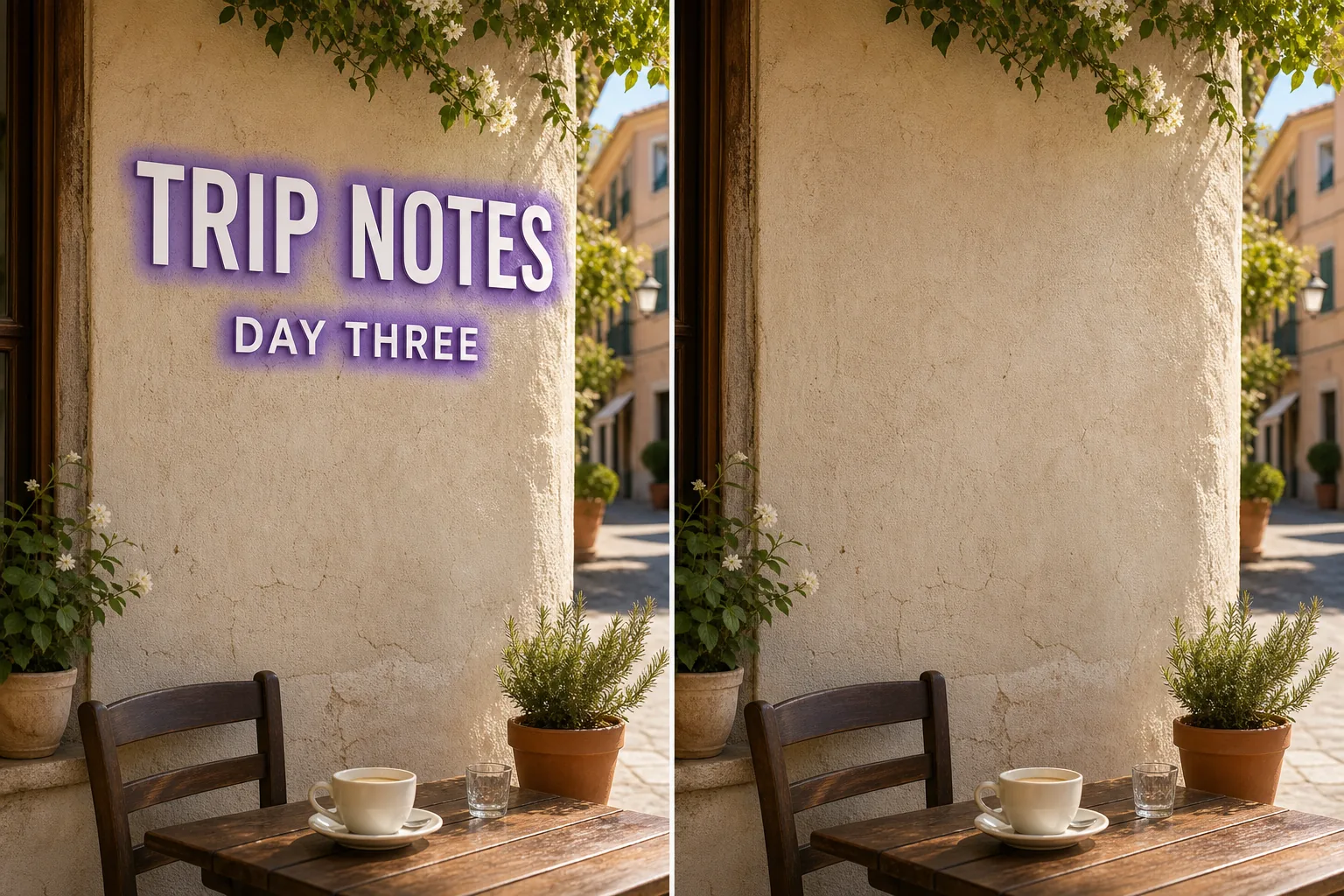
Photo before removing text with Magic Eraser
Before
Photo after removing text with Magic Eraser
After

AI 删除文字的工作原理

Text on a photo is rarely just a flat sticker — it sits on top of skies, faces, brick walls, menus, and signage, and each letter hides a slightly different patch of background. Removing it cleanly means rebuilding what every stroke and serif was covering, then matching the colour, lighting, and texture of the surrounding area. Done by hand with a clone stamp, that is slow and usually leaves smears or repeated patterns. Magic Eraser handles it in one pass: you mark the words — a meme caption across the top, a watermark-style line of credit text, a street sign, a product label, or subtitles baked into a screenshot — and the AI paints them out and fills the gap with a plausible continuation of the background. The result depends heavily on what the text was sitting on, which is the honest part most tools skip over.

分步教程

  1. 1

    上传照片

    在网页、iOS 或 Android 上打开 Magic Eraser,上传包含文字的照片。支持 JPEG、PNG 和 WebP 格式。

  2. 2

    涂抹要删除的区域

    用画笔涂抹要删除的文字。画笔范围比对象稍大一点,AI 会产生更干净的边缘。

  3. 3

    擦除并下载

    AI 在几秒内重建背景。检查结果,必要时用修补画笔微调,然后以全分辨率导出。

最适合

重要提示

Text removal is only as good as the background under the letters, and Magic Eraser is candid about that. Words sitting on a plain, even surface — a clear sky, a solid wall, a blurred backdrop, flat-colour packaging — reconstruct almost invisibly, because the AI only has to extend a simple, predictable texture. Words sitting on detailed or unique content are different: text laid over a person's face, dense text, fine print over a patterned fabric, or a sign whose underlying shopfront is fully hidden cannot be recovered, because that information genuinely is not in the image. There the AI estimates a plausible fill rather than restoring the true pixels, so treat the patch as a believable reconstruction, not a reveal of what was actually behind the words. For best results, brush tightly around each character, include outlines and shadows, and run a second pass on any ghosting. Note this is distinct from a semi-transparent watermark or a graphic logo — here you are removing readable, opaque lettering, which the AI can isolate cleanly but must rebuild from scratch underneath.

常见问题

从照片中删除文字是免费的吗?
是的。Magic Eraser 免费版包含删除文字功能,有每日使用限制。升级到 Premium($29.99/年)可解除限制并解锁高分辨率导出。
删除文字需要多长时间?
通常只需几秒钟。AI 处理涂抹区域并几乎即时重建背景。
手机上能用吗?
是的。Magic Eraser 适用于 iOS、Android 和网页浏览器。您可以在任何设备上删除文字。
图片质量会下降吗?
不会。AI 保留照片的原始分辨率和质量。重建区域与周围的光线、颜色和纹理匹配。