
去除照片上的疤痕
消除肖像、头像和身体照片中的手术疤痕、痤疮疤痕、受伤痕迹和其他可见疤痕。 Magic Eraser 去除疤痕组织并重建自然肤色和纹理 - 产生看起来未经编辑的干净结果。
最后更新
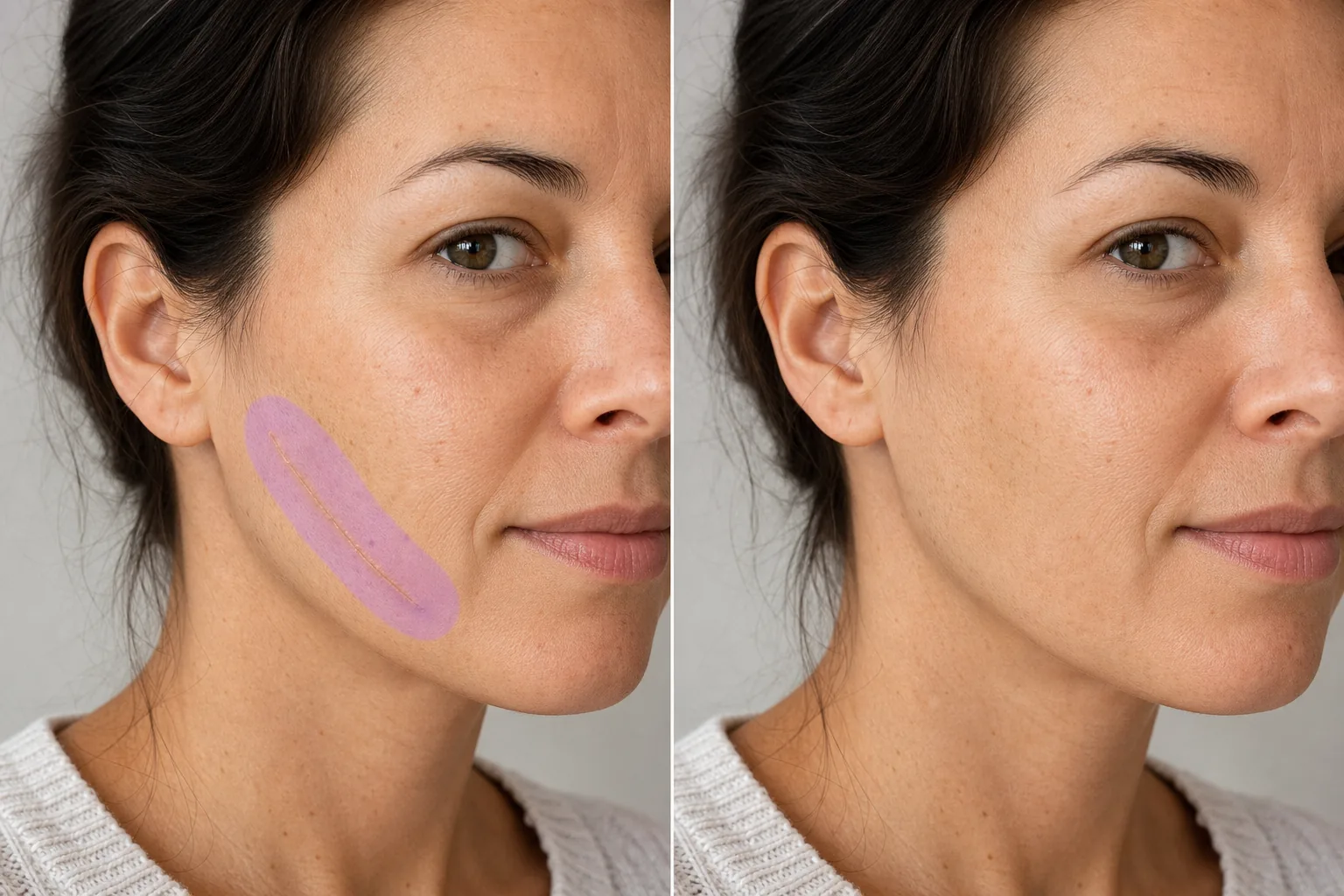
如何从照片中去除疤痕
想从照片里去除疤痕,只需在网页端、iOS 或 Android 上打开 Magic Eraser,用画笔涂抹疤痕及周围一小圈皮肤,然后点击 Erase——AI 会自动重建出自然的肤色和皮肤纹理来替换掉它。完全免费,无需注册。它能淡化或遮盖疤痕的痕迹,同时保留真实的皮肤质感;对于平整、有色差的痕迹,以及清晰、光线充足的照片,效果最佳。 伤疤会讲述故事,但在专业头像、模特作品集和正式肖像中,伤疤可以代替人物成为焦点。额头上的手术疤痕、脸颊上的痤疮疤痕或手臂上的伤痕都会将观众的注意力从摄影师想要的表情和构图上移开。客户经常要求在修饰后的照片中减少或去除疤痕——不是因为他们感到羞耻,而是因为他们希望图像代表他们如何看待自己,而不是他们病史的任何一个时刻。 Magic Eraser 的 AI 分析疤痕纹理(凸起、凹陷、变色或光滑)和周围的健康皮肤,然后用与色调、纹理、毛孔图案和照明相匹配的自然皮肤重建该区域。 The result preserves the natural look of the skin without the over-smoothed appearance of heavy retouching.
三步去除疤痕
- 1
上传您的照片
在网络、iOS 或 Android 上打开 Magic Eraser,然后上传包含您想要去除的疤痕的肖像或照片。
- 2
刷在疤痕上
用刷子在疤痕组织上涂抹,覆盖疤痕的整个宽度以及健康皮肤的一小部分边缘。对于长疤痕,可一笔刷过整个长度,以实现一致的重建。
- 3
擦除并验证
点击“擦除”,人工智能会用自然的皮肤纹理替换疤痕。放大以确认重建区域与周围皮肤无缝融合 - 检查色调、纹理和照明是否一致。导出修饰后的照片。
最适合
- 客户要求去除疤痕的专业头像
- 需要干净皮肤呈现的建模组合
- 具有修饰要求的婚礼和活动肖像
- 需要特定外观的角色的表演头像
- 统一修图标准的企业团队照片
- 外观精美的社交媒体个人资料照片
- 记录之前/之后的皮肤科和整容手术
- 原照片后出现疤痕的照片修复
自然去除疤痕的技巧
疤痕去除的质量取决于疤痕的类型。扁平、变色的疤痕(比周围皮肤更浅或更深)是最容易矫正的——人工智能会匹配周围的色调,结果几乎是看不见的。凸起的疤痕(疤痕疙瘩或肥厚性疤痕)会投射出微妙的阴影,人工智能也会将其删除,但将阴影区域包含在画笔选择中以进行完整校正。锯齿状疤痕(萎缩性疤痕,如冰锥痤疮疤痕)需要人工智能重建皮肤表面和纹理深度——当周围皮肤提供清晰的参考时,结果最好。对于覆盖重要皮肤表面的大疤痕区域,分段工作并验证各部分的肤色保持一致。人工智能产生的结果可以保留自然的皮肤纹理,包括毛孔和细纹,避免激进的美颜滤镜造成的塑料光滑外观。
常见问题
- 可以去除大的手术疤痕吗?
- 是的。刷过疤痕的整个长度和宽度。人工智能重建整个区域的自然皮肤。身体轮廓区域(例如弯曲的躯干)上的非常大的疤痕可能会受益于分段处理。
- 它对痤疮疤痕有效吗?
- 是的。凸起和凹陷的痤疮疤痕都是可以矫正的。对于脸上散布的痤疮疤痕,请刷在每个疤痕区域。 AI重建光滑肌肤,毛孔纹理自然。
- 结果看起来会像喷枪一样吗?
- 不会。人工智能保留了自然的皮肤特征——毛孔、细纹和颜色变化。校正后的区域与周围皮肤的真实纹理相匹配,而不是产生平滑、经过过滤的外观。
- 去疤痕是免费的吗?
- 是的。 Magic Eraser 的免费套餐涵盖肖像去除疤痕。上传您的照片,涂抹疤痕,然后免费导出修饰后的结果。
- 这是一款可以在线使用的免费疤痕去除照片编辑器吗?
- 是的。Magic Eraser 可直接在浏览器中运行,是一款免费的在线疤痕去除编辑器——无需下载、无需注册,处理结果也没有水印。打开网页版,上传照片,用画笔涂抹疤痕,再点击 Erase 即可。如果你更习惯在手机上编辑,也有 iOS 和 Android 应用可用。免费版即可完成人像和身体照片的疤痕修饰。
- 我能去除老照片或冲印照片上的疤痕吗?
- 可以。先扫描或拍摄冲印照片,再上传扫描件,像平常一样涂抹疤痕即可。AI 会根据周围区域重建皮肤,所以效果取决于扫描后的皮肤是否清晰、光线是否充足。如果照片对焦偏软、有胶片颗粒感或分辨率较低,AI 可以参考的纹理就更少,因此老照片上修饰过的区域可能会显得比其他部分稍微平滑一些。
- 去除疤痕会改变照片的其他部分吗?
- 不会。Magic Eraser 只编辑你涂抹的区域——照片的其余部分,包括脸部、光线和背景,都保持原样。在你涂抹并点击 Erase 之前不会有任何改动,而且原始文件会保留,方便你对比前后效果或重新编辑。这让它非常适合制作前后对比记录,因为只有标记的区域会发生变化。