Skip to content
移除对象

Remove skin blemishes from photos

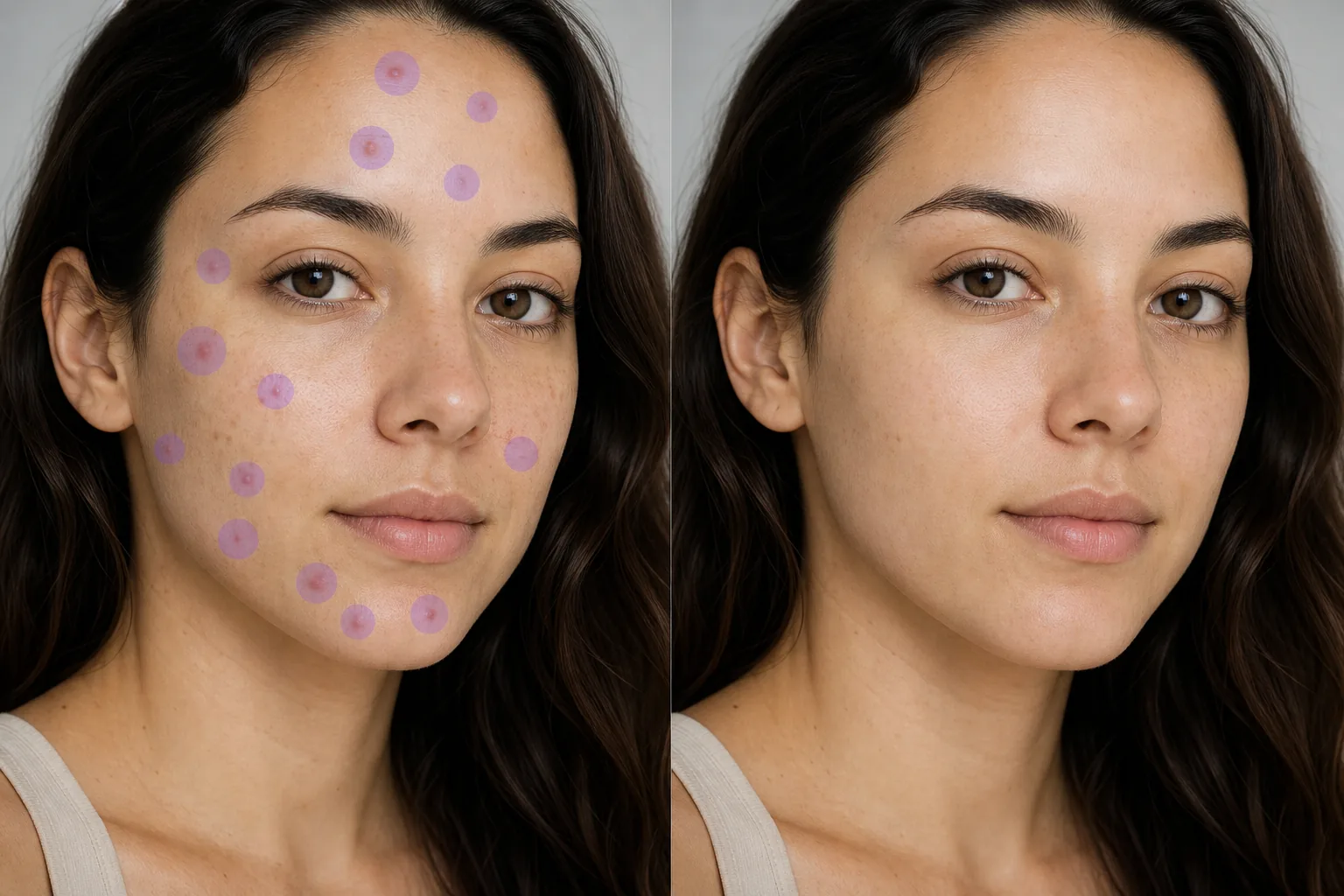
Pimples, acne scars, temporary redness, dark spots, insect bites, and minor skin imperfections appear in portrait sessions, corporate headshots, graduation photos, dating-profile selfies, and event photography regardless of how careful the makeup prep was. Magic Eraser's AI removes each blemish and reconstructs the surrounding skin texture — pore pattern, tone gradient, natural highlight, and shadow — so the result looks like clean skin rather than airbrushed plastic.

Last updated

立即尝试

Why skin blemishes show up in otherwise-great portraits — Magic Eraser

Portrait photography captures skin at a level of detail the human eye doesn't normally process in conversation. A pimple that's barely noticeable face-to-face becomes a focal point in a tightly cropped headshot rendered at 4000×6000 pixels on a retina display. Corporate headshot sessions for company websites and LinkedIn are typically scheduled weeks in advance, and there's no rescheduling because someone woke up with a breakout the morning of the shoot — the photographer, the studio rental, and 30 employees' calendars are already locked. Graduation photos happen on a fixed date regardless of whether the graduate has clear skin that week. Wedding photography captures the bridal party across an 8-12 hour day during which stress, sweat, humidity, and makeup reapplication create conditions where blemishes appear mid-event even when they weren't visible during the morning prep session. Dating-profile photography matters disproportionately because the viewer's first impression forms in under two seconds, and a visible blemish competes with the subject's expression for that initial attention. Real-estate agent headshots, author portraits, speaker bios, and social-media profile photos all share the same dynamic: the photo represents the person for months or years, but the blemish existed for days. Manual blemish removal in Photoshop uses the healing brush or clone stamp tool on each individual spot — workable for 2-3 blemishes, but tedious when a portrait has 15-20 small imperfections scattered across the forehead, cheeks, chin, and jawline. Magic Eraser's AI handles each blemish as a discrete removal target: brush over the spot, and the AI reconstructs the clean skin underneath using the surrounding pore pattern and tone as reference, preserving the natural skin texture rather than replacing it with a flat smoothed patch.

分步教程

  1. 1

    Upload the portrait

    Open Magic Eraser on web, iOS, or Android. Drop in the headshot, portrait, selfie, graduation photo, event candid, or group shot where skin blemishes need cleanup. The tool works on any photo with visible skin — close-up headshots, half-body portraits, and wider group shots where individual faces are large enough to show detail. JPEG, PNG, HEIC, and WebP supported.

  2. 2

    Brush over each blemish

    Paint over each pimple, acne mark, dark spot, redness patch, insect bite, or minor skin imperfection. Size the brush to just cover the blemish plus a thin margin — for small pimples, a tight brush matching the spot's diameter plus 20-30% works best. For scattered blemishes across a face (forehead cluster, cheek area, chin), brush each spot individually rather than mass-painting a large skin region. The AI produces more natural results when each blemish has clear surrounding skin as reference. For acne scars with texture (not just discoloration), brush the scar area with enough margin to include the raised or depressed edge.

  3. 3

    Tap Erase and export

    The AI removes each blemish and rebuilds the skin surface — matching the local pore density, tone, natural highlight gradient, and shadow direction from the surrounding clear skin. The result preserves the subject's actual skin character (freckles, moles, natural tone variation) while removing only the temporary imperfections you brushed. For professional headshots and editorial portraits, follow with one AI Enhance pass to recover any fine skin detail the smoothing softened. Export at full resolution for print, web, or social media.

最适合

重要提示

Blemish removal works best when the surrounding skin within a centimeter of the blemish is relatively consistent in tone and texture — the AI uses that adjacent region as reference to rebuild the clean surface. Four situations need extra attention. First, blemishes near structural features (the edge of the nostril, the lip line, the eyebrow boundary, the hairline): size the brush carefully to cover only the blemish and not cross into the adjacent feature, because the AI will attempt to rebuild whatever you brush, and brushing across a lip line or eyebrow can distort the feature boundary. Second, dense blemish clusters where spots are nearly touching (a forehead breakout with 8-10 adjacent pimples): the AI handles these but benefits from a two-pass approach — remove every other blemish first, let the AI rebuild, then remove the remaining blemishes in a second pass so each removal has more clean-skin reference. Third, discoloration-only marks (post-inflammatory hyperpigmentation, fading acne marks) versus raised blemishes: both respond to the brush tool, but discoloration-only marks produce cleaner single-pass results because the surface texture is already smooth and only the tone needs correction. Fourth, preserving intentional skin character: freckles, beauty marks, and moles are permanent features many subjects want to keep. Don't brush features the subject identifies with — blemish removal should target temporary imperfections (active pimples, transient redness, recent scars) rather than permanent skin character. When in doubt, ask the subject which marks to keep. For group photos where multiple faces need cleanup, work one face at a time to keep each person's skin tone reconstruction accurate to their individual complexion.

常见问题

Is it free to remove blemishes from photos?
Yes. Magic Eraser's free tier handles blemish removal with daily usage limits. Premium ($29.99/year) removes the limits and unlocks high-resolution exports — important for printed headshots, large-format portraits, and professional portfolio images where skin detail matters at full size.
Will the skin look natural after blemish removal?
Yes. The AI reconstructs the local skin texture — pore pattern, tone gradient, natural highlight direction — from the surrounding clear skin rather than applying a flat blur. The result preserves the subject's actual skin character while removing temporary imperfections. For editorial and print work at large sizes, an AI Enhance follow-up pass recovers any fine detail the initial smoothing softened.
Can I remove acne scars, not just active pimples?
Yes. Brush over the scar area including its textured edge. The AI handles both raised scars (where the surface has a bump or ridge) and depressed scars (ice-pick, boxcar, rolling) by rebuilding the surface from the surrounding skin's texture pattern. Deep, wide scars may need a slightly larger brush margin than active pimples. For old scarring with significant texture depth, a two-pass approach (remove, enhance, then refine any remaining texture) produces the cleanest result.
Does this work on phone selfies, not just studio portraits?
Yes. Magic Eraser's iOS and Android apps run the same blemish-removal AI as the web version. Phone selfies, front-camera portraits, and casual photos all work. The lower resolution of phone cameras compared to studio equipment actually makes blemish removal slightly easier because less fine skin detail needs reconstruction.
Will it remove freckles and moles too?
It removes whatever you brush — so don't brush features the subject wants to keep. Freckles, beauty marks, and permanent moles are part of the person's identity, not temporary blemishes. Target only the spots the subject would want removed: active breakouts, temporary redness, recent marks, insect bites. When editing someone else's photo (a client, a family member), ask which marks to preserve before starting.
How many blemishes can I remove from one photo?
There's no hard limit. Brush each blemish individually in a single session — the AI handles 20-40+ separate spots per photo without re-uploading. For faces with dense clusters (a forehead breakout with 15+ adjacent spots), the two-pass approach described in edge cases produces cleaner results than single-pass mass removal.
Is blemish removal appropriate for professional headshots?
Yes — removing temporary blemishes from professional headshots is standard industry practice and is expected by both subjects and employers. The key distinction is temporary versus permanent: removing a pimple that appeared yesterday is routine retouching; altering the shape of someone's nose or jawline is a different category. Magic Eraser's brush tool is designed for spot removal, not facial restructuring, so it naturally stays within the standard retouching boundary.