
Cải Tiến Ảnh Cưới
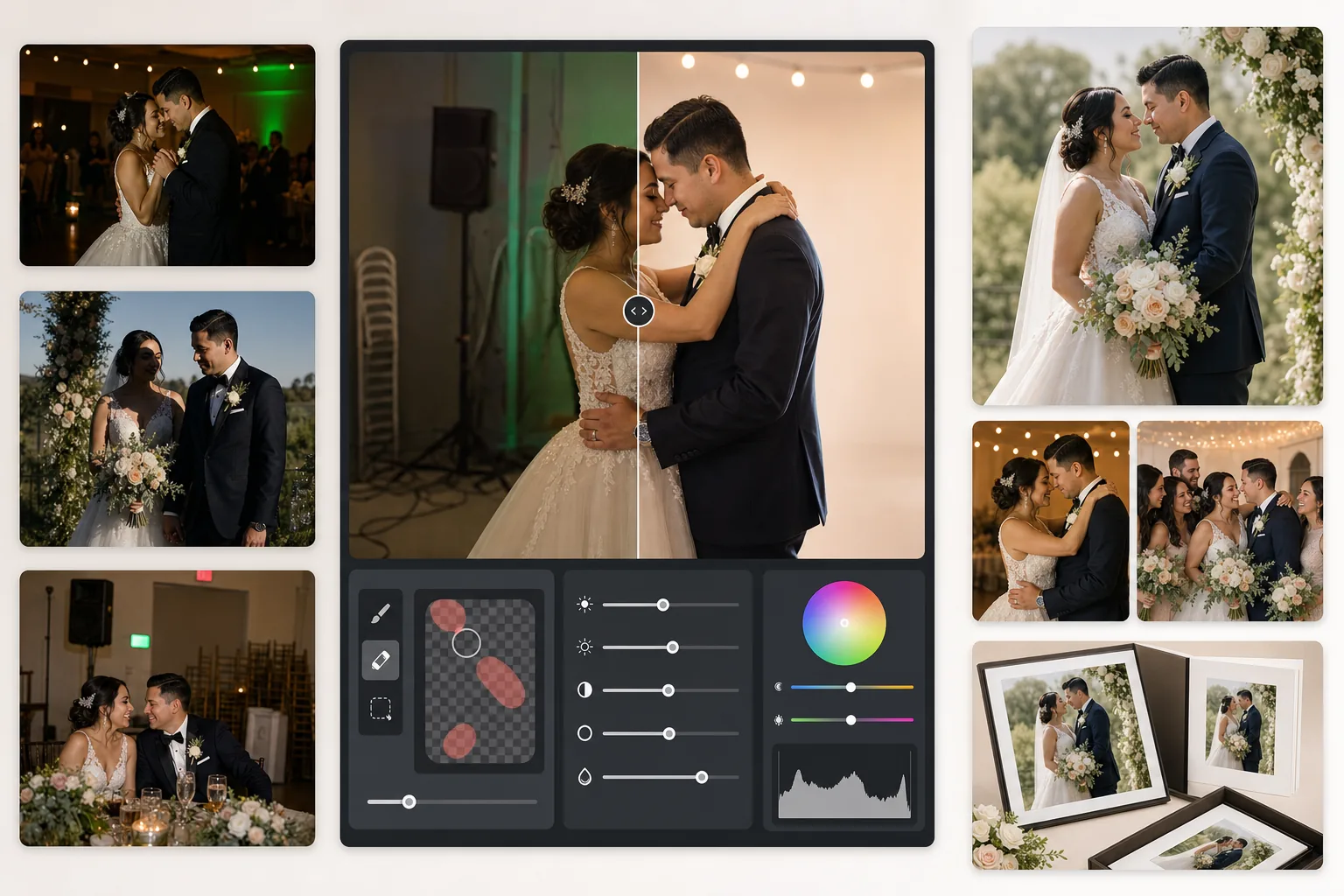
Cứu lấy những bức ảnh tiệc cưới thiếu sáng, xóa nền gây mất tập trung và tinh chỉnh tông màu da để có những bức ảnh cưới xứng tầm album. Mẫu này được thiết kế cho điều kiện ánh sáng đầy thách thức của các buổi lễ và tiệc chiêu đãi — không gian thiếu sáng, màu sắc pha trộn từ đèn DJ, và nền lộn xộn khiến sự chú ý rời khỏi cô dâu chú rể.
Dùng thử mẫu này miễn phíEvents template preview
Mẫu này làm gì
Khắc phục những vấn đề thường gặp nhất trong nhiếp ảnh cưới: ảnh tiệc chiêu đãi thiếu sáng, màu ám cam của đèn vonfram hoặc ám xanh của đèn huỳnh quang, bóng đổ gắt do đèn flash, và các yếu tố nền gây mất tập trung như biển báo lối ra, ghế xếp chồng và thiết bị tiệc. AI Enhance khôi phục chi tiết từ những bức ảnh sàn nhảy tối và cân bằng ánh sáng pha trộn, trong khi Magic Eraser xóa các vật thể không mong muốn mà không để lại dấu vết. Tông màu da được tinh chỉnh trông tự nhiên và ấm áp mà không làm mịn quá mức.
Cài đặt mẫu
| Khôi phục phơi sáng | Nâng vùng tối +1.5 EV với bảo toàn vùng sáng |
| Cân bằng trắng | Tự động hiệu chỉnh ánh sáng pha trộn (vonfram/huỳnh quang/ánh sáng ban ngày) |
| Chế độ tông màu da | Ấm áp tự nhiên (+5 độ ấm, +3 làm mịn, giữ chi tiết) |
| Độ phân giải đầu ra | Cạnh dài 4000px (sẵn sàng in ở 300 DPI lên đến 13×19) |
| Hồ sơ màu | Adobe RGB (gam màu rộng hơn cho in ấn chuyên nghiệp) |
| Giảm nhiễu | Thích ứng ISO cao (giữ chi tiết ở vùng tối được nâng sáng) |
Cách sử dụng mẫu này
Tải lên ảnh cưới của bạn
Tải lên ảnh tiệc chiêu đãi, ảnh buổi lễ, hoặc ảnh chụp bằng điện thoại của khách. Mẫu này xử lý mọi thứ từ ảnh JPEG xuất từ RAW của máy DSLR chuyên nghiệp đến ảnh điện thoại nén — AI điều chỉnh cường độ cải tiến dựa trên chất lượng nguồn.
Hiệu chỉnh ánh sáng và màu sắc
AI Enhance nâng sáng các cảnh tiệc tối, trung hòa màu ám cam-xanh từ ánh sáng pha trộn của địa điểm, và cân bằng tiền cảnh được chiếu đèn flash với hậu cảnh ánh sáng môi trường. Tông màu da được chuyển về ấm áp tự nhiên mà không ảnh hưởng đến màu trắng của váy hay màu trang trí.
Xóa các yếu tố gây mất tập trung
Magic Eraser xóa biển báo lối ra, bình chữa cháy, ghế xếp chồng, xe đẩy phục vụ tiệc, dây điện trên sàn, và khách chụp lén ở hậu cảnh. AI tái tạo họa tiết nền một cách tự nhiên phía sau các vật thể đã xóa.
Xuất cho album và bản in
Tải xuống ở cạnh dài 4000px trong Adobe RGB để in tại phòng lab ảnh chuyên nghiệp, hoặc sRGB để chia sẻ kỹ thuật số và thư viện trực tuyến. Đầu ra có kích thước cho bản in lên đến 13×19 inch ở 300 DPI.
Mẹo chuyên nghiệp để có kết quả tốt nhất
- ✓Đối với ảnh sàn nhảy tiệc tối, mẫu có thể khôi phục khoảng 1.5 stop chi tiết vùng tối. Nếu ảnh gốc gần như đen hoàn toàn, việc cải tiến có thể tạo ra nhiễu — hãy bắt đầu với những bức ảnh mà bạn ít nhất có thể thấy mờ mờ các chủ thể.
- ✓Hiệu chỉnh tông màu da được điều chỉnh cho độ ấm của nhiếp ảnh cưới — ấm hơn một chút so với trung tính, làm tôn lên hầu hết các tông màu da dưới ánh sáng pha trộn. Đối với ảnh lễ ngoài trời đã có ánh sáng tự nhiên tốt, hiệu chỉnh sẽ tinh tế.
- ✓Khi xóa các vật thể nền, hãy xử lý từng khu vực một để có kết quả tự nhiên nhất. Biển báo lối ra, đầu phun chữa cháy và ổ cắm trên tường đủ nhỏ để xóa sạch trong một lần. Các vật thể lớn hơn như ghế xếp chồng có thể cần xóa theo từng phần.
- ✓Xử lý ảnh chân dung của cô dâu chú rể trước, sau đó đến ảnh nhóm, rồi đến ảnh đời thường. Điều này giúp bạn thiết lập một cơ sở chỉnh màu nhất quán trên những bức ảnh quan trọng nhất trước khi chuyển sang ảnh phụ.
Công cụ
Câu hỏi thường gặp
Tính năng này có thể sửa ảnh tiệc bị mờ không?
+
AI Enhance có thể làm sắc nét độ mờ nhẹ do tốc độ màn trập chậm và khôi phục đáng kể chi tiết vùng tối, nhưng không thể sửa được nhòe chuyển động nghiêm trọng khi các chủ thể bị kéo vệt rõ ràng. Ảnh bị mờ nhẹ do rung tay hoặc lệch nét nhẹ sẽ được cải thiện đáng kể.
Váy trắng của cô dâu có bị mất chi tiết không?
+
Thuật toán ánh xạ tông màu bảo vệ riêng chi tiết vùng sáng trong màu trắng. Kết cấu váy, họa tiết ren và nếp gấp vải được giữ nguyên ngay cả khi nâng sáng vùng tối trong cùng một ảnh. Kết quả duy trì dải đầy đủ từ trắng sáng đến vùng tối sâu.
Chất lượng này có đủ tốt cho album in không?
+
Có. Đầu ra 4000px ở 300 DPI hỗ trợ bản in lên đến 13×19 inch. Hồ sơ màu Adobe RGB bảo toàn gam màu rộng hơn mà các phòng lab ảnh chuyên nghiệp sử dụng. Đối với trang album tiêu chuẩn 8×10, độ phân giải vượt xa mức cần thiết cho bản in sắc nét.
Biến mọi bức ảnh cưới thành hình ảnh xứng tầm album
Tải lên ảnh tiệc chiêu đãi và buổi lễ, nhận ngay hình ảnh được cải tiến chuyên nghiệp, sẵn sàng in chỉ trong vài giây. Hoạt động trên cả ảnh máy ảnh chuyên nghiệp và ảnh điện thoại.
Dùng thử miễn phíRelated templates
More events templates for your workflow.