
Làm sáng ảnh sự kiện
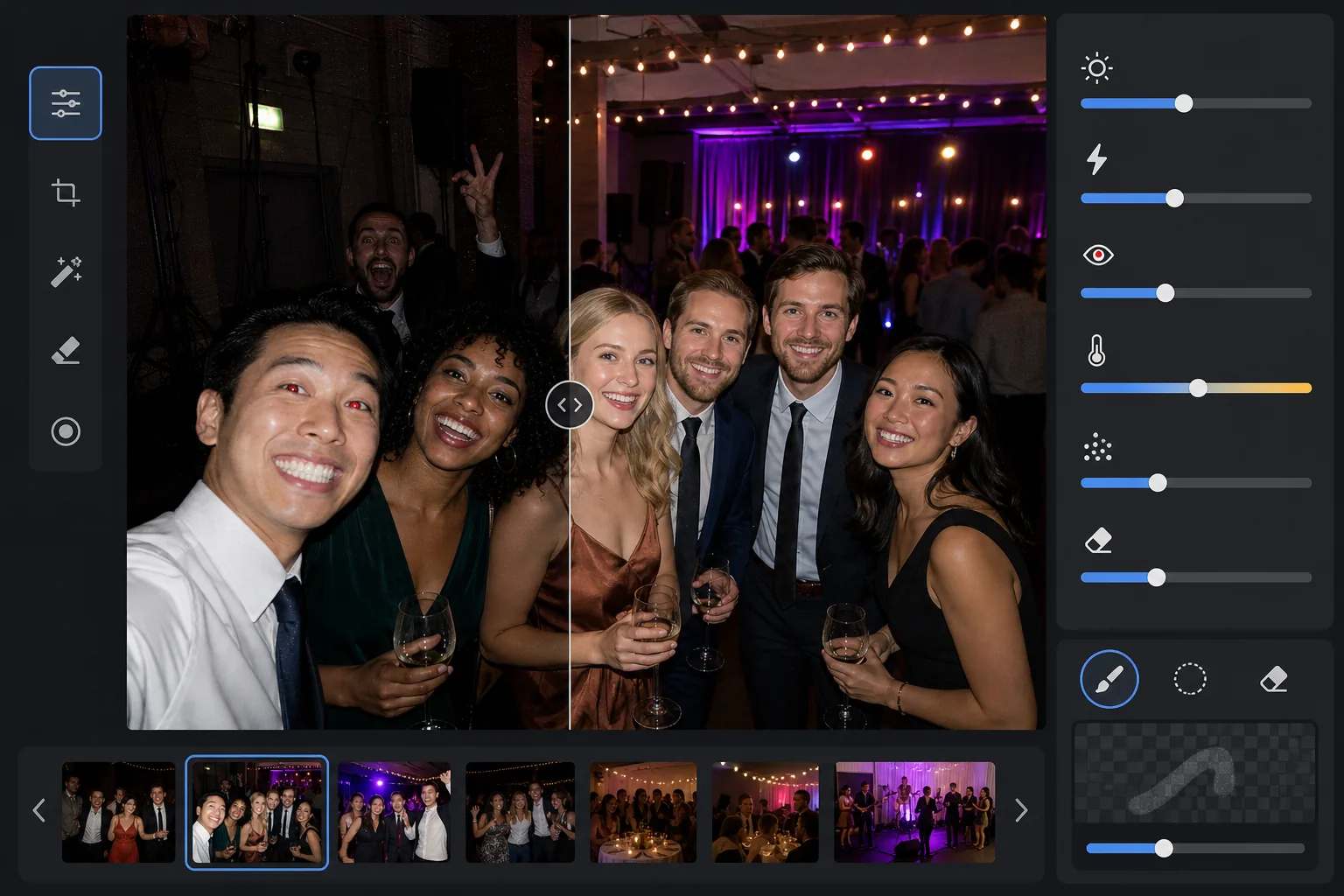
Khôi phục chi tiết từ những bức ảnh chụp tại địa điểm tối ở buổi hòa nhạc, dạ tiệc, tiệc sinh nhật và sự kiện doanh nghiệp. Mẫu này nâng độ phơi sáng lên tới +2 EV, sửa các bóng đổ gắt do flash, loại bỏ mắt đỏ và làm nổi bật bầu không khí của khung cảnh gốc để ảnh sự kiện của bạn trông sống động đúng như khoảnh khắc thực tế.
Dùng thử mẫu này miễn phíEvents template preview
Mẫu này làm gì
Cứu vãn những bức ảnh sự kiện chụp trong môi trường thiếu sáng khó khăn — sảnh tiệc mờ tối, địa điểm hòa nhạc với ánh đèn sân khấu màu, tiệc ngoài trời buổi tối và phòng giải trí dưới tầng hầm. AI Enhance khôi phục tới hai khẩu chi tiết vùng tối trong khi vẫn giữ được tâm trạng của ánh sáng màu và trang trí. Các lỗi do flash gồm bóng đổ gắt ở tiền cảnh, mắt đỏ và khuôn mặt bị cháy sáng được sửa tự động. Magic Eraser loại bỏ người vô tình lọt khung, biển thoát hiểm, thiết bị xếp chồng và những thứ gây xao nhãng thường gặp trong các sự kiện.
Cài đặt mẫu
| Nâng phơi sáng | Khôi phục vùng tối thích ứng +2.0 EV với việc giữ ánh sáng môi trường |
| Sửa flash | Làm mềm bóng đổ tiền cảnh, giảm vùng sáng trên da bị flash chiếu |
| Loại bỏ mắt đỏ | Tự động phát hiện và tái tạo màu mống mắt |
| Cân bằng trắng | Thích ứng nhiều nguồn (đèn DJ, đèn vonfram, đèn huỳnh quang, nến) |
| Chế độ không khí | Tăng ấm áp môi trường (+8 độ ấm, +5 độ rực rỡ ở nền) |
Cách sử dụng mẫu này
Tải lên ảnh sự kiện
Tải lên ảnh từ bất kỳ sự kiện nào — hòa nhạc, đám cưới, tiệc sinh nhật, dạ tiệc doanh nghiệp hoặc tụ họp ở sân sau. Mẫu tự động nhận diện môi trường ánh sáng và điều chỉnh cường độ nâng cao dựa trên mức độ thiếu sáng của ảnh gốc.
Khôi phục phơi sáng và sửa flash
AI Enhance nâng các vùng tối lên tới +2 EV, làm lộ ra khuôn mặt và chi tiết đã mất trong bóng tối. Vùng sáng bị flash làm cháy trên chủ thể tiền cảnh được giảm xuống để khôi phục kết cấu da, và các bóng đổ gắt phía sau chủ thể bị flash chiếu được làm mềm để hòa quyện tự nhiên.
Loại bỏ mắt đỏ và những thứ gây xao nhãng
Mắt đỏ do flash trực tiếp được tự động phát hiện và thay bằng màu mống mắt tự nhiên. Magic Eraser loại bỏ người lạ lọt khung, thiết bị nhìn thấy được như chồng loa và dây cáp, biển thoát hiểm và những thứ lộn xộn khác làm giảm giá trị khoảnh khắc.
Xuất ảnh đã nâng cao
Tải xuống ảnh sự kiện đã làm sáng ở độ phân giải gốc để chia sẻ mạng xã hội, in ấn hoặc lưu trữ. Kết quả giữ được bầu không khí của khung cảnh gốc — ánh nến ấm áp, đèn sân khấu nhiều màu hay đèn dây lấp lánh — đồng thời làm cho khuôn mặt và chi tiết hiện rõ.
Mẹo chuyên nghiệp cho kết quả tốt nhất
- ✓Khả năng khôi phục +2 EV hoạt động tốt nhất với ảnh mà chủ thể ít nhất còn nhìn thấy lờ mờ trong ảnh gốc. Nếu ảnh hoàn toàn đen ngoại trừ vài nguồn sáng, vùng tối được khôi phục sẽ chứa nhiều nhiễu. Hãy bắt đầu với những ảnh bạn còn nhận ra được hình bóng.
- ✓Với ảnh hòa nhạc có ánh đèn sân khấu màu ấn tượng, việc sửa cân bằng trắng giữ nguyên sắc màu nghệ thuật thay vì trung hòa nó. Các mảng đèn xanh dương và đỏ tươi sân khấu được giữ lại trong khi vẫn chỉnh tông da cho chủ thể gần sân khấu.
- ✓Khi xử lý một loạt ảnh từ cùng một sự kiện, hãy thử trước trên một ảnh tối tiêu biểu và một ảnh chụp flash. Việc này giúp bạn kiểm tra mức độ sáng và độ ấm có phù hợp không trước khi áp dụng cho cả loạt.
- ✓Sửa mắt đỏ hoạt động trên cả mắt người và thú cưng. Với ảnh thú cưng tại sự kiện, AI xử lý ánh mắt xanh hoặc vàng mà động vật tạo ra từ flash máy ảnh, thay bằng đồng tử tối tự nhiên.
Công cụ
Câu hỏi thường gặp
Cái này có sửa được ảnh hoàn toàn đen không?
+
Mẫu khôi phục tới +2 EV chi tiết vùng tối, tương đương với việc làm ảnh sáng gấp bốn lần. Nếu ảnh gốc cho thấy ít nhất đường nét lờ mờ của chủ thể, việc khôi phục sẽ cho kết quả dùng được. Những khung hình hoàn toàn đen chỉ thấy các nguồn sáng điểm thường không chứa đủ dữ liệu cảm biến để khôi phục chi tiết có ý nghĩa.
Làm sáng có khiến ảnh bị hạt không?
+
Một chút nhiễu là điều khó tránh khi nâng vùng tối sâu, nhưng việc giảm nhiễu thích ứng nhắm cụ thể vào các vùng được nâng. Chi tiết tinh tế ở những phần đủ sáng của khung hình được giữ nguyên trong khi nhiễu ở vùng tối khôi phục được làm mịn. Kết quả tốt hơn nhiều so với chỉ tăng độ sáng trong một trình chỉnh sửa ảnh cơ bản.
Cái này có hoạt động với ảnh hòa nhạc có đèn sân khấu không?
+
Có. Mẫu được thiết kế để xử lý ánh sáng hỗn hợp và màu sắc. Các mảng đèn sân khấu xanh dương, đỏ, đỏ tươi và xanh lá được giữ lại như yếu tố nghệ thuật của khung cảnh thay vì bị coi là sắc màu cần sửa. Khuôn mặt chủ thể gần sân khấu được điều chỉnh cân bằng trắng có chọn lọc trong khi tâm trạng ánh sáng nền được duy trì.
Khiến mọi bức ảnh sự kiện đều đáng chia sẻ
Tải lên những bức ảnh sự kiện tối, cháy flash hoặc bị mắt đỏ và nhận kết quả sáng, trông tự nhiên, lưu giữ trọn năng lượng của khoảnh khắc.
Dùng thử miễn phíRelated templates
More events templates for your workflow.