
Chỉnh Sửa Da Tự Nhiên
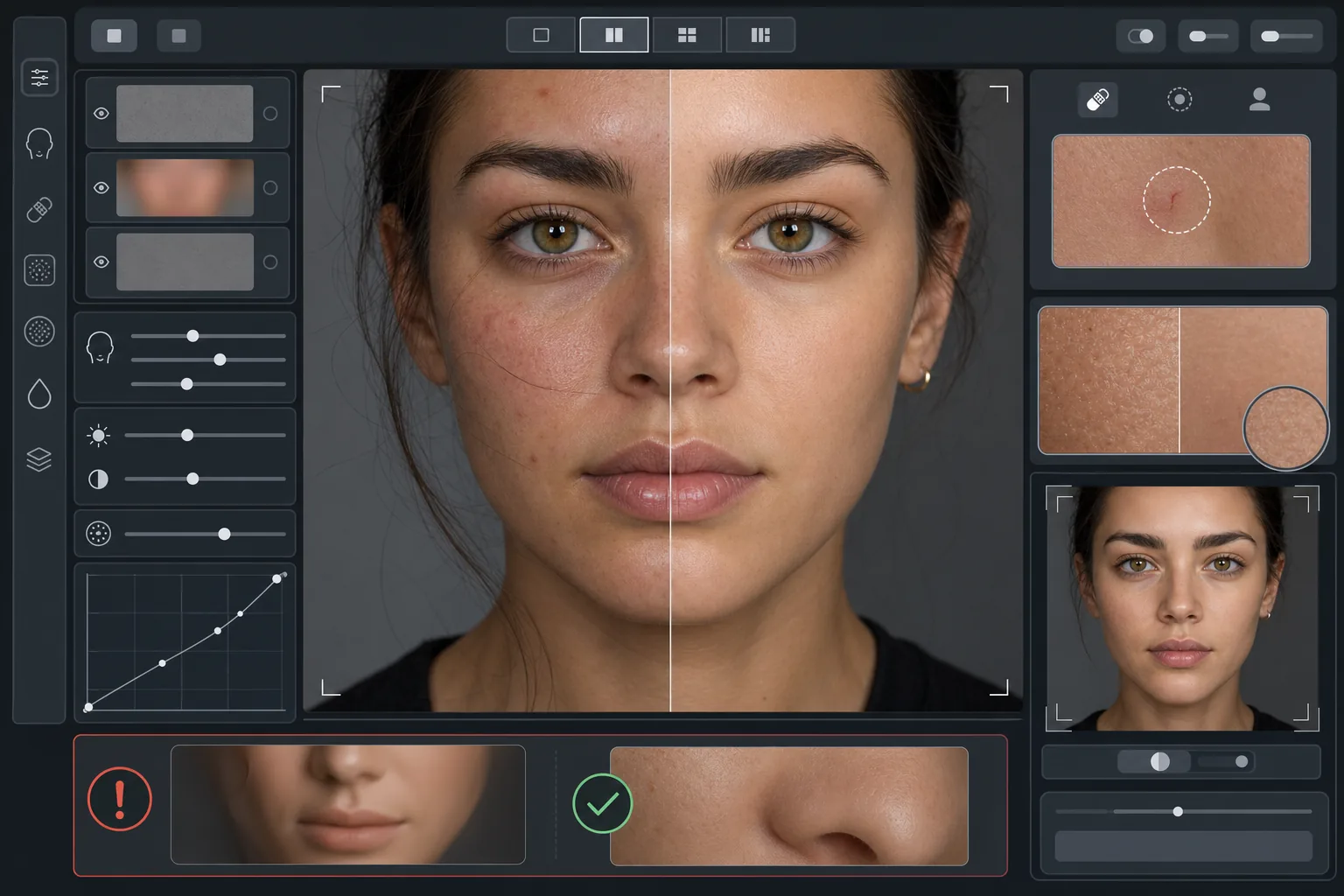
Cải thiện ảnh chân dung mà không tạo vẻ ngoài giả tạo như nhựa. Mẫu này loại bỏ các khuyết điểm tạm thời, làm đều màu da và làm mịn những chỗ ánh sáng không đồng đều, đồng thời cố ý giữ lại lỗ chân lông, các nếp nhăn nhỏ và kết cấu tự nhiên giúp làn da trông chân thực. Kết quả là một bức chân dung trong đó nhân vật trông như phiên bản đẹp nhất của chính mình vào ngày đẹp nhất — chứ không phải một ma-nơ-canh do AI tạo ra.
Dùng thử mẫu này miễn phíPortrait template preview
Mẫu này làm gì
Áp dụng kỹ thuật chỉnh sửa da theo tần số, tách biệt kết cấu khỏi tông màu. AI Enhance loại bỏ các khuyết điểm tạm thời (mụn, vết đỏ, quầng thâm dưới mắt) trong khi vẫn giữ kết cấu da mịn — lỗ chân lông, lông tơ và những biến đổi tự nhiên — mà mắt người nhận ra là chân thực. Magic Eraser xử lý việc xóa từng điểm cụ thể khi chỉnh sửa bằng AI quá rộng, chẳng hạn như xóa một vết xước hoặc một vết côn trùng cắn mà không ảnh hưởng đến vùng da xung quanh. Hiệu ứng tổng thể là làn da đều màu, trông khỏe mạnh và vượt qua được phép thử phóng to.
Cài đặt mẫu
| Cường độ chỉnh sửa | Tự nhiên — nhắm vào khuyết điểm và vết đỏ, giữ lại kết cấu |
| Giữ lỗ chân lông | Đầy đủ — duy trì toàn bộ kết cấu da tự nhiên ở cấp độ điểm ảnh |
| Làm đều tông màu | Vừa phải — giảm vết loang lổ và vết đỏ mà không làm phẳng sự biến đổi màu sắc |
| Chỉnh sửa vùng dưới mắt | Tinh tế — làm sáng quầng thâm mà không loại bỏ bóng đổ tự nhiên |
| Làm mịn ánh sáng | Lấp đầy bóng đổ gắt và giảm các điểm cháy sáng do đèn flash trực tiếp |
| Độ phân giải đầu ra | Khớp với ảnh gốc (giữ toàn bộ chi tiết để cắt và phóng to) |
Cách sử dụng mẫu này
Tải lên ảnh chân dung
Sử dụng ảnh chân dung đủ sáng với khuôn mặt được lấy nét rõ. Mẫu này hoạt động tốt nhất khi kết cấu da tự nhiên hiển thị rõ trong ảnh gốc — ảnh mờ nhòe hoặc nén quá mức cung cấp ít kết cấu hơn để AI có thể giữ lại.
Áp dụng chỉnh sửa tự nhiên
AI Enhance nhận diện các khuyết điểm tạm thời, vết đỏ không đều và các bất thường về tông màu rồi sửa chúng trong khi giữ kết cấu da bên dưới hoàn toàn nguyên vẹn. Lỗ chân lông, nếp nhăn nhỏ và biến đổi màu tự nhiên vẫn hiển thị — chỉ các khuyết điểm thay đổi.
Chỉnh sửa từng vùng cụ thể
Dùng Magic Eraser cho bất kỳ vết riêng lẻ nào còn lại mà bạn muốn xóa — một vết xước đang lành, một vết phát ban tạm thời, hoặc một sợi tóc vương trên mặt. Mỗi lần xóa đều hòa quyện với kết cấu da tự nhiên xung quanh.
Kiểm tra ở mức phóng to tối đa và xuất ảnh
Phóng to 100% để xác nhận kết cấu da còn nguyên vẹn — lỗ chân lông phải hiển thị và trông tự nhiên. Nếu vùng nào trông quá mịn, hãy giảm cường độ chỉnh sửa và xử lý lại. Xuất ở độ phân giải tối đa để giữ lại chi tiết tự nhiên.
Mẹo chuyên nghiệp để có kết quả tốt nhất
- ✓Bắt đầu với cường độ chỉnh sửa thấp nhất và chỉ tăng khi cần — thêm độ mịn dễ hơn nhiều so với khôi phục kết cấu đã bị xử lý mất.
- ✓Đối với người bị mụn hoặc bệnh rosacea, mẫu này loại bỏ từng khuyết điểm mà không làm thay đổi tông da bên dưới — kết quả trông như một ngày da đẹp, chứ không phải một người khác.
- ✓Tránh xếp chồng mẫu này với bộ lọc làm đẹp của camera điện thoại — tính năng làm mịn tích hợp trên nhiều camera điện thoại đã giảm kết cấu, và xử lý hai lần tạo ra vẻ ngoài giả tạo mà mẫu này được thiết kế để tránh.
- ✓Nếu có thể, hãy chụp ở định dạng RAW và chuyển sang JPEG trước khi tải lên — RAW lưu giữ nhiều dữ liệu kết cấu da hơn để AI có thể giữ lại trong quá trình chỉnh sửa.
Công cụ
Câu hỏi thường gặp
Điều này khác gì so với bộ lọc làm đẹp giúp làm mịn da?
+
Bộ lọc làm đẹp áp dụng độ mờ đồng đều xóa đi lỗ chân lông, nếp nhăn nhỏ và kết cấu tự nhiên — tạo ra vẻ ngoài giả tạo dễ nhận biết. Mẫu này dùng xử lý theo tần số, tách biệt kết cấu khỏi tông màu, loại bỏ khuyết điểm khỏi lớp tông màu trong khi giữ nguyên lớp kết cấu. Kết quả trông như làn da thật, không phải một bề mặt được dựng hình.
Điều này có làm thay đổi hình dạng các đường nét khuôn mặt không?
+
Không. Mẫu này chỉ ảnh hưởng đến vẻ ngoài bề mặt da — tông màu, khuyết điểm và độ đều của ánh sáng. Nó không bao giờ định hình lại mũi, hàm, mắt hay bất kỳ cấu trúc khuôn mặt nào. Nhân vật trông đúng như chính họ, chỉ với làn da rõ ràng hơn và ánh sáng đều hơn.
Tôi có thể dùng mẫu này cho ảnh chân dung chuyên nghiệp và hồ sơ năng lực không?
+
Có. Tiêu chuẩn chỉnh sửa tự nhiên đáp ứng kỳ vọng chuyên nghiệp cho ảnh chân dung doanh nghiệp, hồ sơ diễn xuất, hồ sơ hẹn hò và mạng xã hội nơi tính chân thực quan trọng. Nhân vật sẽ trông giống ảnh của họ ngoài đời — đó chính là toàn bộ mục đích của việc chỉnh sửa tự nhiên.
Da đẹp hơn, vẫn là bạn
Tải lên một bức chân dung và nhận chỉnh sửa da tự nhiên, giữ nguyên kết cấu chỉ trong vài giây. Không vẻ ngoài giả tạo, không làm mịn kỳ lạ — chỉ là bạn vào ngày đẹp nhất.
Dùng thử miễn phíRelated templates
More portrait templates for your workflow.
Mẫu chỉnh sửa chân dung trường học phù hợp với lứa tuổi. Loại bỏ khuyết điểm một cách tự nhiên, hình nền nhất quán và đầu ra đạt tiêu chuẩn kỷ yếu với khả năng xử lý hàng loạt cho cả lớp.
Mẫu chân dung thú cưng chất lượng studio. Xử lý các cạnh lông, loại bỏ dây xích và dụng cụ xử lý, thay thế hình nền và làm sắc nét mắt cho chó, mèo và các động vật khác.
Nâng cao chất lượng ảnh trẻ sơ sinh và trẻ nhỏ với tông màu ấm nhẹ nhàng, làm mịn da nhẹ nhàng, loại bỏ yếu tố chống đỡ và gây xao nhãng cũng như định cỡ sẵn sàng để in cho các thông báo và tác phẩm nghệ thuật treo tường.
Chỉnh sửa ảnh bà bầu với tính năng làm mịn da nhẹ nhàng, ánh sáng dịu nhẹ, đơn giản hóa hậu cảnh và phân loại màu ấm để có diện mạo chân dung bà bầu vượt thời gian.
Làm sạch các bức chân dung gia đình bằng cách loại bỏ các chi tiết gây xao lãng ở hậu cảnh, khắc phục độ phơi sáng không đồng đều, làm mịn da một cách tự nhiên và đảm bảo mọi người đều trông đẹp nhất trong cùng một khung hình.