
Dọn dẹp chân dung gia đình
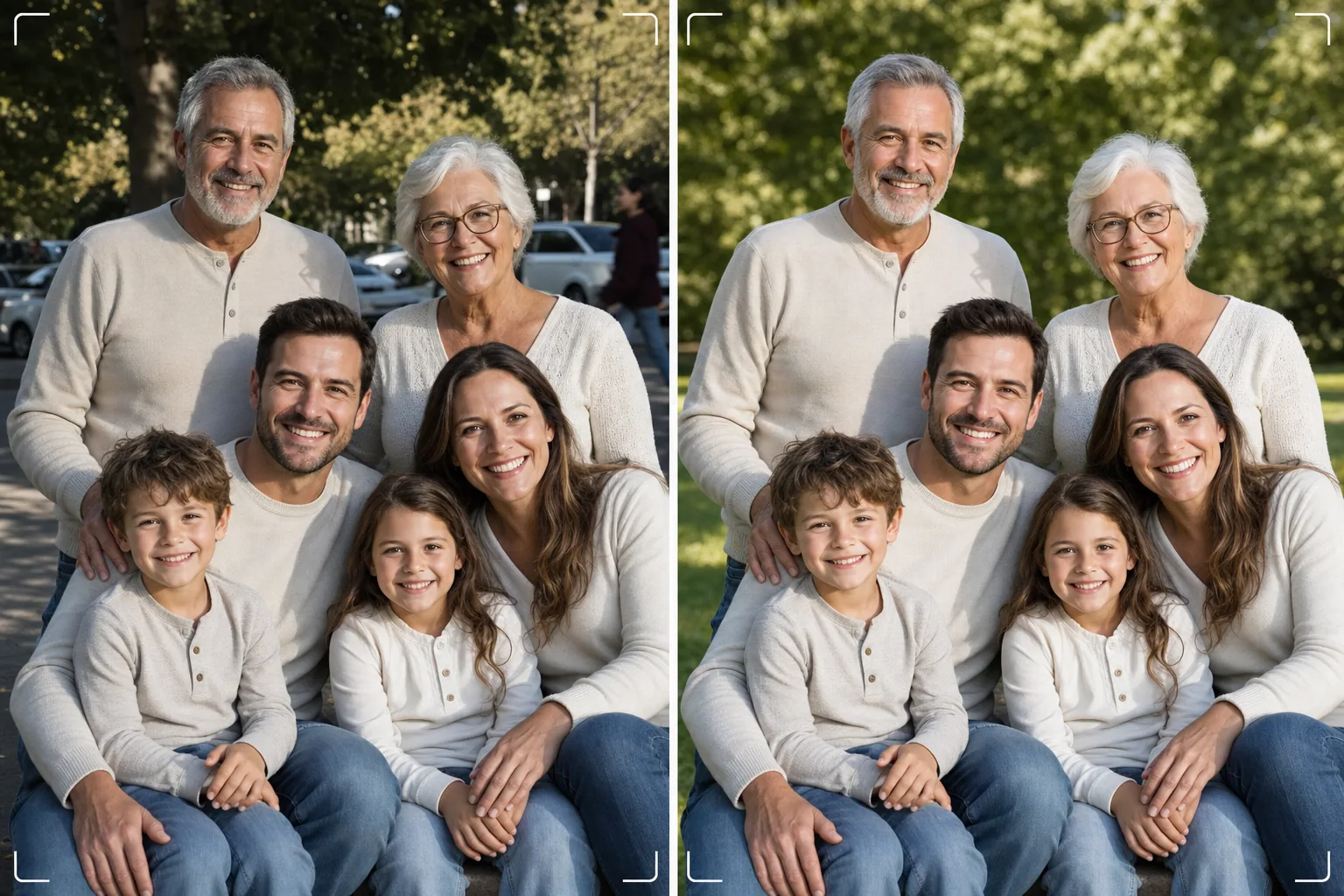
Có được bức ảnh gia đình hoàn hảo mà không cần chụp đến cả trăm lần. Mẫu này loại bỏ các chi tiết gây xao lãng ở hậu cảnh, sửa ánh sáng không đồng đều trên cả nhóm, giảm khuyết điểm một cách tự nhiên trên mọi gương mặt, và xử lý những lỗi nhỏ khiến một bức ảnh nhóm tốt không thể trở nên tuyệt vời.
Dùng thử mẫu này miễn phíPortrait template preview
Mẫu này làm được gì
Giải quyết vấn đề muôn thuở của ảnh gia đình — làm cho mọi người trông thật đẹp trong cùng một khung hình. Magic Eraser loại bỏ người chụp ké, thùng rác, biển báo lối ra, đường dây điện, xe đỗ và những chi tiết gây xao lãng khác làm hỏng một bố cục nhóm vốn rất tốt. AI Enhance sửa ánh sáng không đồng đều xảy ra khi một số thành viên đứng trong bóng râm còn những người khác đứng dưới nắng trực tiếp, đưa tất cả về độ phơi sáng nhất quán và tôn dáng. Tính năng làm mịn da tự nhiên giảm khuyết điểm, quầng thâm dưới mắt và vết ửng đỏ trên mọi gương mặt mà không khiến ai trông như đã chỉnh sửa giả tạo. Kết quả là bức chân dung gia đình bạn từng hình dung khi tập hợp mọi người lại với nhau.
Cài đặt mẫu
| Dọn dẹp hậu cảnh | Tự động phát hiện và loại bỏ chi tiết gây xao lãng (người, biển báo, đồ vật) |
| Cân bằng phơi sáng | Ánh sáng đồng đều trên mọi đối tượng (lấp bóng tối + khôi phục vùng sáng) |
| Cải thiện da | Giảm khuyết điểm tự nhiên theo từng gương mặt (giữ nguyên nét riêng) |
| Hiệu chỉnh màu | Cân bằng trắng thống nhất trên ảnh nhóm có ánh sáng pha trộn |
| Làm sắc nét | Làm sắc nét nhận diện gương mặt (ưu tiên đôi mắt và nụ cười) |
| Độ phân giải đầu ra | Cạnh dài 6000px (in treo tường ở 300 DPI lên đến 20×13 inch) |
Cách sử dụng mẫu này
Tải ảnh gia đình lên
Tải lên bức ảnh nhóm chụp tại buổi họp mặt gia đình, ngày lễ, buổi đoàn tụ hoặc buổi chụp chân dung. Mẫu này xử lý được nhóm từ hai đến ba mươi người. Để có kết quả tốt nhất, hãy chọn khung hình mà nhiều gương mặt nhất nhìn vào máy ảnh với biểu cảm dễ chịu — mẫu này sửa hậu cảnh và ánh sáng nhưng không thể thay đổi biểu cảm gương mặt hoặc mở mắt nhắm.
Loại bỏ chi tiết gây xao lãng ở hậu cảnh
Magic Eraser nhận diện và loại bỏ người lạ, biển báo gây xao lãng, rác, xe cộ và những yếu tố không mong muốn khác phía sau nhóm gia đình. AI tái tạo hậu cảnh một cách tự nhiên, lấp đầy cỏ, bầu trời, tường hoặc sàn nhà phía sau các vật thể đã xóa.
Cân bằng ánh sáng và làm đẹp gương mặt
AI Enhance sửa chênh lệch phơi sáng giữa các thành viên trong gia đình — không còn cảnh nửa nhóm trong bóng râm và nửa kia nheo mắt dưới nắng. Mỗi gương mặt được giảm khuyết điểm riêng và làm sáng mắt tinh tế, đồng thời giữ nguyên nét riêng và vẻ tự nhiên của từng người.
Xuất để in hoặc chia sẻ
Tải về với cạnh dài 6000px để in treo tường khổ lớn, hoặc 2000px cho mạng xã hội và thiệp lễ kỹ thuật số. Mẫu này xuất ra ở sRGB để hiển thị trên màn hình hoặc Adobe RGB để in chuyên nghiệp. Nhiều tỷ lệ cắt (4:5, 5:7, 8:10) có sẵn cho các kích thước khung phổ biến.
Mẹo chuyên nghiệp để có kết quả tốt nhất
- ✓Chụp liên tiếp ba đến năm tấm. Chọn tấm mà nhiều người nhất mở mắt và có biểu cảm tự nhiên — mẫu này xử lý mọi thứ còn lại, nhưng biểu cảm và trạng thái mở mắt không thể thay đổi sau khi chụp.
- ✓Đặt gia đình trong bóng râm thoáng — dưới tán cây hoặc phía bóng râm của tòa nhà — thay vì nơi pha trộn nắng và bóng râm. Điều này mang lại cho mẫu một điểm khởi đầu có ánh sáng đồng đều, tạo ra hiệu ứng cải thiện tự nhiên nhất.
- ✓Với nhóm lớn (mười người trở lên), hãy xếp mọi người thành các hàng so le với người cao hơn ở phía sau. Cách phân lớp tự nhiên này tạo chiều sâu và đảm bảo mọi gương mặt đều hiện rõ. Mẫu này có thể làm sáng những gương mặt ở hàng sau hơi tối do cách xa nguồn sáng.
Công cụ
Câu hỏi thường gặp
Mẫu này có sửa được mắt nhắm hoặc biểu cảm xấu không?
+
Không. Mẫu này cải thiện ánh sáng, loại bỏ chi tiết gây xao lãng và làm mịn da, nhưng không thể thay đổi biểu cảm gương mặt, mở mắt nhắm hoặc sắp xếp lại vị trí người. Hãy chọn khung hình có biểu cảm đẹp nhất trước khi tải lên — mẫu này sẽ làm cho khung hình đó trông đẹp nhất có thể.
Còn các nhóm đoàn tụ đông người thì sao?
+
Mẫu này xử lý được nhóm lên đến khoảng ba mươi người. Với nhóm rất đông, việc làm đẹp từng gương mặt trở nên tinh tế hơn do kích thước gương mặt trong khung nhỏ hơn, nhưng việc dọn dẹp hậu cảnh và hiệu chỉnh ánh sáng vẫn hoàn toàn hiệu quả ở mọi quy mô nhóm.
Tôi có thể xóa một người khỏi ảnh gia đình không?
+
Có, Magic Eraser có thể xóa từng cá nhân cụ thể khỏi nhóm. Chọn người bạn muốn xóa và AI sẽ tái tạo hậu cảnh phía sau họ. Cách này hiệu quả nhất khi người đó ở rìa nhóm thay vì ở giữa giữa những người khác.
Bức chân dung gia đình hoàn hảo chỉ cách một lần dọn dẹp
Tải ảnh nhóm của bạn lên và nhận những bức chân dung gia đình sạch sẽ, ánh sáng đồng đều, được làm đẹp tự nhiên, sẵn sàng để treo tường.
Dùng thử miễn phíRelated templates
More portrait templates for your workflow.
Mẫu chỉnh sửa chân dung trường học phù hợp với lứa tuổi. Loại bỏ khuyết điểm một cách tự nhiên, hình nền nhất quán và đầu ra đạt tiêu chuẩn kỷ yếu với khả năng xử lý hàng loạt cho cả lớp.
Mẫu chân dung thú cưng chất lượng studio. Xử lý các cạnh lông, loại bỏ dây xích và dụng cụ xử lý, thay thế hình nền và làm sắc nét mắt cho chó, mèo và các động vật khác.
Mẫu chỉnh sửa da tự nhiên giúp loại bỏ nhược điểm trong khi vẫn giữ được lỗ chân lông và kết cấu. Ánh sáng đều, không có vẻ ngoài nhựa - chỉ có lớp da đẹp hơn trên máy ảnh.
Nâng cao chất lượng ảnh trẻ sơ sinh và trẻ nhỏ với tông màu ấm nhẹ nhàng, làm mịn da nhẹ nhàng, loại bỏ yếu tố chống đỡ và gây xao nhãng cũng như định cỡ sẵn sàng để in cho các thông báo và tác phẩm nghệ thuật treo tường.
Chỉnh sửa ảnh bà bầu với tính năng làm mịn da nhẹ nhàng, ánh sáng dịu nhẹ, đơn giản hóa hậu cảnh và phân loại màu ấm để có diện mạo chân dung bà bầu vượt thời gian.