
Thiết kế bảng menu
Tạo đồ họa bảng menu chuyên nghiệp từ chính ảnh chụp món ăn của bạn. Mẫu này tách từng món riêng lẻ khỏi bàn ăn và phông nền lộn xộn, chuẩn hóa giao diện cho tất cả các món để có một menu đồng nhất, và xuất ra hình ảnh sẵn sàng cho bố cục được tối ưu cho bảng menu kỹ thuật số, menu in và danh sách trên nền tảng giao hàng như DoorDash, Uber Eats và Grubhub.
Dùng thử mẫu này miễn phíFood template preview
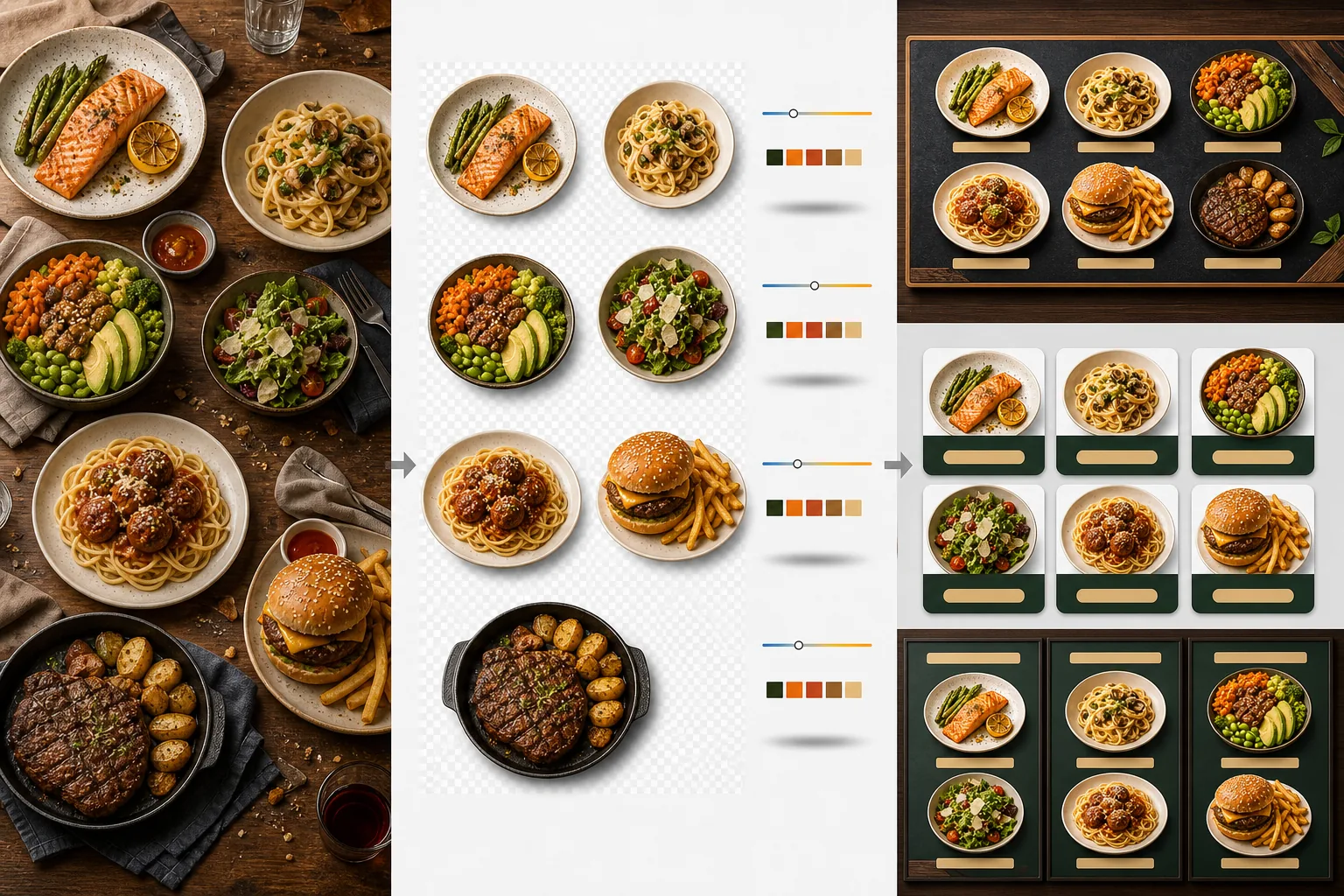
Mẫu này làm gì
Biến những bức ảnh món ăn không nhất quán được chụp vào những thời điểm khác nhau, dưới ánh sáng khác nhau và trên những chiếc bàn khác nhau thành một bộ hình ảnh đồng nhất sẵn sàng cho menu. Background Eraser tách từng món — đĩa, tô hoặc bao bì — khỏi bối cảnh bàn ăn ban đầu và thay phông nền bằng một màu hoặc kết cấu nhất quán phù hợp với thương hiệu nhà hàng của bạn. Nhiệt độ màu được chuẩn hóa trên tất cả các món để những ảnh chụp dưới ánh đèn vonfram ấm, đèn LED mát và ánh sáng tự nhiên từ cửa sổ đều trông nhất quán. Màu sắc món ăn được tăng cường để trông ngon miệng mà không vượt sang mức phi thực tế — rau xanh tươi mát, thịt ấm và mọng nước, nước sốt bóng bẩy. Kết quả là một bộ hình ảnh hoạt động như một hệ thống menu trực quan thống nhất thay vì một tập hợp ảnh điện thoại ngẫu nhiên.
Cài đặt mẫu
| Phông nền | Màu đơn sắc (khớp thương hiệu), kết cấu gỗ, đá phiến, hoặc trong suốt |
| Chuẩn hóa nhiệt độ màu | Đưa tất cả các món về cân bằng trắng ánh sáng ban ngày 5000K |
| Tăng cường màu món ăn | Tăng độ ngon miệng (protein ấm, rau xanh tươi, nước sốt bóng) |
| Kiểu đổ bóng | Bóng đổ nhẹ tạo chiều sâu trên phông nền đơn sắc |
| Kích thước xuất | 1200×1200px (nền tảng giao hàng), 800×600px (bảng menu kỹ thuật số), tùy chỉnh |
Cách sử dụng mẫu này
Tải lên ảnh món ăn
Tải lên ảnh của từng món trong menu. Ảnh điện thoại chụp trong lúc phục vụ, ảnh chụp món ăn chuyên nghiệp và ảnh danh sách trên nền tảng giao hàng đều dùng được. Mẫu xử lý từng món riêng biệt để cho kết quả nhất quán trên toàn bộ menu của bạn.
Tách món khỏi phông nền
Background Eraser tách từng món khỏi bàn, tấm lót hoặc mặt quầy. Việc nhận diện cạnh bám theo vành đĩa, mép tô hoặc đường viền bao bì một cách chính xác. Các loại trang trí và topping vượt ra ngoài mép đĩa — một nhánh ngò tây, một đường rưới sốt — đều được giữ lại.
Chuẩn hóa màu sắc và phong cách
Nhiệt độ màu được chuẩn hóa để tất cả các món xuất hiện dưới cùng một ánh sáng nhất quán. Màu sắc món ăn được tăng cường để hấp dẫn vị giác. Một bóng đổ nhẹ được thêm bên dưới mỗi món để tạo cảm giác vững chãi, ba chiều trên phông nền mới.
Xuất cho menu và nền tảng
Tải về ở 1200×1200px cho danh sách DoorDash, Uber Eats và Grubhub. Xuất ở 800×600px cho bảng menu kỹ thuật số và màn hình TV. Tệp PNG trong suốt cũng có sẵn cho nhà thiết kế đồ họa xây dựng menu in và biển hiệu tùy chỉnh.
Mẹo chuyên nghiệp để có kết quả tốt nhất
- ✓Chụp món ăn từ trực diện phía trên (flat lay) hoặc ở góc 45 độ. Hai góc này tạo ra kết quả xóa nền sạch nhất vì đường viền đĩa hiển thị đầy đủ và AI có thể tách món khỏi bàn một cách chính xác.
- ✓Lau sạch vành đĩa trước khi chụp. Vết sốt và vụn thức ăn trên mép đĩa sẽ trở thành một phần của hình ảnh được tách và trông luộm thuộm trên phông nền mới sạch sẽ.
- ✓Xử lý tất cả các món trong menu theo một đợt với cùng cài đặt. Sự nhất quán trên mọi ảnh món ăn là điều khiến menu trông chuyên nghiệp — nhiệt độ màu và sắc độ phông nền không khớp khiến ngay cả món ăn tuyệt vời cũng trông nghiệp dư.
Công cụ
Câu hỏi thường gặp
Tôi có thể dùng mẫu này cho đồ uống không?
+
Có. Ly, cốc, chai và cocktail được tách với độ chính xác như các món bày trên đĩa. Đồ uống trong suốt như nước, rượu vang và cocktail trong vẫn giữ được độ trong suốt trên phông nền mới.
Món ăn có trông như bị chỉnh sửa giả tạo không?
+
Việc tăng cường màu sắc được hiệu chỉnh để món ăn trông ngon miệng nhất mà không vượt sang mức phi thực tế. Hãy hình dung sự khác biệt giữa món ăn chụp dưới ánh đèn huỳnh quang gắt và món ăn chụp dưới ánh sáng ban ngày tự nhiên — mẫu này làm cho mọi món trông như được chụp trong điều kiện lý tưởng.
Mẫu này có dùng được cho ảnh menu trên nền tảng giao hàng không?
+
Có. Đầu ra vuông 1200×1200px đáp ứng yêu cầu hình ảnh của DoorDash, Uber Eats, Grubhub và Postmates. Các nhà hàng có ảnh menu trông chuyên nghiệp trên nền tảng giao hàng luôn nhận được tỷ lệ đặt hàng cao hơn so với những nơi dùng ảnh điện thoại chưa qua xử lý.
Xây dựng một menu khiến mọi món ăn trông khó cưỡng
Tải lên ảnh món ăn và nhận hình ảnh menu nhất quán, hấp dẫn, sẵn sàng cho bảng kỹ thuật số, menu in và nền tảng giao hàng.
Dùng thử miễn phíRelated templates
More food templates for your workflow.
Tạo những bức ảnh thực đơn giao đồ ăn ngon miệng với khả năng tăng cường độ sống động của màu sắc, nền sạch, hiệu ứng hơi nước và độ tươi cũng như kích thước được tối ưu hóa cho nền tảng.
Nâng cao hình ảnh công thức nấu ăn cho sách dạy nấu ăn và blog ẩm thực với chất lượng in sắc nét, độ chính xác về màu sắc của nguyên liệu, dọn dẹp cảnh theo kiểu và đầu ra có độ phân giải cao.