
Ảnh Công thức Sách dạy nấu ăn
Nâng tầm ảnh công thức nấu tại nhà lên tiêu chuẩn chất lượng sách dạy nấu ăn. Mẫu này tăng cường màu sắc nguyên liệu để đạt độ chính xác khi in, làm sắc nét kết cấu món ăn cho khả năng tái tạo độ phân giải cao, loại bỏ các yếu tố không mong muốn khỏi cảnh được dàn dựng, và xuất ra ở độ phân giải đạt chuẩn in cho sách dạy nấu ăn, blog ẩm thực và thẻ công thức.
Dùng thử mẫu này miễn phíFood template preview
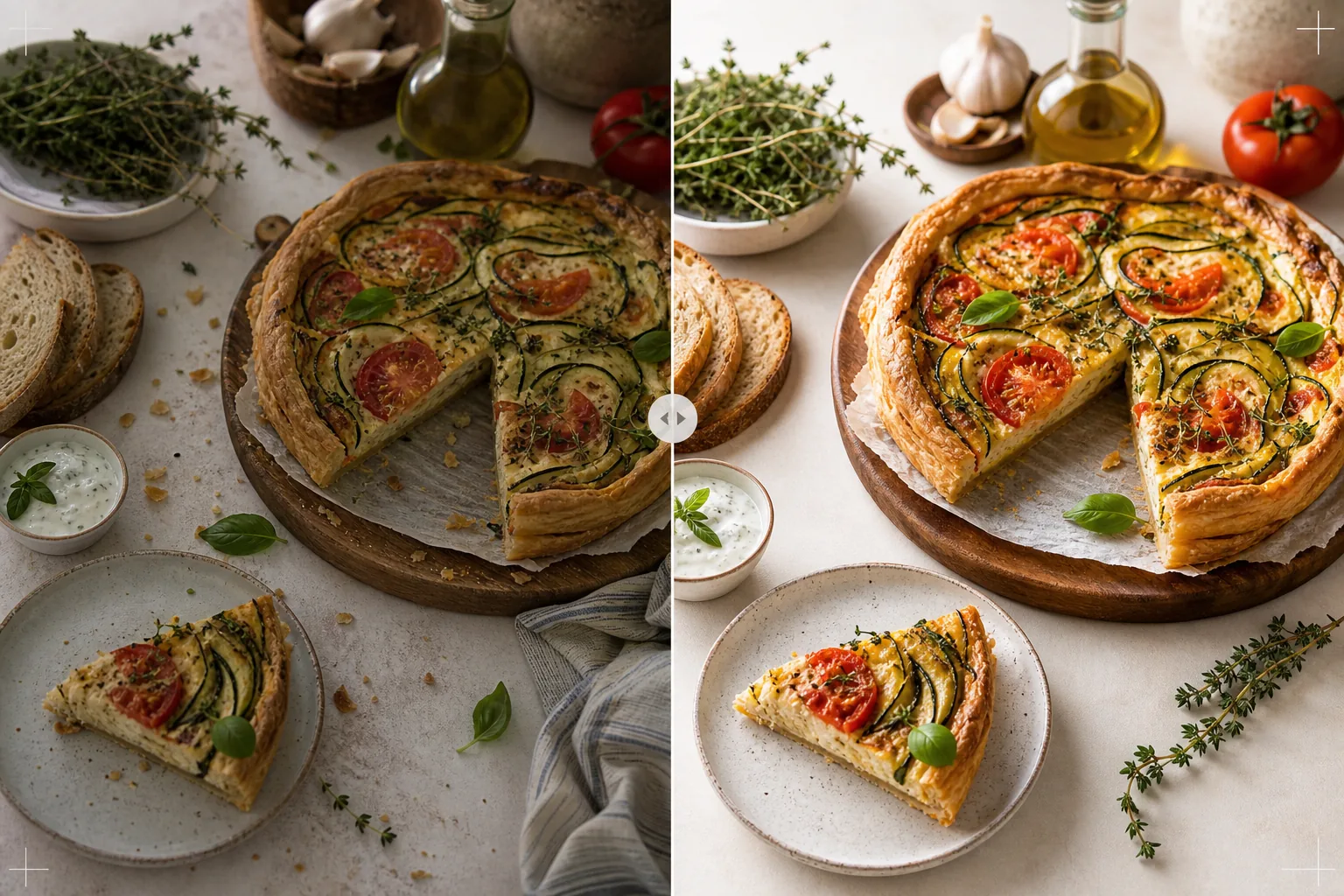
Mẫu này làm gì
Biến ảnh công thức nấu trong bếp nhà thành những hình ảnh xứng đáng với sách dạy nấu ăn được xuất bản và blog ẩm thực chuyên nghiệp. Nhiếp ảnh sách dạy nấu ăn đòi hỏi tiêu chuẩn cao hơn mạng xã hội — màu sắc phải chính xác khi in (không chỉ bắt mắt trên màn hình), kết cấu phải đủ sắc nét để in ở 300 DPI với kích thước lớn, và các cảnh dàn dựng phải trông có chủ ý mà không lộn xộn. AI Enhance áp dụng hiệu chỉnh màu được căn chuẩn cho in ấn, đảm bảo màu nguyên liệu được tái tạo chính xác trên giấy chứ không chỉ trên màn hình. Magic Eraser loại bỏ sự lộn xộn ở hậu cảnh, dụng cụ vương vãi, bát đĩa bẩn xuất hiện trong cảnh, và những khiếm khuyết trong cách dàn dựng món ăn vốn trở nên rõ ràng hơn ở độ phân giải in. Kết quả trông như được chụp bởi một nhiếp ảnh gia sách dạy nấu ăn với nhiều năm kinh nghiệm tạo kiểu món ăn.
Cài đặt mẫu
| Hồ sơ màu | Adobe RGB cho in hoặc sRGB cho kỹ thuật số (có thể chọn) |
| Kết cấu món ăn | Làm sắc nét chi tiết tần số cao cho độ giòn, vụn bánh và lớp men bóng |
| Dọn dẹp cảnh | Loại bỏ dụng cụ vương vãi, vụn bánh và sự lộn xộn ở hậu cảnh |
| Độ chính xác màu | Căn chuẩn in (màu xanh lá, đỏ và nâu chính xác trên giấy) |
| Độ phân giải đầu ra | Cạnh dài 6000px (300 DPI cho trang đôi sách dạy nấu ăn nguyên trang) |
Cách sử dụng mẫu này
Tải lên ảnh công thức của bạn
Tải lên ảnh công thức đã dàn dựng — chụp từ trên xuống, góc 45 độ, hoặc cận cảnh chi tiết món ăn hoàn thành. Bao gồm các đạo cụ như nguyên liệu, dụng cụ và vải vóc là một phần của bố cục dự định. Mẫu sẽ loại bỏ các yếu tố không mong muốn trong khi giữ nguyên cách tạo kiểu có chủ ý.
Tăng cường màu sắc và kết cấu
AI Enhance hiệu chỉnh nhiệt độ màu để đạt độ chính xác khi in và làm sắc nét kết cấu món ăn — độ giòn rụm của vỏ bánh mì, độ bóng của lớp ganache sô cô la, các lớp riêng biệt trong một lát cắt ngang. Việc căn chuẩn màu đảm bảo rằng màu xanh lá, đỏ và nâu vàng trông chính xác trên màn hình cũng sẽ được tái tạo chính xác khi in trên giấy.
Tinh chỉnh cảnh
Magic Eraser loại bỏ các yếu tố không phục vụ bố cục — vụn bánh vương vãi ngoài khu vực dự định, một góc khăn lau bát đĩa lấp ló từ mép, sự lộn xộn ở hậu cảnh xuất hiện ở rìa khung hình, hoặc vết bẩn trên đạo cụ và bề mặt. Cảnh dàn dựng được tinh chỉnh để trông có chủ ý và chỉn chu.
Xuất để in hoặc kỹ thuật số
Tải xuống ở cạnh dài 6000px bằng Adobe RGB để in sách dạy nấu ăn ở 300 DPI lên đến trang đôi nguyên trang, hoặc bằng sRGB cho blog ẩm thực và trang web công thức. Độ phân giải cao giữ đủ chi tiết để người đọc thấy từng lá thảo mộc, kết cấu hạt và độ sánh của nước sốt ở mức phóng đại khi in.
Mẹo chuyên nghiệp để có kết quả tốt nhất
- ✓Chụp dưới ánh sáng tự nhiên từ cửa sổ theo một hướng, với tấm phản quang trắng ở phía bóng đổ. Điều này tạo ra ánh sáng định hướng mềm mại đặc trưng của nhiếp ảnh ẩm thực chuyên nghiệp. Mẫu có thể chỉnh ánh sáng nhân tạo, nhưng ánh sáng tự nhiên cho ra màu món ăn chân thực nhất ngay từ đầu.
- ✓Bày món chủ đạo trước và chụp trong vòng năm phút khi kết cấu và màu sắc đang ở đỉnh điểm. Sau đó chụp các ảnh quá trình từng bước. Mẫu tăng cường các dấu hiệu tươi mới như hơi nước và độ ẩm nhưng không thể phục hồi món ăn đã để quá lâu.
- ✓Sử dụng số lượng lẻ các đạo cụ (ba nguyên liệu, một dụng cụ, một tấm vải) để có bố cục cân đối nhất về mặt thị giác. Mẫu dọn dẹp cảnh nhưng làm việc trong bố cục hiện có của bạn — một điểm khởi đầu được bố cục tốt sẽ cho ra hình ảnh cuối chuyên nghiệp hơn.
- ✓Đối với ảnh cắt ngang (bánh ngọt cắt, bánh mì thái lát, bánh ngọt tách đôi), hãy dùng dao thật sắc và cắt ngay trước khi chụp. Mẫu làm sắc nét sự phân lớp và kết cấu vụn bánh nhưng không thể sửa một vết cắt nham nhở che khuất cấu trúc bên trong.
Công cụ
Câu hỏi thường gặp
Điều này có thể thay thế một nhiếp ảnh gia ẩm thực chuyên nghiệp không?
+
Mẫu nâng ảnh công thức chụp tại nhà lên mức phù hợp với sách dạy nấu ăn tự xuất bản, blog ẩm thực và thẻ công thức. Đối với sách dạy nấu ăn của các nhà xuất bản lớn có tiêu chuẩn hình ảnh nghiêm ngặt, một nhiếp ảnh gia và người tạo kiểu chuyên nghiệp cho kết quả vượt trội hơn, nhưng mẫu là một lựa chọn tuyệt vời cho các tác giả độc lập và người sáng tạo nội dung.
Còn ảnh quá trình từng bước thì sao?
+
Ảnh quá trình (trộn, thái, rót) được hưởng lợi từ cùng việc hiệu chỉnh màu và dọn dẹp. Mẫu xử lý hiện tượng nhòe chuyển động điển hình của ảnh chụp hành động bằng cách làm sắc nét món ăn một cách chọn lọc trong khi vẫn giữ độ nhòe tự nhiên của bàn tay và dụng cụ đang chuyển động.
Việc căn chuẩn màu in hoạt động như thế nào?
+
Đầu ra Adobe RGB chứa gam màu rộng hơn sRGB, giữ lại những khác biệt màu tinh tế ở màu xanh lá và đỏ vốn bị mất khi chuyển đổi sang sRGB. Khi in trên máy in đã căn chuẩn, các màu này được tái tạo chính xác hơn. Đối với in tại nhà, đầu ra sRGB cho kết quả tốt hơn trên hầu hết máy in dân dụng.
Ảnh công thức xứng đáng với một cuốn sách dạy nấu ăn được xuất bản
Tải lên ảnh chụp món ăn của bạn và nhận hình ảnh chất lượng in, màu sắc chính xác với kết cấu sắc nét và bố cục tinh tế.
Dùng thử miễn phíRelated templates
More food templates for your workflow.
Tạo những bức ảnh thực đơn giao đồ ăn ngon miệng với khả năng tăng cường độ sống động của màu sắc, nền sạch, hiệu ứng hơi nước và độ tươi cũng như kích thước được tối ưu hóa cho nền tảng.
Tạo đồ họa bảng menu với tính năng xóa nền ảnh đồ ăn, kiểu dáng nhất quán và xuất sẵn bố cục cho màn hình kỹ thuật số, menu in và nền tảng phân phối của bên thứ ba.