
Nâng cao nụ cười nha khoa
Tạo hình ảnh tiếp thị nha khoa trước-sau chuyên nghiệp để giới thiệu công việc của phòng khám bạn. Mẫu này áp dụng kỹ thuật làm trắng răng trông tự nhiên, loại bỏ sự lộn xộn của nền lâm sàng, chuẩn hóa nền chân dung bệnh nhân và cân bằng ánh sáng trên cao gay gắt thường gặp trong ảnh phòng điều trị.
Dùng thử mẫu này miễn phíProfessional template preview
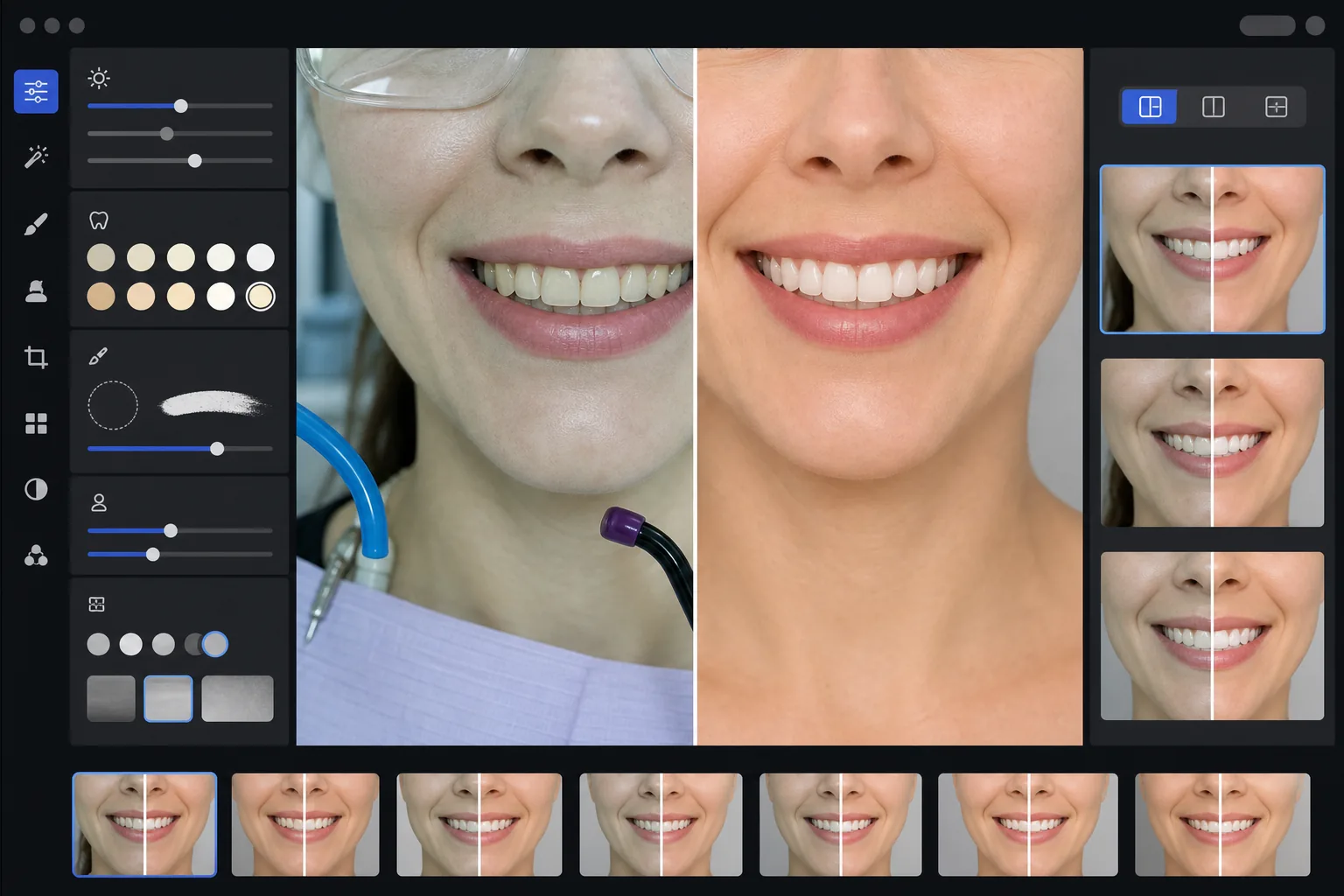
Mẫu này làm gì
Biến những bức ảnh nha khoa lâm sàng thành hình ảnh tiếp thị bóng bẩy cho website phòng khám, mạng xã hội và tài liệu giáo dục bệnh nhân. AI Enhance khắc phục sắc xanh-trắng kém hấp dẫn của ánh sáng phòng điều trị nha khoa và áp dụng kỹ thuật làm trắng răng nhẹ nhàng trông tự nhiên — làm sáng răng thêm 2-3 tông mà không khiến chúng trông giả tạo. Magic Eraser loại bỏ các yếu tố nền lâm sàng như ống hút, đèn quang trùng hợp, vết giấy cắn khớp trên môi và kính bảo hộ. Nền chân dung bệnh nhân được chuẩn hóa thành phông nền sạch sẽ, nhất quán trên toàn bộ thư viện ca bệnh của bạn.
Cài đặt mẫu
| Làm trắng răng | Tăng tự nhiên +2 đến +3 tông (giữ độ trong mờ và kết cấu men răng) |
| Hiệu chỉnh ánh sáng | Cân bằng ánh sáng ban ngày phòng điều trị nha khoa (loại bỏ sắc xanh-trắng lâm sàng) |
| Nền | Phông nền xám hoặc trắng trung tính nhất quán với hiệu ứng làm mờ viền mềm mại |
| Tông da | Hiệu chỉnh độ ấm quanh miệng (giảm độ nhợt nhạt do ánh sáng nha khoa) |
| Màu môi | Khôi phục độ bão hòa tự nhiên (chống lại ánh sáng lâm sàng làm phai màu) |
Cách sử dụng mẫu này
Tải lên ảnh lâm sàng
Tải lên ảnh cận cảnh nụ cười, ảnh trước-sau theo phong cách chân dung hoặc ảnh trong khoang miệng chụp trong phòng điều trị của bạn. Mẫu này hoạt động với ảnh từ máy ảnh chuyên dụng cho nha khoa, máy DSLR có đèn flash vòng và ảnh điện thoại chụp dưới đèn phòng điều trị.
Hiệu chỉnh ánh sáng lâm sàng
AI Enhance trung hòa sắc xanh-trắng từ đèn ghế nha khoa trên cao, làm ấm tông da quanh miệng và khôi phục màu môi tự nhiên. Màu răng được làm sáng nhẹ nhàng để thể hiện kết quả tốt nhất trong khi vẫn chân thực và trung thực.
Dọn dẹp nền và yếu tố gây xao nhãng
Magic Eraser loại bỏ các ống hút có thể nhìn thấy, đầu đèn quang trùng hợp, kẹp khăn yếm, vết giấy cắn khớp trên môi và thiết bị lâm sàng ở nền. Nền được thay thế bằng phông nền trung tính nhất quán khớp trên tất cả các cặp ảnh trước-sau của bạn.
Xuất để sử dụng cho tiếp thị
Tải xuống từng ảnh được nâng cao riêng lẻ hoặc ảnh ghép trước-sau cạnh nhau. Đầu ra được điều chỉnh kích thước cho thư viện website, bài đăng Instagram, Google Business Profile và tờ rơi in cho bệnh nhân với độ phân giải phù hợp để in 8x10 inch.
Mẹo chuyên nghiệp để có kết quả tốt nhất
- ✓Đối với các cặp ảnh trước-sau, hãy chụp cả ảnh trước và sau điều trị từ cùng một góc, khoảng cách và vị trí ánh sáng. Mẫu này có thể hiệu chỉnh sự khác biệt về độ phơi sáng giữa hai ảnh, nhưng việc khớp góc máy ảnh ban đầu sẽ tạo ra sự so sánh thuyết phục nhất.
- ✓Việc làm trắng răng được cố ý giữ ở mức thận trọng — nó làm sáng thêm 2-3 tông vita thay vì làm răng trắng như giấy. Điều này trông tự nhiên và đáng tin cậy hơn đối với bệnh nhân tiềm năng. Nếu kết quả lâm sàng thực tế của bạn ấn tượng, một bức ảnh trung thực với mức nâng cao nhẹ sẽ thuyết phục hơn một hình ảnh xử lý quá mức.
- ✓Sử dụng dụng cụ banh má cho ảnh nụ cười trong khoang miệng để có cái nhìn đầy đủ nhất về công việc nha khoa. Mẫu này xử lý vẻ hơi lâm sàng của ảnh chụp có hỗ trợ banh má bằng cách làm ấm tông da và cắt cúp tập trung vào vùng nụ cười.
- ✓Xử lý toàn bộ thư viện ca bệnh của bạn trong một lô để đảm bảo màu nền, độ sáng và độ ấm nhất quán trên tất cả các cặp ảnh trước-sau. Ánh sáng không khớp giữa các ca trên website của bạn làm suy giảm ấn tượng chuyên nghiệp.
Công cụ
Câu hỏi thường gặp
Điều này có bị coi là quảng cáo nha khoa gây hiểu lầm không?
+
Việc nâng cao độ trắng được giới hạn ở 2-3 tông vita và giữ nguyên độ trong mờ tự nhiên cùng kết cấu bề mặt của men răng. Điều này hoàn toàn nằm trong phạm vi ảnh hưởng tự nhiên của ánh sáng nhiếp ảnh chuyên nghiệp và cân bằng trắng. Mẫu này không thay đổi hình dạng răng, sự sắp xếp hay đường viền nướu — nó chỉ khắc phục các hiệu ứng màu kém hấp dẫn của ánh sáng lâm sàng khiến kết quả trông tệ hơn trong ảnh so với ngoài đời.
Có thể tạo ảnh ghép trước-sau cạnh nhau không?
+
Có. Mẫu này có thể xuất từng ảnh được nâng cao riêng lẻ hoặc tạo ảnh ghép cạnh nhau với đường chia ở giữa, nền nhất quán và nhãn trước/sau. Cả hai ảnh trong cặp đều nhận cùng cách xử lý nền để sự so sánh trực quan sạch sẽ và chuyên nghiệp.
Điều này có hoạt động với ảnh camera trong khoang miệng không?
+
Có. Ảnh camera trong khoang miệng thường có ánh sáng rất gay gắt, trực tiếp làm bay mất kết cấu bề mặt. Mẫu này khôi phục chi tiết men răng, hiệu chỉnh sắc trắng cực đoan và điều chỉnh độ tương phản để thể hiện giải phẫu răng một cách tự nhiên. Kết quả chi tiết và trông tự nhiên hơn so với ảnh thô trong khoang miệng.
Giới thiệu công việc nha khoa của bạn bằng ảnh tiếp thị chuyên nghiệp
Tải lên ảnh lâm sàng và nhận hình ảnh trước-sau được nâng cao tự nhiên, có phong cách nhất quán, sẵn sàng cho website, mạng xã hội và tờ rơi bệnh nhân của bạn.
Dùng thử miễn phíRelated templates
More professional templates for your workflow.
Mẫu ảnh chụp đầu LinkedIn chuyên nghiệp. Nền sạch, tôn lên làn da tự nhiên và giao diện bóng bẩy giúp nhận được số lượt xem hồ sơ nhiều hơn 14 lần.
Tạo ảnh hộ chiếu và visa phù hợp tại nhà. Nền trắng, tỷ lệ kích thước đầu chính xác, tiêu chuẩn 2×2 inch của Hoa Kỳ và đầu ra 600DPI đáp ứng yêu cầu của Bộ Ngoại giao.
Mẫu headshot chuyên nghiệp dành cho diễn viên, người mẫu. Đáp ứng các tiêu chuẩn của đạo diễn casting với đầu ra có kích thước 8×10 sẵn sàng để in, chỉnh sửa tự nhiên và hình nền rõ ràng cho các tác phẩm gửi của đại lý.