
Remove Water Reflections From a Photo
Tìm hiểu cách Remove Water Reflections From a Photo với Magic Eraser. Hướng dẫn từng bước đơn giản với công cụ AI miễn phí. Hoạt động trên web, iOS và Android.
Last updated
Thử ngay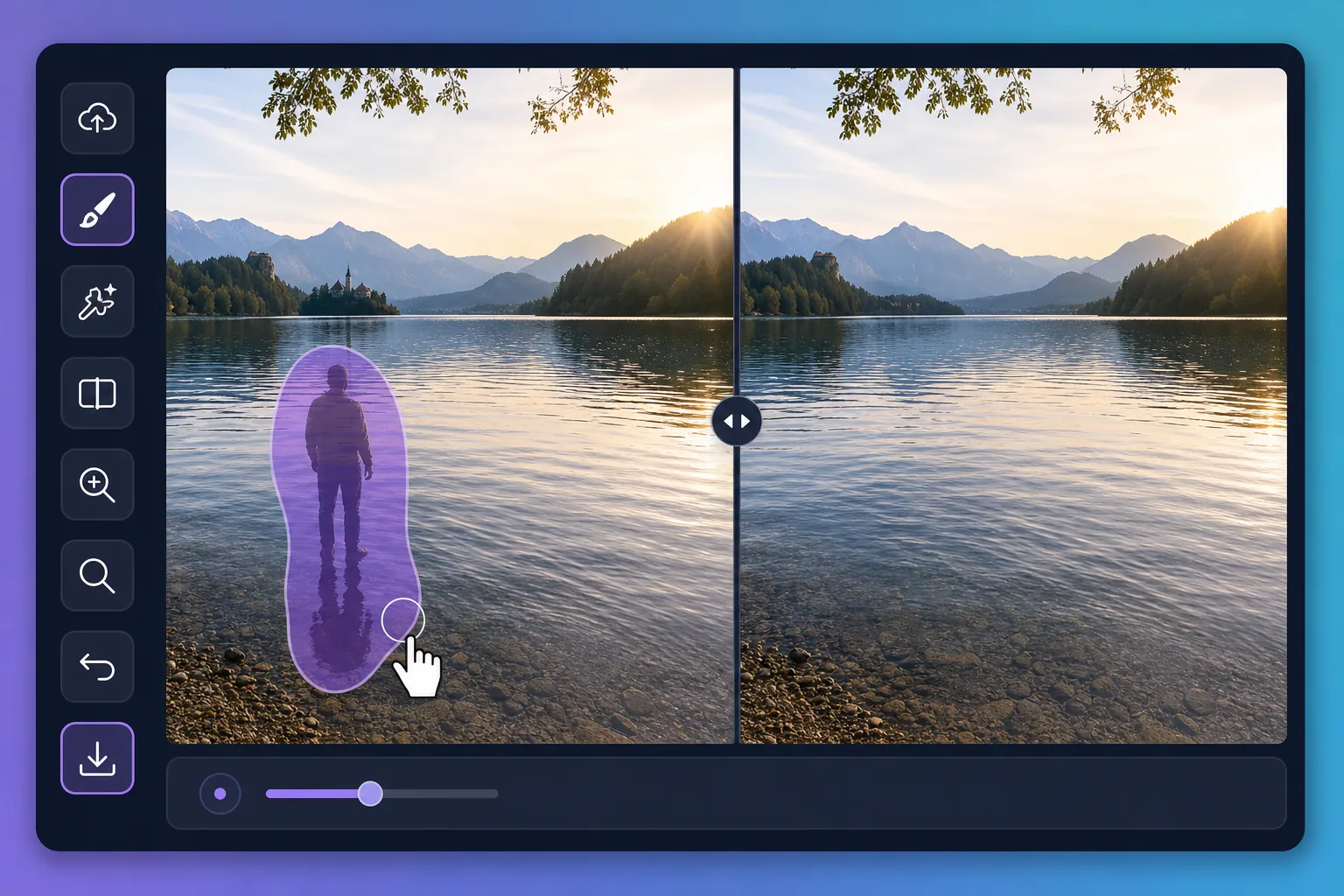
Why water reflections are tricky to edit với Magic Eraser
Water is a mirror that never holds still. A perfect dawn over a lake can be spoiled by the reflection of a power line, a parked car, or a stranger standing at the shore. Puddles after rain pick up neon signs, scaffolding, and harsh sky glare that pull attention away from your subject. Painting these out by hand is slow because the editor has to match ripples, color gradients, and the soft way reflections fade with distance. Magic Eraser handles that for you: brush over the unwanted reflection and its AI inpainting reconstructs a plausible stretch of water in its place — matching the surrounding tone and texture rather than leaving a flat smudge. It does not recover the literal scene that was hidden behind the reflection; it synthesizes a believable replacement that blends with the rest of the surface, which is exactly what you want for a clean travel or landscape shot.
Before you start
Hướng dẫn từng bước
Start with tải ảnh lên. The result preview above and tips below use this guide's existing content; no separate before-and-after proof is assumed.
- 1
Tải ảnh lên
Mở Magic Eraser trên web, iOS hoặc Android. Kéo thả ảnh JPEG, PNG, HEIC hoặc WebP vào. Không cần tài khoản để bắt đầu.
- 2
Chọn công cụ và vùng cần xử lý
Chọn công cụ phù hợp và đánh dấu vùng cần xử lý. AI sẽ tự động phân tích và thực hiện thay đổi trong vài giây.
- 3
Tải kết quả về
Xem trước kết quả và tải ảnh đã chỉnh sửa về. Xuất dưới dạng PNG hoặc JPEG với chất lượng cao.
Phù hợp nhất cho
- Wiping a reflected power line, crane, or building off a calm lake at sunrise
- Cleaning neon, signage, and headlight glare out of rain puddles in street shots
- Removing a stray person or parked car mirrored along a pond's far shore
- Softening harsh sun glare patches that blow out a glassy water surface
- Tidying reflections in fountains and reflecting pools for cleaner travel photos
Mẹo để có kết quả tốt nhất
Work in small sections rather than one giant brush stroke — water has subtle gradients and ripples that the AI rebuilds more convincingly across a smaller area. Keep your brush just inside the reflection so you preserve the genuine ripples around it. For mirror-still water, erasing a large reflection can leave the surface looking too uniform; brushing in a few short passes helps the reconstruction vary naturally. Remember the result is a synthesized surface, not the real scene beneath the reflection, so zoom in to confirm the edges blend before you export.
Câu hỏi thường gặp
- Tính năng Remove Water Reflections From a Photo có miễn phí không?
- Có, Magic Eraser cho phép bạn Remove Water Reflections From a Photo miễn phí với giới hạn hàng ngày. Nâng cấp lên Pro để xử lý không giới hạn và xuất chất lượng cao.
- Remove Water Reflections From a Photo mất bao lâu?
- Chỉ mất vài giây. AI của Magic Eraser xử lý ảnh nhanh chóng — hầu hết kết quả có ngay lập tức sau khi tải lên.
- Tôi có thể sử dụng trên điện thoại không?
- Có, Magic Eraser hoạt động trên iOS, Android và mọi trình duyệt web. Bạn có thể chuyển đổi giữa các thiết bị.
- Chất lượng ảnh có bị giảm không?
- Không, Magic Eraser duy trì chất lượng ảnh gốc. AI xử lý thông minh để giữ nguyên chi tiết và độ sắc nét.