
Cách xóa thùng rác khỏi ảnh
Thùng rác ở lề đường, thùng rác phía sau tòa nhà hoặc thùng tái chế khiến ảnh chụp của bạn bị ảnh hưởng — Magic Eraser loại bỏ những chướng mắt này trong khi tái tạo lại vỉa hè, bức tường hoặc cảnh quan phía sau chúng một cách liền mạch.
Last updated
Loại bỏ thùng rác ngay bây giờ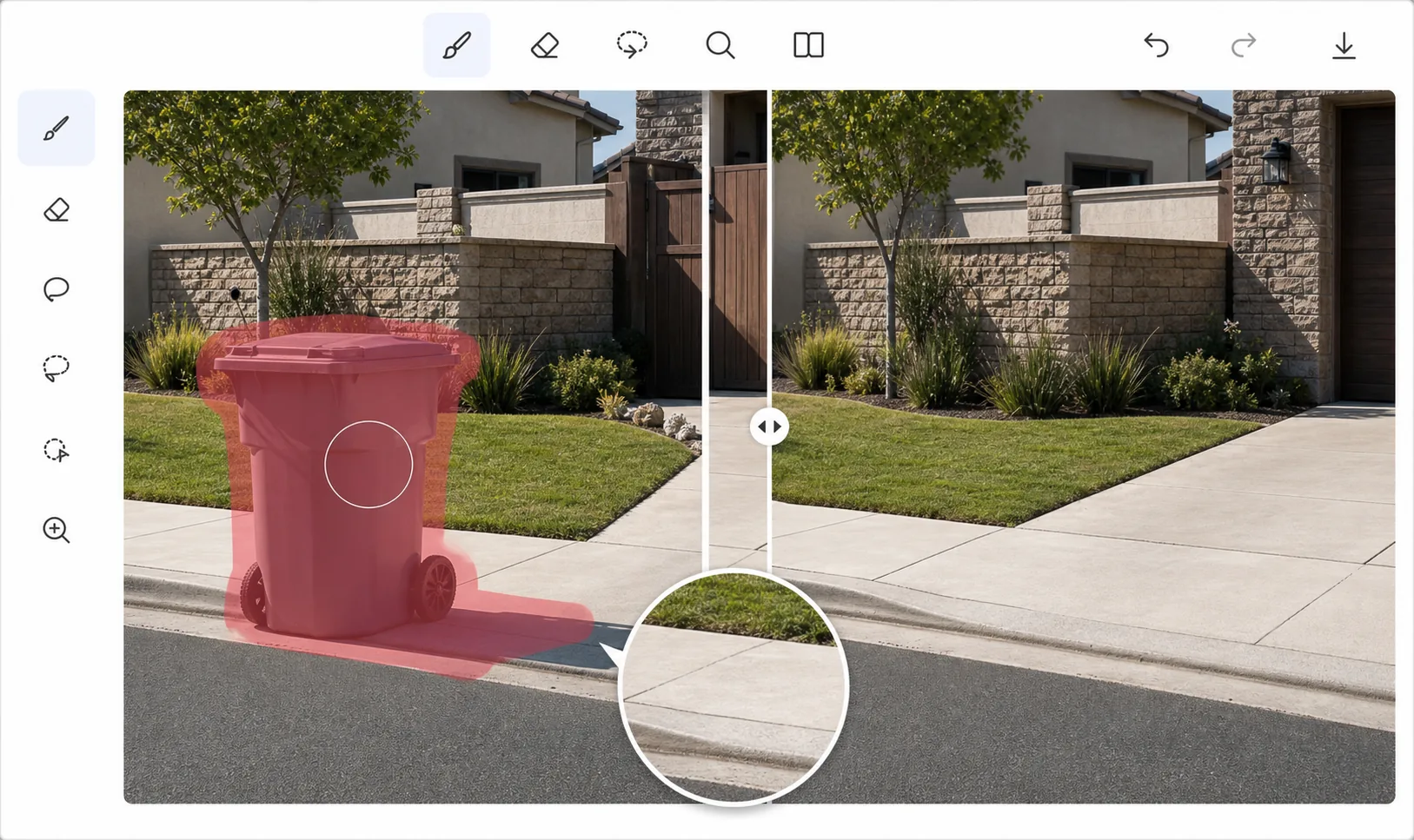
Làm sạch ảnh bất động sản và ảnh ngoài trời
Thùng rác là một trong những yếu tố gây xao nhãng thị giác phổ biến nhất trong chụp ảnh bất động sản, ảnh khu phố và cảnh đường phố. Chúng xuất hiện ở lề đường vào ngày thu gom, bên cạnh các tòa nhà, trong các con hẻm và gần lối vào nhà hàng. Di chuyển chúng trước khi chụp không phải lúc nào cũng có thể thực hiện được, và trong chụp ảnh bất động sản, các đại lý thường chụp ảnh hàng chục bất động sản trong một ngày mà không có thời gian để dàn dựng từng bức ảnh ngoại thất. Việc loại bỏ đối tượng được hỗ trợ bởi AI sẽ xử lý vấn đề này sau: quét qua thùng rác và AI sẽ lấp đầy không gian bằng bất cứ thứ gì cần có - vỉa hè, cỏ, hàng rào, tường hoặc bề mặt đường lái xe.
Before you start
Loại bỏ thùng rác trong ba bước
Start with tải ảnh lên. The result preview above and tips below use this guide's existing content; no separate before-and-after proof is assumed.
- 1
Tải ảnh lên
Mở Magic Eraser trên web, iOS hoặc Android. Tải lên ảnh chứa thùng rác hoặc thùng rác mà bạn muốn xóa.
- 2
Quét qua thùng rác
Sử dụng công cụ cọ vẽ để vẽ lên toàn bộ thùng rác bao gồm cả bóng của nó. Đối với thùng rác, bao gồm bánh xe và bất kỳ vết bẩn nào trên mặt đất. Lựa chọn hơi lớn sẽ giúp AI có thêm bối cảnh để tái thiết rõ ràng.
- 3
Xem xét và xuất khẩu
AI tái tạo lại nền - tiếp tục mô hình vỉa hè, kết cấu tường và cảnh quan một cách liền mạch. Kiểm tra nơi thùng gặp mặt đất để tái tạo bề mặt chính xác. Xuất ảnh sạch.
Tốt nhất cho
- Các nhiếp ảnh gia bất động sản loại bỏ thùng rác lề đường khỏi ảnh bên ngoài khu nhà
- Các nhiếp ảnh gia khu phố và đường phố tạo ra các tác phẩm đô thị sạch sẽ
- Các nhiếp ảnh gia nhà hàng và khách sạn loại bỏ thùng rác khỏi mặt ngoài tòa nhà
- Các nhiếp ảnh gia du lịch dọn dẹp cảnh đường phố tại các điểm du lịch
- Công ty quản lý tài sản chuẩn bị ảnh niêm yết sạch sẽ
Lời khuyên để có kết quả tốt nhất
Bao gồm bóng và bất kỳ vết bẩn nào trên mặt đất trong lựa chọn của bạn - một bề mặt sạch sẽ nơi đặt thùng rõ ràng trông không tự nhiên mà không loại bỏ bằng chứng về sự hiện diện của nó. Đối với các thùng dựa vào tường, AI sẽ tái tạo lại kết cấu tường và mọi tính năng bị ẩn một phần như ổ cắm điện hoặc đường ống. Các thùng rác bên lề đường trong ngày thu gom thường xuất hiện thành hàng - hãy loại bỏ từng thùng một, bắt đầu từ thùng biệt lập nhất để tạo bối cảnh nền sạch sẽ.
Câu hỏi thường gặp
- Tôi có thể loại bỏ thùng rác phía sau tòa nhà không?
- Đúng. Thùng rác, thùng thương mại và thùng tái chế ở mọi kích cỡ đều có thể được loại bỏ. AI tái tạo lại bức tường, mặt đường và khu vực xung quanh phía sau chúng.
- Nó có hoạt động khi thùng bị ẩn một phần bởi các vật thể khác không?
- Đúng. Chỉ quét phần có thể nhìn thấy của thùng. AI chỉ xử lý các khu vực bạn chọn, không chạm vào các vật thể chồng chéo như hàng rào, ô tô hoặc cây cối.
- Việc dọn thùng rác có miễn phí không?
- Đúng. Tính năng loại bỏ đối tượng có sẵn ở cấp miễn phí với giới hạn sử dụng hàng ngày. Premium loại bỏ giới hạn xử lý hàng loạt bộ ảnh bất động sản.