
Remove Multiple Emojis From a Photo in One Pass
Tìm hiểu cách Xóa nhiều emoji với Magic Eraser. Hướng dẫn từng bước đơn giản với công cụ AI miễn phí. Hoạt động trên web, iOS và Android.
Last updated
Thử ngay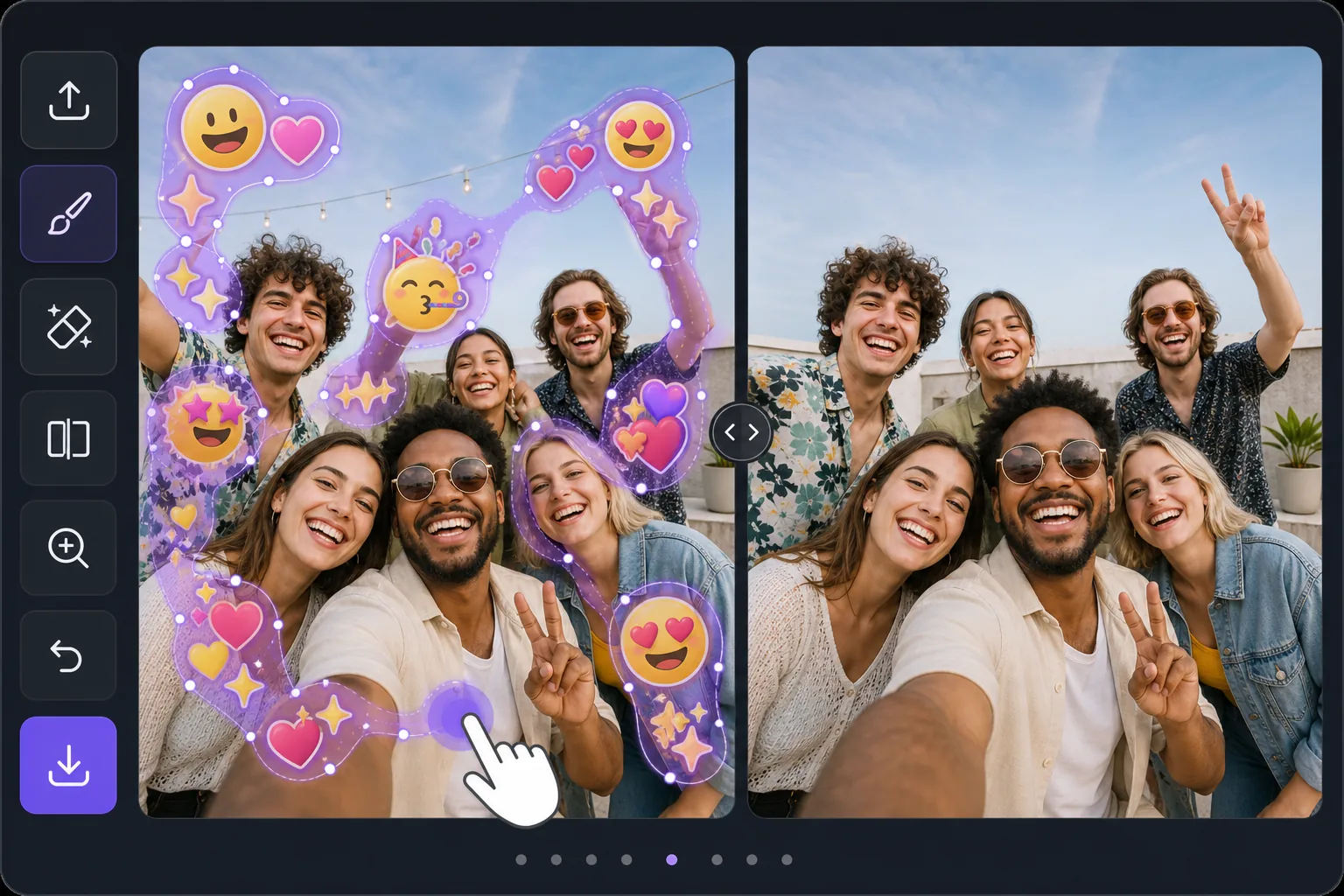
Batch-erase a photo covered in emojis với Magic Eraser
Some photos look like an emoji explosion: smiley faces, hearts, sparkles, and sticker packs piled across faces, backgrounds, and corners. Removing them individually means dozens of taps and re-renders. Magic Eraser is built for the opposite workflow — mark every emoji you want gone in one selection, then let the AI clear them together. Instead of treating each emoji as a separate job, you brush a continuous mask across the whole emoji-covered area, including overlapping stacks and scattered reactions, and process them in a single pass. The AI inpainting studies the surrounding pixels and synthesizes a believable fill for everything underneath at once, so textures like skin, sky, walls, and clothing flow naturally across the cleared zone. Be clear about what this does: it generates a plausible reconstruction of what was likely behind the emojis — it does not recover the literal original pixels or reveal any hidden face or identity. For a photo blanketed in emoji clutter, that one-pass batch approach is the fastest way from chaotic to clean.
Before you start
Hướng dẫn từng bước
Start with tải ảnh lên. The result preview above and tips below use this guide's existing content; no separate before-and-after proof is assumed.
- 1
Tải ảnh lên
Mở Magic Eraser trên web, iOS hoặc Android. Kéo thả ảnh JPEG, PNG, HEIC hoặc WebP vào. Không cần tài khoản để bắt đầu.
- 2
Chọn công cụ và vùng cần xử lý
Chọn công cụ phù hợp và đánh dấu vùng cần xử lý. AI sẽ tự động phân tích và thực hiện thay đổi trong vài giây.
- 3
Tải kết quả về
Xem trước kết quả và tải ảnh đã chỉnh sửa về. Xuất dưới dạng PNG hoặc JPEG với chất lượng cao.
Phù hợp nhất cho
- Group selfies or party photos plastered with friends' emoji and sticker reactions
- Screenshots where multiple emojis were stamped across faces and the background
- Memes or edits buried under sparkles, hearts, and laughing-face stacks
- Social posts covered in scattered emoji clutter you want cleared before reposting
- Cleaning up a single image with dozens of small emojis faster than erasing each one
Mẹo để có kết quả tốt nhất
Work in passes rather than chasing perfection in one go. First, mask the dense clusters and overlapping emoji stacks — these benefit most from being inpainted together so the AI keeps the background consistent across them. Then do a second pass for the small, scattered emojis in corners and edges. Zoom in for emojis that overlap a face or fine detail; a tighter brush leaves more real pixels for the AI to reference, which yields a more believable reconstruction. If a large emoji covered a busy area like a crowd or patterned fabric, expect the fill to be a plausible approximation, not the exact hidden detail — it never restores a true hidden face or identity. For photos that are almost entirely emoji, sometimes a generous single mask over the whole covered zone reconstructs more cohesively than many small separate edits.
Câu hỏi thường gặp
- Tính năng Xóa nhiều emoji có miễn phí không?
- Có, Magic Eraser cho phép bạn Xóa nhiều emoji miễn phí với giới hạn hàng ngày. Nâng cấp lên Pro để xử lý không giới hạn và xuất chất lượng cao.
- Xóa nhiều emoji mất bao lâu?
- Chỉ mất vài giây. AI của Magic Eraser xử lý ảnh nhanh chóng — hầu hết kết quả có ngay lập tức sau khi tải lên.
- Tôi có thể sử dụng trên điện thoại không?
- Có, Magic Eraser hoạt động trên iOS, Android và mọi trình duyệt web. Bạn có thể chuyển đổi giữa các thiết bị.
- Chất lượng ảnh có bị giảm không?
- Không, Magic Eraser duy trì chất lượng ảnh gốc. AI xử lý thông minh để giữ nguyên chi tiết và độ sắc nét.