
Cách chuyển ảnh sang PNG có độ trong suốt
Hình ảnh JPEG không được có nền trong suốt - nền luôn có một màu đồng nhất. Chuyển đổi sang PNG với tính năng xóa nền AI mang đến cho bạn một bản cắt rõ ràng với nền trong suốt, sẵn sàng để đặt trên mọi thiết kế, trang trình bày hoặc trang web.
Last updated
Chuyển đổi sang PNG ngay bây giờ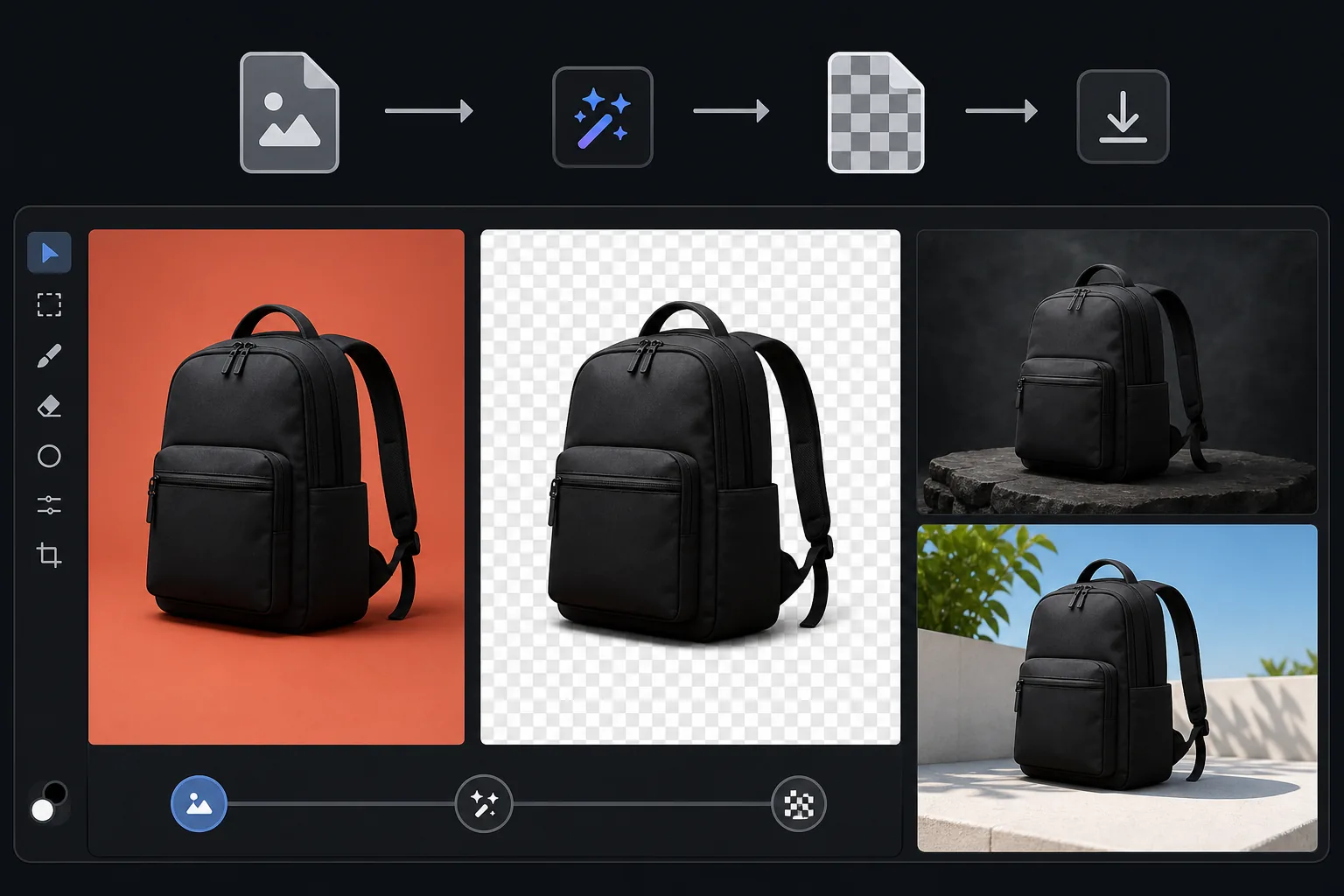
Cách chuyển ảnh sang định dạng PNG với nền trong suốt
Để chuyển ảnh JPG thành ảnh PNG nền trong suốt, hãy mở Magic Eraser trên web, iOS hoặc Android, tải ảnh lên, xóa nền rồi xuất file dưới dạng PNG — phần chủ thể được cắt ra sẽ giữ nền trong suốt thay vì một khối nền trắng. Hoàn toàn miễn phí, không cần đăng ký. Bản thân file JPEG không thể lưu được phần trong suốt, nên việc chuyển đổi thực ra gồm hai bước mà công cụ làm cùng lúc: xóa nền để tạo kênh alpha, rồi lưu thành PNG. Kết quả là một ảnh có thể đặt gọn gàng lên slide, trang web hay ấn phẩm marketing. JPEG là định dạng tiêu chuẩn cho ảnh nhưng nó không hỗ trợ độ trong suốt - mỗi pixel đều có một màu, kể cả nền. Khi bạn cần đặt một sản phẩm, người hoặc đối tượng trên một nền khác (trang trình bày, trang web, đồ họa tiếp thị), bạn cần một PNG có nền trong suốt. Định dạng PNG hỗ trợ kênh alpha xác định mức độ trong suốt của từng pixel - mờ hoàn toàn đối với chủ thể, hoàn toàn trong suốt đối với nền đã xóa và nửa trong suốt đối với các cạnh tóc và ranh giới mềm. Độ trong suốt này cho phép hình ảnh hiển thị tự nhiên trên bất kỳ nền nào mà không có hình chữ nhật hiển thị. Việc tạo PNG trong suốt từ JPEG yêu cầu xóa nền (tạo kênh alpha) và lưu ở định dạng PNG — chính xác là những gì Magic Eraser thực hiện trong một bước.
Before you start
Chuyển đổi sang PNG trong suốt theo ba bước
Start with tải ảnh lên. The result preview above and tips below use this guide's existing content; no separate before-and-after proof is assumed.
- 1
Tải ảnh lên
Mở Magic Eraser trên web, iOS hoặc Android. Tải lên ảnh JPEG, HEIC hoặc WebP có chủ đề bạn muốn cắt. Ảnh sản phẩm, ảnh chân dung, logo trên nền màu và vật thể trên bất kỳ nền nào đều được hỗ trợ.
- 2
Xóa nền
Chọn loại bỏ nền. AI phát hiện chủ thể chính và loại bỏ mọi thứ đằng sau chủ thể đó, tạo ra kênh alpha trong suốt. Các mép tóc, vật liệu bán trong suốt và các đường viền phức tạp đều được xử lý tự động.
- 3
Xuất dưới dạng PNG
Tải xuống kết quả dưới dạng PNG để giữ nguyên nền trong suốt. Tệp sẽ có mẫu bàn cờ trong trình xem hiển thị độ trong suốt và sẽ xếp lớp rõ ràng trên mọi nền trong công cụ thiết kế, bản trình chiếu hoặc trang web. Xuất JPEG cũng có sẵn nếu bạn muốn có màu nền đồng nhất.
Tốt nhất cho
- Hình ảnh sản phẩm dành cho thương mại điện tử cần đặt trên nền trang web tùy chỉnh hoặc trong các mẫu thiết kế
- Cắt dọc cho trang nhóm, bản trình bày và hình ảnh tổng hợp
- Chuyển đổi logo từ ảnh logo được in sang PNG trong suốt để sử dụng kỹ thuật số
- Thiết kế nội dung trong đó các đối tượng cần phủ lên các nền khác nhau trong Canva, Figma hoặc Photoshop
- Các slide thuyết trình trong đó các phần cắt ra của sản phẩm hoặc con người cần được đặt trên nền slide có thương hiệu
Lời khuyên để có kết quả tốt nhất
Bắt đầu với hình ảnh nguồn có chất lượng cao nhất — chất lượng đầu ra PNG không được vượt quá chất lượng đầu vào. Nếu đối tượng có chi tiết đẹp ở các cạnh (tóc, lông, lông vũ), AI sẽ tạo ra các cạnh bán trong suốt hòa trộn tự nhiên trên bất kỳ nền nào. Đối với những sản phẩm có nền trắng, việc xóa nền gần như hoàn hảo vì ranh giới được xác định rõ ràng. Đối với các đối tượng có hậu cảnh phức tạp, AI có thể cần vượt qua lần thứ hai ở các khu vực khó khăn ở rìa. Khi đặt PNG trong suốt trên nền màu, hãy kiểm tra xem các khu vực cạnh bán trong suốt trông có tự nhiên so với màu nền cụ thể hay không - nền quá tối có thể làm lộ bất kỳ quầng sáng nền nào còn sót lại từ ảnh gốc.
Câu hỏi thường gặp
- Tại sao tôi không thể đổi tên JPEG thành PNG?
- Đổi tên thay đổi phần mở rộng tập tin nhưng không thay đổi định dạng. JPEG được đổi tên vẫn không có kênh alpha - nền sẽ có màu trắng hoặc bất kỳ màu nào. Bạn cần loại bỏ nền thực tế để tạo độ trong suốt thực sự.
- Tệp PNG có lớn hơn JPEG không?
- Có, thường lớn hơn 2-5 lần vì PNG sử dụng tính năng nén không mất dữ liệu. Để sử dụng trên web khi kích thước tệp quan trọng, hãy xem xét WebP (hỗ trợ tính minh bạch với kích thước tệp nhỏ hơn). Đối với quy trình thiết kế, PNG là tiêu chuẩn và kích thước lớn hơn có thể chấp nhận được.
- Tôi có thể chuyển đổi lại thành JPEG sau không?
- Có, nhưng bạn sẽ cần chọn màu nền cho vùng trong suốt - JPEG không hỗ trợ độ trong suốt. Màu trắng là sự lựa chọn phổ biến nhất. Giữ PNG làm tệp chính của bạn.
- Chuyển đổi PNG có miễn phí không?
- Đúng. Tính năng xóa nền và xuất PNG có sẵn ở cấp miễn phí với giới hạn sử dụng hàng ngày. Premium loại bỏ giới hạn chuyển đổi hàng loạt.
- Làm sao để có nền trong suốt chứ không chỉ là file PNG?
- Việc chuyển JPG sang PNG thông thường vẫn giữ nguyên các điểm ảnh — bao gồm cả nền — nên ảnh sẽ không tự động trong suốt. Để có nền trong suốt thật sự, hãy xóa nền trước: tải ảnh lên, để AI cắt chủ thể ra, rồi xuất file dưới dạng PNG. Cách này sẽ ghi các vùng trong suốt (alpha) vào file, nhờ vậy chủ thể nằm trên mọi nền mà không còn khối nền trắng phía sau. Với Magic Eraser, cả hai bước diễn ra trong cùng một lần xuất file.
- Tôi có thể chuyển JPG sang PNG nền trong suốt ngay trên điện thoại không?
- Có. Hãy mở Magic Eraser trên bất kỳ trình duyệt di động nào hoặc trên ứng dụng iOS, Android, tải ảnh JPG từ thư viện ảnh, xóa nền rồi xuất file dưới dạng PNG. Ảnh PNG nền trong suốt sẽ được lưu thẳng về thư viện ảnh và sẵn sàng để đưa vào bài thuyết trình, sticker hay tin đăng bán sản phẩm. Cách làm giống hệt bản trên máy tính, và nếu dùng trình duyệt thì bạn không cần cài đặt ứng dụng.