
Magic Eraser + Photoshop: การล้างข้อมูลอย่างรวดเร็ว การแก้ไขเชิงลึก
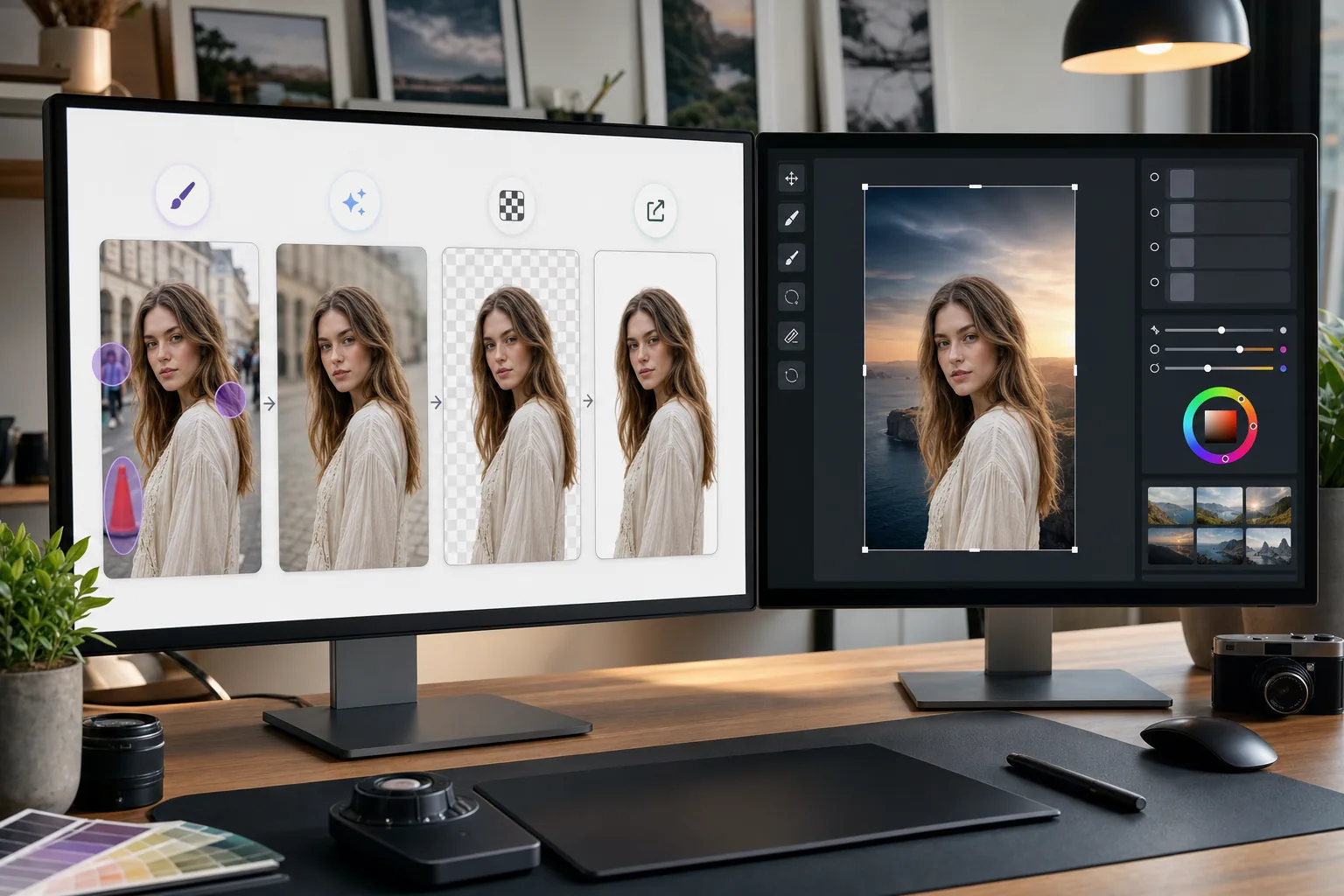
Photoshop เป็นมาตรฐานอุตสาหกรรมสำหรับการแก้ไขภาพโดยละเอียด Magic Eraser จัดการงานล้างข้อมูลอย่างรวดเร็ว — ลบพื้นหลัง ลบวัตถุ และเติมช่องว่างด้วย AI — เพื่อให้คุณสามารถกระโจนเข้าสู่งานที่ดีใน Photoshop ได้โดยตรง
เกี่ยวกับ Adobe Photoshop
Adobe Photoshop เป็นซอฟต์แวร์แก้ไขภาพระดับมืออาชีพที่ใช้โดยช่างภาพ นักออกแบบ และศิลปินดิจิทัลทั่วโลก มีเครื่องมือขั้นสูงสำหรับการคอมโพสิต รีทัช Color correction และการแก้ไขระดับพิกเซล
ประโยชน์
การล้างข้อมูลที่รวดเร็วยิ่งขึ้นก่อนการแก้ไขโดยละเอียด
ลบวัตถุและสิ่งรบกวนที่ไม่ต้องการออกในไม่กี่วินาทีด้วย Magic Eraser แทนที่จะใช้เวลากับโคลนแสตมป์หรือแปรงรักษาของ Photoshop ในงานง่ายๆ
ลบพื้นหลังด้วยคลิกเดียว
แยกวัตถุออกจากกันทันทีด้วยการลบพื้นหลังที่ขับเคลื่อนโดย AI ของ Magic Eraser นำเข้า PNG แบบโปร่งใสลงใน Photoshop เพื่อการผสมและการมาสก์ขั้นสูง
เติมพื้นที่ที่ขาดหายไปโดยขับเคลื่อนด้วย AI
ใช้การเติม AI ของ Magic Eraser เพื่อสร้างพื้นที่ใหม่อย่างชาญฉลาดหลังจากลบวัตถุออก ผลลัพธ์ที่ได้จะเป็นจุดเริ่มต้นที่ชัดเจนสำหรับการปรับแต่ง Photoshop
ทางเลือกที่สามารถเข้าถึงได้สำหรับงานง่ายๆ
ไม่ใช่ทุกภาพที่ต้องการพลังเต็มรูปแบบของ Photoshop ใช้ Magic Eraser ในเบราว์เซอร์เพื่อการแก้ไขอย่างรวดเร็ว และจอง Photoshop ไว้สำหรับงานที่ต้องใช้ชุดเครื่องมือขั้นสูง
วิธีใช้ Magic Eraser กับ Photoshop
อัปโหลดไปที่ Magic Eraser
เปิด Magic Eraser ในเบราว์เซอร์ของคุณ และอัปโหลดรูปภาพที่ต้องล้างข้อมูลเบื้องต้นก่อนแก้ไข Photoshop
ดำเนินการล้างข้อมูลอย่างรวดเร็ว
ลบพื้นหลัง ลบวัตถุที่ไม่ต้องการ หรือใช้การเติม AI เพื่อจัดการกับการแก้ไขแบบตรงไปตรงมาที่อาจใช้เวลานานกว่าใน Photoshop
ส่งออกเต็มคุณภาพ
ดาวน์โหลดรูปภาพที่ล้างแล้วเป็น PNG เพื่อรักษาความโปร่งใส หรือเป็น JPEG คุณภาพสูงสำหรับรูปภาพที่ไม่โปร่งใส
เปิดใน Photoshop เพื่อดูรายละเอียดการทำงาน
นำเข้าภาพที่ประมวลผลแล้วลงใน Photoshop และดำเนินการแก้ไขขั้นสูง รีทัช การจัดองค์ประกอบภาพ หรือการจัดระดับสี
เครื่องมือ
คำถามที่พบบ่อย
Magic Eraser เชื่อมต่อกับ Photoshop โดยตรงหรือไม่
+
ไม่ หน้านี้อธิบายขั้นตอนการส่งออกและนำเข้าไฟล์ด้วยตนเอง ไม่ใช่ปลั๊กอิน Photoshop หรือการเชื่อมต่อโดยตรง ให้แก้ไขภาพใน Magic Eraser ดาวน์โหลดเป็น PNG หรือ JPEG แล้วเปิดไฟล์นั้นใน Photoshop
เหตุใดจึงใช้ Magic Eraser หากฉันมี Photoshop อยู่แล้ว
+
Magic Eraser จัดการงานล้างข้อมูลง่ายๆ ได้ในไม่กี่วินาทีโดยไม่ต้องเปิด Photoshop การลบพื้นหลัง การลบวัตถุ และการล้างข้อมูลขั้นพื้นฐานทำได้เร็วกว่า ช่วยให้คุณใช้ Photoshop สำหรับงานที่ต้องการได้จริง
Magic Eraser แทนที่ Photoshop หรือไม่
+
ไม่ Magic Eraser เสริม Photoshop ด้วยการจัดการงานที่รวดเร็วและขับเคลื่อนด้วย AI Photoshop ยังคงจำเป็นสำหรับการรีทัชอย่างละเอียด การจัดองค์ประกอบ งานสี และการแก้ไขระดับพิกเซล
ไฟล์รูปแบบใดที่ใช้งานได้ระหว่างเครื่องมือทั้งสอง?
+
ส่งออกจาก Magic Eraser เป็น PNG (โปร่งใส) หรือ JPEG คุณภาพสูง ทั้งสองรูปแบบนำเข้าโดยตรงไปยัง Photoshop โดยคงคุณภาพไว้อย่างสมบูรณ์
การลบพื้นหลังของ Magic Eraser แม่นยำเท่ากับ Photoshop หรือไม่
+
สำหรับวัตถุส่วนใหญ่ การลบพื้นหลัง AI ของ Magic Eraser จะให้ผลลัพธ์ที่ชัดเจนในคลิกเดียว สำหรับภาพที่มีรายละเอียดที่ละเอียดมาก เช่น ผมเส้นเล็ก คุณอาจต้องการปรับแต่งขอบเพิ่มเติมใน Photoshop
ฉันสามารถใช้ Magic Eraser กับไฟล์ PSD ได้หรือไม่
+
Magic Eraser ใช้งานได้กับรูปแบบภาพมาตรฐาน เช่น JPEG, PNG และ WebP ส่งออกภาพที่แบนราบจาก Photoshop ประมวลผลใน Magic Eraser จากนั้นนำกลับเข้าสู่โปรเจ็กต์ PSD ของคุณ
เร่งความเร็วเวิร์กโฟลว์ Photoshop ของคุณ
ลองใช้ Magic Eraser ฟรีเพื่อการลบพื้นหลังอย่างรวดเร็ว การลบวัตถุ และการเติม AI ก่อนที่จะเจาะลึกการแก้ไข Photoshop อย่างละเอียด
ลองใช้ Magic Eraser ฟรีกรณีการใช้งานที่เกี่ยวข้อง
ดูว่ามืออาชีพใช้เครื่องมือเหล่านี้ในเวิร์กโฟลว์จริงอย่างไร
ภาพประกาศที่เต็มไปด้วยของส่วนตัว รถจอด หรืออุปกรณ์ก่อสร้าง ทำให้ผู้ซื้อไม่สนใจ Magic Eraser ใช้ AI ทำความสะอาดภาพอสังหาริมทรัพย์ของคุณทันที — ไม่ต้องมีทักษะ Photoshop
รูปสินค้าที่พื้นหลังรกรุงรังทำให้ลูกค้าเลื่อนผ่านร้านคุณทุกวัน Magic Eraser ช่วยสร้างรูปสินค้ามืออาชีพได้ในไม่กี่วินาที ไม่ต้องเก่ง Photoshop อัปโหลด ลบสิ่งรบกวน แล้วลงขายได้เลย
คนแปลกหน้าทำลายรูปท่องเที่ยวของคุณ? พื้นหลังรกๆ ทำให้เซลฟี่ดูไม่ดี? เลิกเสียเวลาหลายชั่วโมงกับ Photoshop ได้แล้ว Magic Eraser ลบสิ่งรบกวน ทำความสะอาดฉากหลัง และขยายรูปให้พอดีทุกแพลตฟอร์ม — แค่แตะครั้งเดียว
การเปรียบเทียบที่เกี่ยวข้อง
ดูว่า Magic Eraser เปรียบเทียบกับเครื่องมือที่คล้ายกันอย่างไร
TouchRetouch เป็นแอปมือถือแบบเสียเงินยอดนิยมสำหรับลบวัตถุและจุดตำหนิ Magic Eraser ให้บริการแก้ไขรูปภาพด้วย AI ฟรีบนทุกอุปกรณ์โดยไม่ต้องติดตั้ง เปรียบเทียบฟีเจอร์ ราคา และความง่ายในการใช้งาน
Cleanup.pictures เป็นเครื่องมือเว็บฟรีสำหรับลบวัตถุอย่างรวดเร็ว Magic Eraser มีเครื่องมือแก้ไข AI 8 ชนิด แอปมือถือ และระบบประมวลผลขั้นสูง มาดูการเปรียบเทียบกัน
remove.bg เป็นผู้นำตลาดด้านการลบพื้นหลังด้วย API ที่ทรงพลังและปลั๊กอินสำหรับ Photoshop และ Figma ส่วน Magic Eraser ให้มากกว่าด้วยเครื่องมือ AI แปดอย่าง ตั้งแต่ลบวัตถุ เติมภาพ AI ไปจนถึงเพิ่มคุณภาพและออกแบบ ทั้งหมดในโปรแกรมเดียว
โปรแกรมแต่งรูป AI ที่ทรงพลังสองตัวที่มีจุดแข็งต่างกัน Magic Eraser มีเครื่องมือ AI สร้างสรรค์ที่หลากหลายกว่า ขณะที่ Photoroom เชี่ยวชาญด้านภาพถ่ายสินค้าอีคอมเมิร์ซและการประมวลผลแบบกลุ่ม ดูว่าตัวไหนเหมาะกับคุณ
บทความที่เกี่ยวข้อง
เคล็ดลับ คู่มือ และบทเรียนที่เกี่ยวข้องกับหัวข้อนี้
เรียนรู้วิธีใช้ Magic Eraser เพื่อลบวัตถุ คน ข้อความ และสิ่งรบกวนออกจากรูปภาพ พร้อมผลลัพธ์ AI ที่สะอาดขึ้น
เรียนรู้วิธีลบคนออกจากรูปภาพด้วย AI ภายในไม่กี่วินาที สำหรับรูปท่องเที่ยว อสังหาริมทรัพย์ และรูปสินค้า
คำแนะนำทีละขั้นตอนในการลบลายน้ำจากรูปภาพของคุณด้วย AI เมื่อไหร่ที่เหมาะสม เทคนิค และวิธีใช้ Magic Eraser
การเชื่อมต่ออื่นๆ
สำรวจแพลตฟอร์มอื่นที่ใช้งานร่วมกับ Magic Eraser ได้