
Magic Eraser + Figma: ทำความสะอาดทรัพย์สินสำหรับทุกการออกแบบ
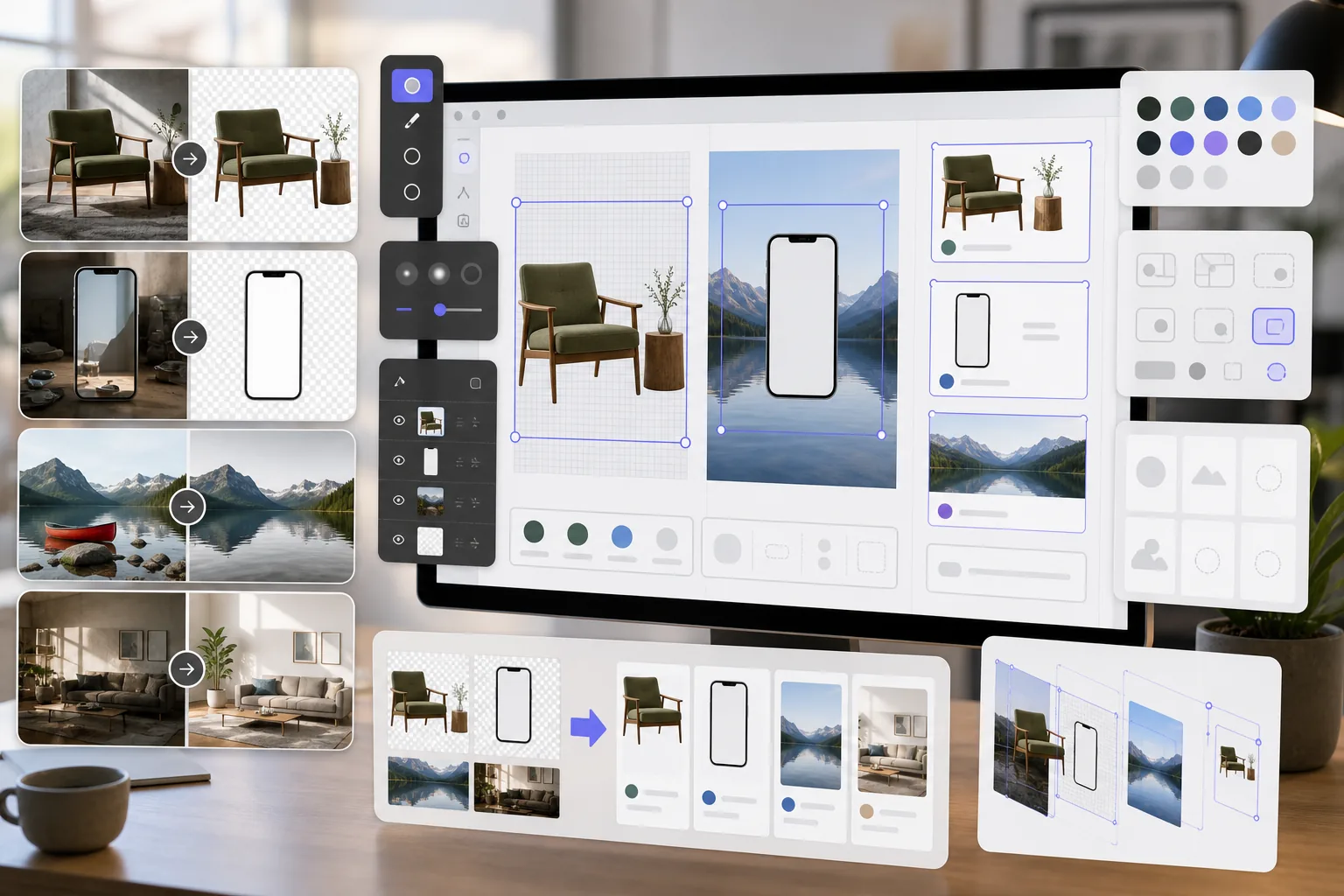
นักออกแบบ Figma ต้องการแอสเซ็ทภาพที่สะอาดตาสำหรับการจำลอง ต้นแบบ และการออกแบบการผลิต Magic Eraser ลบพื้นหลังสำหรับ PNG แบบโปร่งใส ล้างรูปภาพอ้างอิง และเตรียมเนื้อหารูปภาพเพื่อให้โปรเจ็กต์ Figma ของคุณดูสวยงามตั้งแต่เริ่มต้น
เกี่ยวกับ Figma
Figma เป็นเครื่องมือออกแบบบนเบราว์เซอร์ที่ทำงานร่วมกันซึ่งใช้โดยทีมผลิตภัณฑ์ นักออกแบบ UI/UX และเอเจนซี่สำหรับการออกแบบอินเทอร์เฟซ การสร้างต้นแบบ และการจัดการระบบการออกแบบ รองรับการทำงานร่วมกันแบบเรียลไทม์และการรวมปลั๊กอิน
ประโยชน์
PNG โปร่งใสสำหรับการจำลองและต้นแบบ
ลบพื้นหลังออกจากภาพถ่ายผลิตภัณฑ์ หน้าจออุปกรณ์ และองค์ประกอบ UI เพื่อสร้าง PNG โปร่งใสที่เลเยอร์ในเฟรมและส่วนประกอบของ Figma อย่างหมดจด
รูปภาพอ้างอิงที่ทำความสะอาดแล้ว
ลบลายน้ำ คำอธิบายประกอบ และองค์ประกอบที่ทำให้เสียสมาธิออกจากรูปภาพอ้างอิงและภาพหน้าจอ ก่อนที่จะวางลงในไฟล์ออกแบบ Figma
เนื้อหารูปภาพพร้อมการผลิต
ปรับปรุงคุณภาพของภาพและลบวัตถุที่ไม่ต้องการออกจากภาพถ่ายก่อนที่จะนำเข้าเป็นสินทรัพย์ในการออกแบบ Figma ช่วยลดรอบการแก้ไขร่วมกับผู้มีส่วนได้ส่วนเสีย
การเตรียมสินทรัพย์ที่รวดเร็วยิ่งขึ้น
เตรียมเนื้อหารูปภาพในไม่กี่วินาทีด้วยเครื่องมือที่ขับเคลื่อนด้วย AI แทนการมาสก์และรีทัชด้วยตนเองในซอฟต์แวร์แยกต่างหากก่อนนำเข้าสู่ Figma
วิธีใช้ Magic Eraser กับ Figma
อัปโหลดภาพของคุณ
เปิด Magic Eraser และอัปโหลดรูปภาพหรือเนื้อหาที่คุณต้องการเตรียมสำหรับโปรเจ็กต์ออกแบบ Figma ของคุณ
ประมวลผลภาพ
ลบพื้นหลังสำหรับเนื้อหาที่โปร่งใส ลบองค์ประกอบที่ไม่ต้องการ หรือปรับปรุงคุณภาพ ขึ้นอยู่กับความต้องการในการออกแบบของคุณ
ดาวน์โหลดเป็น PNG
ส่งออกภาพที่ประมวลผลเป็น PNG เพื่อรักษาความโปร่งใส หรือเป็น JPEG สำหรับภาพพื้นหลังแบบเต็ม
นำเข้าสู่ Figma
ลากรูปภาพที่ประมวลผลแล้วลงในไฟล์ Figma ของคุณ หรือใช้ฟีเจอร์ Place Image เพื่อเพิ่มลงในเฟรมและส่วนประกอบ
เครื่องมือ
คำถามที่พบบ่อย
Magic Eraser รวมเข้ากับ Figma โดยตรงหรือไม่
+
Magic Eraser และ Figma ทำงานร่วมกันผ่านขั้นตอนการส่งออกและนำเข้า เตรียมภาพของคุณใน Magic Eraser ดาวน์โหลด และนำเข้าสู่ Figma โดยการลากไฟล์ลงบนผืนผ้าใบ
ฉันสามารถสร้าง PNG แบบโปร่งใสสำหรับส่วนประกอบ Figma ได้หรือไม่
+
ใช่. การลบพื้นหลังของ Magic Eraser จะสร้าง PNG แบบโปร่งใสที่นำเข้าสู่ Figma พร้อมการรองรับช่องอัลฟ่าเต็มรูปแบบ เหมาะสำหรับส่วนประกอบ การจำลอง และการออกแบบแบบเลเยอร์
ฉันควรส่งออกความละเอียดใดสำหรับ Figma
+
Magic Eraser คงความละเอียดของภาพต้นฉบับไว้ สำหรับการออกแบบ Figma โดยทั่วไปก็เพียงพอแล้ว ใช้ AI Enhancement เพื่อเพิ่มขนาดหากคุณต้องการเนื้อหาที่มีความละเอียดสูงขึ้นสำหรับการนำเสนอหรือการส่งมอบ
ฉันสามารถลบลายน้ำออกจากภาพถ่ายสต็อกสำหรับการจำลองได้หรือไม่
+
Magic Eraser สามารถลบองค์ประกอบภาพออกจากรูปภาพได้ อย่างไรก็ตาม ตรวจสอบให้แน่ใจว่าคุณมีสิทธิ์การใช้งานที่เหมาะสมสำหรับภาพถ่ายสต็อกก่อนที่จะนำไปใช้ในการออกแบบ
เร็วกว่าการใช้เครื่องมือรูปภาพในตัวของ Figma หรือไม่
+
ใช่. เครื่องมือรูปภาพของ Figma นั้นจำกัดอยู่เพียงการครอบตัดขั้นพื้นฐานและการปรับแต่งสี Magic Eraser จัดการการลบพื้นหลัง การลบวัตถุ และ AI Enhancement ที่ Figma ไม่สามารถทำได้โดยกำเนิด
เตรียมทรัพย์สินที่ดีกว่าสำหรับการออกแบบ Figma ของคุณ
ลองใช้ Magic Eraser ฟรีเพื่อสร้าง PNG แบบโปร่งใส ล้างรูปภาพอ้างอิง และปรับปรุงเนื้อหารูปภาพสำหรับโปรเจ็กต์ Figma ของคุณ
ลองใช้ Magic Eraser ฟรีกรณีการใช้งานที่เกี่ยวข้อง
ดูว่ามืออาชีพใช้เครื่องมือเหล่านี้ในเวิร์กโฟลว์จริงอย่างไร
ภาพประกาศที่เต็มไปด้วยของส่วนตัว รถจอด หรืออุปกรณ์ก่อสร้าง ทำให้ผู้ซื้อไม่สนใจ Magic Eraser ใช้ AI ทำความสะอาดภาพอสังหาริมทรัพย์ของคุณทันที — ไม่ต้องมีทักษะ Photoshop
รูปสินค้าที่พื้นหลังรกรุงรังทำให้ลูกค้าเลื่อนผ่านร้านคุณทุกวัน Magic Eraser ช่วยสร้างรูปสินค้ามืออาชีพได้ในไม่กี่วินาที ไม่ต้องเก่ง Photoshop อัปโหลด ลบสิ่งรบกวน แล้วลงขายได้เลย
สำนักงานพาสปอร์ตและวีซ่าปฏิเสธรูปถ่ายหลายพันใบต่อวันเพราะพื้นหลังไม่ถูกต้อง Magic Eraser ลบพื้นหลังทุกชนิดและแทนที่ด้วยสีที่คุณต้องการ — ขาว เทาอ่อน หรือฟ้า — ในไม่กี่วินาที
การเปรียบเทียบที่เกี่ยวข้อง
ดูว่า Magic Eraser เปรียบเทียบกับเครื่องมือที่คล้ายกันอย่างไร
TouchRetouch เป็นแอปมือถือแบบเสียเงินยอดนิยมสำหรับลบวัตถุและจุดตำหนิ Magic Eraser ให้บริการแก้ไขรูปภาพด้วย AI ฟรีบนทุกอุปกรณ์โดยไม่ต้องติดตั้ง เปรียบเทียบฟีเจอร์ ราคา และความง่ายในการใช้งาน
remove.bg เป็นผู้นำตลาดด้านการลบพื้นหลังด้วย API ที่ทรงพลังและปลั๊กอินสำหรับ Photoshop และ Figma ส่วน Magic Eraser ให้มากกว่าด้วยเครื่องมือ AI แปดอย่าง ตั้งแต่ลบวัตถุ เติมภาพ AI ไปจนถึงเพิ่มคุณภาพและออกแบบ ทั้งหมดในโปรแกรมเดียว
โปรแกรมแต่งรูป AI ที่ทรงพลังสองตัวที่มีจุดแข็งต่างกัน Magic Eraser มีเครื่องมือ AI สร้างสรรค์ที่หลากหลายกว่า ขณะที่ Photoroom เชี่ยวชาญด้านภาพถ่ายสินค้าอีคอมเมิร์ซและการประมวลผลแบบกลุ่ม ดูว่าตัวไหนเหมาะกับคุณ
เราทดสอบและเปรียบเทียบเครื่องมือแต่งรูป AI ชั้นนำเพื่อคุณ จากการลบวัตถุไปจนถึงการเปลี่ยนพื้นหลัง ดูว่าโปรแกรมไหนให้ผลลัพธ์ที่ดีที่สุด
บทความที่เกี่ยวข้อง
เคล็ดลับ คู่มือ และบทเรียนที่เกี่ยวข้องกับหัวข้อนี้
สำรวจว่า AI กำลังเปลี่ยนการดำเนินงานของธุรกิจอย่างไร ตั้งแต่ระบบอัตโนมัติ การวิเคราะห์ข้อมูล ไปจนถึงประสบการณ์ลูกค้าที่เป็นส่วนตัวมากขึ้น
เรียนรู้วิธีใช้ Magic Eraser เพื่อลบวัตถุ คน ข้อความ และสิ่งรบกวนออกจากรูปภาพ พร้อมผลลัพธ์ AI ที่สะอาดขึ้น
เรียนรู้วิธีใช้ปลั๊กอินแปลภาษาใน Figma เพื่อโลคัลไลซ์ไฟล์ออกแบบได้เร็วขึ้นโดยยังคุม layout ได้ดี
การเชื่อมต่ออื่นๆ
สำรวจแพลตฟอร์มอื่นที่ใช้งานร่วมกับ Magic Eraser ได้