
Magic Eraser + Amazon: ภาพถ่ายสินค้าที่ทำให้เกิดการเปลี่ยนแปลง
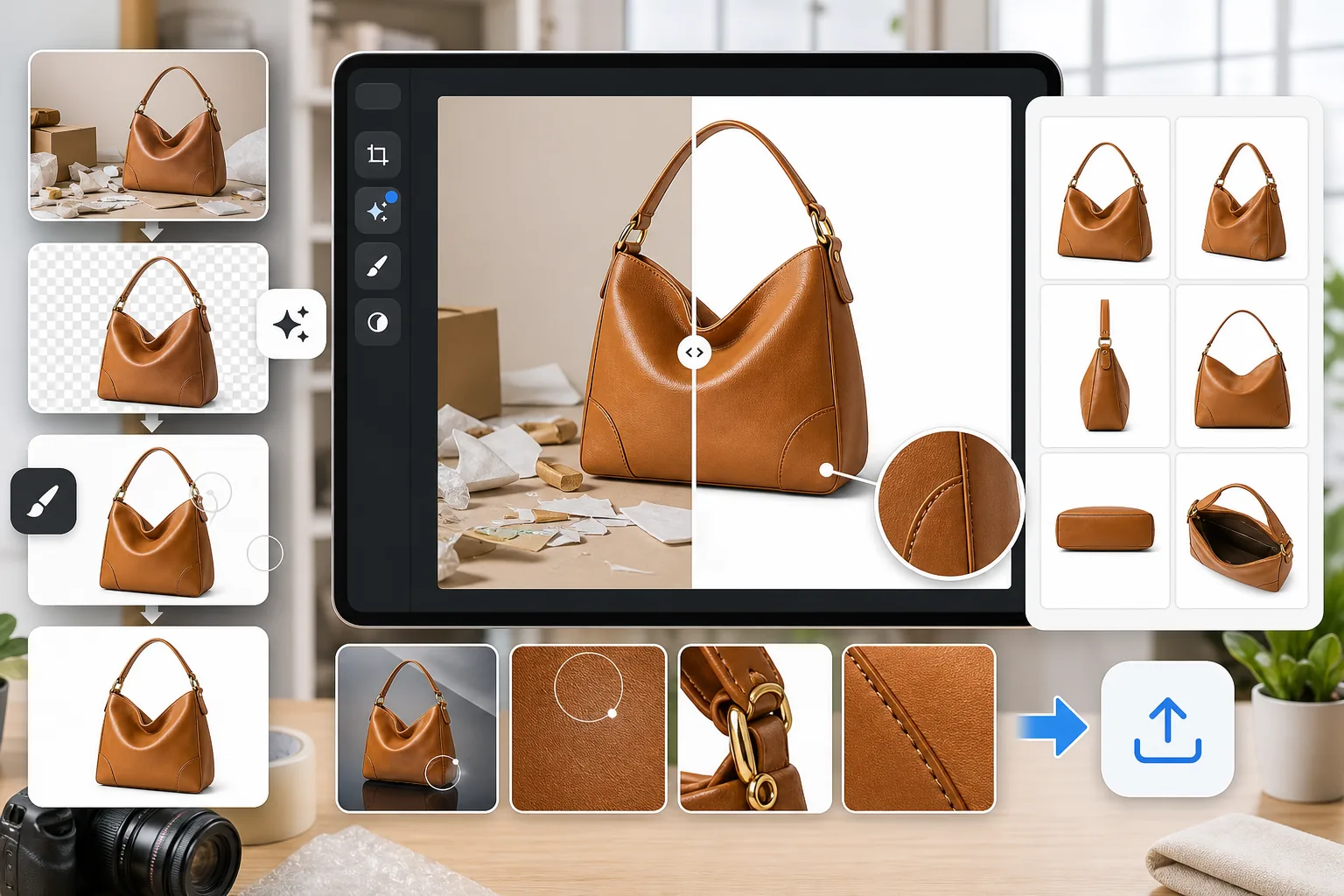
รายการผลิตภัณฑ์ของ Amazon ต้องการภาพที่สะอาดตาและมีคุณภาพสูง Magic Eraser ลบพื้นหลังเพื่อให้ตรงตามข้อกำหนดของพื้นหลังสีขาว ลบสิ่งรบกวนสมาธิจากภาพผลิตภัณฑ์ และเพิ่มความคมชัดของภาพเพื่อให้รายการของคุณดูเป็นมืออาชีพและกระตุ้นยอดขาย
เกี่ยวกับ Amazon
Amazon เป็นตลาดออนไลน์ที่ใหญ่ที่สุดในโลก โดยเชื่อมโยงผู้ขายหลายล้านรายกับลูกค้าในกว่า 20 ประเทศ คุณภาพของรูปภาพผลิตภัณฑ์ส่งผลโดยตรงต่ออันดับการค้นหา อัตราการคลิกผ่าน และคอนเวอร์ชันบนแพลตฟอร์ม
ประโยชน์
พื้นหลังสีขาวตรงตามมาตรฐานของ Amazon
Amazon ต้องการพื้นหลังสีขาวล้วน (RGB 255,255,255) สำหรับรูปภาพผลิตภัณฑ์หลัก การลบพื้นหลังของ Magic Eraser จะสร้างภาพที่เข้ากันได้ภายในไม่กี่วินาทีโดยไม่ต้องใช้สตูดิโอถ่ายภาพ
ขจัดสิ่งรบกวนสมาธิออกจากภาพผลิตภัณฑ์
ลบวัตถุที่หลงเหลือ แสงสะท้อน เศษบรรจุภัณฑ์ และสิ่งรบกวนอื่นๆ ที่ดึงความสนใจไปจากผลิตภัณฑ์ของคุณ ภาพที่สะอาดสร้างความมั่นใจให้กับผู้ซื้อ
ปรับปรุงรายละเอียดและความคมชัดของภาพ
ใช้ AI Enhancement เพื่อทำให้รายละเอียดสินค้าคมชัดขึ้น ปรับปรุงความสมดุลของแสง และรับประกันว่าภาพจะดูคมชัดในทุกระดับการซูมบนหน้าผลิตภัณฑ์ของ Amazon
คุณภาพที่สม่ำเสมอในทุกรายการ
ประมวลผลแคตตาล็อกผลิตภัณฑ์ทั้งหมดผ่าน Magic Eraser เพื่อรักษารายการสินค้า Amazon ทั้งหมดของคุณให้มีรูปลักษณ์ที่เหมือนกันและเป็นมืออาชีพ โดยไม่ต้องจ้างช่างภาพสำหรับ SKU ทุกรายการ
วิธีใช้ Magic Eraser สำหรับรายการสินค้าใน Amazon
อัพโหลดรูปภาพสินค้าของคุณ
เปิด Magic Eraser และอัปโหลดรูปภาพผลิตภัณฑ์ที่คุณต้องการเตรียมสำหรับการลงประกาศใน Amazon ของคุณ
ลบพื้นหลัง
ใช้การลบพื้นหลังเพื่อแยกผลิตภัณฑ์ของคุณบนพื้นหลังสีขาวสะอาดตาที่ตรงตามข้อกำหนดรูปภาพของ Amazon
ทำความสะอาดและปรับปรุง
ลบสิ่งรบกวนที่เหลืออยู่ และเพิ่มความคมชัดของภาพและแสงเพื่อความชัดเจนสูงสุด
ดาวน์โหลดและอัปโหลดไปยัง Amazon
ส่งออกเป็น JPEG หรือ PNG ความละเอียดสูง และอัปโหลดภาพไปยังรายการผลิตภัณฑ์ Amazon Sell Central ของคุณ
เครื่องมือ
คำถามที่พบบ่อย
Magic Eraser สร้างพื้นหลังสีขาวที่สอดคล้องกับ Amazon หรือไม่
+
ใช่. การลบพื้นหลังของ Magic Eraser จะสร้างพื้นหลังสีขาวสะอาดตาซึ่งตรงตามข้อกำหนดของ Amazon สำหรับสีขาวบริสุทธิ์ (RGB 255,255,255) บนรูปภาพผลิตภัณฑ์หลัก
ฉันสามารถประมวลผลภาพผลิตภัณฑ์หลายภาพพร้อมกันได้หรือไม่
+
แก้ไขและตรวจสอบรูปภาพแต่ละภาพก่อนส่งออก รักษาการจัดวาง พื้นหลัง และแสงให้สม่ำเสมอ และตรวจสอบทุกไฟล์ตามข้อกำหนดของ Amazon ที่เกี่ยวข้อง
Amazon ต้องการขนาดรูปภาพเท่าใด
+
Amazon แนะนำรูปภาพที่มีด้านยาวที่สุดอย่างน้อย 1,600 พิกเซลสำหรับฟังก์ชันการซูม Magic Eraser คงความละเอียดดั้งเดิมและสามารถขยายขนาดรูปภาพให้เล็กลงได้ด้วย AI Enhancement
Magic Eraser สามารถลบแสงสะท้อนออกจากภาพถ่ายผลิตภัณฑ์ได้หรือไม่
+
ใช่. เครื่องมือลบวัตถุสามารถลบแสงสะท้อน เงา และวัตถุทางการมองเห็นอื่นๆ ที่ไม่ต้องการออกจากการถ่ายภาพผลิตภัณฑ์ได้
สิ่งนี้เหมาะสำหรับอิมเมจเนื้อหา Amazon A+ หรือไม่
+
ใช่. นอกเหนือจากรูปภาพรายการหลักแล้ว Magic Eraser ยังสามารถจัดเตรียมรูปภาพไลฟ์สไตล์และรายละเอียดสำหรับเนื้อหา A+ แผนภูมิเปรียบเทียบ และโมดูลเรื่องราวของแบรนด์
สร้างรายการผลิตภัณฑ์ของ Amazon ที่ดีขึ้น
ลองใช้ Magic Eraser ฟรีเพื่อลบพื้นหลัง ล้างภาพผลิตภัณฑ์ และปรับปรุงคุณภาพของภาพสำหรับรายการสินค้าใน Amazon ของคุณ
ลองใช้ Magic Eraser ฟรีกรณีการใช้งานที่เกี่ยวข้อง
ดูว่ามืออาชีพใช้เครื่องมือเหล่านี้ในเวิร์กโฟลว์จริงอย่างไร
ภาพประกาศที่เต็มไปด้วยของส่วนตัว รถจอด หรืออุปกรณ์ก่อสร้าง ทำให้ผู้ซื้อไม่สนใจ Magic Eraser ใช้ AI ทำความสะอาดภาพอสังหาริมทรัพย์ของคุณทันที — ไม่ต้องมีทักษะ Photoshop
รูปสินค้าที่พื้นหลังรกรุงรังทำให้ลูกค้าเลื่อนผ่านร้านคุณทุกวัน Magic Eraser ช่วยสร้างรูปสินค้ามืออาชีพได้ในไม่กี่วินาที ไม่ต้องเก่ง Photoshop อัปโหลด ลบสิ่งรบกวน แล้วลงขายได้เลย
คนแปลกหน้าทำลายรูปท่องเที่ยวของคุณ? พื้นหลังรกๆ ทำให้เซลฟี่ดูไม่ดี? เลิกเสียเวลาหลายชั่วโมงกับ Photoshop ได้แล้ว Magic Eraser ลบสิ่งรบกวน ทำความสะอาดฉากหลัง และขยายรูปให้พอดีทุกแพลตฟอร์ม — แค่แตะครั้งเดียว
การเปรียบเทียบที่เกี่ยวข้อง
ดูว่า Magic Eraser เปรียบเทียบกับเครื่องมือที่คล้ายกันอย่างไร
TouchRetouch เป็นแอปมือถือแบบเสียเงินยอดนิยมสำหรับลบวัตถุและจุดตำหนิ Magic Eraser ให้บริการแก้ไขรูปภาพด้วย AI ฟรีบนทุกอุปกรณ์โดยไม่ต้องติดตั้ง เปรียบเทียบฟีเจอร์ ราคา และความง่ายในการใช้งาน
Cleanup.pictures เป็นเครื่องมือเว็บฟรีสำหรับลบวัตถุอย่างรวดเร็ว Magic Eraser มีเครื่องมือแก้ไข AI 8 ชนิด แอปมือถือ และระบบประมวลผลขั้นสูง มาดูการเปรียบเทียบกัน
remove.bg เป็นผู้นำตลาดด้านการลบพื้นหลังด้วย API ที่ทรงพลังและปลั๊กอินสำหรับ Photoshop และ Figma ส่วน Magic Eraser ให้มากกว่าด้วยเครื่องมือ AI แปดอย่าง ตั้งแต่ลบวัตถุ เติมภาพ AI ไปจนถึงเพิ่มคุณภาพและออกแบบ ทั้งหมดในโปรแกรมเดียว
โปรแกรมแต่งรูป AI ที่ทรงพลังสองตัวที่มีจุดแข็งต่างกัน Magic Eraser มีเครื่องมือ AI สร้างสรรค์ที่หลากหลายกว่า ขณะที่ Photoroom เชี่ยวชาญด้านภาพถ่ายสินค้าอีคอมเมิร์ซและการประมวลผลแบบกลุ่ม ดูว่าตัวไหนเหมาะกับคุณ
บทความที่เกี่ยวข้อง
เคล็ดลับ คู่มือ และบทเรียนที่เกี่ยวข้องกับหัวข้อนี้
เรียนรู้วิธีใช้ Magic Eraser เพื่อลบวัตถุ คน ข้อความ และสิ่งรบกวนออกจากรูปภาพ พร้อมผลลัพธ์ AI ที่สะอาดขึ้น
เรียนรู้วิธีลบคนออกจากรูปภาพด้วย AI ภายในไม่กี่วินาที สำหรับรูปท่องเที่ยว อสังหาริมทรัพย์ และรูปสินค้า
คำแนะนำทีละขั้นตอนในการลบลายน้ำจากรูปภาพของคุณด้วย AI เมื่อไหร่ที่เหมาะสม เทคนิค และวิธีใช้ Magic Eraser
การเชื่อมต่ออื่นๆ
สำรวจแพลตฟอร์มอื่นที่ใช้งานร่วมกับ Magic Eraser ได้