
Улучшение свадебных фотографий
Спасите недоэкспонированные снимки с банкета, удалите отвлекающий фон и доведите тона кожи до совершенства, чтобы получить свадебные изображения, достойные альбома. Этот шаблон создан для сложных условий освещения церемоний и банкетов: тусклые залы, смешанные цветовые оттенки от света диджея и загромождённый фон, отвлекающий внимание от молодожёнов.
Попробовать этот шаблон бесплатноEvents template preview
Что делает этот шаблон
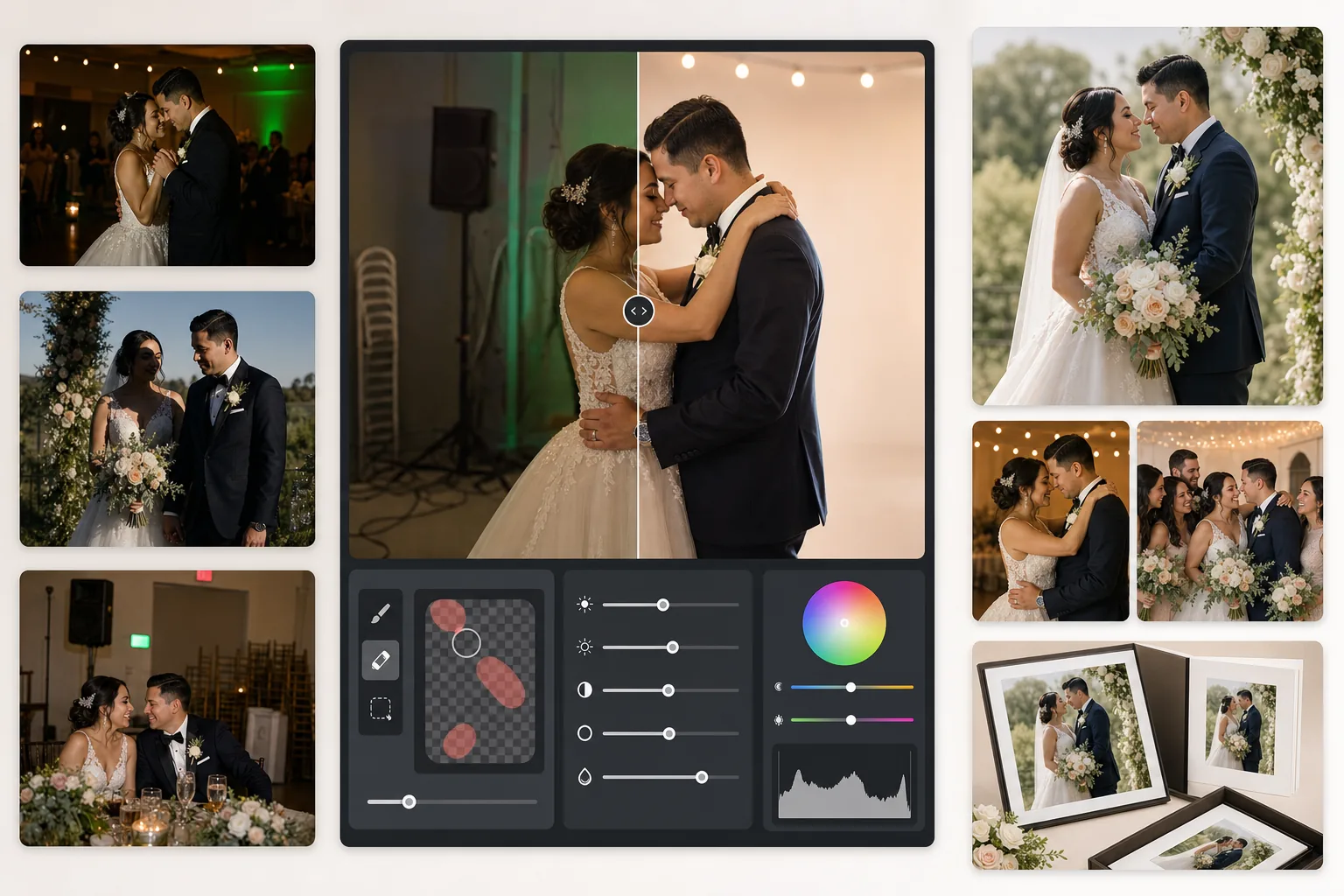
Исправляет самые распространённые проблемы в свадебной фотографии: недоэкспонированные банкетные снимки, оранжевые оттенки от ламп накаливания или зелёные от люминесцентных ламп, жёсткие тени от вспышки, а также отвлекающие элементы фона, такие как знаки выхода, составленные стулья и кейтеринговое оборудование. AI Enhance восстанавливает детали на тёмных снимках с танцпола и выравнивает смешанное освещение, а Magic Eraser удаляет ненужные объекты, не оставляя следов. Тона кожи дорабатываются так, чтобы выглядеть естественно и тепло, без избыточного сглаживания.
Настройки шаблона
| Восстановление экспозиции | Осветление теней на +1,5 EV с сохранением светов |
| Баланс белого | Автокоррекция смешанного света (лампа накаливания/люминесцентная/дневной свет) |
| Режим тона кожи | Естественная теплота (+5 теплоты, +3 сглаживания, детали сохранены) |
| Разрешение на выходе | 4000px по длинной стороне (готово к печати при 300 DPI до 13×19) |
| Цветовой профиль | Adobe RGB (более широкий охват для профессиональной печати) |
| Шумоподавление | Адаптивное для высоких ISO (сохраняет детали в осветлённых тенях) |
Как использовать этот шаблон
Загрузите свои свадебные фотографии
Загрузите банкетные снимки, фотографии церемонии или снимки, сделанные гостями на смартфон. Шаблон справляется со всем: от JPEG, экспортированных из RAW профессиональной зеркальной камеры, до сжатых телефонных фотографий — ИИ адаптирует силу улучшения в зависимости от качества исходника.
Скорректируйте освещение и цвет
AI Enhance осветляет тёмные банкетные сцены, нейтрализует оранжево-зелёные оттенки от смешанного освещения зала и выравнивает передний план, освещённый вспышкой, с фоном при окружающем свете. Тона кожи смещаются к естественной теплоте, не затрагивая белизну платья и цвета декора.
Удалите отвлекающие элементы
Magic Eraser удаляет знаки выхода, огнетушители, составленные стулья, кейтеринговые тележки, силовые кабели на полу и гостей, случайно попавших в кадр на фоне. ИИ естественно восстанавливает узор фона позади удалённых объектов.
Экспортируйте для альбомов и печати
Скачайте в 4000px по длинной стороне в Adobe RGB для печати в профессиональной фотолаборатории или в sRGB для цифрового обмена и онлайн-галерей. Размер выходного файла рассчитан на печать до 13×19 дюймов при 300 DPI.
Профессиональные советы для лучших результатов
- ✓Для тёмных снимков с танцпола шаблон может восстановить примерно 1,5 ступени деталей в тенях. Если исходное фото почти полностью чёрное, улучшение может добавить шум — начинайте с фотографий, на которых вы хотя бы слабо различаете объекты.
- ✓Коррекция тона кожи откалибрована под теплоту свадебной фотографии — немного теплее нейтрального, что выгодно подчёркивает большинство тонов кожи при смешанном освещении. Для фотографий церемонии на улице, где уже есть хороший естественный свет, коррекция будет едва заметной.
- ✓При удалении объектов фона обрабатывайте по одной области за раз для самого естественного результата. Знаки выхода, спринклеры и розетки достаточно малы для чистого удаления за один проход. Более крупные объекты, такие как составленные стулья, лучше удалять по частям.
- ✓Сначала обрабатывайте портреты молодожёнов, затем групповые снимки, а потом репортажные кадры. Это позволит задать единую основу цветокоррекции на самых важных фотографиях, прежде чем переходить к второстепенным изображениям.
Инструменты
Частые вопросы
Может ли это исправить размытые банкетные фотографии?
+
AI Enhance может повысить резкость лёгкой мягкости от медленной выдержки и существенно восстановить детали в тенях, но не способен исправить сильную смазанность движения, когда объекты заметно размазаны полосами. Фотографии с лёгкой смазанностью от дрожания рук или небольшой нерезкостью фокуса заметно улучшатся.
Потеряет ли детали белое платье невесты?
+
Алгоритм тональной компрессии специально защищает детали светов в белых тонах. Текстура платья, узоры кружева и складки ткани сохраняются даже при осветлении теней на том же изображении. Результат сохраняет полный диапазон — от ярко-белого до глубоких теней.
Достаточно ли этого качества для печатных альбомов?
+
Да. Выходное изображение 4000px при 300 DPI поддерживает печать до 13×19 дюймов. Цветовой профиль Adobe RGB сохраняет более широкий охват, используемый профессиональными фотолабораториями. Для стандартных страниц альбома 8×10 разрешение значительно превышает необходимое для чёткой печати.
Превратите каждую свадебную фотографию в изображение, достойное альбома
Загрузите фотографии с банкета и церемонии и за считаные секунды получите профессионально улучшенные, готовые к печати изображения. Работает как с фотографиями профессиональных камер, так и со снимками со смартфона.
Попробовать бесплатноRelated templates
More events templates for your workflow.