
Осветление фотографий с мероприятий
Восстановите детали на тёмных снимках, сделанных на концертах, торжествах, днях рождения и корпоративных мероприятиях. Этот шаблон повышает экспозицию до +2 EV, исправляет резкие тени от вспышки, устраняет эффект красных глаз и усиливает атмосферу исходной сцены, чтобы фотографии с мероприятий выглядели такими же яркими, как сам момент.
Попробовать этот шаблон бесплатноEvents template preview
Что делает этот шаблон
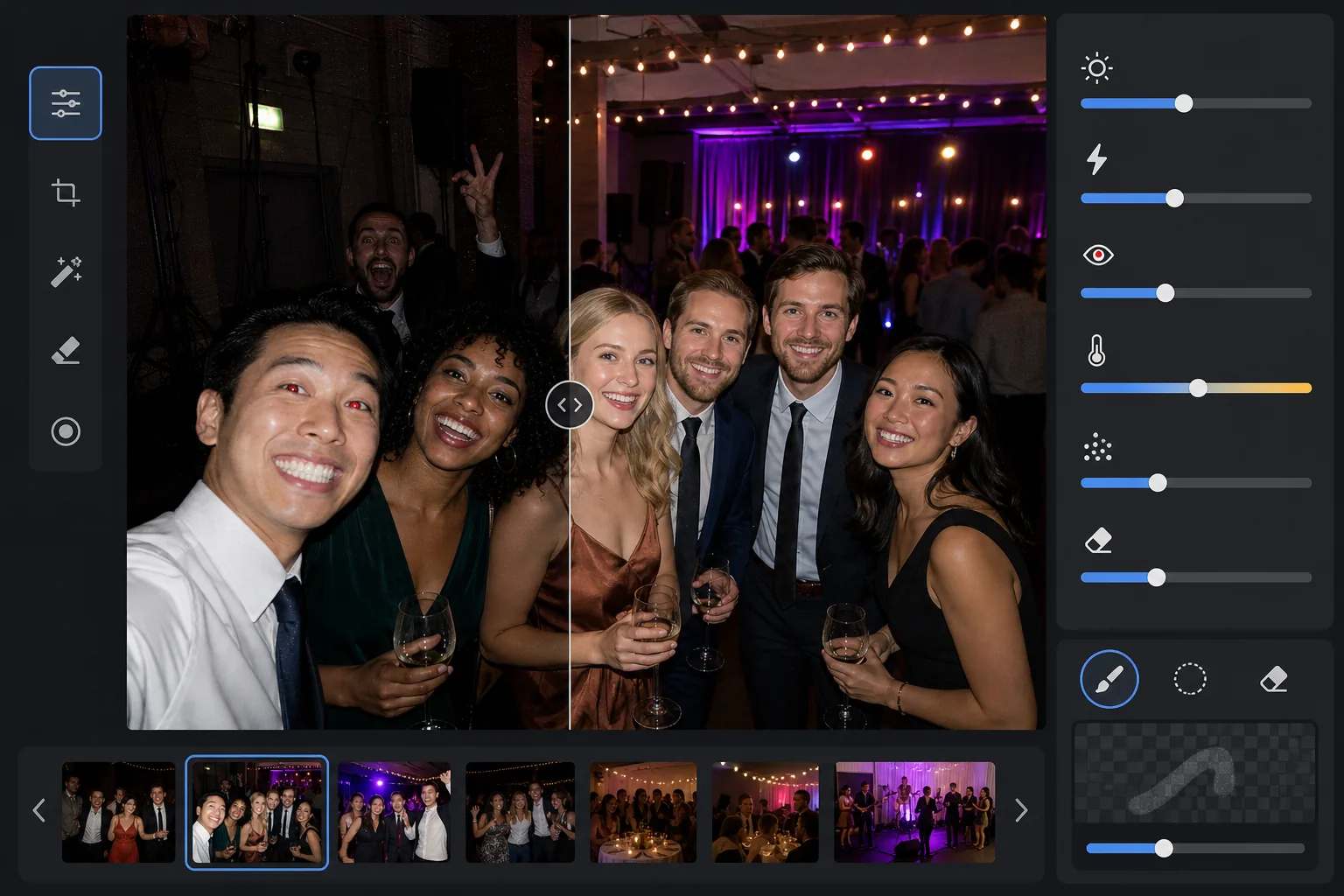
Спасает фотографии с мероприятий, снятые в сложных условиях слабого освещения — в тускло освещённых банкетных залах, на концертных площадках с цветным сценическим светом, на вечерних вечеринках под открытым небом и в подвальных комнатах отдыха. AI Enhance восстанавливает до двух ступеней детализации в тенях, сохраняя при этом настроение цветного освещения и украшений. Дефекты вспышки, включая резкие тени на переднем плане, красные глаза и пересвеченные лица, исправляются автоматически. Magic Eraser удаляет случайно попавших в кадр людей, таблички выхода, сложенное оборудование и другие отвлекающие элементы, типичные для мероприятий.
Настройки шаблона
| Повышение экспозиции | Адаптивное восстановление теней +2,0 EV с сохранением атмосферы |
| Коррекция вспышки | Смягчение теней переднего плана, ослабление светов на освещённой вспышкой коже |
| Устранение красных глаз | Автоматическое обнаружение и восстановление цвета радужки |
| Баланс белого | Адаптивный для смешанных источников (свет диджея, лампы накаливания, люминесцентные, свечи) |
| Режим атмосферы | Тёплое усиление атмосферы (+8 теплоты, +5 насыщенности на фоне) |
Как использовать этот шаблон
Загрузите фотографии с мероприятия
Загрузите фотографии с любого мероприятия — концертов, свадеб, дней рождения, корпоративных торжеств или встреч на заднем дворе. Шаблон автоматически определяет условия освещения и регулирует интенсивность улучшения в зависимости от того, насколько недоэкспонирован оригинал.
Восстановите экспозицию и исправьте вспышку
AI Enhance поднимает теневые участки до +2 EV, открывая лица и детали, потерянные в темноте. Пересвеченные вспышкой света на объектах переднего плана приглушаются для восстановления текстуры кожи, а резкие падающие тени за освещёнными вспышкой объектами смягчаются для естественного слияния.
Удалите красные глаза и отвлекающие элементы
Красные глаза от прямой вспышки автоматически обнаруживаются и заменяются естественным цветом радужки. Magic Eraser удаляет случайно попавших в кадр незнакомцев, видимое оборудование вроде стопок колонок и кабелей, таблички выхода и прочий беспорядок, отвлекающий от момента.
Экспортируйте улучшенные фотографии
Скачайте осветлённые фотографии с мероприятия в исходном разрешении для публикации в соцсетях, печати или архивирования. Результат сохраняет атмосферу исходной сцены — тёплое сияние свечей, цветной сценический свет или мерцающие гирлянды — и при этом делает лица и детали чётко видимыми.
Профессиональные советы для лучших результатов
- ✓Восстановление +2 EV лучше всего работает на фотографиях, где объекты хотя бы слабо различимы в оригинале. Если фотография полностью чёрная, кроме нескольких источников света, восстановленные тени будут содержать значительный шум. Начните со снимков, на которых можно различить силуэты.
- ✓Для концертных фотографий с эффектным цветным сценическим светом коррекция баланса белого сохраняет художественный цветовой оттенок, а не нейтрализует его. Синие и пурпурные сценические заливки сохраняются, при этом тона кожи объектов рядом со сценой корректируются.
- ✓При обработке партии фотографий с одного мероприятия сначала проведите тест на одной типичной тёмной фотографии и одной со вспышкой. Это позволит убедиться, что уровень яркости и теплоты подходят, прежде чем обрабатывать всю партию.
- ✓Коррекция красных глаз работает как с человеческими глазами, так и с глазами животных. Для фотографий питомцев на мероприятиях ИИ обрабатывает зелёный или жёлтый блеск глаз, который животные дают от вспышки камеры, заменяя его естественным тёмным зрачком.
Инструменты
Частые вопросы
Можно ли исправить полностью чёрные фотографии?
+
Шаблон восстанавливает до +2 EV детализации в тенях, что примерно равнозначно увеличению яркости фотографии в четыре раза. Если на исходной фотографии видны хотя бы слабые очертания ваших объектов, восстановление даст пригодный результат. Полностью чёрные кадры, на которых видны только точечные источники света, обычно не содержат достаточно данных сенсора для восстановления значимых деталей.
Сделает ли осветление фотографии зернистыми?
+
Некоторый шум неизбежен при подъёме глубоких теней, но адаптивное шумоподавление воздействует именно на поднятые участки. Мелкие детали в хорошо освещённых частях кадра сохраняются, а шум в восстановленных тенях сглаживается. Результат значительно лучше, чем простое увеличение яркости в базовом фоторедакторе.
Работает ли это на концертных фотографиях со сценическим светом?
+
Да. Шаблон рассчитан на работу со смешанным и цветным освещением. Сценические заливки синего, красного, пурпурного и зелёного цветов сохраняются как художественные элементы сцены, а не воспринимаются как цветовые оттенки, требующие коррекции. Лица объектов рядом со сценой получают выборочную коррекцию баланса белого, при этом настроение фонового освещения сохраняется.
Сделайте каждую фотографию с мероприятия достойной публикации
Загрузите тёмные, пересвеченные вспышкой или с красными глазами фотографии с мероприятий и получите яркие, естественные результаты, передающие энергию момента.
Попробовать бесплатно