
Дизайн доски меню
Создавайте профессиональную графику доски меню из собственных фотографий блюд. Этот шаблон отделяет каждое блюдо от сервировки стола и загромождённого фона, унифицирует внешний вид всех позиций для целостного меню и экспортирует готовые к вёрстке изображения, оптимизированные для цифровых досок меню, печатных меню и листингов на платформах доставки, таких как DoorDash, Uber Eats и Grubhub.
Попробовать этот шаблон бесплатноFood template preview
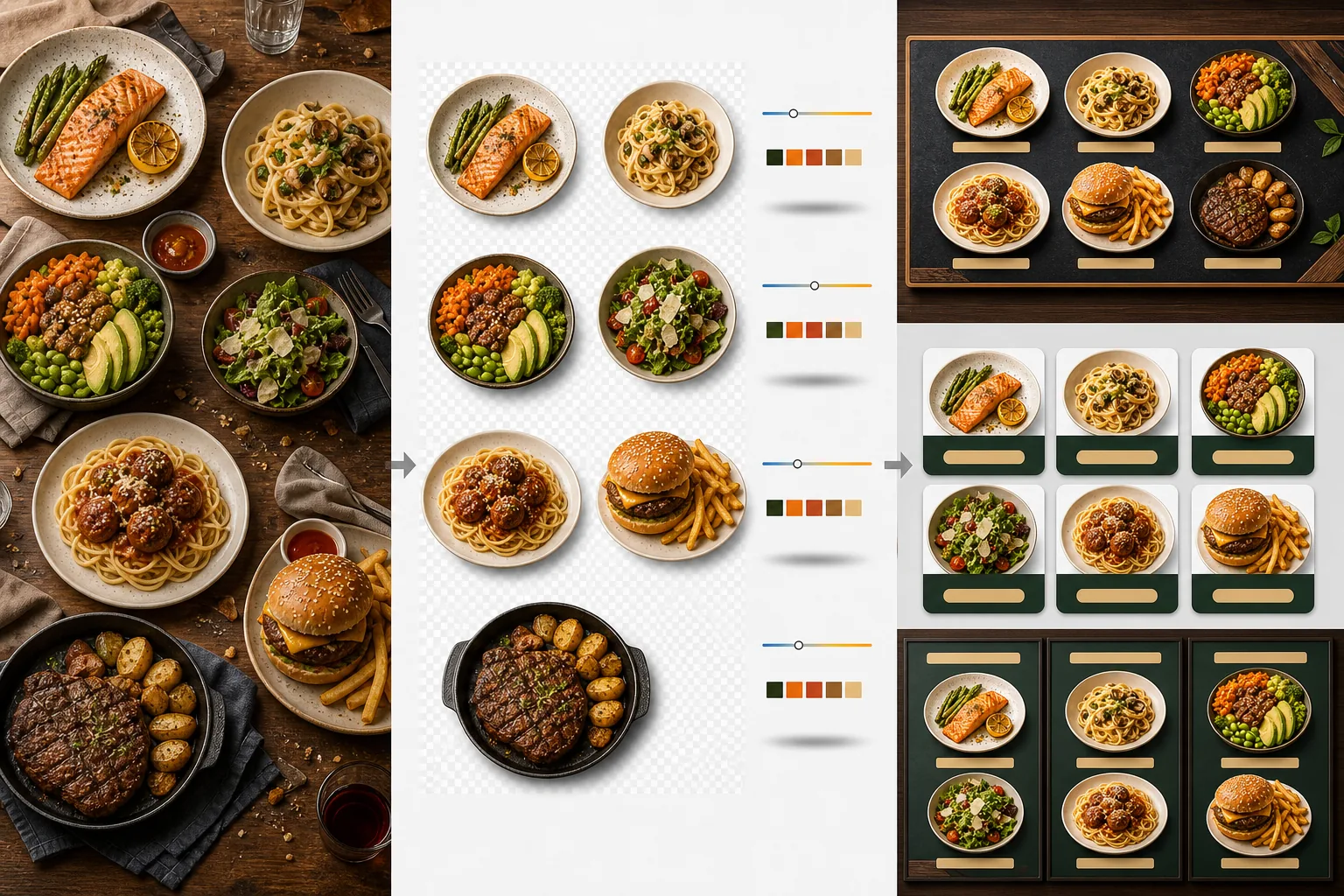
Что делает этот шаблон
Превращает несогласованные фотографии блюд, снятые в разное время, при разном освещении и на разных столах, в единый набор готовых для меню изображений. Background Eraser отделяет каждое блюдо — тарелку, миску или упаковку — от исходной сервировки стола и заменяет фон однородным цветом или текстурой, соответствующей брендингу вашего ресторана. Цветовая температура нормализуется по всем позициям, поэтому фотографии, снятые при тёплом свете ламп накаливания, холодных светодиодных панелях и естественном свете из окна, выглядят согласованно. Цвета блюд усиливаются, чтобы выглядеть аппетитно, не переходя в нереалистичную область — зелень яркая, мясо тёплое и сочное, а соусы блестящие. В результате получается набор изображений, который функционирует как единая визуальная система меню, а не случайная подборка фотографий с телефона.
Настройки шаблона
| Фон | Сплошной цвет (под бренд), текстура дерева, сланец или прозрачный |
| Нормализация цветовой температуры | Привести все позиции к балансу белого дневного света 5000K |
| Усиление цвета блюд | Аппетитное усиление (тёплые белки, яркая зелень, блестящие соусы) |
| Стиль тени | Лёгкая падающая тень для глубины на сплошных фонах |
| Размеры вывода | 1200×1200px (платформы доставки), 800×600px (цифровые доски меню), произвольный |
Как использовать этот шаблон
Загрузите фотографии блюд
Загрузите фотографии отдельных позиций меню. Подойдут снимки с телефона во время обслуживания, профессиональные фотосессии блюд и фотографии из листингов на платформах доставки. Шаблон обрабатывает каждое блюдо отдельно для согласованных результатов по всему меню.
Отделите блюда от фона
Background Eraser отделяет каждое блюдо от стола, салфетки-подложки или поверхности стойки. Распознавание краёв точно следует за ободком тарелки, кромкой миски или контуром упаковки. Гарниры и топпинги, выходящие за край тарелки — веточка петрушки, струйка соуса — сохраняются.
Унифицируйте цвет и стиль
Цветовая температура нормализуется, чтобы все блюда выглядели при одном согласованном освещении. Цвета блюд усиливаются для аппетитности. Под каждым блюдом добавляется лёгкая тень для устойчивого, объёмного вида на новом фоне.
Экспортируйте для меню и платформ
Скачивайте в 1200×1200px для листингов DoorDash, Uber Eats и Grubhub. Экспортируйте в 800×600px для цифровых досок меню и ТВ-экранов. Экспорт в прозрачный PNG доступен для графических дизайнеров, создающих индивидуальные печатные меню и вывески.
Профессиональные советы для лучших результатов
- ✓Снимайте блюда строго сверху (flat lay) или под углом 45 градусов. Эти два ракурса дают самое чистое удаление фона, потому что контур тарелки полностью виден и ИИ может точно отделить блюдо от стола.
- ✓Протрите ободок тарелки перед съёмкой. Разводы соуса и крошки на краю тарелки становятся частью отделённого изображения и выглядят неопрятно на новом чистом фоне.
- ✓Обрабатывайте все позиции меню одним пакетом с одинаковыми настройками. Согласованность по всем фотографиям блюд — это то, что делает меню профессиональным; несовпадающие цветовые температуры и оттенки фона делают даже отличную еду любительской.
Инструменты
Частые вопросы
Можно ли использовать это для напитков?
+
Да. Стаканы, чашки, бутылки и коктейли отделяются с той же точностью, что и блюда на тарелке. Прозрачные напитки, такие как вода, вино и прозрачные коктейли, сохраняют свою прозрачность на новом фоне.
Будет ли еда выглядеть искусственно обработанной?
+
Усиление цвета откалибровано так, чтобы еда выглядела максимально аппетитно, не переходя в нереалистичную область. Представьте это как разницу между едой, снятой при резком люминесцентном свете, и едой, снятой при естественном дневном свете — шаблон делает так, чтобы каждое блюдо выглядело снятым в идеальных условиях.
Подходит ли это для фотографий меню на платформах доставки?
+
Да. Квадратный вывод 1200×1200px соответствует требованиям к изображениям DoorDash, Uber Eats, Grubhub и Postmates. Рестораны с профессионально выглядящими фотографиями меню на платформах доставки стабильно получают более высокий уровень заказов, чем те, кто использует необработанные снимки с телефона.
Создайте меню, которое делает каждое блюдо неотразимым
Загрузите фотографии блюд и получите согласованные, аппетитные изображения меню, готовые для цифровых досок, печатных меню и платформ доставки.
Попробовать бесплатноRelated templates
More food templates for your workflow.
Создавайте аппетитные фотографии меню доставки еды с усилением яркости цвета, чистым фоном, эффектами пара и свежести, а также размерами, оптимизированными для платформы.
Улучшайте фотографии рецептов для кулинарных книг и кулинарных блогов с помощью повышения резкости печатного качества, точности цветопередачи ингредиентов, стилизованной очистки сцены и вывода с высоким разрешением.