
Фото рецепта для кулинарной книги
Поднимите домашние фотографии рецептов до уровня качества кулинарной книги. Этот шаблон улучшает цвета ингредиентов для точности печати, повышает резкость текстур блюд для воспроизведения с высоким разрешением, удаляет нежелательные элементы из оформленных сцен и выводит изображение в разрешении полиграфического уровня для кулинарных книг, кулинарных блогов и карточек рецептов.
Попробовать этот шаблон бесплатноFood template preview
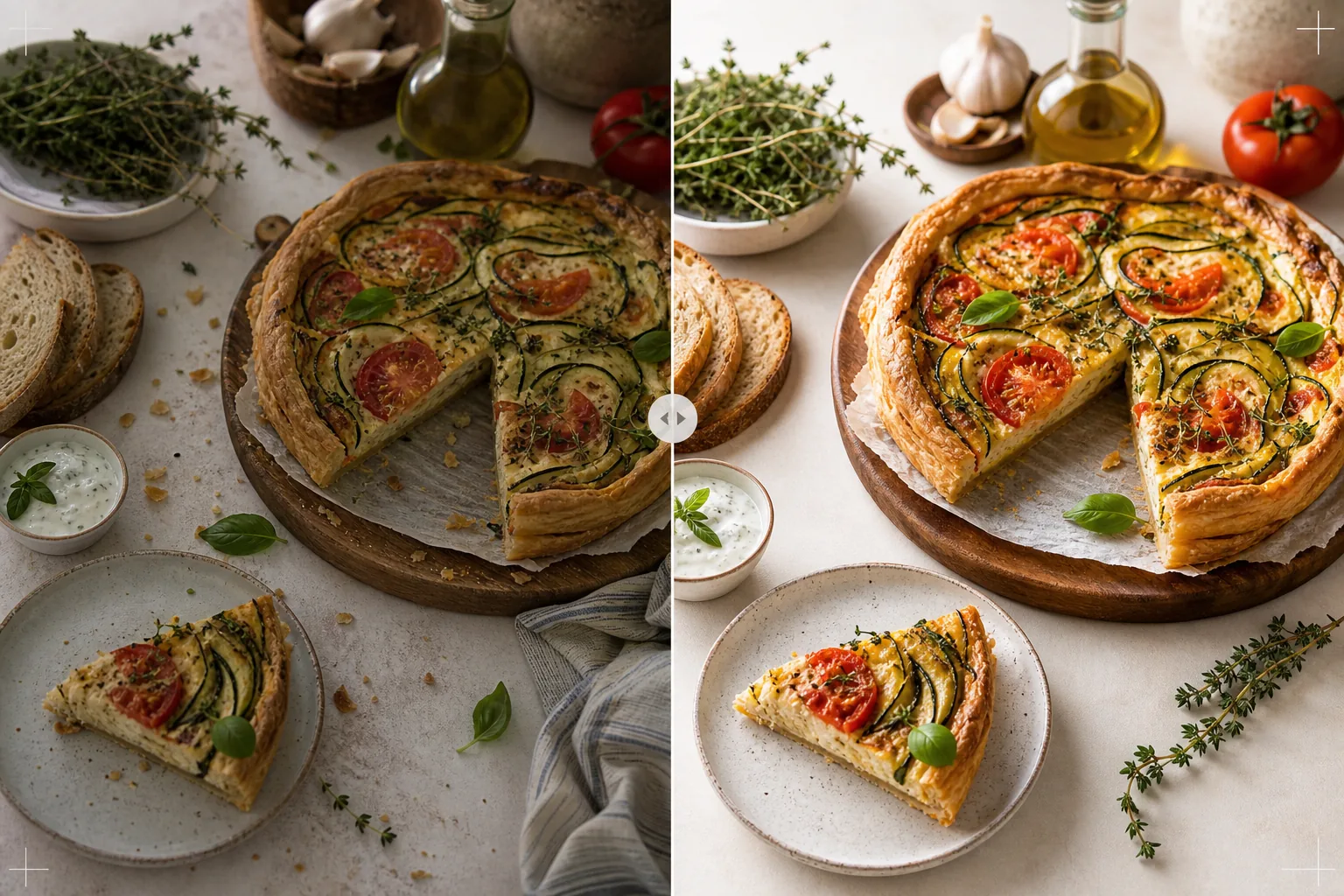
Что делает этот шаблон
Превращает фотографии рецептов, снятые на домашней кухне, в изображения, достойные изданных кулинарных книг и профессиональных кулинарных блогов. Фотография для кулинарных книг требует более высоких стандартов, чем социальные сети: цвета должны быть точными при печати (а не просто привлекательными на экране), текстуры должны быть достаточно резкими для печати с разрешением 300 DPI в больших размерах, а оформленные сцены должны выглядеть продуманно, без видимого беспорядка. AI Enhance применяет цветокоррекцию, откалиброванную для печати, которая гарантирует точное воспроизведение цветов ингредиентов на бумаге, а не только на экранах. Magic Eraser удаляет беспорядок на фоне, оставленные приборы, грязную посуду, видимую в кадре, и недостатки оформления блюда, которые становятся более заметными при разрешении печати. Результат выглядит так, будто его снял фотограф кулинарных книг с многолетним опытом фуд-стайлинга.
Настройки шаблона
| Цветовой профиль | Adobe RGB для печати или sRGB для цифры (на выбор) |
| Текстура блюда | Высокочастотное повышение резкости деталей для хрусткости, мякиша и глазури |
| Очистка сцены | Удаление оставленных приборов, крошек и фонового беспорядка |
| Точность цвета | Калибровано для печати (точные зелёные, красные и коричневые тона на бумаге) |
| Разрешение на выходе | 6000px по длинной стороне (300 DPI для полностраничного разворота кулинарной книги) |
Как использовать этот шаблон
Загрузите фотографию рецепта
Загрузите оформленный снимок рецепта — съёмку сверху (флэт-лэй), под углом 45 градусов или крупный план готового блюда. Включите реквизит, например ингредиенты, приборы и текстиль, которые являются частью задуманной композиции. Шаблон удаляет нежелательные элементы, сохраняя при этом намеренное оформление.
Улучшение цвета и текстуры
AI Enhance корректирует цветовую температуру для точности печати и повышает резкость текстур блюд — хруст хлебной корочки, блеск шоколадного ганаша, чёткие слои на срезе. Калибровка цвета гарантирует, что зелёные, красные и золотисто-коричневые тона, которые выглядят точными на экране, будут так же точно воспроизведены при печати на бумаге.
Доработка сцены
Magic Eraser удаляет элементы, не служащие композиции, — разбросанные крошки за пределами нужной области, угол кухонного полотенца, выглядывающий с края, фоновый беспорядок, видимый по периферии кадра, или пятна на реквизите и поверхностях. Оформленная сцена дорабатывается так, чтобы выглядеть продуманно и аккуратно.
Экспорт для печати или цифры
Скачайте с длинной стороной 6000px в Adobe RGB для печати кулинарной книги с разрешением 300 DPI вплоть до полностраничного разворота или в sRGB для использования в кулинарном блоге и на сайтах рецептов. Высокое разрешение сохраняет достаточно деталей, чтобы читатели видели отдельные листья трав, текстуры семян и консистенцию соусов при увеличении печати.
Профессиональные советы для лучших результатов
- ✓Снимайте при естественном свете из окна с одного направления, с белым отражателем со стороны тени. Это создаёт мягкое направленное освещение, характерное для профессиональной фуд-фотографии. Шаблон может скорректировать искусственное освещение, но естественный свет с самого начала даёт самые достоверные цвета блюд.
- ✓Сначала выложите главное блюдо на тарелку и сфотографируйте в течение пяти минут, пока текстуры и цвета на пике. Затем снимайте пошаговые кадры процесса. Шаблон усиливает признаки свежести, такие как пар и влага, но не может восстановить блюдо, которое простояло продолжительное время.
- ✓Используйте нечётное количество реквизита (три ингредиента, один прибор, один текстиль) для наиболее визуально сбалансированной композиции. Шаблон очищает сцену, но работает в рамках вашей существующей композиции — хорошо выстроенная отправная точка даёт более профессиональное итоговое изображение.
- ✓Для снимков на срезе (разрезанные торты, нарезанный хлеб, раскрытая выпечка) используйте очень острый нож и режьте непосредственно перед съёмкой. Шаблон повышает резкость определения слоёв и текстуры мякиша, но не может исправить неровный срез, скрывающий внутреннюю структуру.
Инструменты
Частые вопросы
Может ли это заменить профессионального фуд-фотографа?
+
Шаблон доводит снятые дома фотографии рецептов до уровня, подходящего для самоиздаваемых кулинарных книг, кулинарных блогов и карточек рецептов. Для кулинарных книг крупных издательств со строгими визуальными стандартами профессиональный фотограф и стилист дают более высокий результат, но шаблон — отличный вариант для независимых авторов и создателей контента.
А как насчёт пошаговых фотографий процесса?
+
Фотографии процесса (перемешивание, нарезка, наливание) выигрывают от той же цветокоррекции и очистки. Шаблон справляется с размытием от движения, типичным для динамичных кадров, избирательно повышая резкость блюда и сохраняя естественное размытие движущихся рук и приборов.
Как работает калибровка цвета для печати?
+
Вывод в Adobe RGB содержит более широкий цветовой охват, чем sRGB, сохраняя тонкие цветовые различия в зелёных и красных тонах, которые теряются при преобразовании в sRGB. При печати на откалиброванной машине эти цвета воспроизводятся точнее. Для домашней печати вывод в sRGB даёт лучшие результаты на большинстве потребительских принтеров.
Фотографии рецептов, достойные изданной кулинарной книги
Загрузите свою фуд-фотографию и получите изображения полиграфического качества с точными цветами, резкими текстурами и доработанными композициями.
Попробовать бесплатноRelated templates
More food templates for your workflow.
Создавайте аппетитные фотографии меню доставки еды с усилением яркости цвета, чистым фоном, эффектами пара и свежести, а также размерами, оптимизированными для платформы.
Создавайте графику доски меню с удалением фона фотографий еды, единообразным стилем и готовым экспортом для цифровых дисплеев, печатных меню и сторонних платформ доставки.