
Remove Sun Glare From a Photo
Узнайте, как Remove Sun Glare From a Photo с Magic Eraser. Простое пошаговое руководство с бесплатным AI-инструментом. Работает в браузере, на iOS и Android.
Last updated
Попробовать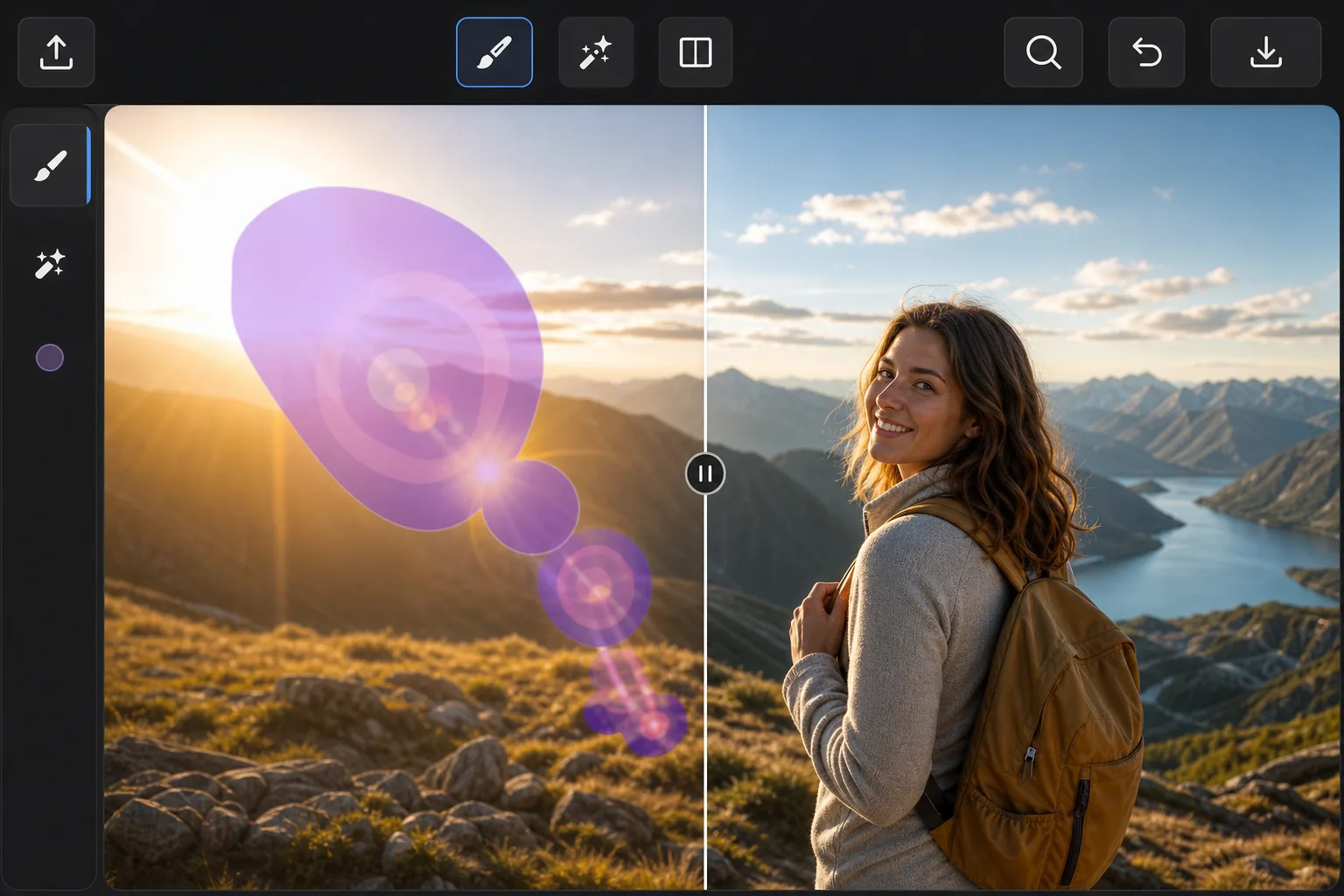
When the sun ruins an outdoor shot — Magic Eraser
Point a lens anywhere near the sun and the light fights back: hazy flare washing over a face, polygon-shaped lens-flare ghosts marching across the frame, and a searing hotspot that drowns out detail. These artifacts are different from a glossy reflection — they're scattered light baked into the exposure, so you can't just dim them down. Magic Eraser handles them by removing the affected pixels and inpainting a believable replacement. Instead of trying to recover blown-out detail that the sensor never captured, the AI studies the surrounding sky, foliage, or skin tones and synthesizes a plausible patch that blends in. It's a reconstruction, not hidden detail brought back — but for sky, gradients, and even backgrounds, the result usually looks like the flare was never there. It runs free in your browser or on the iOS and Android apps, with no watermark on the export.
Before you start
Пошаговая инструкция
Start with загрузите фото. The result preview above and tips below use this guide's existing content; no separate before-and-after proof is assumed.
- 1
Загрузите фото
Откройте Magic Eraser в браузере, на iOS или Android. Перетащите фото в формате JPEG, PNG, HEIC или WebP. Аккаунт не нужен.
- 2
Выберите инструмент и область
Выберите подходящий инструмент и укажите область обработки. AI автоматически проанализирует и применит изменения за секунды.
- 3
Скачайте результат
Просмотрите результат и скачайте отредактированное фото. Экспорт в высококачественном PNG или JPEG.
Лучше всего подходит для
- Sweeping sun-flare streaks and haze across landscape and beach photos
- Polygon-shaped lens-flare ghosts that march across the frame toward the sun
- Bright hotspots washing out faces in backlit portraits
- Rainbow flare arcs over skies, water, and open horizons
- Golden-hour shots where flare spills over an otherwise perfect scene
Советы для лучших результатов
Tackle each flare element separately — one pass for the ghost rings, another for the haze, another for the hotspot — so the AI can sample the right neighbors for each. Glare sitting over smooth, predictable areas like open sky or water reconstructs almost invisibly; flare crossing detailed edges (tree lines, faces, architecture) is harder, so brush tightly around those and review the seams. If a hotspot has eaten fine detail that was never recorded, accept that the fill is a clean plausible substitute rather than the original texture. For stubborn spots, run a second light pass instead of one heavy brush stroke.
Часто задаваемые вопросы
- Функция Remove Sun Glare From a Photo бесплатна?
- Да, Magic Eraser позволяет Remove Sun Glare From a Photo бесплатно с ежедневными лимитами. Перейдите на Pro для безлимитной обработки и экспорта в высоком разрешении.
- Сколько времени занимает Remove Sun Glare From a Photo?
- Всего несколько секунд. AI Magic Eraser обрабатывает фото быстро — большинство результатов доступны сразу после загрузки.
- Можно ли использовать на телефоне?
- Да, Magic Eraser работает на iOS, Android и во всех веб-браузерах. Вы можете свободно переключаться между устройствами.
- Ухудшается ли качество изображения?
- Нет, Magic Eraser сохраняет исходное качество фото. AI обрабатывает интеллектуально, сохраняя детали и резкость.