
Remove an Emoji Covering a Face
Узнайте, как Удалить эмодзи с лица с Magic Eraser. Простое пошаговое руководство с бесплатным AI-инструментом. Работает в браузере, на iOS и Android.
Last updated
Попробовать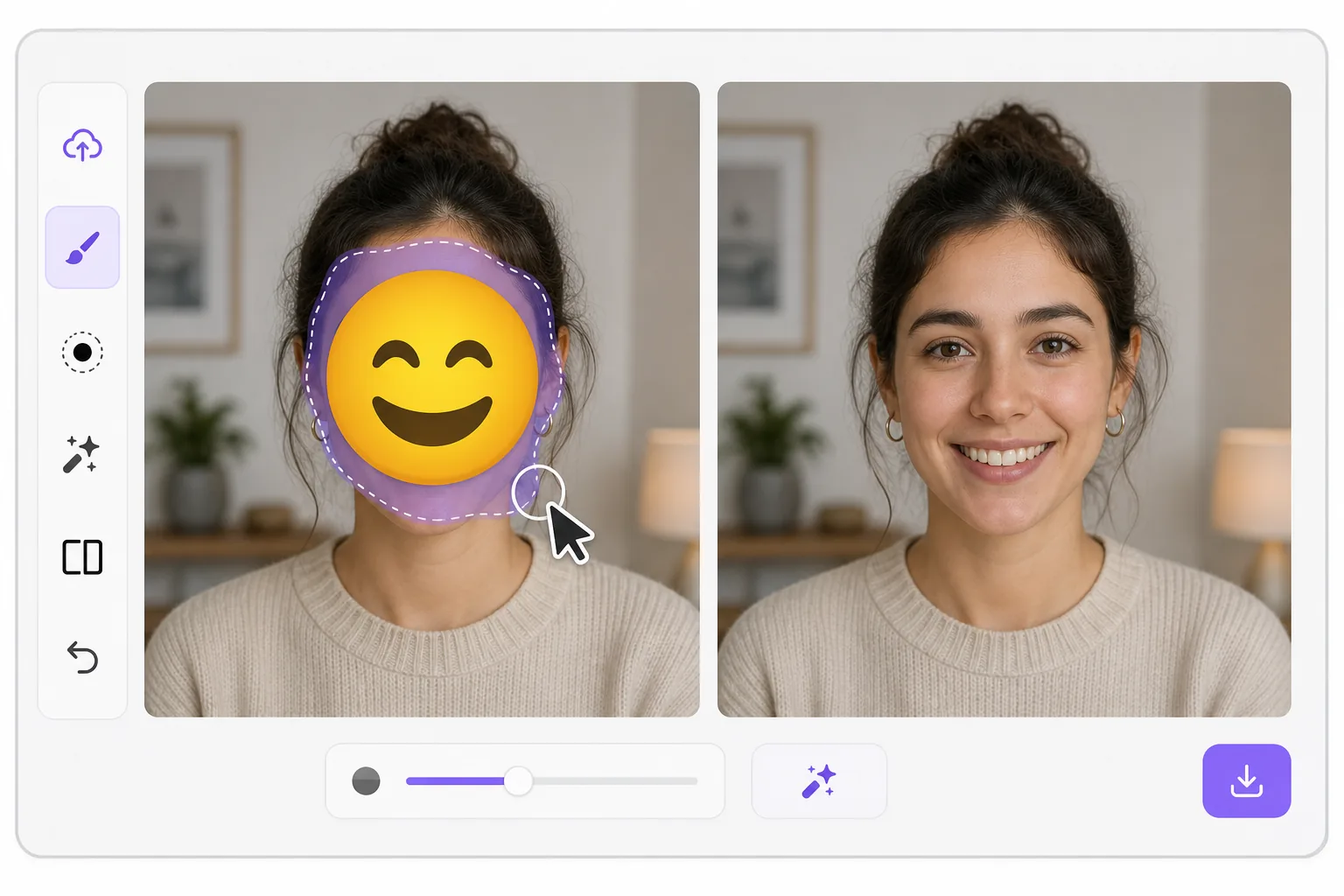
What "uncensoring" an emoji actually does — Magic Eraser
When a smiley, sunglasses, or blur-emoji is slapped over someone's face, those original pixels are gone — the emoji replaced them in the saved image. Magic Eraser's AI inpainting can remove that emoji and fill the gap with a natural-looking face that matches the lighting, skin tone, hairline, and angle around it. Here's the honest part most tools won't tell you: this is a reconstruction, not a recovery. The AI synthesizes a face that fits the scene; it does not and cannot reveal the true identity of whoever was censored. Treat the result as a plausible repair for a photo, not as forensic proof of who someone is. Use it to fix your own images or photos you have permission to edit — never to unmask someone who deliberately hid their face.
Before you start
Пошаговая инструкция
Start with загрузите фото. The result preview above and tips below use this guide's existing content; no separate before-and-after proof is assumed.
- 1
Загрузите фото
Откройте Magic Eraser в браузере, на iOS или Android. Перетащите фото в формате JPEG, PNG, HEIC или WebP. Аккаунт не нужен.
- 2
Выберите инструмент и область
Выберите подходящий инструмент и укажите область обработки. AI автоматически проанализирует и применит изменения за секунды.
- 3
Скачайте результат
Просмотрите результат и скачайте отредактированное фото. Экспорт в высококачественном PNG или JPEG.
Лучше всего подходит для
- Restoring an old group photo where you yourself added a privacy emoji and lost the original
- Cleaning up a meme or reaction image so the face area reads as a face again instead of a sticker
- Removing a smiley or sunglasses emoji a friend placed on your own picture before resharing
- Designers prototyping how a portrait looks without a placeholder emoji overlay
- Recovering the composition of a photo you edited, where you have the right to undo your own censorship
Советы для лучших результатов
Smaller emojis over a clear, well-lit face reconstruct far better than a big sticker covering eyes, nose, and mouth at once — the more original face the AI can see around the edges, the more convincing its fill. If the emoji sits on a turned or partially shadowed face, expect a softer, more generic result. Run it two or three times and compare; each pass produces a different plausible face. Above all, stay honest with anyone you share it with: say the face was AI-reconstructed. Don't present the output as the real hidden person, and don't use it to identify or expose someone who covered their face on purpose.
Часто задаваемые вопросы
- Функция Удалить эмодзи с лица бесплатна?
- Да, Magic Eraser позволяет Удалить эмодзи с лица бесплатно с ежедневными лимитами. Перейдите на Pro для безлимитной обработки и экспорта в высоком разрешении.
- Сколько времени занимает Удалить эмодзи с лица?
- Всего несколько секунд. AI Magic Eraser обрабатывает фото быстро — большинство результатов доступны сразу после загрузки.
- Можно ли использовать на телефоне?
- Да, Magic Eraser работает на iOS, Android и во всех веб-браузерах. Вы можете свободно переключаться между устройствами.
- Ухудшается ли качество изображения?
- Нет, Magic Eraser сохраняет исходное качество фото. AI обрабатывает интеллектуально, сохраняя детали и резкость.