
Как удалить машину с фотографии
Припаркованная машина закрывает идеальный снимок дома, улицы или пейзажа? Magic Eraser удаляет транспортные средства с фотографий, плавно реконструируя дорогу, подъездную дорожку или фон позади них.
Last updated
Удалить машину сейчас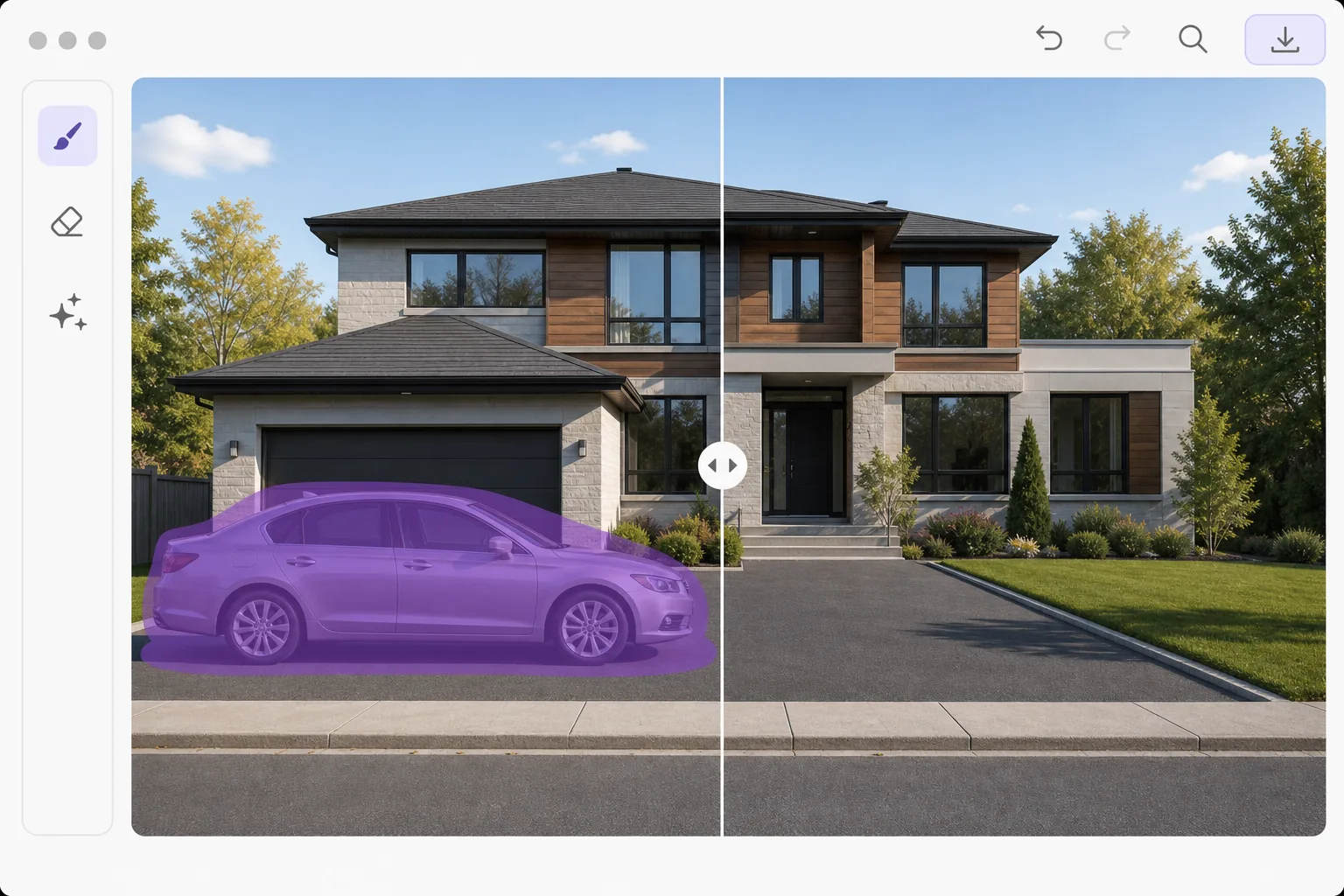
Почему эвакуация автомобилей важна для съемки недвижимости и пейзажей
Чтобы убрать машину с фото, откройте Magic Eraser в браузере, на iOS или Android, загрузите снимок, закрасьте кистью автомобиль — и AI достроит дорогу, подъездную дорожку или фон за ним. Это бесплатно и без регистрации. Лучше всего получается, когда вокруг машины есть простая, повторяющаяся поверхность — асфальт, трава, тротуар, — которую AI может убедительно продолжить. Маленькая или далёкая машина на открытом пространстве исчезает почти незаметно; крупный автомобиль на переднем плане или стоящий на фоне детализированного здания оставляет больше области для восстановления, поэтому закрашивайте по частям и запускайте заново, а потом увеличьте масштаб и проверьте результат. Автомобили на фотографиях — одна из самых частых жалоб со стороны агентов по недвижимости, фотографов-пейзажистов и создателей туристического контента. Случайный автомобиль, припаркованный перед выставленным на продажу объектом недвижимости, снижает воспринимаемую привлекательность бордюра. Автомобиль на живописном фоне отвлекает внимание от пейзажа. Уличные фотографы часто ждут несколько минут, пока машины проедут перекресток. Удаление автомобилей с помощью искусственного интеллекта решает эту проблему при постобработке: проведите прикосновением по транспортному средству, и ИИ реконструирует то, что находится за ним — подъездные пути, дороги, траву, тротуары и фасады зданий. Искусственный интеллект понимает перспективу и текстуру поверхности, поэтому реконструированный асфальт соответствует текстуре и углу дороги, а детали здания продолжаются естественно.
Before you start
Снять машину в три шага
Start with загрузите фотографию. The result preview above and tips below use this guide's existing content; no separate before-and-after proof is assumed.
- 1
Загрузите фотографию
Откройте Magic Eraser в Интернете, iOS или Android. Загрузите фотографию автомобиля, который хотите удалить. Работает под любым углом — с уровня улицы, с высоты птичьего полета или с точки зрения камеры наблюдения.
- 2
Зачистить машину
Используйте кисть, чтобы закрасить всю машину, включая ее тень и отражение. Для внедорожников и грузовиков используйте щетку большего размера. Включите все тени, отбрасываемые на землю: отсутствующие тени от автомобилей — самый важный плюс ретуши.
- 3
Обзор и экспорт
ИИ заполняет область соответствующими текстурами поверхности: асфальтом для дорог, бетоном для подъездных путей, травой для газонов или любой другой поверхностью, на которой находился автомобиль. Проверьте края, где машина встречается со зданиями или бордюрами, а затем экспортируйте их в полном разрешении.
Лучшее для
- Фотографы недвижимости убирают припаркованные автомобили со снимков экстерьера недвижимости
- Фотографы-пейзажисты убирают живописные виды с помощью придорожных машин
- Уличные фотографы создают чистые архитектурные композиции
- Фотографы-дроны снимают транспортные средства с аэрофотоснимков окрестностей
- Фотографы-путешественники очищают арендованные туристические автомобили от фотографий мест назначения
Советы для достижения наилучших результатов
Всегда включайте в выбор тень автомобиля — дорожное покрытие без теней сразу будет выглядеть неправильно. Если автомобили находятся частично позади других объектов (деревьев, столбов), чистите только видимые части. Если несколько автомобилей припаркованы впритык к бамперу, удаляйте их по одному, начиная с автомобиля, который наименее заблокирован. Для фотографий недвижимости также удалите все масляные пятна или следы шин на подъездной дорожке, чтобы она выглядела совершенно чистой. Снимки с дрона дают наилучшие результаты удаления автомобилей, поскольку текстура земли сверху более однородна.
Часто задаваемые вопросы
- Могу ли я удалить несколько автомобилей с одной фотографии?
- Да. Раскрасьте каждую машину отдельно или выберите несколько машин одновременно. На парковках с большим количеством транспортных средств обрабатывайте партиями по 3–5 штук для получения максимально чистых результатов.
- Работает ли это с частично видимыми автомобилями?
- Да. Автомобили, обрезанные по краю фотографии, частично скрытые за деревьями или перекрывающие другие объекты, можно удалить. ИИ реконструирует только ту область, которую вы затронули.
- Эвакуация автомобиля бесплатна?
- Да. Функции удаления объектов доступны на бесплатном уровне с ежедневными ограничениями на использование. Премиум снимает ограничения на пакетную обработку целых наборов фотографий недвижимости.
- Сработает ли это с большой машиной на переднем плане?
- Может, но с крупной машиной на переднем плане сложнее, чем с маленькой и далёкой. Когда автомобиль занимает большую часть кадра, у AI меньше окружающего контекста для восстановления, поэтому заливка получается скорее обоснованной реконструкцией, чем точным восстановлением того, что было скрыто. Лучше всего получается, когда за машиной что-то простое и непрерывное — дорога, газон или ровная стена. Если машина большая, а фон насыщенный или детализированный, закрашивайте её небольшими участками, сделайте несколько проходов и проверьте результат при полном увеличении.
- Будет ли дорога или подъездная дорожка за машиной выглядеть бесшовно?
- Обычно да — на однородных поверхностях. Асфальт, бетон, трава и гравий — это повторяющиеся текстуры, которые AI продолжает аккуратно, поэтому заплатка сливается с фоном. Швы вероятнее там, где машина закрывала конкретный элемент — разметку полосы, край бордюра, сток или ту самую линию, где подъездная дорожка переходит в газон, — потому что AI домысливает то, что там было, а не восстанавливает. Если восстановленная линия выглядит немного не так, повторный проход только по этой полосе обычно всё выравнивает.