
パスポート写真テンプレート
ドラッグストアの証明写真ボックスは不要です。このテンプレートは、十分に明るい自撮り写真から政府準拠のパスポート写真を作成します — 白い背景、正しい頭部とフレームの比率(あごから頭頂部まで1〜1-3/8インチ)、そして米国国務省、英国HMPO、EU、シェンゲンビザの要件を満たす600 DPIの2×2インチ出力。
このテンプレートを無料で試すProfessional template preview
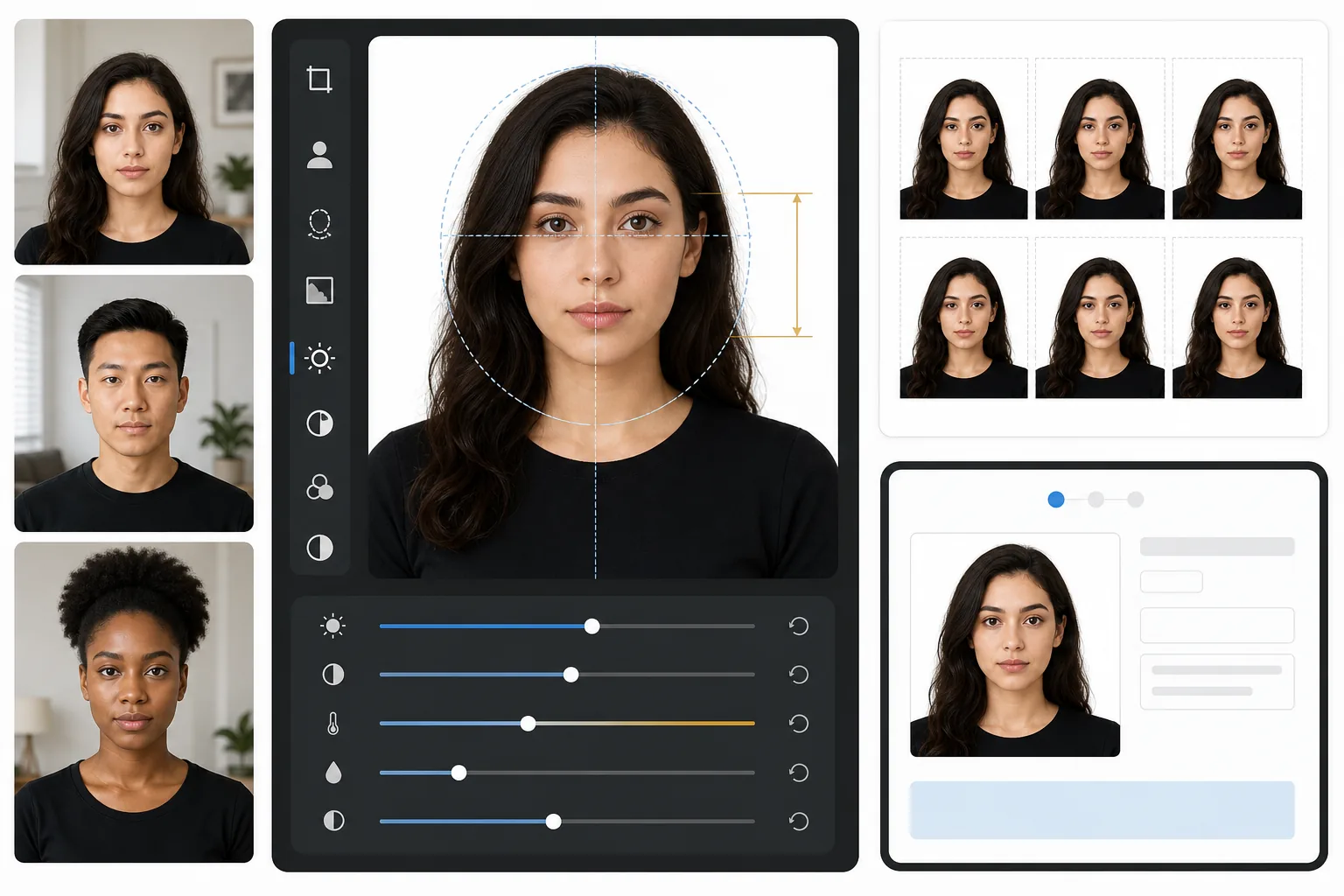
このテンプレートの機能
標準的なポートレート写真を政府準拠のパスポートまたはビザ写真に変換します。このテンプレートはあらゆる背景を削除して白一色に置き換え、米国国務省が要求する正確な2×2インチ(51×51mm)の寸法に切り抜き、頭部を必要なサイズ範囲内に配置し、きつい影のない均一な照明を確保します。出力は600 DPIで印刷準備が整っており、写真用紙への印刷やデジタル提出に直接利用できます。
テンプレート設定
| 出力寸法 | 2×2インチ(51×51mm)600 DPI(1200×1200px) |
| 背景 | 白一色(#FFFFFF)、グラデーションやテクスチャなし |
| 頭部サイズ | あごから頭頂部まで1インチ〜1-3/8インチ(25〜35mm) |
| 目の位置 | 下端から1-1/8〜1-3/8インチの間に目を中央配置 |
| カラープロファイル | sRGB(写真ラボ対応) |
| ファイル形式 | JPEG 100%品質またはPNG(デジタル提出ポータル用) |
このテンプレートの使い方
正面向きのポートレートを撮影する
顔に均一な光が当たる無地の壁の前に立ちます。自然光、または両側に等距離で配置した2つのランプを使用します。中立的な表情でカメラを直視し、両耳が見えるようにします。
背景を削除して置き換える
Background Eraserは、壁紙の模様、影、家具の縁などあらゆる背景を取り除き、必要な白一色に置き換えます。このツールは、ハロー効果を生じさせることなく自然な髪の縁やメガネのフレームを保持します。
準拠するように自動切り抜き
テンプレートは顔を検出し、政府が定める頭部サイズの範囲内に配置します。目は正しい高さに配置され、あごから頭頂部までの測定値が1〜1-3/8インチの要件内に収まります。
印刷またはデジタル提出
4×6の光沢写真用紙への印刷用に600 DPIファイルをダウンロードするか(1枚に2×2写真が4枚収まります)、オンラインのパスポート更新やビザ申請ポータルにデジタルファイルを直接提出します。
最良の結果を得るためのプロのヒント
- ✓窓からの正面向きの自然光を利用しましょう — パスポート窓口が好む柔らかく均一な照明を生み出し、フラッシュ撮影によるきつい影を解消します。
- ✓可能であれば撮影前にメガネを外してください。多くの国で現在メガネなしの写真が求められており、許可されている場合でも、反射やフレームの影は写真が却下される最も一般的な理由です。
- ✓白とコントラストをなす無地の上着を着用しましょう — 濃紺、黒、深緑が最適です。白い服は背景に溶け込み、却下の原因になることがあります。
- ✓自撮りではなく、他の人に腕の長さの距離から撮影してもらいましょう。フロントカメラの自撮りはわずかな広角の歪みを生じさせ、顔の比率を不自然に見せ、手動審査を引き起こす可能性があります。
よくある質問
この写真は米国国務省に受理されますか?
+
テンプレートは米国国務省のパスポート写真要件に公開されている正確な仕様に従っています:2×2インチ、白い背景、1〜1-3/8インチの頭部サイズ、正しい目の配置。ただし、受理は表情、頭の角度、照明にも左右されます — テンプレートは背景、サイズ調整、切り抜きを処理しますが、閉じた目や傾いた頭は修正できません。
米国以外のパスポート写真にも使えますか?
+
デフォルトは米国パスポート(2×2インチ)に設定されていますが、パスポート写真の寸法は国によって異なります — 例えば、英国は35×45mm、インドは異なる頭部サイズ比で2×2インチを要求します。中核となる背景削除と顔の配置はどの国でも機能します。特定の要件に合わせて切り抜き寸法を調整してください。
自宅で印刷できますか?
+
はい。600 DPI出力はどの写真プリンターでも正確に2×2インチで印刷されます。最良の結果を得るには、光沢またはマット写真用紙を使用し、1枚の4×6シートに4部印刷してください。ほとんどのドラッグストアの写真キオスクも高品質印刷用にデジタルファイルを受け付けています。
Related templates
More professional templates for your workflow.
プロフェッショナルな LinkedIn ヘッドショット テンプレート。きれいな背景、自然な肌の強調、洗練された外観により、プロフィールの閲覧数は 14 倍に増加します。
俳優やモデル向けのプロフェッショナルな顔写真テンプレート。 8×10 の印刷対応出力、自然なレタッチ、代理店への提出用のきれいな背景により、キャスティング ディレクターの基準を満たします。
自然な歯のホワイトニング、一貫したポートレートの背景、診療 Web サイトやソーシャル メディア向けの前後比較画像を使用して、歯科マーケティング用の写真を強化します。