
歯科スマイル強化
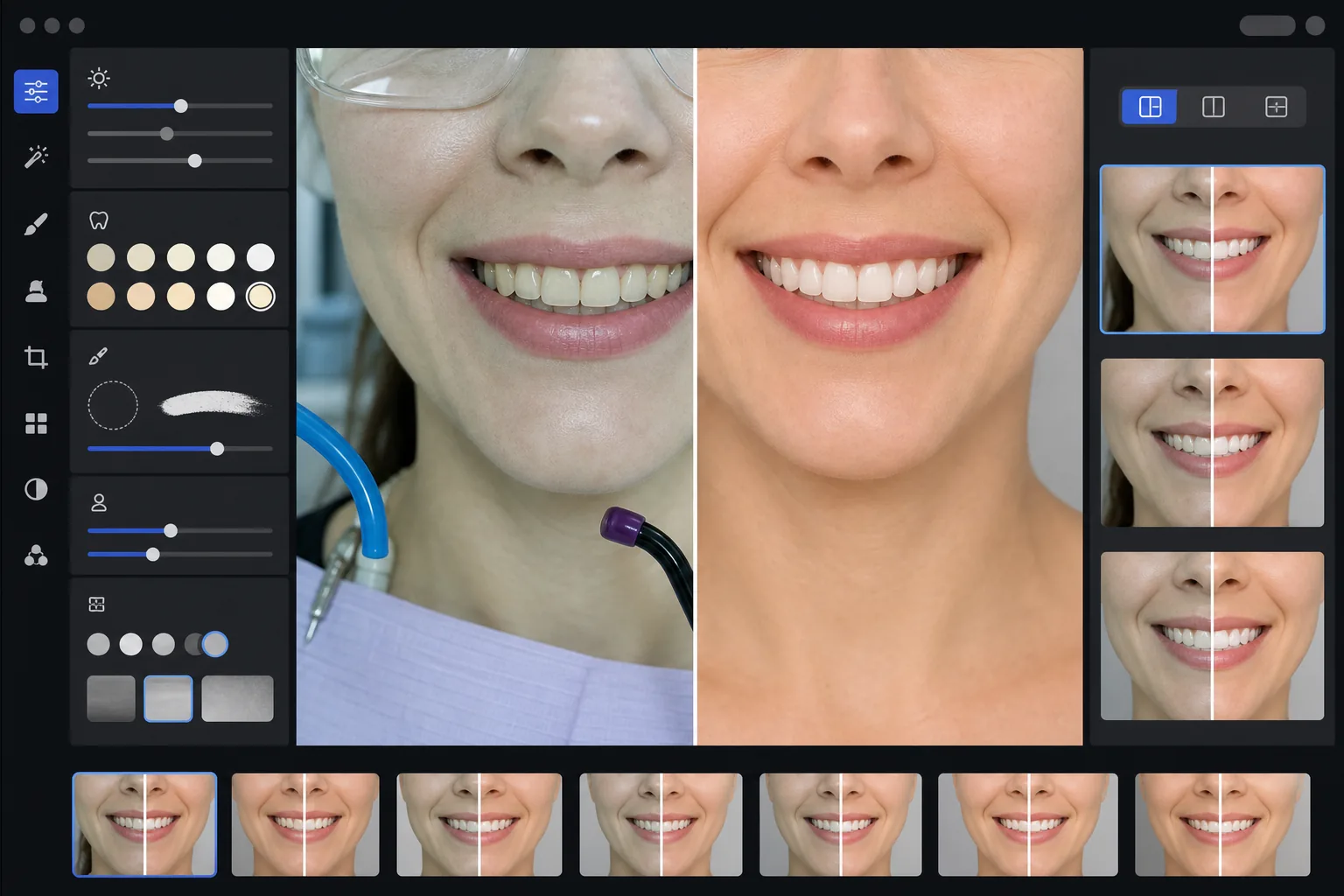
あなたの診療の成果を紹介する、プロフェッショナルな歯科マーケティング用ビフォーアフター画像を作成します。このテンプレートは自然に見える歯のホワイトニングを施し、臨床的な背景の雑然さを取り除き、患者のポートレート背景を統一し、診療室の写真でよく見られる厳しい頭上照明を整えます。
このテンプレートを無料で試すProfessional template preview
このテンプレートでできること
臨床的な歯科写真を、診療Webサイト、ソーシャルメディア、患者向け説明資料に使える洗練されたマーケティング画像へと変換します。AI Enhance は歯科診療室照明の魅力に欠ける緑白色のかぶりを補正し、自然に見える控えめなホワイトニングを施します — 人工的に見せることなく歯を2~3シェード明るくします。Magic Eraser は吸引ホース、光照射器、唇に付いた咬合紙の跡、保護眼鏡などの臨床的な背景要素を取り除きます。患者のポートレート背景は、症例ギャラリー全体で一貫したクリーンな背景に統一されます。
テンプレート設定
| 歯のホワイトニング | 自然な +2 ~ +3 シェードの明るさアップ(透明感とエナメル質の質感を維持) |
| 照明補正 | 歯科診療室の昼光バランス(緑白色の臨床的かぶりを除去) |
| 背景 | 柔らかなビネット付きの一貫したニュートラルなグレーまたは白の背景 |
| 肌の色味 | 口周りの暖色補正(歯科照明による青白さを軽減) |
| 唇の色 | 自然な彩度の回復(臨床照明による色あせを補正) |
このテンプレートの使い方
臨床写真をアップロード
笑顔のクローズアップ、ポートレート風のビフォーアフター写真、または診療室で撮影した口腔内画像をアップロードします。このテンプレートは、歯科専用カメラ、リングフラッシュ付きの一眼レフ、診療室照明下で撮影したスマートフォン写真に対応しています。
臨床照明を補正
AI Enhance は頭上の歯科ユニットライトによる緑白色のかぶりを中和し、口周りの肌の色味を暖め、自然な唇の色を回復させます。歯の色は、リアルで誠実さを保ちつつ、結果を最も良く見せるために控えめに明るくされます。
背景と気を散らす要素を整理
Magic Eraser は、目に見えるホース、光照射器の先端、エプロンクリップ、唇に付いた咬合紙の汚れ、背景の臨床機器を取り除きます。背景は、すべてのビフォーアフターのペアで一致する一貫したニュートラルな背景に置き換えられます。
マーケティング用に書き出し
強化された個別の画像、または並列のビフォーアフター合成画像をダウンロードできます。出力は、Webサイトギャラリー、Instagram投稿、Google Business Profile、印刷用の患者向けパンフレット向けにサイズ調整され、8x10インチの印刷に適した解像度です。
最良の結果を得るためのプロのヒント
- ✓ビフォーアフターのペアでは、治療前と治療後の両方の画像を同じ角度、距離、照明位置から撮影してください。このテンプレートは2枚間の露出差を補正できますが、元のカメラアングルを揃えることで最も説得力のある比較が得られます。
- ✓ホワイトニングは意図的に控えめにしています — 歯を真っ白にするのではなく、2~3ビタシェード明るくします。これは見込み患者にとってより自然で信頼できる印象を与えます。実際の臨床結果が劇的な場合でも、軽い強化を施した誠実な写真の方が、過剰に加工した画像よりも説得力があります。
- ✓口腔内のスマイル撮影では頬粘膜リトラクターを使用し、歯科処置を最も完全に見せましょう。このテンプレートは、肌の色味を暖め、スマイルゾーンに焦点を当ててトリミングすることで、リトラクター使用写真のやや臨床的な見た目を処理します。
- ✓症例ギャラリー全体を一括処理して、すべてのビフォーアフターのペアで背景色、明るさ、暖かさを一貫させましょう。Webサイト上の症例間で照明が一致していないと、プロフェッショナルな印象が損なわれます。
よくある質問
これは誤解を招く歯科広告とみなされますか?
+
ホワイトニング強化は2~3ビタシェードに制限され、エナメル質の自然な透明感と表面の質感を維持します。これはプロの写真照明とホワイトバランスが自然に及ぼす範囲内に十分収まります。このテンプレートは歯の形状、配列、歯肉の輪郭を変えることはなく、写真では実物より結果が悪く見えてしまう臨床照明の魅力に欠ける色の影響を補正するだけです。
並列のビフォーアフター合成画像を作成できますか?
+
はい。このテンプレートは強化された個別の画像を出力するか、中央に仕切り、一貫した背景、ビフォー/アフターのラベルを付けた並列合成画像を生成できます。ペアの両方の画像が同じ背景処理を受けるため、比較は視覚的にクリーンでプロフェッショナルになります。
口腔内カメラの写真でも使えますか?
+
はい。口腔内カメラの画像は通常、表面の質感を白飛びさせる非常に厳しい直接照明になっています。このテンプレートはエナメル質のディテールを回復し、極端な白かぶりを補正し、歯の解剖学的構造を自然に見せるようコントラストを調整します。結果は生の口腔内撮影よりも詳細で自然な見た目になります。
プロフェッショナルなマーケティング写真であなたの歯科処置を紹介
臨床写真をアップロードすれば、自然に強化され、一貫したスタイルのビフォーアフター画像が得られ、Webサイト、ソーシャルメディア、患者向けパンフレットにすぐ使えます。
無料で試すRelated templates
More professional templates for your workflow.
プロフェッショナルな LinkedIn ヘッドショット テンプレート。きれいな背景、自然な肌の強調、洗練された外観により、プロフィールの閲覧数は 14 倍に増加します。
準拠したパスポートとビザの写真を自宅で作成します。白い背景、正しいヘッド サイズ比、2×2 インチの米国標準、および国務省の要件を満たす 600 DPI 出力。
俳優やモデル向けのプロフェッショナルな顔写真テンプレート。 8×10 の印刷対応出力、自然なレタッチ、代理店への提出用のきれいな背景により、キャスティング ディレクターの基準を満たします。