
How to remove window reflection from a photo
Magic EraserでHow to remove window reflection from a photoする方法を学びましょう。無料のAIツールを使ったシンプルなステップバイステップガイド。Web、iOS、Androidで利用可能。
Last updated
今すぐ試す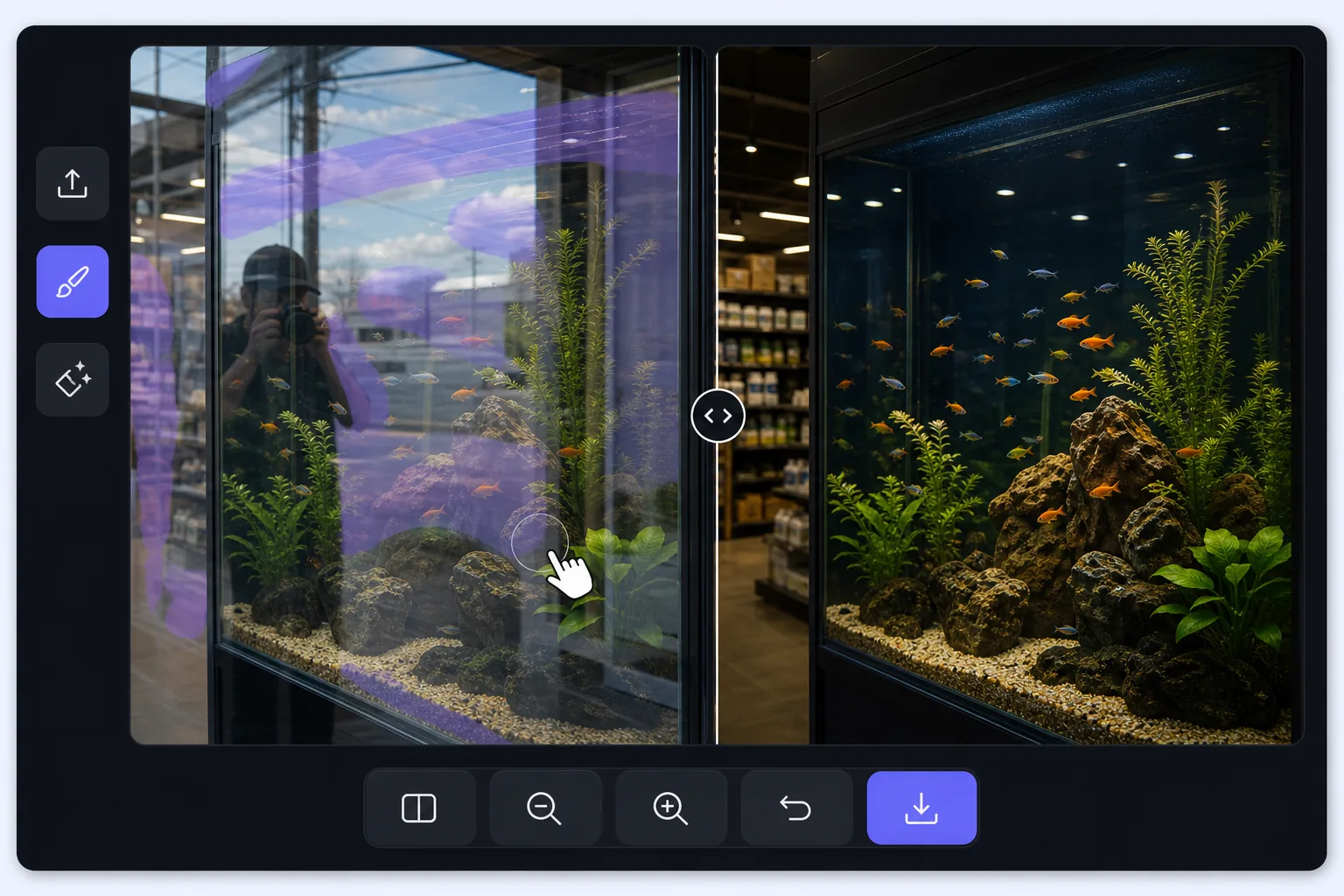
Shooting through glass is a layering problem — Magic Eraser
A window pane does two things at once: it lets you see through to what is behind it, and it reflects whatever is in front of it. When you photograph through it, the camera records both layers stacked together — the storefront mannequin and your own reflection, the aquarium octopus and the gallery lights behind you, the road ahead and the dashboard mirrored in the windshield. The reflected layer is usually brightest where the glass is darkest behind, which is exactly where your subject hides. A polarizing filter helps at capture time, but if the shot is already taken, the reflection is baked in. Magic Eraser approaches it differently: you mark the reflected streaks and shapes, and its AI inpainting reconstructs a plausible version of what was behind the glass using the surrounding visible detail. It is honest to say the result is a synthesized reconstruction, not literal recovery of pixels the reflection covered — but when the subject behind the pane is mostly visible and the reflection only veils part of it, the rebuild is convincing.
Before you start
ステップバイステップ手順
Start with 写真をアップロード. The result preview above and tips below use this guide's existing content; no separate before-and-after proof is assumed.
- 1
写真をアップロード
Web、iOS、またはAndroidでMagic Eraserを開きます。JPEG、PNG、HEIC、WebP形式の写真をドラッグ&ドロップ。アカウント不要で始められます。
- 2
ツールと範囲を選択
適切なツールを選択し、処理する範囲を指定します。AIが自動的に分析し、数秒で変更を適用します。
- 3
結果をダウンロード
結果をプレビューして、編集済みの写真をダウンロード。高品質のPNGまたはJPEGでエクスポートできます。
こんな方におすすめ
- Storefront and shop-window photos where your reflection or the street sits on top of the display behind the glass
- Car, train, and bus window shots where the dashboard, your face, or interior lights veil the view outside
- Aquarium and zoo-enclosure photos where gallery lighting and visitors reflect over the animals in the tank
- Museum display cases and glass cabinets where overhead spots reflect across the exhibit you are shooting
- Photos through office, gallery, or skyscraper windows where the indoor room reflects over the cityscape outside
ベストな結果を得るコツ
The cleaner the original capture, the more convincing the rebuild: press the lens close to the glass and shoot at a slight angle to push your own reflection out of frame, and cup a hand or use a rubber lens hood against the pane to block stray light. When you do edit, work the reflection in patches rather than one giant selection — the AI has more surrounding subject to reference, so the reconstruction stays faithful to what is actually behind the glass. Watch the boundary between reflected and clear areas; that seam is where artifacts show, so a second light pass along it usually tidies things up. Be realistic about coverage: a reflection that only veils the subject lifts away cleanly, but a hot spec of glare that completely hides a section means the AI is inventing that patch, and on aquarium or storefront scenes with busy detail behind the glass, re-shooting from another angle often beats fighting a fully blocked area.
よくある質問
- How to remove window reflection from a photo機能は無料ですか?
- はい、Magic Eraserでは毎日の無料枠内でHow to remove window reflection from a photoが可能です。Pro にアップグレードすると無制限に処理でき、高解像度でエクスポートできます。
- How to remove window reflection from a photoにはどのくらい時間がかかりますか?
- ほんの数秒です。Magic EraserのAIは写真を高速処理し、ほとんどの場合アップロード直後に結果が得られます。
- スマートフォンでも使えますか?
- はい、Magic EraserはiOS、Android、およびすべてのWebブラウザで利用できます。デバイス間で自由に切り替え可能です。
- 画質は低下しますか?
- いいえ、Magic Eraserは元の写真の品質を維持します。AIがスマートに処理し、ディテールとシャープネスを保ちます。