
Remove the Emoji Hiding One Face in Your Group Photo
Magic Eraserで集合写真から絵文字を除去する方法を学びましょう。無料のAIツールを使ったシンプルなステップバイステップガイド。Web、iOS、Androidで利用可能。
Last updated
今すぐ試す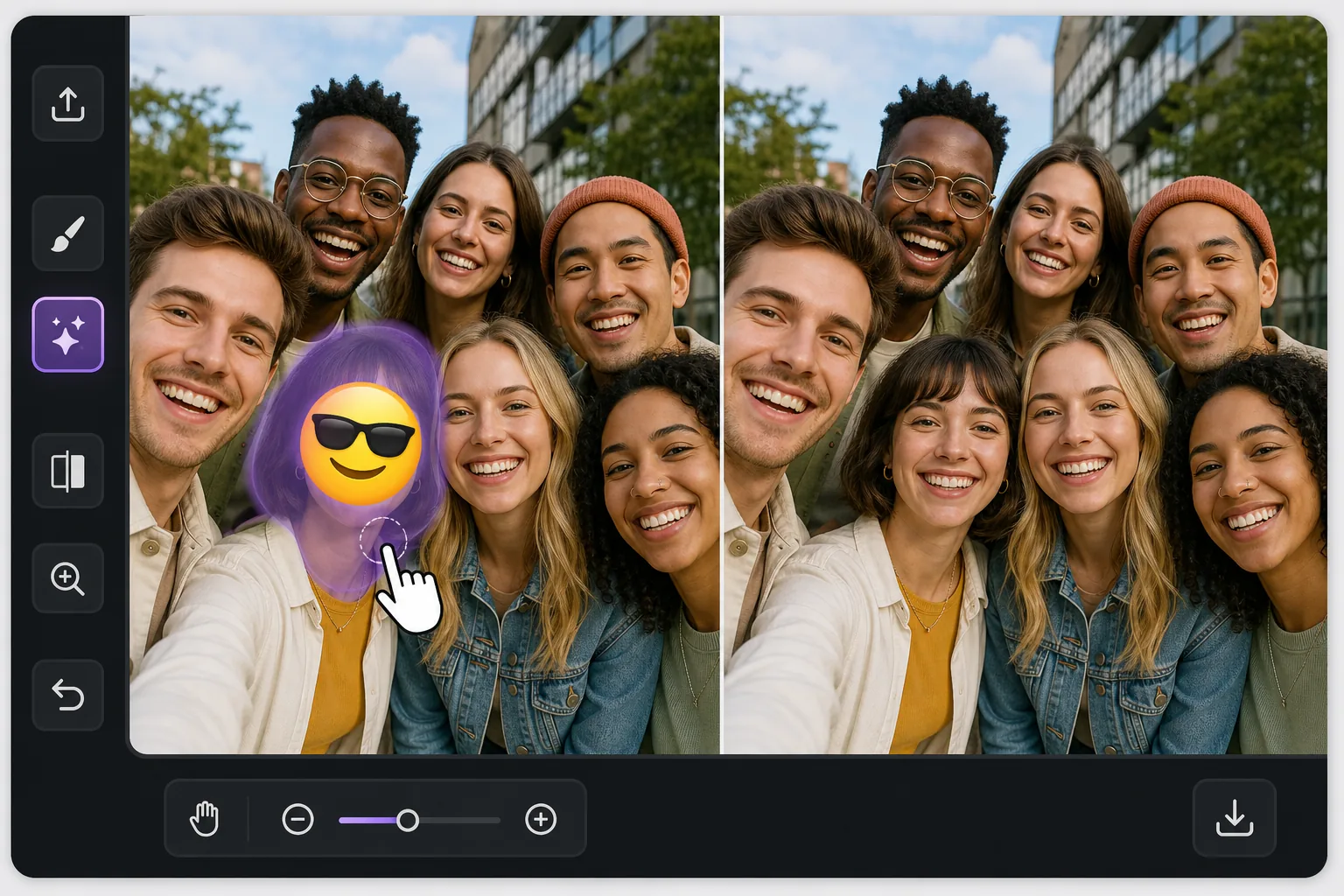
One face covered, everyone else fine — Magic Eraser
In a busy group photo, an emoji over a single person is awkward in a specific way: the rest of the shot is perfect, so the one covered face stands out even more. Magic Eraser is built for exactly this kind of pinpoint fix. You brush only the emoji sitting on that one person, and the AI inpaints the small area it covered — matching the surrounding skin tone, hair edges, and the shoulder of the person tucked in next to them. Be clear about what happens here: the AI does not recover the real hidden face. It synthesizes a plausible reconstruction of that region based on the rest of the image. In a tight group shot where the covered head is small and partly framed by neighbors, that often reads as natural at a glance. Magic Eraser works free on web, iOS, and Android with no watermark, so you can fix the group photo on whatever device the picture lives on.
Before you start
ステップバイステップ手順
Start with 写真をアップロード. The result preview above and tips below use this guide's existing content; no separate before-and-after proof is assumed.
- 1
写真をアップロード
Web、iOS、またはAndroidでMagic Eraserを開きます。JPEG、PNG、HEIC、WebP形式の写真をドラッグ&ドロップ。アカウント不要で始められます。
- 2
ツールと範囲を選択
適切なツールを選択し、処理する範囲を指定します。AIが自動的に分析し、数秒で変更を適用します。
- 3
結果をダウンロード
結果をプレビューして、編集済みの写真をダウンロード。高品質のPNGまたはJPEGでエクスポートできます。
こんな方におすすめ
- A friend stamped a laughing or sunglasses emoji on one person in a shared group selfie
- A privacy sticker was placed over a single face but you now have permission to show them
- A meme reply covered one person's face and you want the clean original group shot back
- Restoring a reunion or team photo where one head got hidden behind a reaction emoji
- Reposting a group picture and needing the one covered face to blend in with everyone else
ベストな結果を得るコツ
The reconstruction is most convincing when the covered head is small relative to the group and partly bordered by neighbors — the AI has nearby skin, hair, and lighting to imitate. If the emoji covers a large front-and-center face, expect a softer, more invented result and consider cropping instead. Brush a touch beyond the emoji's edge so no colored fringe survives, but stop short of the people on either side. Match expectations honestly: this rebuilds the region plausibly, it does not restore the true expression or identity of the person who was hidden. For shared photos, get that person's okay before reposting a reconstructed version of their face.
よくある質問
- 集合写真から絵文字を除去機能は無料ですか?
- はい、Magic Eraserでは毎日の無料枠内で集合写真から絵文字を除去が可能です。Pro にアップグレードすると無制限に処理でき、高解像度でエクスポートできます。
- 集合写真から絵文字を除去にはどのくらい時間がかかりますか?
- ほんの数秒です。Magic EraserのAIは写真を高速処理し、ほとんどの場合アップロード直後に結果が得られます。
- スマートフォンでも使えますか?
- はい、Magic EraserはiOS、Android、およびすべてのWebブラウザで利用できます。デバイス間で自由に切り替え可能です。
- 画質は低下しますか?
- いいえ、Magic Eraserは元の写真の品質を維持します。AIがスマートに処理し、ディテールとシャープネスを保ちます。