
Preparazione di foto stock
Fai accettare le tue foto dalle agenzie stock al primo invio. Questo modello rimuove marchi, loghi ed elementi brandizzati che provocano il rifiuto, corregge le imperfezioni tecniche che non superano la revisione qualità ed esporta i file nelle specifiche esatte richieste da Shutterstock, Adobe Stock, Getty e iStock, eliminando i motivi più comuni per cui le foto vengono rifiutate dalle librerie stock.
Prova gratis questo modelloDesign template preview
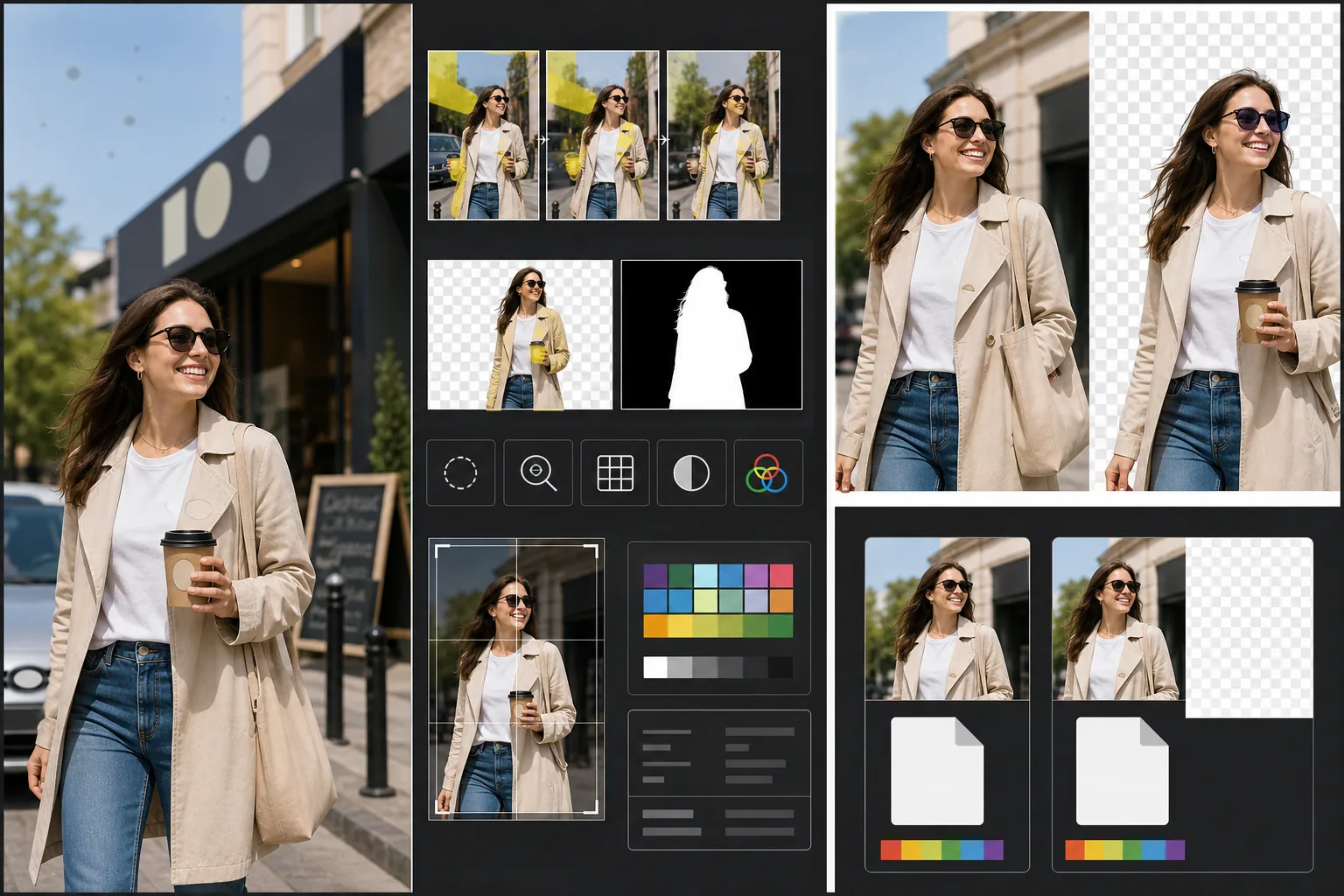
Cosa fa questo modello
Affronta i requisiti tecnici e legali specifici che causano il rifiuto delle foto stock. Magic Eraser rileva e rimuove marchi, loghi di marca, etichette di prodotto e insegne brandizzate visibili che richiederebbero liberatorie di proprietà o causerebbero un rifiuto immediato. Questo include loghi sull'abbigliamento, emblemi delle auto, insegne dei negozi e nomi di marca sulle confezioni. Background Eraser fornisce uno scontorno pulito per le immagini destinate al ritaglio, generando sia l'immagine RGB sia una maschera alfa separata richiesta dalle agenzie stock. I controlli di qualità tecnica verificano i livelli di rumore, la nitidezza, l'aberrazione cromatica e le macchie di polvere del sensore, tutte cause comuni di rifiuto, e l'IA corregge ciò che può segnalando i problemi che richiedono un nuovo scatto. L'esportazione finale rispetta le specifiche dell'agenzia per formato file, profilo colore, risoluzione e incorporamento dei metadati.
Impostazioni del modello
| Rilevamento marchi | Rileva e rimuove automaticamente loghi, nomi di marca ed etichette di prodotto visibili |
| Controllo di qualità tecnica | Verifica rumore, nitidezza, aberrazione cromatica e polvere del sensore |
| Maschera di scontorno | Genera un canale alfa per le immagini ritagliate (PNG con trasparenza) |
| Profilo colore | sRGB (richiesto dalla maggior parte delle agenzie stock) |
| Metadati | Incorpora i campi IPTC per titolo, descrizione e parole chiave |
| Formato di output | JPEG alla massima qualità (livello 12) o TIFF (senza perdita, preferito da Getty) |
Come usare questo modello
Carica la tua foto
Carica la foto che vuoi inviare alle agenzie stock. Il modello accetta file RAW, JPEG, TIFF e PNG. Carica la versione di qualità più alta disponibile: le agenzie stock valutano la qualità tecnica alla risoluzione piena e rifiutano le immagini che mostrano artefatti di compressione dovuti a salvataggi ripetuti.
Rimuovi marchi e loghi
Magic Eraser analizza l'immagine alla ricerca di marchi, loghi, nomi di marca ed etichette di prodotto visibili. Gli elementi rilevati vengono evidenziati per la revisione. Le rimozioni approvate vengono eseguite con l'IA che ricostruisce la superficie dietro ogni marchio: la trama del tessuto sotto un logo dell'abbigliamento, la carrozzeria sotto un emblema, la superficie del muro sotto l'insegna di un negozio.
Esegui il controllo di qualità tecnica
Il modello analizza l'immagine alla ricerca di problemi tecnici che comunemente causano il rifiuto delle agenzie stock: rumore nelle zone d'ombra, nitidezza insufficiente, aberrazione cromatica sui bordi ad alto contrasto, macchie di polvere del sensore ed errori di bilanciamento del bianco. I problemi correggibili vengono risolti automaticamente. I problemi non correggibili (come una forte sfocatura da movimento) vengono segnalati così da saperlo prima dell'invio.
Esporta con i metadati dell'agenzia
Seleziona l'agenzia di destinazione e il modello esporta nel formato e nelle specifiche preferiti da quell'agenzia. I campi di metadati IPTC per titolo, descrizione e parole chiave possono essere incorporati prima dell'esportazione. Il file è pronto per essere caricato direttamente sui portali per contributori di Shutterstock, Adobe Stock, Getty/iStock o Alamy.
Consigli da professionisti per risultati ottimali
- ✓Pensa ai marchi fin dall'inizio dello scatto. Sebbene l'IA rimuova i loghi in modo efficace, le scene con meno elementi brandizzati richiedono meno ritocco e appaiono più naturali. Rivolgi le etichette dell'abbigliamento verso l'interno, scegli oggetti di scena senza marchio e posiziona la fotocamera in modo da escludere le insegne dei negozi quando possibile.
- ✓Invia alla massima risoluzione che la tua fotocamera produce. Le agenzie stock classificano i risultati di ricerca in parte in base alla risoluzione: un'immagine da 50 megapixel appare sopra una da 12 megapixel per la stessa query, perché gli acquirenti preferiscono file più grandi per ritagli flessibili e usi su grande formato.
- ✓Includi persone nelle tue foto stock quando possibile. Le immagini con soggetti umani riconoscibili (con liberatorie del modello) generano costantemente più ricavi rispetto a scene simili senza persone. Il ritocco della pelle del modello è calibrato per essere minimo, cosa che le agenzie stock preferiscono rispetto a una pelle eccessivamente modificata.
Strumenti
Domande frequenti
Rimuovere l'emblema di un'auto avrà un aspetto naturale?
+
Sì. L'IA ricostruisce la carrozzeria dietro l'emblema, abbinando colore della vernice, riflessi e curvatura della superficie. Per le posizioni comuni degli emblemi (griglia anteriore, bagagliaio, centri delle ruote) la ricostruzione è molto pulita. Posizioni insolite o emblemi molto grandi possono richiedere un rapido ritocco manuale ai bordi.
Questo modello può generare parole chiave per il mio invio?
+
Il modello incorpora campi di metadati IPTC in cui puoi inserire titolo, descrizione e parole chiave. Non genera automaticamente le parole chiave: l'ottimizzazione delle parole chiave stock è una competenza specializzata che dipende dalla tua comprensione di come cercano gli acquirenti, e le parole chiave generate automaticamente spesso tralasciano i concetti commerciali che guidano le vendite.
Quali agenzie supporta?
+
Le preimpostazioni di esportazione coprono Shutterstock, Adobe Stock, Getty Images, iStock, Alamy, Dreamstime e 500px. Ogni preimpostazione configura il formato file corretto, il profilo colore, la dimensione massima del file e l'incorporamento dei metadati per i requisiti di invio specifici di quell'agenzia.
Fai accettare le tue foto al primo invio
Carica le foto e ottieni file pronti per le agenzie stock, con i marchi rimossi, la qualità verificata e i requisiti di formato soddisfatti.
Provalo gratisRelated templates
More design templates for your workflow.
Crea loghi PNG trasparenti con rifinitura dei bordi netti ed esportazione in più dimensioni per icone web, stampa, social media e app. Funziona su foto di loghi stampati e file digitali.
Genera modelli realistici di copertine di libri con prospettiva 3D, rendering delle ombre e sfondi lifestyle per il marketing degli autori e le promozioni degli editori.
Progetta copertine di podcast che soddisfino le specifiche di Apple Podcast e Spotify con sostituzione dello sfondo, isolamento del ritratto dell'host e layout pronti per la tipografia.
Prepara opere d'arte e fotografie digitali per la stampa di grande formato con upscaling AI, espansione della tela, prove colore accurate ed esportazione di file pronti per la stampa.