
Mockup di copertina di libro
Crea mockup fotorealistici della copertina del tuo libro collocata in scene di vita quotidiana, su scaffali o presentata come render 3D autonomo con ombre naturali. Questo modello prende la grafica piatta della tua copertina e la trasforma in immagini promozionali per annunci sui social media, siti web di autori, contenuti Amazon A+ e kit per la stampa, senza bisogno di alcun software 3D.
Prova gratis questo modelloDesign template preview
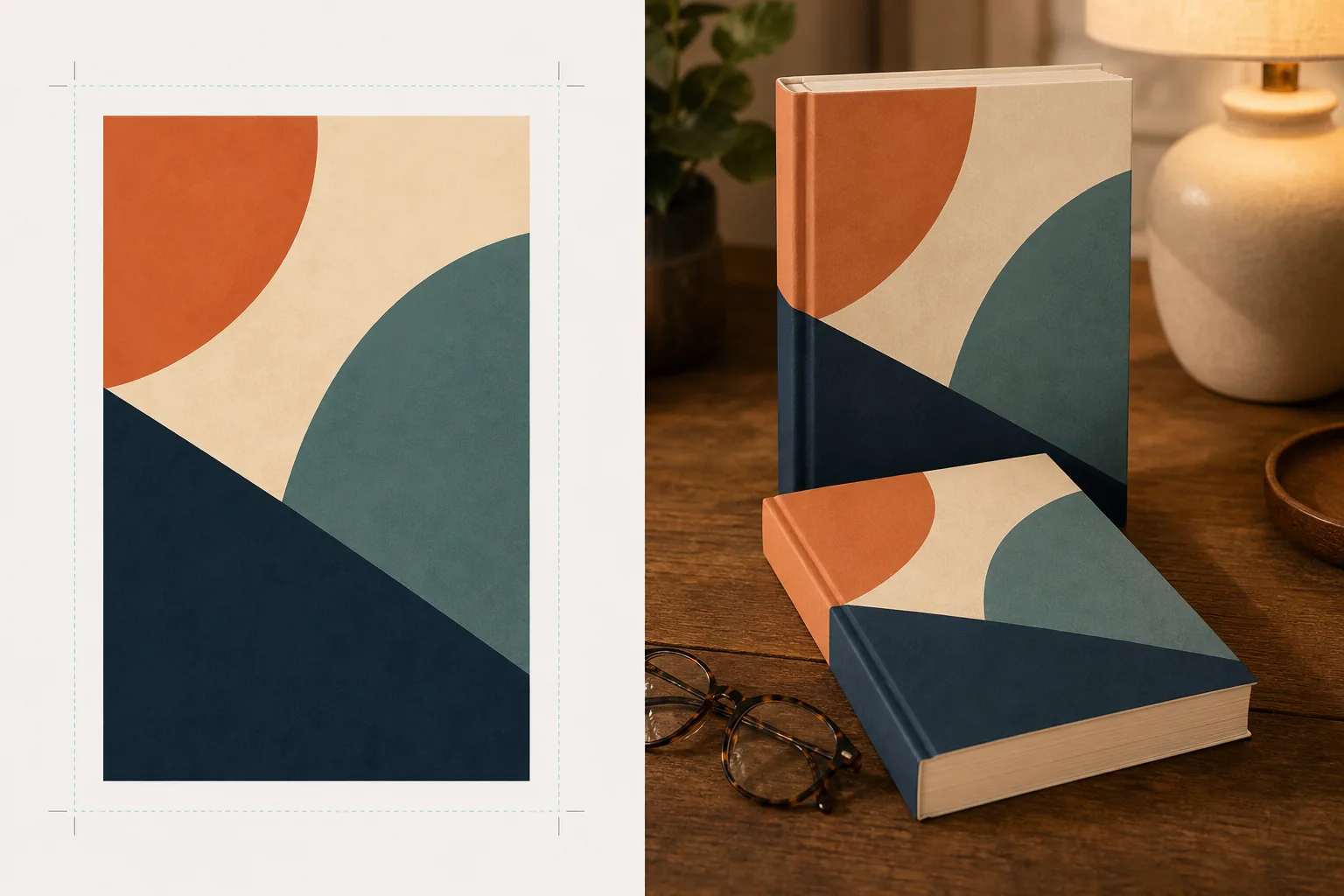
Cosa fa questo modello
Converte i design piatti delle copertine dei libri in immagini mockup promozionali che sembrano fotografia di prodotto professionale. Carica la grafica della copertina come JPEG o PNG piatto e il modello la proietta su una forma di libro realistica con prospettiva corretta, spessore delle pagine e curvatura del dorso. Il mockup viene poi collocato in scene di vita quotidiana — un tavolino da caffè con occhiali da lettura, uno scaffale di libreria, un comodino con la calda luce di una lampada — oppure reso come prodotto autonomo su uno sfondo pulito con ombra naturale. Per serie o promozioni di più libri, è possibile disporre più copertine in fila o impilate con prospettiva coerente. La direzione di luce e ombra corrisponde all'ambiente della scena, così il libro appare fisicamente presente anziché composto.
Impostazioni del modello
| Formato del libro | Brossura, copertina rigida o copertina rigida con sovraccoperta |
| Aspetto del numero di pagine | Sottile (100 pp.), medio (250 pp.), spesso (400+ pp.) — influisce sulla larghezza del dorso e del bordo delle pagine |
| Tipo di scena | Autonomo con ombra, tavolino da caffè, libreria, comodino o tenuto in mano |
| Angolo di prospettiva | Frontale, tre quarti o leggera inclinazione dall'alto |
| Risoluzione di output | 3000×3000px (1:1 social) o 2400×1600px (banner 16:10) |
Come usare questo modello
Carica la grafica della copertina
Carica la copertina del tuo libro come immagine piatta — almeno la copertina anteriore. Per i mockup di copertine rigide con sovraccoperta, puoi caricare anche il dorso e la quarta di copertina. Il modello accetta file JPEG, PNG e PDF. Le dimensioni della copertina vengono rilevate automaticamente e le proporzioni del libro vengono ridimensionate di conseguenza.
Seleziona formato del libro e scena
Scegli tra i formati brossura, copertina rigida o sovraccoperta. Seleziona l'intervallo del numero di pagine affinché la larghezza del dorso e del bordo delle pagine corrisponda al tuo libro reale. Poi scegli una scena: autonomo con ombra, ambientazione di vita quotidiana o colore di sfondo personalizzato.
Regola la prospettiva ed esegui il rendering
Scegli l'angolo di visione — frontale per la nitidezza delle miniature, tre quarti per la profondità visiva o inclinazione dall'alto per i post social in piano. Il modello esegue il rendering del mockup con illuminazione adeguata, texture del bordo delle pagine e direzione dell'ombra corrispondente alla scena selezionata.
Scarica le immagini promozionali
Esporta in 1:1 per Instagram, in 16:9 per le intestazioni di Twitter/Facebook o in dimensioni personalizzate per la sezione hero del tuo sito web. Ogni esportazione include il mockup del libro con l'opzione di sfondo trasparente, così puoi inserirlo nei tuoi layout personalizzati.
Consigli da professionisti per risultati ottimali
- ✓Carica la copertina alla risoluzione più alta disponibile. La trasformazione prospettica 3D riduce la risoluzione apparente sulla faccia che si allontana del libro, quindi partire da una sorgente ad alta risoluzione garantisce che il testo sul dorso e sulla copertina rimanga leggibile.
- ✓Per i contenuti Amazon A+, usa il mockup autonomo su sfondo bianco. Questo conferisce al libro un aspetto da fotografia di prodotto premium che lo distingue dall'immagine piatta della copertina già mostrata nella pagina dell'inserzione.
- ✓Crea una composizione di serie caricando tutte le copertine di una serie. Il modello le dispone in fila con prospettiva e spaziatura coerenti, il che ha un impatto visivo molto maggiore per la promozione di una serie rispetto a mostrare le copertine singolarmente.
Strumenti
Domande frequenti
Posso creare un mockup di un e-reader o tablet che mostra la mia copertina?
+
Il modello si concentra sui mockup di libri fisici — formati brossura e copertina rigida. Per i mockup con visualizzazione su e-reader o tablet, comporresti separatamente la copertina piatta sulla foto di un dispositivo.
Il testo sul dorso sarà leggibile?
+
Sì, a condizione che il file di copertina sorgente includa la grafica del dorso. Il modello avvolge la grafica del dorso attorno al bordo del libro con una prospettiva che corrisponde all'angolo della copertina anteriore. Per i libri sottili (meno di 150 pagine), il dorso è stretto e il testo piccolo può diventare difficile da leggere a dimensioni di visualizzazione ridotte.
Posso usarlo per promuovere un audiolibro o un podcast?
+
Sì. Il formato di copertina quadrato usato per audiolibri e podcast può essere reso come mockup in stile custodia per CD o come quadrato autonomo con ombra tridimensionale, conferendogli una presenza fisica che la grafica di copertina piatta non ha.
Trasforma la grafica della tua copertina in straordinarie immagini promozionali
Carica una grafica di copertina piatta e ottieni mockup di libri fotorealistici per social media, siti web di autori e campagne di marketing.
Provalo gratisRelated templates
More design templates for your workflow.
Crea loghi PNG trasparenti con rifinitura dei bordi netti ed esportazione in più dimensioni per icone web, stampa, social media e app. Funziona su foto di loghi stampati e file digitali.
Progetta copertine di podcast che soddisfino le specifiche di Apple Podcast e Spotify con sostituzione dello sfondo, isolamento del ritratto dell'host e layout pronti per la tipografia.
Prepara opere d'arte e fotografie digitali per la stampa di grande formato con upscaling AI, espansione della tela, prove colore accurate ed esportazione di file pronti per la stampa.
Prepara le foto per l'invio all'agenzia stock con la rimozione del marchio, la modifica della conformità della liberatoria del modello, i controlli di qualità tecnica e i requisiti di formato specifici dell'agenzia.