
Preparazione stampe artistiche
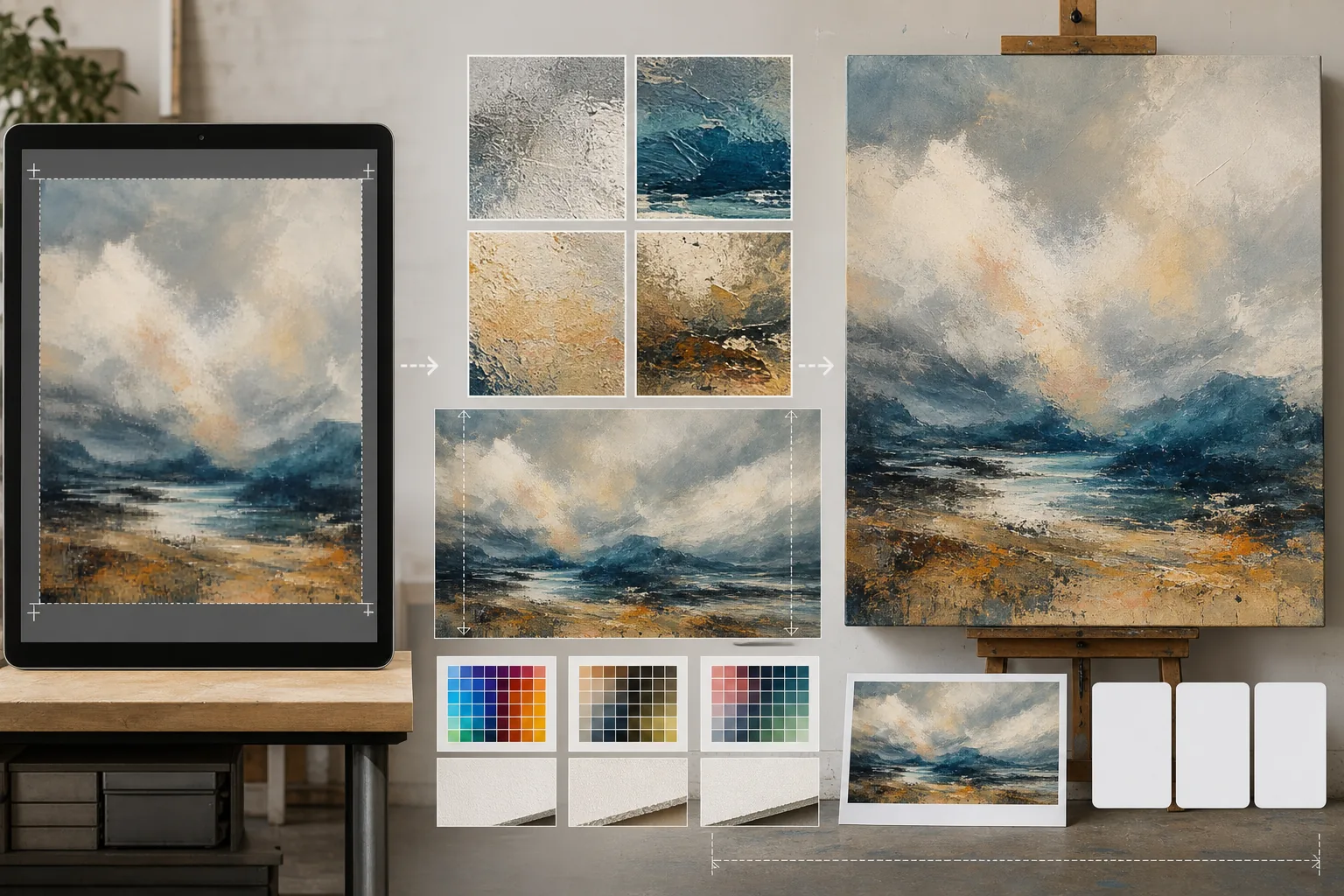
Prepara opere d'arte digitali, fotografie e illustrazioni per stampe da galleria di grande formato, tele montate su telaio e produzione di poster. Questo modello utilizza AI Enhance per ingrandire le immagini a risoluzioni pronte per la stampa senza perdita di qualità, e AI Expand per estendere i bordi della tela e creare i margini di avvolgimento — il tutto mantenendo la precisione del colore per la stampa professionale.
Prova questo modello gratisDesign template preview
Cosa fa questo modello
Colma il divario tra i file digitali a risoluzione da schermo e gli esigenti requisiti di risoluzione della produzione di stampa fisica. AI Enhance ingrandisce le immagini da 2x a 4x preservando i dettagli fini — le pennellate nei dipinti, la struttura della grana nelle fotografie, il tratto nelle illustrazioni — senza introdurre la sfocatura o gli artefatti tipici di una semplice interpolazione. AI Expand estende i bordi della tela generando continuazioni senza soluzione di continuità dell'opera, fornendo il margine extra necessario per le tele da galleria montate su telaio, dove l'immagine si ripiega attorno al telaio. I profili colore vengono convertiti in CMYK o Adobe RGB con una prova a video che mostra come apparirà la stampa finale su carta, tela o supporti metallici.
Impostazioni del modello
| Fattore di ingrandimento | 2x, 3x o 4x (fino a 16000px sul lato lungo per le stampe di grande formato) |
| Espansione della tela | Margine di 1,5 pollici, 2 pollici o personalizzato per l'abbondanza dell'avvolgimento su telaio |
| Conservazione dei dettagli | Adattiva: pennellata per i dipinti, grana per le foto, tratto per le illustrazioni |
| Profilo colore | sRGB (schermo), Adobe RGB (stampa fotografica) o CMYK (stampa commerciale) |
| Formato di output | TIFF (stampa senza perdita), PNG (trasparenza) o JPEG (anteprima web) |
Come usare questo modello
Carica la tua opera
Carica il file digitale — dipinto, fotografia, illustrazione o tecnica mista. Il modello accetta file JPEG, PNG, TIFF e PSD. Per i migliori risultati di ingrandimento, parti dalla versione a risoluzione più alta che possiedi, anche se è inferiore ai requisiti di stampa.
Ingrandisci alla risoluzione di stampa
Seleziona il fattore di ingrandimento in base alle dimensioni di stampa desiderate. Per una stampa di 24×36 pollici a 300 DPI, servono 7200×10800 pixel. L'IA ingrandisce preservando il carattere dell'originale — le pennellate restano pennellate, la grana della pellicola resta grana, la pixel art conserva il suo fascino squadrato.
Espandi la tela per il montaggio su telaio
Se stampi su tela con avvolgimento su telaio, AI Expand genera estensioni senza soluzione di continuità dell'opera attorno a tutti e quattro i bordi. Il margine esteso corrisponde allo stile, alla palette di colori e alla texture dell'originale, così i bordi avvolti appaiono intenzionali anziché stirati o specchiati.
Esegui la prova ed esporta
Esamina la prova a video che mostra come verrà resa l'immagine nel tuo profilo colore di destinazione — CMYK per la stampa offset o giclée, Adobe RGB per la stampa a getto d'inchiostro fine art. Esporta come TIFF per la tipografia o come PNG per ulteriori modifiche. Il file include i dati del profilo ICC incorporati per una riproduzione accurata del colore.
Consigli da esperti per risultati ottimali
- ✓Parti sempre dal file originale alla sua risoluzione nativa. Ingrandire un file già compresso e ridotto per la visualizzazione web introduce artefatti che si accumulano a ogni generazione di elaborazione.
- ✓Per le stampe su tela montata su telaio, richiedi un margine di espansione di 2 pollici anche se il telaio è profondo 1,5 pollici. Il mezzo pollice in più offre una tolleranza durante il processo di tensionamento della tela, dove un leggero spostamento durante il montaggio può esporre il bordo dell'immagine.
- ✓Richiedi una prova di stampa fisica in un formato più piccolo prima di impegnarti nella produzione di grande formato. Gli schermi e le stampe su carta rendono il colore in modo diverso, e una prova 5×7 costa una frazione di una tela 30×40 ma rivela qualsiasi deriva di colore da correggere.
Strumenti
Domande frequenti
Quanto posso stampare in grande partendo da una foto del telefono?
+
Una tipica foto da telefono da 12 megapixel (4000×3000px) si stampa bene a 13×10 pollici a 300 DPI. Con un ingrandimento IA 2x, raddoppia a 26×20 pollici. Con un ingrandimento 4x, una foto del telefono può produrre una stampa nitida di 40×30 pollici — adatta all'esposizione in galleria.
L'ingrandimento cambierà l'aspetto della mia opera?
+
L'IA adatta il proprio approccio di ingrandimento al tipo di contenuto. I dipinti mantengono le pennellate e la texture visibili. Le fotografie conservano la loro struttura di grana e il loro carattere di nitidezza. Le illustrazioni preservano la coerenza dello spessore del tratto. L'obiettivo è una versione più grande che assomigli all'originale, non una reinterpretazione.
Posso espandere solo un lato della tela?
+
Sì. Puoi specificare quali bordi espandere e di quanto. È utile quando vuoi spostare la composizione all'interno di una stampa — ad esempio, aggiungere cielo sopra un paesaggio per creare spazio per un titolo, oppure aggiungere primo piano per bilanciare una composizione troppo sbilanciata sull'orizzonte.
Stampa la tua arte in qualsiasi formato senza perdita di qualità
Carica un'opera digitale e ottieni file pronti per la stampa con ingrandimento IA, espansione della tela e prova con colori accurati.
Provalo gratisRelated templates
More design templates for your workflow.
Crea loghi PNG trasparenti con rifinitura dei bordi netti ed esportazione in più dimensioni per icone web, stampa, social media e app. Funziona su foto di loghi stampati e file digitali.
Genera modelli realistici di copertine di libri con prospettiva 3D, rendering delle ombre e sfondi lifestyle per il marketing degli autori e le promozioni degli editori.
Progetta copertine di podcast che soddisfino le specifiche di Apple Podcast e Spotify con sostituzione dello sfondo, isolamento del ritratto dell'host e layout pronti per la tipografia.
Prepara le foto per l'invio all'agenzia stock con la rimozione del marchio, la modifica della conformità della liberatoria del modello, i controlli di qualità tecnica e i requisiti di formato specifici dell'agenzia.