
Foto per raccolta fondi no-profit
Trasforma gli scatti degli eventi e le foto di documentazione dei programmi in immagini convincenti per gli appelli ai donatori, le relazioni annuali e le richieste di sovvenzioni. Questo modello corregge l'illuminazione difficile delle sale per banchetti, degli eventi all'aperto e dei siti dei programmi, rimuove il disordine visivo e applica una gradazione dei colori calda che comunica l'energia e l'impatto del lavoro della tua organizzazione.
Prova questo modello gratisBusiness template preview
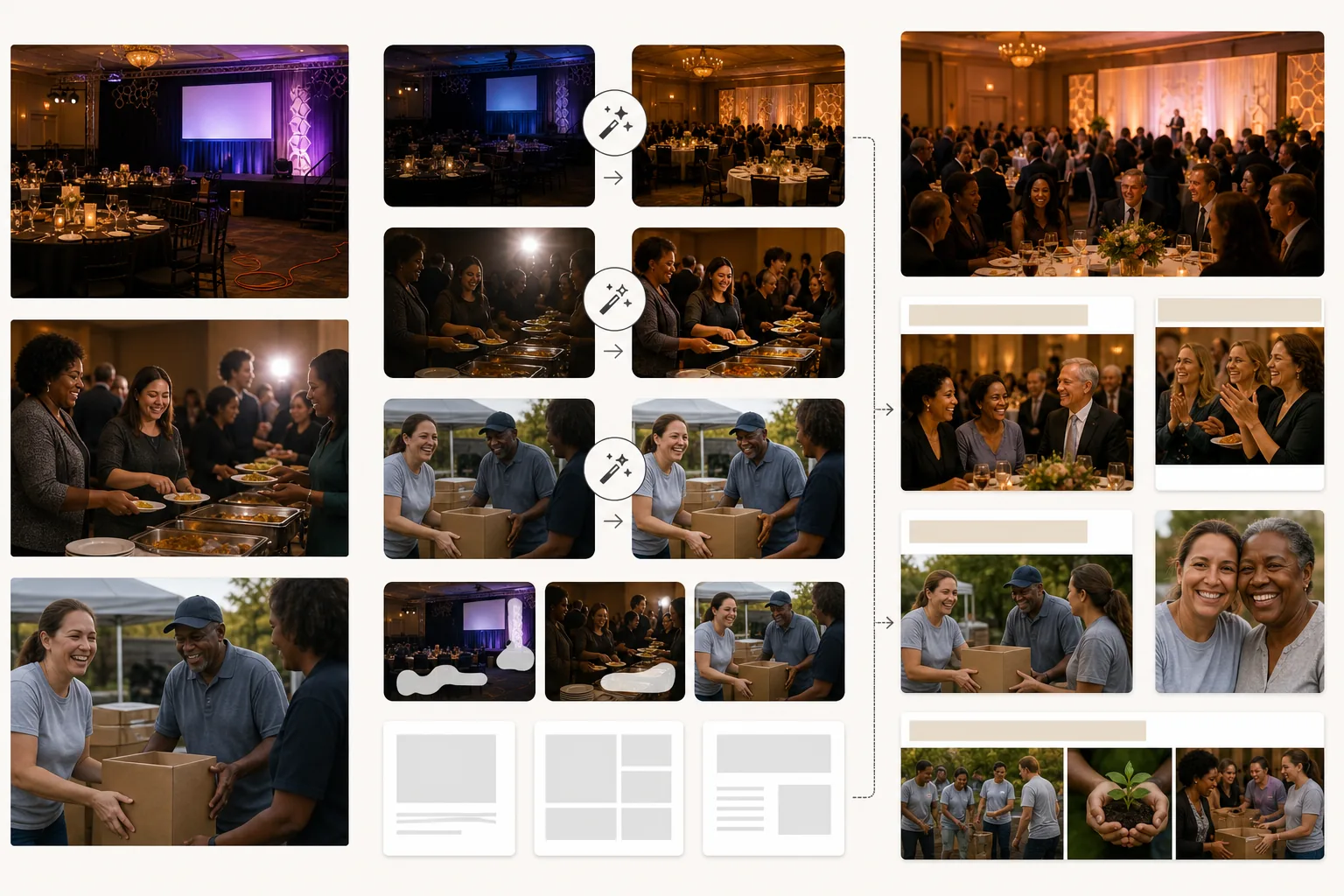
Cosa fa questo modello
Eleva la qualità visiva delle comunicazioni delle organizzazioni no-profit senza richiedere un budget per la fotografia professionale. La maggior parte delle foto no-profit viene scattata da volontari o membri dello staff con telefoni personali in ambienti difficili: sale per banchetti poco illuminate, affollati eventi all'aperto, siti di programmi gremiti. AI Enhance corregge la sottoesposizione, uniforma l'illuminazione mista di lampadari, fari da palco e candele da tavolo, e recupera i dettagli dei volti persi nell'ombra o bruciati dal flash della fotocamera. Magic Eraser rimuove gli elementi di disturbo che compromettono la qualità professionale dei materiali di raccolta fondi: cavi e prolunghe visibili ai gala, rifiuti e piatti di carta negli eventi all'aperto, attrezzature edili nei cantieri e la segnaletica di marca degli sponsor aziendali che non dovrebbe comparire in determinate comunicazioni. La gradazione calda dei colori trasmette connessione umana e impatto positivo, che secondo le ricerche sulla comunicazione no-profit stimola la risposta dei donatori.
Impostazioni del modello
| Correzione dell'illuminazione | Preset per sala per banchetti, evento all'aperto e sito di programma al chiuso |
| Correzione del flash | Riduce i punti caldi intensi del flash e gli occhi rossi preservando il calore ambientale |
| Pulizia dello sfondo | Rimuove cavi, segnaletica temporanea e disordine dell'evento |
| Gradazione dei colori | Comunità calda (enfatizza la connessione umana e l'energia positiva) |
| Risoluzione di output | 3000×2000px (3:2 per relazioni annuali, newsletter e web) |
Come usare questo modello
Carica le foto di eventi o programmi
Carica foto di gala di raccolta fondi, eventi di volontariato, attività dei programmi, iniziative di sensibilizzazione comunitaria e qualsiasi attività organizzativa. Foto da telefono, scatti da compatte e immagini da reflex digitali funzionano tutte. Il modello gestisce l'ampia gamma di condizioni di illuminazione che le organizzazioni no-profit incontrano.
Correggi illuminazione ed esposizione
AI Enhance schiarisce le foto sottoesposte di sale per banchetti ed eventi serali, corregge le dominanti di colore miste di lampadari e illuminazione da palco e riduce gli artefatti intensi del flash. I volti tra la folla che erano troppo scuri o troppo chiari vengono bilanciati per un aspetto naturale e caldo.
Rimuovi gli elementi di disturbo
Magic Eraser rimuove il disordine visivo che compromette la qualità professionale delle tue comunicazioni: prolunghe, attrezzature per il catering, striscioni degli sponsor (quando inappropriati) e materiali di allestimento dell'evento. L'IA ricostruisce il pavimento, le pareti e lo sfondo dietro gli elementi rimossi.
Esporta per le comunicazioni ai donatori
Scarica a 3000×2000px per relazioni annuali e richieste di sovvenzioni, oppure in formati ottimizzati per il web per campagne email, social media e il sito web dell'organizzazione. La qualità calda e professionale segnala ai donatori che i loro contributi finanziano programmi ben gestiti.
Consigli da professionisti per i migliori risultati
- ✓Cattura momenti di interazione autentica: un volontario e un partecipante che ridono insieme, un donatore che stringe la mano a un responsabile del programma, bambini assorti in un'attività. Sono questi momenti di connessione autentica a colpire i donatori, e il miglioramento con l'IA li fa risaltare anche quando catturati in condizioni scarse e imperfette.
- ✓Assegna una persona come fotografo a ogni evento. Anche un membro dello staff con un telefono produce risultati migliori rispetto ad affidarsi a scatti casuali, perché un'inquadratura e una tempistica intenzionali catturano i momenti che raccontano la storia della tua organizzazione.
- ✓Elabora tutte le foto di un singolo evento con le stesse impostazioni. Una correzione dell'illuminazione e una gradazione dei colori coerenti su una serie di foto creano una storia visiva organica per la relazione annuale o la pagina della campagna, anziché una raccolta disomogenea di scatti casuali.
Strumenti
Domande frequenti
Posso rimuovere i loghi degli sponsor dalle foto degli eventi?
+
Sì. Magic Eraser può rimuovere striscioni di marca, esposizioni di loghi e segnaletica degli sponsor dalle foto degli eventi. Questo è utile quando le foto di un evento sponsorizzato vengono usate in contesti in cui mettere in evidenza quello specifico sponsor è inappropriato, come le richieste di sovvenzioni a finanziatori concorrenti o il marketing generale dell'organizzazione.
Funziona per eventi di costruzione e volontariato all'aperto?
+
Sì. Gli eventi di volontariato all'aperto — costruzione di alloggi, pulizia di parchi, orti comunitari — hanno le proprie sfide, tra cui sole intenso, ombra mista e sfondi affollati di materiali da costruzione. Il modello corregge queste condizioni e rimuove dall'inquadratura attrezzature e materiali che distraggono.
Posso usarlo per le foto delle richieste di sovvenzioni?
+
Assolutamente. Le richieste di sovvenzioni con foto di programma di qualità professionale dimostrano la competenza organizzativa e l'efficace attuazione del programma. Il modello produce immagini che soddisfano lo standard visivo che i finanziatori si aspettano dalle organizzazioni affermate.
Mostra ai donatori l'impatto di ogni euro
Carica le foto di eventi e programmi e ottieni immagini curate che rafforzano gli appelli ai donatori, le relazioni annuali e le richieste di sovvenzioni.
Provalo gratisRelated templates
More business templates for your workflow.
Foto di team aziendali polacchi con sfondi coerenti, correzione dell'illuminazione professionale, gradazione del colore adeguata al marchio e qualità dell'immagine uniforme in tutto il team.
Migliora le foto di palestra e fitness con il miglioramento della definizione muscolare, la correzione dinamica dell'illuminazione, la pulizia dello sfondo e la gradazione del colore atletica ad alto contrasto.
Migliora le foto del portfolio di tatuaggi con la vivacità del colore dell'inchiostro, la nitidezza dei dettagli delle linee, la riduzione del rossore della pelle e sfondi puliti per portfolio di artisti e Instagram.
Crea un ritratto del curriculum raffinato con sostituzione dello sfondo, levigatura della pelle e correzione dell'illuminazione. Ideale per CV, portali di lavoro e directory aziendali.
Crea foto professionali di squadre e singoli giocatori con la sostituzione dello sfondo, il miglioramento del colore delle maglie e sfondi per stadi o studi per roster e programmi.
Crea foto promozionali professionali per band e musicisti con la sostituzione dello sfondo, un notevole miglioramento dell'illuminazione e risultati pronti per la stampa per cartelle stampa e invii per i locali.