
Foto per curriculum
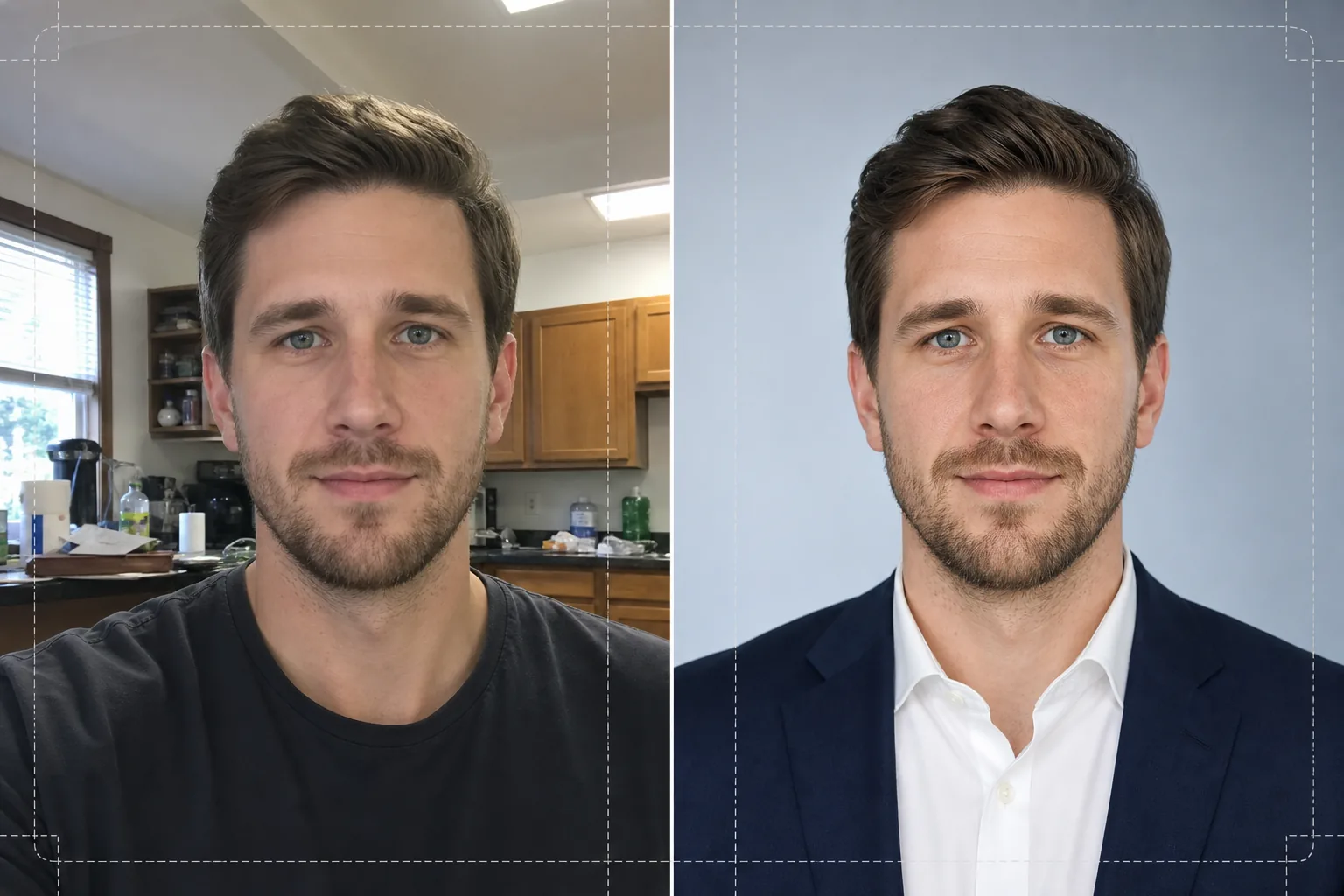
Trasforma qualsiasi foto informale in un ritratto pronto per le selezioni, ideale per curriculum, profili LinkedIn e portali di candidatura. Questo modello rimuove gli sfondi che distraggono, li sostituisce con uno sfondo pulito a tinta unita o sfumato, applica un ritocco naturale della pelle e corregge l'illuminazione irregolare in modo che tu appaia sicuro e affabile in ogni candidatura.
Prova gratis questo modelloBusiness template preview
Cosa fa questo modello
Trasforma selfie, scatti rapidi da telefono e ritratti informali in foto curate, adatte a curriculum e profili professionali. Background Eraser isola la testa e le spalle da qualsiasi ambiente — cucina, parco, postazione d'ufficio — e li sostituisce con uno sfondo bianco pieno, grigio chiaro o una delicata sfumatura blu in linea con le convenzioni aziendali. AI Enhance corregge poi gli squilibri di esposizione causati dai neon a soffitto o dalla luce dura di una finestra, leviga la texture della pelle preservando il dettaglio naturale dei pori e rende più nitidi gli occhi, così che l'attenzione di chi guarda sia attirata sul tuo viso. Il risultato è un ritratto dall'illuminazione uniforme e privo di distrazioni, che si stampa nitido a 2x2 pollici su un curriculum o appare ben definito come avatar 400x400 sui portali di lavoro.
Impostazioni del modello
| Sfondo | Bianco pieno, grigio chiaro (#F0F0F0) o delicata sfumatura blu |
| Ritocco della pelle | Levigatura naturale (riduce le imperfezioni, preserva la texture dei pori) |
| Correzione dell'illuminazione | Luce frontale uniforme con un lieve riflesso negli occhi |
| Proporzione di ritaglio | Ritratto 3:4 (proporzione standard di una foto per curriculum) |
| Risoluzione di output | 1200x1600px (stampa a 300 DPI fino a 4x5.3 pollici) |
Come usare questo modello
Carica la tua foto
Carica qualsiasi foto in cui il viso e le spalle siano ben visibili. Selfie, scatti da webcam e foto di gruppo ritagliate vanno tutti bene. Il modello gestisce immagini da qualsiasi dispositivo e compensa la distorsione dell'obiettivo tipica delle fotocamere frontali dei telefoni.
Rimuovere e sostituire lo sfondo
Background Eraser rileva automaticamente la tua testa e le tue spalle e rimuove tutto ciò che si trova dietro di te. Scegli uno sfondo bianco pieno, grigio neutro o con una sottile sfumatura blu. Il rilevamento dei bordi preserva i capelli ribelli e i dettagli del colletto per uno scontorno naturale.
Migliorare e ritoccare
AI Enhance bilancia l'illuminazione su tutto il viso, riducendo le ombre marcate sotto il mento e il naso. Il ritocco della pelle elimina le imperfezioni temporanee e uniforma l'incarnato senza creare un effetto plastico. La nitidezza degli occhi aggiunge un lieve riflesso che rende il ritratto vivo e attento.
Scaricare e usare
Esporta il ritratto finito a 1200x1600px. Il file è ottimizzato sia per la stampa (inserimento nel curriculum a 300 DPI) sia per il digitale (foto profilo di LinkedIn, Indeed, Glassdoor). Sono disponibili i formati JPEG e PNG — usa il PNG se hai bisogno che lo sfondo resti trasparente per layout personalizzati.
Consigli da professionisti per risultati ottimali
- ✓Usa una foto in cui guardi l'obiettivo con le spalle leggermente angolate. Una lieve rotazione di tre quarti aggiunge profondità e appare più naturale di una posa perfettamente frontale.
- ✓Evita le foto con forte controluce — stare davanti a una finestra luminosa rende il viso una sagoma e limita quanto dettaglio l'IA può recuperare nelle zone in ombra.
- ✓Indossa un capo a tinta unita che contrasti con lo sfondo che intendi usare. Una camicia bianca su uno sfondo bianco si fonde all'altezza delle spalle e fa perdere il contorno della tua figura.
Strumenti
Domande frequenti
Posso usare un selfie scattato con il telefono?
+
Sì. Il modello corregge la lieve distorsione a barilotto delle fotocamere frontali che fa apparire il naso più largo del reale. Gestisce inoltre la minore profondità di campo tipica delle fotocamere dei telefoni, così le orecchie e le spalle restano nitide.
Il ritocco si noterà?
+
No. Il ritocco della pelle preserva la texture naturale dei pori e rimuove solo le imperfezioni temporanee come brufoli e rossori. Il risultato ti somiglia, come in una buona giornata con una buona luce, non come una foto ritoccata con l'aerografo.
Quale colore di sfondo dovrei scegliere per un curriculum aziendale?
+
Il bianco pieno è la scelta più sicura per i curriculum stampati. Il grigio chiaro funziona bene per i profili visualizzati a schermo, perché evita il contrasto netto del bianco puro su un display retroilluminato. La sfumatura blu è adatta ai settori tech e creativi.
Conquista il tuo prossimo colloquio con un ritratto professionale
Carica qualsiasi foto e ottieni in pochi secondi un ritratto curato e pronto per le selezioni per il tuo curriculum, LinkedIn e i portali di lavoro.
Provalo gratisRelated templates
More business templates for your workflow.
Foto di team aziendali polacchi con sfondi coerenti, correzione dell'illuminazione professionale, gradazione del colore adeguata al marchio e qualità dell'immagine uniforme in tutto il team.
Migliora le foto di palestra e fitness con il miglioramento della definizione muscolare, la correzione dinamica dell'illuminazione, la pulizia dello sfondo e la gradazione del colore atletica ad alto contrasto.
Migliora le foto del portfolio di tatuaggi con la vivacità del colore dell'inchiostro, la nitidezza dei dettagli delle linee, la riduzione del rossore della pelle e sfondi puliti per portfolio di artisti e Instagram.
Crea foto professionali di squadre e singoli giocatori con la sostituzione dello sfondo, il miglioramento del colore delle maglie e sfondi per stadi o studi per roster e programmi.
Crea foto promozionali professionali per band e musicisti con la sostituzione dello sfondo, un notevole miglioramento dell'illuminazione e risultati pronti per la stampa per cartelle stampa e invii per i locali.
Metti in mostra la nail art con miglioramento dei dettagli a livello macro, vera precisione dei colori di gel e smalti e posizionamento pulito delle mani per portfolio Instagram e pagine di prenotazione.