
Foto per portfolio di tatuaggi
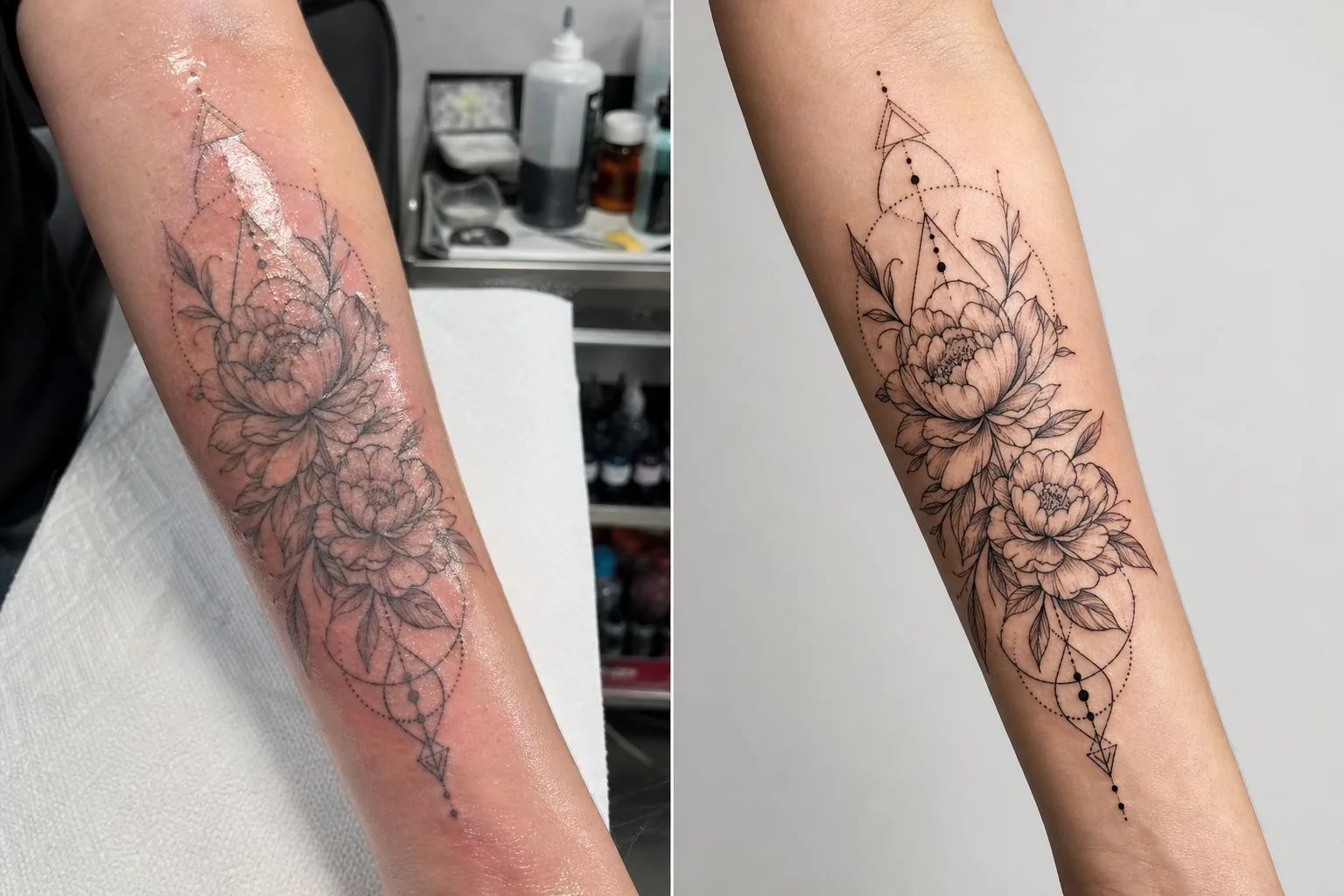
Mostra il tuo lavoro di tatuaggio con il dettaglio e la fedeltà cromatica che attirano nuovi clienti. Questo modello potenzia la saturazione dell'inchiostro e la nitidezza delle linee, riduce rossore e gonfiore della pelle dopo la seduta, corregge l'illuminazione dello studio per colori dell'inchiostro fedeli e crea presentazioni di portfolio pulite che lasciano parlare l'opera.
Prova gratis questo modelloBusiness template preview
Cosa fa questo modello
Affronta le sfide fotografiche specifiche che i tatuatori incontrano nel documentare il proprio lavoro. I tatuaggi appena fatti vengono fotografati in condizioni di studio con illuminazione mista, e la pelle attorno all'inchiostro nuovo è arrossata, gonfia e ricoperta di inchiostro in eccesso e pomata — nulla di tutto ciò rappresenta il risultato finale guarito. Questo modello usa AI Enhance per correggere l'illuminazione in modo che i colori dell'inchiostro appaiano come saranno una volta guariti, affina il lavoro di linee fini e i dettagli del dotwork e riduce rossore e gonfiore attorno ai tatuaggi recenti. Magic Eraser rimuove il disordine sullo sfondo della postazione di tatuaggio, comprese boccette di inchiostro, salviette di carta, guanti e attrezzatura, creando uno sfondo pulito che concentra l'attenzione interamente sull'opera.
Impostazioni del modello
| Potenziamento dell'inchiostro | Boost di saturazione del colore per stili di tatuaggio in nero, a colori e ad acquerello |
| Nitidezza delle linee | Potenziamento dei micro-dettagli di linee fini e dotwork |
| Correzione della pelle | Riduce rossore, gonfiore e lucidità della pomata attorno ai tatuaggi recenti |
| Correzione dell'illuminazione | Corregge l'illuminazione mista da studio in luce diurna neutra per colori dell'inchiostro fedeli |
| Sfondo | Sfondo pulito a tinta unita o sfocato (rimuove il disordine della postazione) |
| Dimensioni di output | 2000 × 2000 px (quadrato Instagram) o 4000px per la stampa del portfolio |
Come usare questo modello
Carica la foto del tuo tatuaggio
Carica una foto del tatuaggio completato — fresco o guarito. Fotografa il tatuaggio frontalmente per ridurre al minimo la distorsione prospettica. Il modello gestisce primi piani di dettaglio, scatti d'insieme dell'opera completa e composizioni avvolgenti su superfici corporee curve come braccia, gambe e costole.
Potenziamento di inchiostro e linee
AI Enhance aumenta la saturazione dell'inchiostro così che i tatuaggi in nero appaiano profondi e intensi mentre quelli a colori mostrano tutta la loro vivacità. Linee fini, dotwork e motivi geometrici vengono affinati per mostrare la precisione del tuo lavoro con l'ago. Il potenziamento rispetta i diversi stili di tatuaggio — tradizionale deciso, linea fine, acquerello e blackwork ricevono ciascuno un trattamento adeguato.
Correzione di pelle e sfondo
Per i tatuaggi recenti, il rossore e il gonfiore attorno all'inchiostro vengono ridotti per avvicinarsi all'aspetto guarito. La lucidità della pomata e l'inchiostro in eccesso sulla pelle circostante vengono attenuati. Magic Eraser rimuove lo sfondo della postazione di tatuaggio — coppette di inchiostro, salviette di carta, guanti e attrezzatura — sostituendolo con uno sfondo pulito.
Esporta per portfolio e social
Scarica nel formato quadrato 2000 × 2000 px per i post di portfolio su Instagram, oppure a 4000px sul lato lungo per portfolio di siti web e lookbook stampati. Il profilo colore preserva l'intera gamma dei colori dell'inchiostro da tatuaggio, comprese le sottili variazioni di tonalità degli stili acquerello e neo-traditional.
Consigli da professionisti per risultati ottimali
- ✓Fotografa il tatuaggio con una luce bilanciata sulla luce diurna (5000–5500K) da un'angolazione costante. Questo fornisce al modello i dati cromatici più accurati su cui lavorare. Le luci al tungsteno calde fanno apparire l'inchiostro più giallo-arancione, e la correzione, pur efficace, dà risultati migliori partendo da un'illuminazione neutra.
- ✓Pulisci l'inchiostro in eccesso e la pomata dalla superficie della pelle prima di fotografare. Il modello riduce la lucidità della pomata, ma una superficie pulita e tamponata mostra il lavoro a inchiostro più chiaramente e produce un risultato migliorato migliore.
- ✓Quando possibile, fotografa sia la versione fresca sia quella guarita dello stesso tatuaggio. La foto fresca elaborata dal modello ti dà contenuti per il portfolio immediati, mentre quella guarita conferma il risultato reale stabilizzato. Entrambe le versioni nel tuo portfolio dimostrano professionalità.
- ✓Per le opere grandi che si avvolgono attorno agli arti, scatta più primi piani di dettaglio sovrapposti oltre alla panoramica dell'opera completa. Il modello affina i dettagli che si perdono negli scatti d'insieme ampi, e i primi piani degli elementi salienti creano post di portfolio singoli d'impatto.
Strumenti
Domande frequenti
Può far sembrare guarito un tatuaggio appena fatto?
+
Il modello riduce rossore e gonfiore per avvicinarsi all'aspetto guarito, ma il risultato è un miglioramento, non una previsione perfetta della guarigione. La guarigione individuale varia in base al tipo di pelle, al tipo di inchiostro e alla zona del corpo. La foto fresca migliorata apparirà vicina a quella guarita ma potrebbe non essere identica al risultato guarito reale.
Funziona con tutti gli stili di tatuaggio?
+
Sì. Il modello riconosce e migliora in modo appropriato gli stili tradizionale deciso, giapponese, linea fine, dotwork, geometrico, acquerello, neo-traditional, blackwork e ritratto realistico. Ogni stile riceve una nitidezza e un trattamento cromatico differenti, calibrati per ciò che valorizza al meglio quell'estetica.
E i tatuaggi di copertura?
+
I tatuaggi di copertura vengono elaborati come qualsiasi altro tatuaggio. Il modello migliora l'inchiostro visibile, cioè il disegno di copertura. Se vuoi mostrare il prima e dopo (originale rispetto alla copertura), elabora ogni foto separatamente per la presentazione di portfolio più coerente.
Un portfolio che riempie la tua agenda
Carica le foto dei tatuaggi e ottieni immagini per il portfolio nitide nei dettagli e fedeli nei colori che valorizzano la tua arte e attirano nuovi clienti.
Provalo gratisRelated templates
More business templates for your workflow.
Foto di team aziendali polacchi con sfondi coerenti, correzione dell'illuminazione professionale, gradazione del colore adeguata al marchio e qualità dell'immagine uniforme in tutto il team.
Migliora le foto di palestra e fitness con il miglioramento della definizione muscolare, la correzione dinamica dell'illuminazione, la pulizia dello sfondo e la gradazione del colore atletica ad alto contrasto.
Crea un ritratto del curriculum raffinato con sostituzione dello sfondo, levigatura della pelle e correzione dell'illuminazione. Ideale per CV, portali di lavoro e directory aziendali.
Crea foto professionali di squadre e singoli giocatori con la sostituzione dello sfondo, il miglioramento del colore delle maglie e sfondi per stadi o studi per roster e programmi.
Crea foto promozionali professionali per band e musicisti con la sostituzione dello sfondo, un notevole miglioramento dell'illuminazione e risultati pronti per la stampa per cartelle stampa e invii per i locali.
Metti in mostra la nail art con miglioramento dei dettagli a livello macro, vera precisione dei colori di gel e smalti e posizionamento pulito delle mani per portfolio Instagram e pagine di prenotazione.