
Foto aziendale del team
Dai alla pagina del tuo team un aspetto professionale e coerente senza un fotografo costoso. Questo modello uniforma gli sfondi dei singoli ritratti, corregge l'illuminazione mista dell'ufficio verso toni professionali neutri, applica un sottile ammorbidimento della pelle e garantisce che la foto di ogni membro del team abbia lo stesso stile e la stessa qualità.
Prova gratuitamente questo modelloBusiness template preview
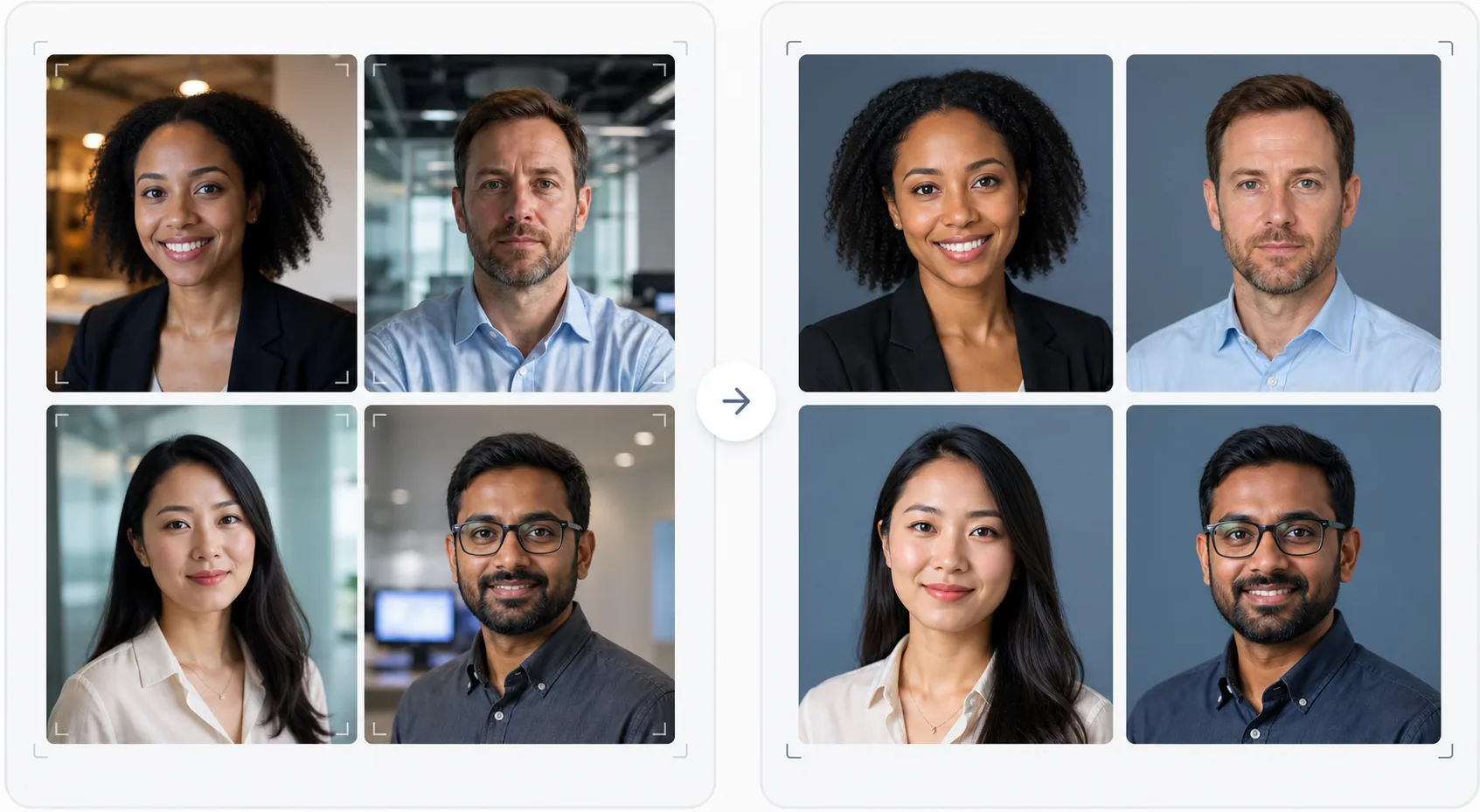
Cosa fa questo modello
Crea foto del team visivamente coerenti per i siti web aziendali, le pagine aziendali LinkedIn e i materiali di marketing. Quando i ritratti del team vengono scattati in momenti diversi, da persone diverse, con fotocamere diverse, il risultato è una pagina del team disomogenea che appare poco professionale. Questo modello risolve il problema uniformando sfondi, temperatura del colore, stile di illuminazione e inquadratura su tutti i ritratti. Background Eraser rimuove i vari sfondi d'ufficio e li sostituisce con uno sfondo uniforme a tinta unita o sfumato nel colore del tuo brand. AI Enhance normalizza l'esposizione, corregge la dominante verde delle luci fluorescenti dell'ufficio e applica un sottile ammorbidimento della pelle in modo che ogni membro del team appaia curato e professionale.
Impostazioni del modello
| Sfondo | Tinta unita, sfumatura o sfocatura d'ufficio uniforme (configurabile in base al brand) |
| Inquadratura | Testa e spalle, centrata, uniforme su tutte le foto del team |
| Normalizzazione dell'illuminazione | Professionale neutra (corregge il mix di fluorescente, LED e luce della finestra) |
| Miglioramento della pelle | Riduzione sottile delle imperfezioni e correzione delle occhiaie |
| Dimensioni di output | 800 × 800 px (pagina del team web) e 400 × 400 px (directory) |
Come usare questo modello
Carica le foto dei membri del team
Carica i ritratti dei membri del team: possono provenire da fotocamere, luoghi e periodi diversi. Il modello gestisce di tutto, dai ritratti professionali ai selfie scattati con lo smartphone alla scrivania. Carica in blocco l'intero team per un'elaborazione efficiente.
Uniforma gli sfondi
Background Eraser rimuove lo sfondo originale di ogni foto e lo sostituisce con un'opzione uniforme per tutti i membri del team. Scegli tra colori a tinta unita del brand, sfumature professionali o un effetto di sfocatura d'ufficio standardizzato. Tutte le foto ricevono lo stesso trattamento dello sfondo per l'uniformità visiva.
Normalizza l'illuminazione e migliora
AI Enhance corregge l'illuminazione di ogni foto verso un tono professionale neutro e uniforme. Le dominanti verdi fluorescenti, le dominanti calde incandescenti e l'illuminazione mista vengono tutte corrette. Il sottile ammorbidimento della pelle riduce le imperfezioni e le occhiaie. Gli occhi vengono delicatamente schiariti per creare un aspetto coinvolgente e accessibile.
Esporta per web e directory
Scarica l'intero set a 800 × 800 px per le pagine del team del sito web e a 400 × 400 px per le directory interne e le firme e-mail. Tutte le immagini vengono esportate con lo stesso profilo colore, compressione e convenzione di denominazione dei file per un facile caricamento in blocco nel tuo CMS.
Consigli da professionisti per risultati ottimali
- ✓Invia ai membri del team un semplice brief fotografico: guardare direttamente l'obiettivo, indossare un capo superiore a tinta unita che contrasti con lo sfondo, garantire una buona illuminazione del viso (rivolgersi verso una finestra se possibile) e mantenere un'espressione naturale con un leggero sorriso. Foto di origine migliori richiedono meno correzioni dell'IA.
- ✓Scegli un colore di sfondo presente nelle linee guida del tuo brand: di solito un grigio neutro, blu navy o il colore secondario del brand. Questo trasforma la pagina del team in un asset di brand anziché in una semplice raccolta di foto.
- ✓Elabora i nuovi membri del team attraverso il modello quando entrano a far parte del team, usando le stesse impostazioni. Questo mantiene l'uniformità visiva nel tempo anche mentre il team cresce e cambia.
- ✓Per i dirigenti e la leadership, valuta un'inquadratura leggermente diversa (taglio più stretto, tono leggermente più caldo) per distinguere visivamente la leadership dal resto del team mantenendo lo stesso sfondo e stile.
Strumenti
Domande frequenti
Posso elaborare l'intero team in una volta sola?
+
Sì. Carica tutte le foto dei membri del team in un unico blocco. Il modello applica lo stesso sfondo, la stessa correzione dell'illuminazione e la stessa inquadratura a ogni immagine, garantendo una coerenza perfetta. Le foto vengono restituite con dimensioni, compressione e profili colore corrispondenti.
Cosa succede se i membri del team hanno una qualità delle foto molto diversa?
+
Il modello normalizza le differenze di qualità tra i selfie da smartphone e i ritratti con reflex DSLR regolando nitidezza, riduzione del rumore e compressione. Sebbene una sorgente DSLR produca sempre un risultato leggermente più nitido, gli output elaborati sono visivamente coerenti a sufficienza da rendere le differenze di qualità non evidenti su una griglia di un sito web.
Funziona per i team remoti?
+
Questo è il caso d'uso ideale per i team remoti in cui un servizio fotografico di persona non è pratico. Ogni membro del team si scatta un selfie o si fa fotografare da qualcuno a casa, e il modello li uniforma tutti in modo che sembrino scattati nella stessa sessione in studio.
Una pagina del team professionale senza il servizio fotografico
Carica ritratti individuali da qualsiasi fonte e ottieni un set di foto del team visivamente coerente e allineato al brand, pronto per il tuo sito web.
Provalo gratisRelated templates
More business templates for your workflow.
Migliora le foto di palestra e fitness con il miglioramento della definizione muscolare, la correzione dinamica dell'illuminazione, la pulizia dello sfondo e la gradazione del colore atletica ad alto contrasto.
Migliora le foto del portfolio di tatuaggi con la vivacità del colore dell'inchiostro, la nitidezza dei dettagli delle linee, la riduzione del rossore della pelle e sfondi puliti per portfolio di artisti e Instagram.
Crea un ritratto del curriculum raffinato con sostituzione dello sfondo, levigatura della pelle e correzione dell'illuminazione. Ideale per CV, portali di lavoro e directory aziendali.
Crea foto professionali di squadre e singoli giocatori con la sostituzione dello sfondo, il miglioramento del colore delle maglie e sfondi per stadi o studi per roster e programmi.
Crea foto promozionali professionali per band e musicisti con la sostituzione dello sfondo, un notevole miglioramento dell'illuminazione e risultati pronti per la stampa per cartelle stampa e invii per i locali.
Metti in mostra la nail art con miglioramento dei dettagli a livello macro, vera precisione dei colori di gel e smalti e posizionamento pulito delle mani per portfolio Instagram e pagine di prenotazione.