
Medico prima e dopo
Produci fotografie prima e dopo standardizzate dal punto di vista clinico per studi di dermatologia, chirurgia plastica, odontoiatria e medicina estetica. Questo modello uniforma illuminazione e colore tra le coppie di confronto, sostituisce gli sfondi incoerenti della sala visite con sfondi clinici puliti e fornisce strumenti di ritaglio e oscuramento attenti alla privacy, conferendo alle immagini di marketing del tuo studio la coerenza e la professionalità che costruiscono la fiducia dei pazienti.
Prova gratis questo modelloBusiness template preview
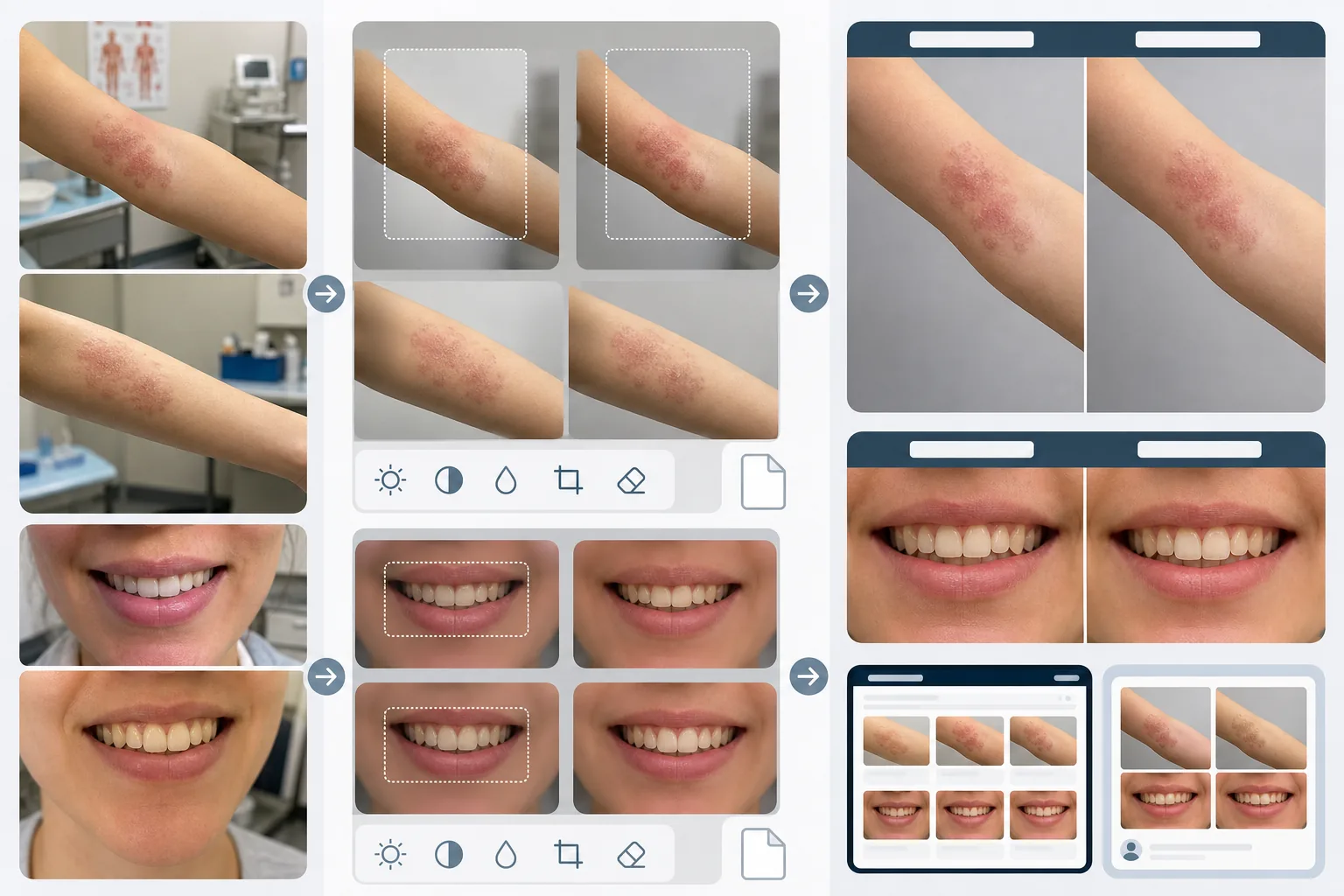
Cosa fa questo modello
Crea la coerenza visiva che rende i confronti medici prima e dopo credibili e convincenti. Il problema più grande della fotografia clinica è che le immagini prima e dopo vengono scattate a settimane o mesi di distanza, in condizioni di illuminazione diverse, con fotocamere diverse e talvolta in stanze diverse. AI Enhance uniforma l'esposizione, la temperatura del colore e il bilanciamento del bianco su entrambe le immagini, in modo che ogni differenza visibile sia dovuta alla procedura e non alla fotografia. Magic Eraser rimuove il disordine della sala visite — strumenti medici sui banconi, cartelle alle pareti, carrelli per le apparecchiature sullo sfondo — e lo sostituisce con uno sfondo clinico neutro. Le funzionalità di privacy includono il rilevamento e l'oscuramento automatici dei segni identificativi, la possibilità di ritagliare regioni corporee specifiche e la rimozione dei metadati per la protezione dei dati dei pazienti.
Impostazioni del modello
| Uniformazione dell'illuminazione | Abbina esposizione, temperatura del colore e bilanciamento del bianco tra la coppia prima/dopo |
| Sfondo | Grigio neutro clinico, bianco pulito o telo chirurgico blu |
| Oscuramento per privacy | Sfoca automaticamente i tratti identificativi al di fuori dell'area di trattamento |
| Coerenza di scala | Abbina inquadratura e ingrandimento tra le immagini prima e dopo |
| Rimozione dei metadati | Rimuovi i dati EXIF di posizione, dispositivo e timestamp per la consapevolezza HIPAA |
| Risoluzione di output | 2400×1600px per immagine (composito affiancato a 4800×1600px) |
Come usare questo modello
Carica le foto prima e dopo
Carica l'immagine prima e la corrispondente immagine dopo. Il modello gestisce foto scattate con configurazioni di fotocamere cliniche, smartphone e fotocamere compatte. Caricale in coppia così l'IA può abbinare le impostazioni di uniformazione tra le due immagini.
Uniforma illuminazione e inquadratura
AI Enhance abbina esposizione, temperatura del colore e bilanciamento del bianco tra le due immagini. Se l'inquadratura differisce — più ravvicinata in uno scatto, più ampia nell'altro — il modello regola il ritaglio in modo che l'area di trattamento sia alla stessa scala e posizione in entrambe le immagini, per un confronto visivo equo.
Pulisci lo sfondo e applica la privacy
Magic Eraser rimuove il disordine della sala visite e sostituisce lo sfondo con uno sfondo clinico neutro. L'oscuramento per la privacy sfoca o ritaglia i tratti identificativi al di fuori dell'area di trattamento. I metadati EXIF contenenti posizione, informazioni sul dispositivo e timestamp vengono rimossi.
Esporta per il marketing dello studio
Scarica immagini singole o un composito affiancato con intestazioni etichettate 'Before' e 'After'. Gli output sono dimensionati per gallerie di siti web, schermi delle sale di consultazione e social media. La presentazione clinica coerente costruisce credibilità con i potenziali pazienti che sfogliano la tua galleria di risultati.
Consigli da professionisti per i migliori risultati
- ✓Allestisci nello studio una postazione fotografica coerente con illuminazione fissa e sfondo neutro. Anche se il modello può uniformare diverse condizioni di illuminazione, partire da una configurazione coerente produce il confronto più preciso e riduce il rischio di artefatti di uniformazione.
- ✓Usa la stessa lunghezza focale e la stessa distanza della fotocamera per gli scatti prima e dopo. Il modello regola le differenze di inquadratura, ma la distorsione prospettica dovuta a diverse distanze obiettivo-soggetto può modificare in modo sottile l'aspetto dei tratti del viso o dei contorni del corpo, compromettendo la credibilità del confronto.
- ✓Ottieni sempre il consenso scritto del paziente per la fotografia prima e dopo e per l'uso previsto prima di elaborare le immagini. Il modello fornisce funzionalità di privacy ma non sostituisce il requisito legale del consenso informato.
Strumenti
Domande comuni
È conforme all'HIPAA?
+
Il modello offre funzionalità attente alla privacy — rimozione dei metadati, oscuramento dei tratti identificativi e ritaglio sull'area di trattamento — che supportano la conformità all'HIPAA. Tuttavia, la conformità all'HIPAA è una responsabilità organizzativa. Il modello è uno strumento, non un programma di conformità. Consulta il tuo responsabile della conformità in merito ai requisiti specifici del tuo studio.
Posso elaborare foto dentali prima e dopo?
+
Sì. Il modello gestisce foto intraorali, primi piani del sorriso e fotografia dentale a viso intero. L'uniformazione dell'illuminazione è particolarmente preziosa per le foto dentali, in cui l'immagine prima è spesso scattata sotto la luce della sala visite mentre quella dopo è scattata con un flash anulare.
Le differenze di texture della pelle saranno preservate accuratamente?
+
Sì. L'uniformazione regola illuminazione e colore senza levigare la texture della pelle. Questo è fondamentale: i miglioramenti della texture della pelle derivanti da procedure dermatologiche devono essere visibili nel confronto. Il modello, intenzionalmente, non applica ritocchi della pelle alle immagini mediche prima e dopo.
Costruisci la fiducia dei pazienti con una fotografia clinica coerente
Carica le foto prima e dopo e ottieni immagini di confronto standardizzate e attente alla privacy per il marketing del tuo studio.
Provalo gratisRelated templates
More business templates for your workflow.
Foto di team aziendali polacchi con sfondi coerenti, correzione dell'illuminazione professionale, gradazione del colore adeguata al marchio e qualità dell'immagine uniforme in tutto il team.
Migliora le foto di palestra e fitness con il miglioramento della definizione muscolare, la correzione dinamica dell'illuminazione, la pulizia dello sfondo e la gradazione del colore atletica ad alto contrasto.
Migliora le foto del portfolio di tatuaggi con la vivacità del colore dell'inchiostro, la nitidezza dei dettagli delle linee, la riduzione del rossore della pelle e sfondi puliti per portfolio di artisti e Instagram.
Crea un ritratto del curriculum raffinato con sostituzione dello sfondo, levigatura della pelle e correzione dell'illuminazione. Ideale per CV, portali di lavoro e directory aziendali.
Crea foto professionali di squadre e singoli giocatori con la sostituzione dello sfondo, il miglioramento del colore delle maglie e sfondi per stadi o studi per roster e programmi.
Crea foto promozionali professionali per band e musicisti con la sostituzione dello sfondo, un notevole miglioramento dell'illuminazione e risultati pronti per la stampa per cartelle stampa e invii per i locali.