
Rimuovere fili e cavi dalle foto
Fili e cavi sono ovunque negli interni moderni e fanno sembrare disordinate tutte le foto di quegli interni, anche quando la stanza stessa è pulita. L'intelligenza artificiale di Magic Eraser rimuove i cavi del caricabatterie, i cavi della lampada, i cavi USB, i cavi HDMI e AV, i cavi Ethernet, i cavi delle cuffie e qualsiasi altro cablaggio visibile dalle foto di elenchi di immobili, scatti di prodotti, fotografie di cibo, foto di lifestyle e contenuti di visite guidate, ricostruendo la superficie sottostante in pochi secondi.
Ultimo aggiornamento
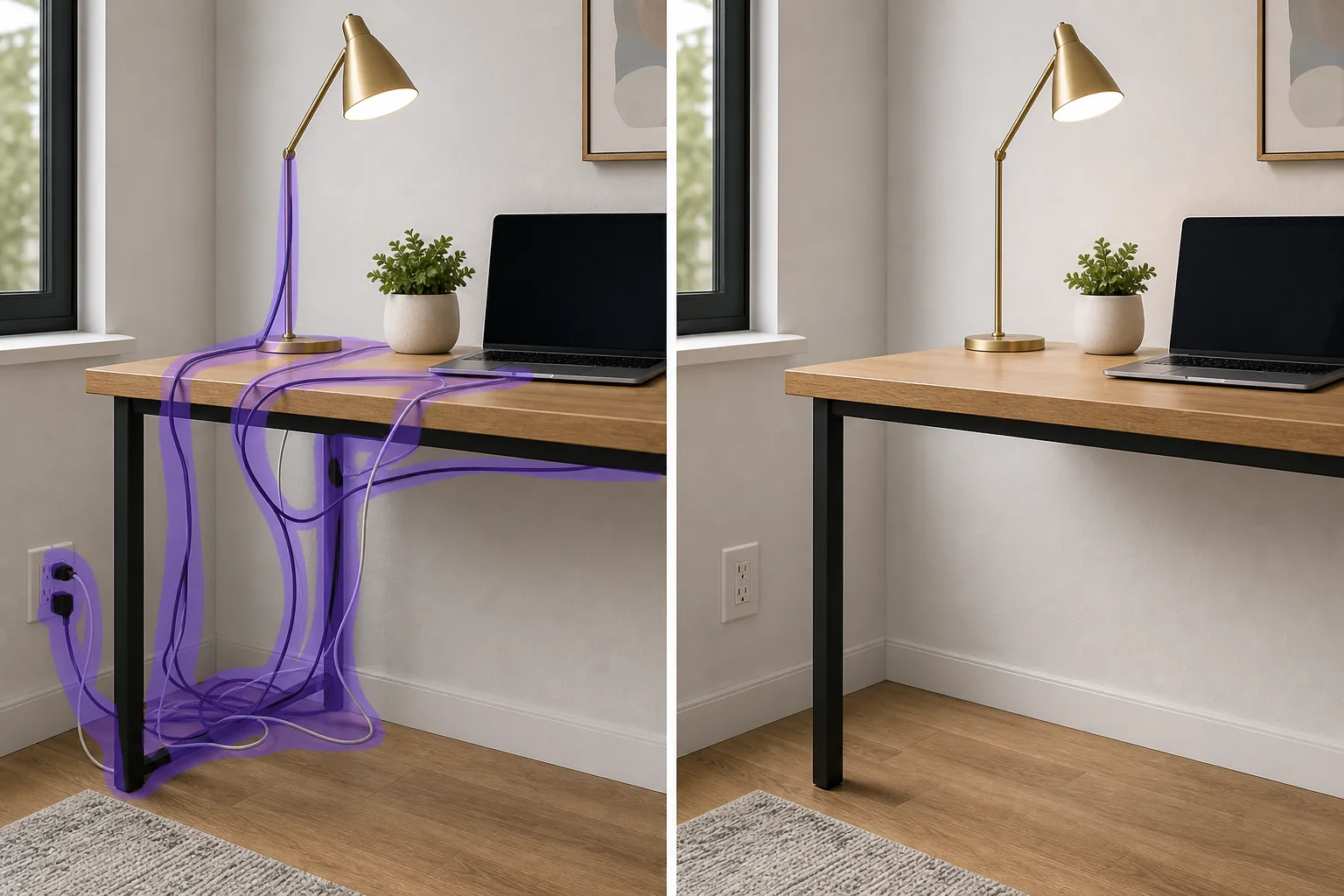
Come rimuovere fili e cavi da una foto
Per rimuovere fili e cavi da una foto, apri Magic Eraser su web, iOS o Android, carica l'immagine, passa il brush lungo ogni cavo — il cavo di un caricabatterie, il filo di una lampada o il groviglio dietro la TV — e lascia che l'AI ricostruisca la superficie sottostante. È gratis, senza registrazione. I cavi sottili su una superficie uniforme (una parete, il pavimento o un piano) spariscono quasi del tutto; dove invece un filo attraversa una zona affollata o a fantasia, il riempimento è una ricostruzione plausibile più che la copia esatta dell'originale. Per il risultato più pulito procedi cavo per cavo e, per un groviglio fitto dietro un mobile TV, passa il brush a sezioni, rilancia l'operazione e fai zoom per controllare. Il numero di piccoli dispositivi elettronici nella famiglia media è quasi raddoppiato nell’ultimo decennio (altoparlanti intelligenti, robot aspirapolvere, stazioni di ricarica multiple, lampadine intelligenti, telecamere di sicurezza, campanelli video, console di gioco, dispositivi di streaming, router mesh, spazzolini da denti elettrici) e ogni dispositivo porta da 1 a 3 cavi visibili. La casa media del Nord America ora contiene 20-40 cavi visibili tra i dispositivi elettronici del soggiorno, gli elettrodomestici da cucina, le scrivanie dell’ufficio, le stazioni di ricarica accanto al letto e i dispositivi per la pulizia del bagno. Nascondere i cavi dietro i mobili e all'interno delle canaline aiuta ma non li elimina: c'è sempre il cavo della lampada che corre lungo il muro, il cavo del dispositivo che collega il retro della TV al rack AV, il cavo di ricarica per il telefono sul comodino, il cavo del robot da cucina che non entra nel garage degli elettrodomestici. Per le inserzioni immobiliari, ogni filo nel telaio è una distrazione dell'acquirente dalle caratteristiche architettoniche che l'inserzione sta cercando di vendere. Per le foto dei prodotti scattate sul bancone della cucina o sulla scrivania, i cavi sullo sfondo vengono letti come "contenuti fatti in casa non professionali" anche quando il prodotto stesso è professionale. Per la fotografia di cibo nelle cucine domestiche, il cavo del tostapane e quello della macchina per il caffè fotobombano ogni scatto dall'alto altrimenti pulito. La rimozione manuale dei cavi in Photoshop è uno dei lavori di pulizia più complicati perché i cavi sono sottili, irregolari e attraversano ogni tipo di sfondo (pavimento in legno, moquette, bancone in pietra, piastrelle, pareti dipinte, tessuto) e lo strumento timbro clone deve ricostruire ogni tipo di sfondo lungo il percorso del cavo con una corrispondenza continua delle texture. L'intelligenza artificiale di Magic Eraser gestisce la geometria deducendo la superficie sottostante dalle regioni non bloccate adiacenti al filo e ricostruendo la superficie in modo continuo lungo il percorso del cavo in un unico passaggio della spazzola. Per le custodie con cavi densi (un supporto TV con 6-12 cavi visibili che vanno in ogni direzione), un flusso di lavoro a 2-3 passaggi gestisce la geometria senza corrispondenza manuale delle texture.
Cancella i fili in tre passaggi
- 1
Carica la foto
Apri Magic Eraser sul Web, iOS o Android. Inserisci la foto dell'annuncio immobiliare, la foto del prodotto, la cornice per la fotografia del cibo, l'allestimento dell'ufficio in casa o qualsiasi foto di interni in cui fili e cavi ingombrano la cornice. JPEG, PNG, HEIC e WebP sono tutti supportati.
- 2
Spennellare ogni filo e cavo
Dipingi su ogni filo visibile: cavi del caricabatterie, cavi della lampada, cavi USB, cavi HDMI e AV, cavi Ethernet, cavi delle cuffie, cavi degli elettrodomestici, cavi della telecamera di sicurezza. Coprire l'intero percorso del cavo più un piccolo margine per catturare le linee d'ombra lungo il cavo. Per gruppi di cavi densi (supporto TV con 8-12 cavi, scrivania di casa-ufficio con cavi per caricabatterie, monitor e tastiera), lavorare i cavi in due passaggi: prima i cavi visibili più spessi (alimentazione AV, alimentazione monitor), quindi i cavi più sottili (USB, audio, Ethernet). Lavorando per passaggi in base allo spessore del cavo si ottengono ricostruzioni più pulite rispetto a una passata di massa su tutto in una volta.
- 3
Tocca Cancella e perfeziona
L'intelligenza artificiale ricostruisce la superficie sottostante sotto ogni cavo: venature del pavimento in legno, trama del tappeto, motivo del controsoffitto in pietra, malta delle piastrelle, struttura delle pareti dipinte, trama del tessuto, abbinandole alle regioni circostanti non bloccate. Per le superfici ad alto contrasto (muro bianco con cavo nero, moquette chiara con cavo scuro), la ricostruzione è generalmente invisibile in un unico passaggio. Per superfici complesse con venature fortemente direzionali (pavimenti in assi di legno duro, motivi geometrici di piastrelle, sfondi di librerie con bordi di oggetti multipli), un passaggio di perfezionamento su qualsiasi area in cui la prima ipotesi dell'IA non continua del tutto il modello fornisce risultati invisibili. Esporta alla massima risoluzione.
Meglio per
- Foto di annunci immobiliari in cui i cavi sui muri, i banconi e i supporti TV distraggono dalle caratteristiche architettoniche vendute dall'annuncio
- Fotografie di prodotti scattate su scrivanie reali, banconi di cucina o banchi di officina dove i cavi di sfondo fanno sì che i prodotti professionali vengano letti come contenuti fatti in casa
- Fotografia di cibo nelle cucine domestiche reali, dove i cavi del tostapane, della macchina per il caffè e del robot da cucina fotografano scatti dall'alto altrimenti puliti
- Foto di installazione di home-office per post di blog, social media e lanci di prodotti in cui il disordine dei cavi della scrivania compromette l'estetica dello spazio di lavoro curato
- Contenuti home-tour per Instagram, YouTube e TikTok in cui i cavi della lampada e del caricabatterie in ogni fotogramma minano l'atmosfera di uno spazio calmo e curato
- Portfolio di foto di interior design che documentano progetti completati in cui il fotografo ha catturato la stanza prima che tutto lo stile post-scatto potesse nascondere i cavi
- Foto di animali domestici e ritratti di famiglia scattati in spazi abitativi reali dove i cavi del caricabatterie e i cavi dell'elettronica ingombrano lo sfondo
- Foto di annunci di Airbnb e di affitti in cui la visibilità via cavo segnala una proprietà come "disordinata" ai potenziali ospiti che scorrono la griglia dell'annuncio
Casi limite e punte
La rimozione del filo funziona meglio quando la superficie sottostante è visivamente coerente entro pochi centimetri dal cavo (un muro, una controsezione, un'area del pavimento) perché l'intelligenza artificiale utilizza la superficie circostante come riferimento per ricostruire la sezione dietro il cavo. Tre casi richiedono un approccio diverso. Innanzitutto, i fili che attraversano più superfici distinte in un unico passaggio (un cavo del caricabatterie che va da una presa a muro, attraverso il battiscopa, sopra un tappeto, su una scrivania): spazzolare il cavo in segmenti corrispondenti ai confini della superficie sottostante (un passaggio sulla sezione del muro, un passaggio sulla sezione del tappeto, un passaggio sulla sezione della scrivania). L'intelligenza artificiale gestisce ogni segmento di superficie con riferimenti puliti, laddove un pennello di massa continuo sull'intero percorso può produrre bordi incoerenti nei punti di transizione delle superfici. In secondo luogo, i fili corrono paralleli a forti schemi direzionali (cuciture di assi di legno duro, linee di malta per piastrelle, strisce di tessuto): l'IA ricostruirà la superficie ma potrebbe smussare leggermente lo schema direzionale lungo la sezione ricostruita. Per un lavoro editoriale degno di una cornice, un passaggio di perfezionamento di 2-3 minuti con lo strumento timbro clone in qualsiasi editor desktop (o il ritocco con pennello più piccolo di Magic Eraser) ripristina la nitidezza direzionale. Terzo, fili che scompaiono dietro altri oggetti nell'inquadratura (un cavo che corre dietro un vaso, parzialmente visibile da entrambi i lati): sfiorano solo i segmenti di cavo visibili, non la porzione dedotta dietro l'oggetto. L'intelligenza artificiale gestisce la ricostruzione visibile; la parte dietro l'oggetto non è già visibile e non necessita di modifiche. Nello specifico, per le foto delle inserzioni immobiliari, le regole MLS nella maggior parte delle regioni richiedono che le foto rappresentino accuratamente la proprietà: la rimozione dei cavi generalmente va bene come pulizia estetica poiché i cavi non sono elementi architettonici della proprietà, ma controlla le linee guida MLS specifiche.
Domande frequenti
- È gratuito rimuovere i fili da una foto?
- SÌ. Il livello gratuito di Magic Eraser copre la pulizia di fili e cavi con limiti di utilizzo giornaliero. L'aggiornamento a Premium ($ 29,99/anno) rimuove i limiti e sblocca esportazioni a risoluzione più elevata, utile per foto di elenchi MLS, lavori di catalogo di prodotti e fotografia editoriale di interni dove la piena risoluzione è importante su display e dimensioni di stampa di grandi dimensioni.
- Funziona su gruppi di cavi densi come un supporto TV con 8-12 cavi?
- Sì, con un approccio a due passaggi. Primo passaggio: spazzola i cavi visibili più spessi (cavi di alimentazione AV, cavi di alimentazione del monitor, alimentazione della console di gioco) e lascia che l'intelligenza artificiale ricostruisca la superficie sottostante. Secondo passaggio: spazzolare i rimanenti cavi più sottili (cavi USB, cavi audio, collegamenti Ethernet, cavi HDMI). Lavorando per passaggi in base allo spessore del cavo si ottengono ricostruzioni più pulite rispetto a un pennello di massa su tutto in una volta, perché l'intelligenza artificiale ha riferimenti più visibili tra le sezioni spazzolate. Per gruppi di cavi estremamente densi in cui i cavi ricoprono quasi completamente la superficie sottostante, un terzo passaggio sugli artefatti residui nelle intersezioni dei cavi produce risultati di livello archivistico.
- La superficie ricostruita apparirà ovviamente modificata?
- Per la maggior parte dei casi relativi a beni immobili, prodotti e stili di vita, la ricostruzione è invisibile alle dimensioni di visualizzazione tipiche (visualizzazione web, elenco MLS, feed social). Per stampe editoriali degne di una cornice a 16x20 o più grandi, pianifica un passaggio di rifinitura dopo la rimozione iniziale del filo: il primo passaggio dell'intelligenza artificiale a volte può smussare leggermente i modelli direzionali forti (cuciture di assi di legno duro, malta di piastrelle, trama di tessuto) lungo la sezione ricostruita. Un ritocco di 2-3 minuti con un pennello più piccolo o uno strumento timbro clone ripristina la nitidezza direzionale. Per i social media e le foto degli elenchi, il primo passaggio AI è solitamente sufficiente.
- Posso rimuovere i cavi dalla foto di un annuncio immobiliare?
- In genere sì, con alcune avvertenze. La maggior parte dei comitati MLS regionali richiedono foto dell'elenco per rappresentare accuratamente le caratteristiche permanenti della proprietà - e i cavi in genere non sono caratteristiche permanenti della proprietà (appartengono ai componenti elettronici del venditore che si muovono con loro alla chiusura). Rimuovere i cavi visibili per mettere in ordine lo scatto architettonico è una fotografia standard di inserzioni cosmetiche e in genere non è considerata una falsa dichiarazione. Le eccezioni: i cablaggi integrati come i cavi a vista che fanno parte dell'infrastruttura permanente della proprietà dovrebbero essere lasciati visibili poiché fanno parte di ciò che l'acquirente sta acquistando, e il cablaggio di sicurezza integrato o il cablaggio della casa intelligente che trasmette con la vendita dovrebbe essere rappresentato onestamente. Controlla le linee guida MLS regionali specifiche prima della pubblicazione.
- Che dire delle foto dei prodotti scattate su scrivanie o banconi reali?
- La pulizia dei fili nella fotografia dei prodotti è uno dei casi d'uso di maggior valore per il flusso di lavoro basato sull'intelligenza artificiale. Una foto di prodotto scattata su una vera scrivania o bancone spesso ha 5-15 cavi di sfondo nell'inquadratura (cavi del caricabatterie, cavi del monitor, cavi USB, cavi audio) che devono tutti scomparire prima che la foto venga interpretata come fotografia di prodotto professionale. La pulizia manuale di così tanti cavi in Photoshop richiede 20-45 minuti per foto; Magic Eraser gestisce la pulizia completa in 60-180 secondi per foto. Per i venditori di e-commerce, i negozi Etsy e i cataloghi di prodotti di piccole imprese che producono 20-100 foto per lancio, il risparmio di tempo si traduce in più ore per ciclo di lancio.
- Posso farlo sul mio telefono durante una presentazione immobiliare o una sessione di prodotto?
- SÌ. Le app iOS e Android di Magic Eraser eseguono lo stesso flusso di lavoro di rimozione dei cavi dell'app Web. Per gli agenti immobiliari che scattano foto di elenchi durante una visita con il telefono, un rapido passaggio di pulizia del cavo sulle foto degli eroi più forti prima di pubblicarle su MLS è completamente realizzabile dal telefono. Per i fotografi di prodotto che eseguono una rapida ripresa in batch su una scrivania o sul bancone della cucina, la pulizia sul dispositivo mantiene il flusso di lavoro solo sul telefono senza esportarlo nuovamente in un editor desktop per il passaggio di rimozione dei cavi.
- L'intelligenza artificiale gestisce cavi molto sottili (cavi USB, cavi delle cuffie) e cavi di alimentazione spessi?
- SÌ. I fili sottili sono in realtà leggermente più facili per l'intelligenza artificiale in molti casi perché c'è più riferimento alla superficie circostante per pixel dell'area del cavo, il che fornisce alla ricostruzione un'estrapolazione più pulita. La tecnica del pennello è la stessa: dipingi sul percorso del filo visibile più un piccolo margine per catturare le linee d'ombra e l'intelligenza artificiale ricostruisce la superficie sottostante. Per i cavi visibili più sottili (cavi delle cuffie, cavi di ricarica su superfici leggere), in genere un passaggio li gestisce in modo pulito. Il caso più difficile è il cavo molto spesso o molto lungo che passa su sfondi complessi: per questi, il flusso di lavoro a due passaggi descritto sopra produce risultati più puliti di un pennello continuo.