
Rimuovi la pioggia dalle foto
Elimina le strisce di pioggia, le gocce d'acqua sull'obiettivo e gli effetti della superficie bagnata dalle foto all'aperto. Magic Eraser rimuove gli artefatti della pioggia e rende più nitida la scena sottostante, salvando foto di eventi di giorni di pioggia, scatti di viaggio e ritratti all'aperto.
Ultimo aggiornamento
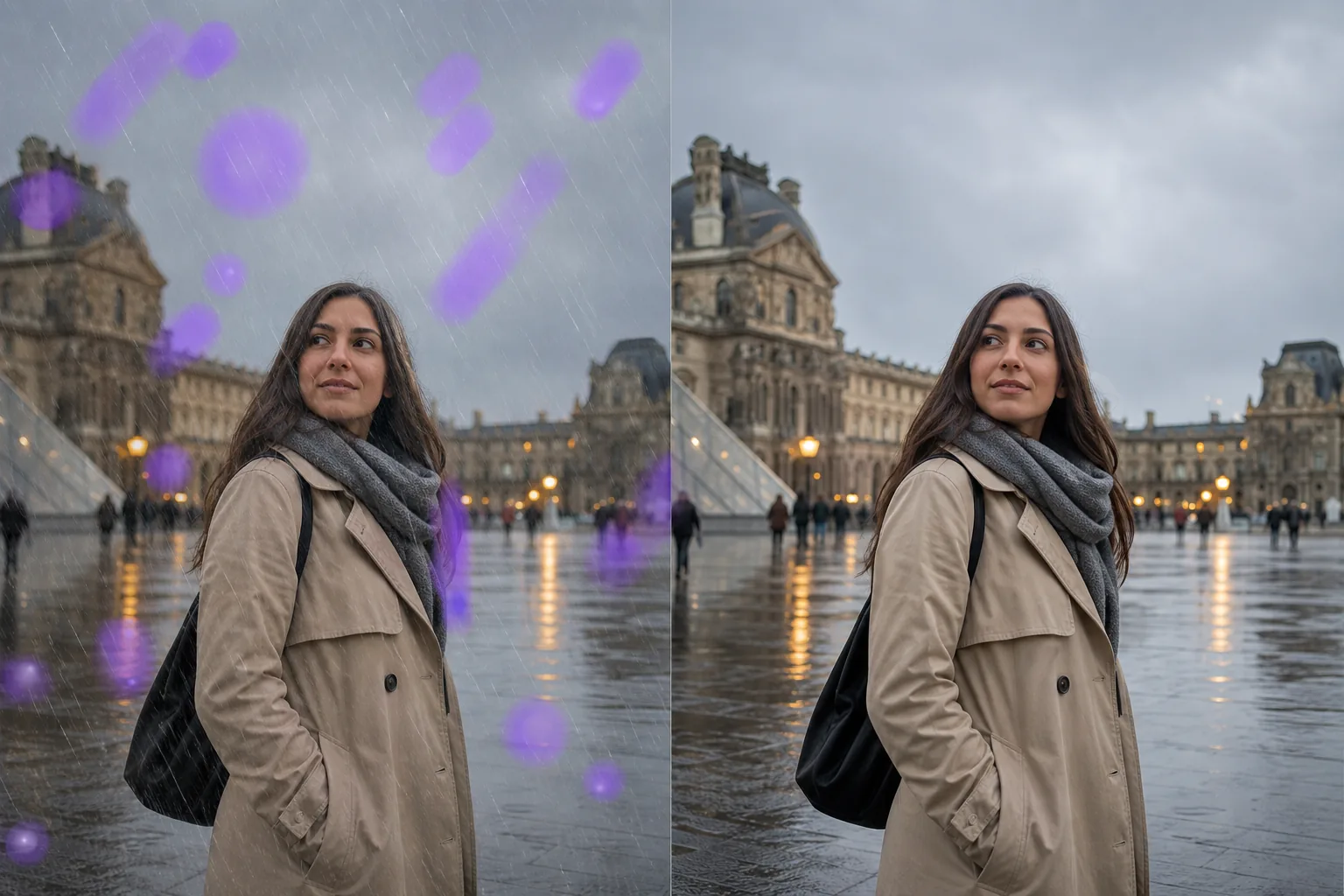
Quando la pioggia interferisce con lo scatto perfetto
La pioggia crea molteplici problemi nelle fotografie: le strisce visibili di pioggia appaiono come linee bianche o traslucide sull'immagine; le gocce d'acqua sulla lente creano punti sfocati e aloni luminosi; le superfici bagnate riflettono tutto ciò che è vicino, ingombrando la composizione. Fotografi di eventi, fotografi di matrimoni e turisti affrontano tutti la stessa realtà: non è possibile riprogrammare la pioggia. La cerimonia, la visita importante, il concerto all'aperto si svolgono con la pioggia o con il sole e le foto devono essere ancora utilizzabili. L'editing tradizionale richiede la clonazione scrupolosa di ogni striscia di pioggia e gocciolina: centinaia di piccole correzioni su una singola immagine. L'intelligenza artificiale di Magic Eraser riconosce gli schemi della pioggia (la direzione delle strisce, la forma delle gocce, la caratteristica foschia) e li rimuove preservando i dettagli della scena sottostante.
Rimuovere la pioggia in tre passaggi
- 1
Carica la tua foto piovosa
Apri Magic Eraser sul Web, iOS o Android e carica la foto dell'esterno interessato dalla pioggia. Lo strumento gestisce qualsiasi cosa, dalla leggera pioggerellina agli artefatti di forti acquazzoni.
- 2
Spazzolare le aree colpite dalla pioggia
Per le striature di pioggia, spazzolare le aree con striature visibili. Per le goccioline della lente, passa il pennello su ogni punto sfocato. Per la foschia generale dovuta alla pioggia, usa gli strumenti di miglioramento anziché il pennello: l'intelligenza artificiale può rendere più nitida e attenuare la foschia dell'intera immagine.
- 3
Cancella e migliora
Tocca Cancella e l'IA rimuoverà gli artefatti della pioggia, ripristinando dettagli chiari nelle aree interessate. Per ottenere i migliori risultati, utilizza lo strumento AI Enhancement per rendere più nitida l'immagine complessiva e recuperare il contrasto perso a causa della foschia dovuta alla pioggia. Esporta la versione chiara.
Meglio per
- Foto di matrimonio scattate durante una pioggia inaspettata
- Scatti di viaggi e turismo in destinazioni piovose
- Copertura di eventi all'aperto dove la pioggia non può essere evitata
- Foto esterne dell'immobile scattate in giornate nuvolose e piovose
- Fotografia sportiva sotto la pioggia in luoghi all'aperto
- Foto di concerti e festival in condizioni di bagnato
- Foto di safari e fauna selvatica attraverso i finestrini del veicolo sotto la pioggia
- Fotografia di strada in contesti urbani piovosi
Suggerimenti per ripulire le foto piovose
La rimozione delle strisce di pioggia funziona meglio quando le strisce sono chiaramente visibili sullo sfondo: le strisce chiare su sfondi scuri o la pioggia retroilluminata sono più facili da rilevare e rimuovere rispetto a una pioggerellina sottile. Per le goccioline delle lenti (le macchie circolari sfocate causate dall'acqua sul vetro), spennellare direttamente su ciascuna gocciolina. L'intelligenza artificiale ricostruisce i dettagli della scena che erano sfocati. Per la foschia da pioggia (la morbidezza complessiva e il contrasto ridotto creati dalla pioggia battente) gli strumenti AI Enhancement e de-haze sono più efficaci del pennello gomma, poiché il problema è distribuito sull'intera immagine anziché in punti specifici. Se la foto presenta sia strisce di pioggia che goccioline di lente, rimuovere prima le strisce, quindi correggere le goccioline, quindi applicare il miglioramento generale. Questo approccio a più livelli produce il risultato più pulito.
Domande frequenti
- Può rimuovere la pioggia battente da una foto?
- La pioggia battente crea più artefatti: strisce dense, foschia generale, contrasto ridotto. L'intelligenza artificiale li gestisce, ma il risultato dipende da quanti dettagli della scena vengono preservati sotto la pioggia. La pioggia da leggera a moderata corregge molto bene; forti piogge in condizioni molto buie possono mantenere una certa morbidezza.
- Fissa le gocce d'acqua sull'obiettivo della fotocamera?
- SÌ. Sfiora ogni goccia e l'intelligenza artificiale ricostruisce l'area sfocata sottostante. Per più goccioline, sfiorarle tutte prima di cancellarle per un'elaborazione coerente.
- Manterrà l'atmosfera lunatica della pioggia se lo voglio?
- Lo strumento influisce solo sulle aree su cui passi il pennello. Se desideri mantenere i riflessi bagnati sul terreno o l'atmosfera piovosa generale ma rimuovere specifiche strisce di pioggia o goccioline di lenti, basta spazzolare gli artefatti specifici che desideri rimuovere.
- La rimozione della pioggia è gratuita?
- SÌ. Il livello gratuito di Magic Eraser gestisce la rimozione degli artefatti dovuti alla pioggia. Carica la tua foto piovosa, sfiora le strisce o le goccioline ed esporta la versione pulita.