
Rimuovi le antenne dalle foto
Cancella antenne TV, antenne paraboliche, antenne sui tetti e apparecchiature cellulari dalla fotografia architettonica e immobiliare. Magic Eraser rimuove l'hardware e ricostruisce la linea del tetto, il bordo del camino o il cielo dietro di esso in modo che l'edificio appaia pulito e ordinato: senza livelli di Photoshop, senza la noia del timbro clone.
Ultimo aggiornamento
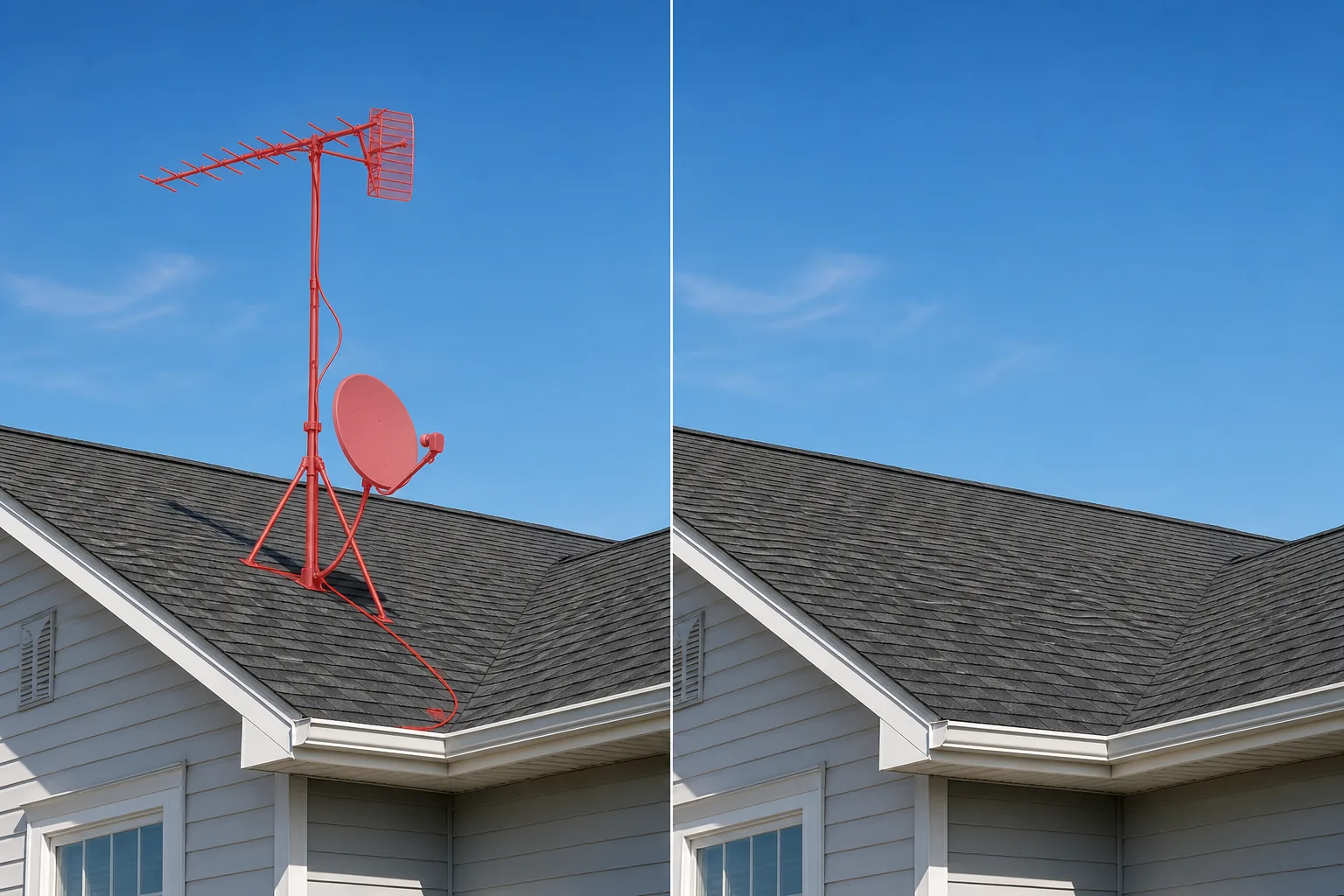
Perché le antenne sul tetto rovinano scatti architettonici altrimenti puliti
Una singola antenna TV o parabola satellitare sulla linea del tetto può trasformare una foto architettonica attentamente composta in un'istantanea disordinata. Il problema si aggrava quando più edifici in un paesaggio stradale portano ciascuno la propria parabola, antenna o ripetitore cellulare: lo skyline diventa un groviglio di metallo che l'occhio dello spettatore non può ignorare. La rimozione manuale in Photoshop è noiosa perché le antenne hanno forme complesse: aste sottili con angoli strani, piatti circolari con staffe di montaggio, cavi che scendono fino alla grondaia. Ogni elemento attraversa uno sfondo diverso (cielo, tegola, muro di mattoni, camino) e ogni incrocio richiede una texture di riempimento diversa. L'intelligenza artificiale di Magic Eraser gestisce queste transizioni in un unico passaggio. Riconosce la struttura dell'antenna, la rimuove e ricostruisce il bordo del tetto, le linee di malta, il disegno delle tegole o il cielo aperto dietro l'hardware. Per agenti immobiliari, fotografi di architettura e blogger di viaggio, il risultato è un esterno dell'edificio che ha l'aspetto previsto dall'architetto: pulito, ininterrotto e privo di elementi di ristrutturazione.
Rimuovere le antenne in tre passaggi
- 1
Carica la tua foto
Apri Magic Eraser sul Web, iOS o Android e carica l'esterno dell'edificio, il panorama stradale o la foto aerea contenente l'antenna o l'antenna parabolica indesiderata. Sono tutti supportati JPEG, PNG, HEIC e WebP. Utilizza la massima risoluzione disponibile in modo che l'IA abbia il massimo dettaglio per la ricostruzione della linea del tetto.
- 2
Spazzola l'antenna
Dipingi l'intera struttura dell'antenna: parabola, albero, staffa di montaggio e tutti i cavi visibili che corrono lungo il tetto o il muro. Includi un piccolo margine del tetto o del cielo circostante in modo che l'IA abbia una texture pulita a cui fare riferimento. Per le antenne TV a bacchetta sottile, utilizzare un pennello leggermente più largo delle bacchette per garantire una copertura completa degli elementi metallici e delle loro ombre.
- 3
Cancella e rivedi
Tocca Cancella e Magic Eraser rimuove l'antenna mentre ricostruisci la linea del tetto, le tegole, i mattoni o il cielo dietro di essa. Zoom al 100% per verificare che il bordo del tetto appaia continuo e naturale. Esegui un secondo passaggio su eventuali cavi residui o hardware di montaggio, quindi esporta alla massima risoluzione per il tuo elenco, portfolio o pubblicazione.
Meglio per
- Annunci immobiliari in cui antenne paraboliche e antenne sul tetto fanno sembrare la proprietà datata
- Portfolio di fotografie di architettura che mostrano la progettazione di edifici senza attrezzature di retrofit
- Fotografia di viaggio e di paesaggio urbano di tetti storici ingombri di antenne moderne
- Riprese aeree e con droni in cui l'attrezzatura sul tetto domina la vista a volo d'uccello
- Annunci di hotel e case vacanze in cui l'attrattiva del marciapiede esterno è importante per le prenotazioni
- Documentazione del patrimonio e della conservazione in cui la linea del tetto originale deve essere visualizzata senza aggiunte moderne
- Marketing di proprietà commerciali in cui la sagoma pulita dell'edificio segnala una struttura ben mantenuta
Suggerimenti per una rimozione dell'antenna dall'aspetto naturale
La rimozione dell'antenna è una delle modifiche sul tetto più complesse perché l'hardware spesso si trova proprio sul colmo del tetto, dove il cielo incontra le tegole e il camino incontra la scossalina. Per ottenere risultati più puliti, maschera l'intero gruppo dell'antenna in un unico passaggio invece di provare a cancellare la parabola e l'albero separatamente: l'intelligenza artificiale genera una linea del tetto più coerente quando può ricostruire l'intera area in una sola volta. Presta attenzione alle ombre: un'antenna parabolica proietta un'ombra circolare distinta sulla superficie del tetto e lasciare quell'ombra dopo aver cancellato l'antenna crea un risultato inquietante. Includi l'ombra nell'area del pennello. Per i paesaggi stradali con antenne su più edifici, lavora su una linea del tetto alla volta dal primo piano allo sfondo: questo consente all'IA di utilizzare le linee del tetto più vicine già pulite come contesto per quelle più lontane. Se l'antenna ha un cavo che corre lungo il muro fino a una scatola di giunzione, traccia l'intero percorso del cavo con il pennello in modo che nessun segmento di filo orfano rimanga visibile nell'immagine finale.
Domande frequenti
- È gratuito rimuovere le antenne da una foto?
- SÌ. Il livello gratuito di Magic Eraser gestisce la rimozione dell'antenna con limiti di utilizzo giornaliero. Premium ($ 29,99/anno) rimuove i limiti e sblocca esportazioni ad alta risoluzione per portfolio architettonici di qualità di stampa ed elenchi MLS.
- Può rimuovere sia le antenne paraboliche che le antenne TV vecchio stile?
- SÌ. L'intelligenza artificiale gestisce tutti i tipi: antenne paraboliche, antenne TV Yagi, antenne digitali, ripetitori cellulari e persino antenne per radioamatori. Ciascun tipo ha una forma e uno stile di montaggio diversi, ma il processo di rimozione e ricostruzione del tetto è lo stesso: sfiorare l'intera struttura e toccare Cancella.
- E la staffa di montaggio e i cavi lasciati sul muro?
- Includili nell'area del pennello. Le staffe di montaggio, le piastre a muro, i fermacavi e il cavo coassiale che corre fino alla grondaia sono tutti rimovibili. L'intelligenza artificiale riempie la struttura del muro (mattoni, stucco, rivestimenti) su cui è stato fissato l'hardware. Se un cavo corre lungo il muro per una lunga distanza, traccia l'intero percorso con una sola pennellata per ottenere un risultato più pulito.
- La linea del tetto apparirà realistica dopo aver rimosso un piatto grande?
- SÌ. L'intelligenza artificiale ricostruisce le tegole del tetto, i colmi, le scossaline e i bordi dei camini in base al modello circostante. Per parabole commerciali molto grandi che coprono una porzione significativa del tetto, l'IA potrebbe aver bisogno di un secondo passaggio per perfezionare l'allineamento delle tegole. Ingrandisci al 100% dopo la prima cancellazione per controllare, quindi ritocca le aree che necessitano di rifinitura.
- È appropriato per le foto di annunci immobiliari?
- La rimozione delle antenne è una modifica estetica comune nella fotografia immobiliare, simile alla rimozione delle linee elettriche o dei bidoni della spazzatura. L'antenna è un accessorio removibile e non un elemento strutturale dell'immobile. Segui le linee guida del Codice etico MLS e NAR locale sulla divulgazione del fotoritocco: la pulizia estetica è generalmente accettata, ma le alterazioni materiali che travisano le condizioni della proprietà non lo sono.