
Penataan Virtual Properti
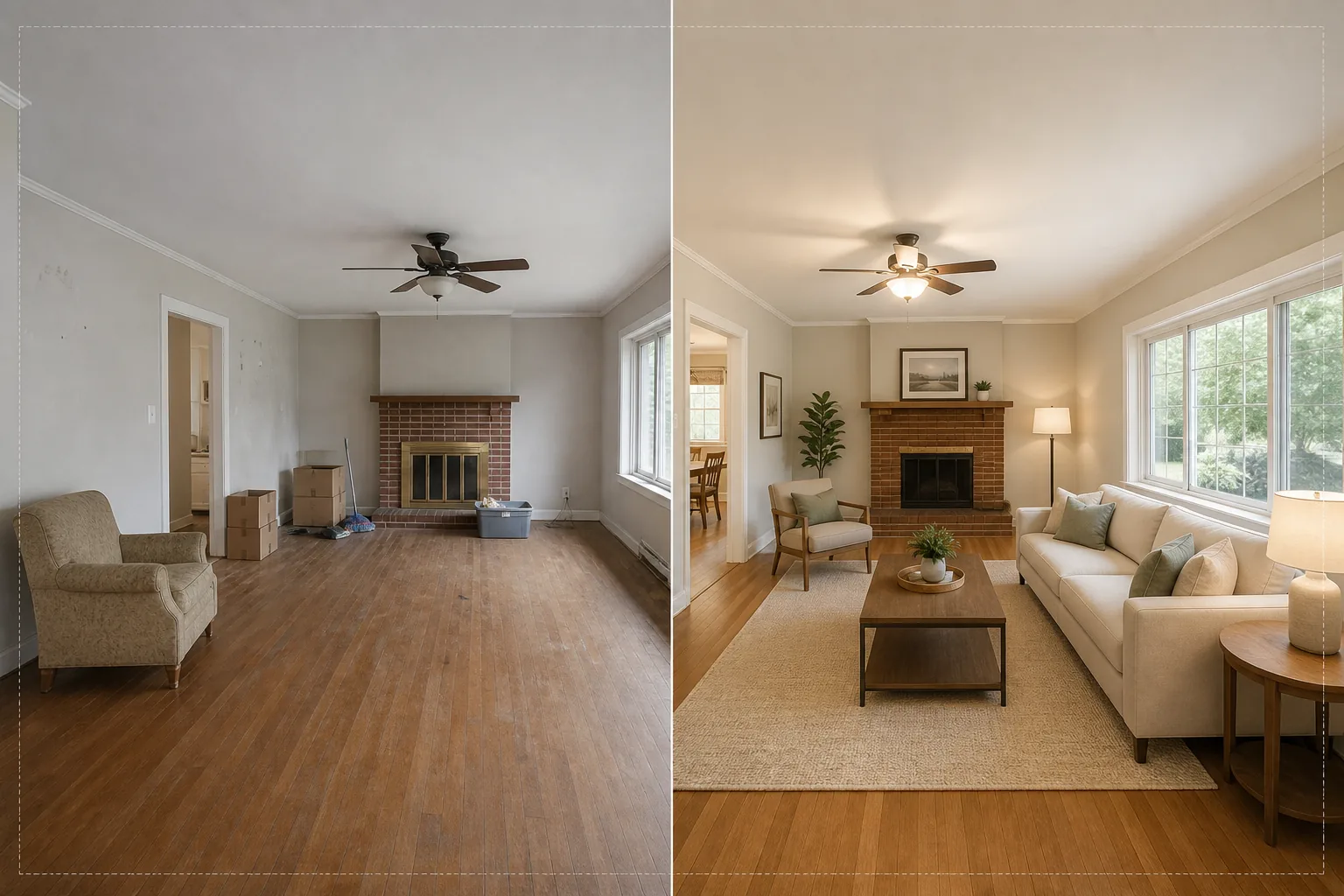
Tata ruangan kosong dengan furnitur dan dekorasi sehalus foto tanpa memindahkan satu pun furnitur fisik. Templat ini menggunakan AI Fill untuk menempatkan sofa, meja, karpet, dan karya seni ke ruangan yang kosong, sementara Magic Eraser menghapus kekacauan yang ada, furnitur lama, dan barang pribadi sebelum penataan dimulai. Hasilnya adalah foto listing yang hangat dan mengundang yang membantu pembeli membayangkan diri mereka tinggal di ruang tersebut.
Coba templat ini gratisReal Estate template preview
Apa yang dilakukan templat ini
Menyelesaikan tantangan terbesar dalam fotografi properti: membuat ruangan yang kosong atau berantakan terasa seperti rumah. Magic Eraser terlebih dahulu menghapus segala kekacauan yang ada — furnitur lama, kardus pindahan, barang pribadi, noda dinding, dan goresan pada lantai. Kemudian AI Fill menempatkan furnitur yang sesuai konteks ke ruangan yang telah dibersihkan, menyelaraskan gaya dengan arsitekturnya. Loft modern mendapat perabot bergaya mid-century dengan aksen industrial, sementara rumah kolonial tradisional mendapat furnitur berlapis kain klasik dan nuansa kayu hangat. Pencahayaan dan bayangan pada furnitur virtual dihitung dari cahaya jendela yang sudah ada di foto, sehingga penataan tampak benar-benar hadir secara fisik, bukan sekadar tempelan.
Pengaturan templat
| Gaya penataan | Modern, Tradisional, Skandinavia, Mid-Century, atau Pesisir |
| Jenis ruangan | Terdeteksi otomatis (ruang tamu, kamar tidur, ruang makan, kantor, dapur) |
| Penghapusan kekacauan | Hapus otomatis kardus, barang pribadi, dan furnitur lama sebelum penataan |
| Render bayangan | Disesuaikan dengan arah dan intensitas cahaya jendela yang ada |
| Resolusi keluaran | 4000×3000px (sesuai MLS pada 300 DPI) |
| Suhu warna | Interior hangat (3200K–4000K agar cocok dengan pencahayaan dalam ruangan pada umumnya) |
Cara menggunakan templat ini
Unggah foto ruangan kosong atau berantakan
Unggah foto sudut lebar dari ruangan. Ambil dari sudut untuk menangkap dua dinding dan lantai demi penataan yang paling realistis. Templat ini bekerja dengan foto dari ponsel pintar, kamera DSLR, dan kamera properti profesional termasuk lensa ultra-lebar.
Hapus kekacauan yang ada
Magic Eraser secara otomatis mendeteksi dan menghapus kardus pindahan, furnitur lama, foto pribadi di dinding, dan kekacauan di lantai. AI merekonstruksi lantai, cat dinding, dan plin di balik objek yang dihapus sehingga ruangan tampak bersih dan kosong.
Tata dengan furnitur virtual
AI Fill menempatkan furnitur yang sesuai dengan jenis ruangan yang terdeteksi dan gaya yang dipilih. Ruang tamu mendapat sofa, meja kopi, karpet, meja samping, dan karya seni dinding. Kamar tidur mendapat tempat tidur, nakas, lampu, dan bantal hias. Furnitur menyesuaikan ukuran ruangan dan menghasilkan bayangan yang realistis.
Ekspor untuk MLS dan listing
Unduh foto yang telah ditata pada 4000×3000px, siap untuk diunggah ke MLS, Zillow, Realtor.com, dan brosur cetak. Gambar menyertakan tag metadata untuk memudahkan pengkatalogan dalam sistem manajemen listing Anda.
Tips profesional untuk hasil terbaik
- ✓Ambil foto dari sudut pada ketinggian sekitar 1,2 meter — ini menangkap dua dinding dan area lantai yang cukup agar AI dapat menempatkan furnitur dengan perspektif yang tepat dan bayangan kontak ke lantai.
- ✓Nyalakan semua lampu di ruangan sebelum memotret. AI menggunakan sumber cahaya yang terlihat dan sorotan jendela untuk menghitung di mana bayangan harus jatuh pada furnitur yang ditata.
- ✓Untuk listing dengan banyak ruangan, gunakan gaya penataan yang sama di semua ruangan untuk menciptakan cerita desain yang kohesif, seakan-akan seorang desainer sungguhan menata seluruh rumah.
Pertanyaan umum
Apakah penataan virtual sesuai dengan aturan MLS?
+
Sebagian besar sistem MLS mengizinkan foto yang ditata secara virtual selama diberi label sebagaimana mestinya. Templat ini tidak menambahkan label secara otomatis — periksa aturan MLS setempat Anda dan tambahkan keterangan pengungkapan seperti 'Ditata Secara Virtual' saat mengunggah.
Bisakah saya menata teras atau balkon luar ruangan?
+
Ya. Templat ini mendeteksi ruang hunian luar ruangan dan menatanya dengan furnitur teras, pot tanaman, dan karpet luar ruangan yang sesuai. Perhitungan pencahayaan memperhitungkan langit terbuka dan sinar matahari langsung alih-alih cahaya sekitar dalam ruangan.
Seberapa realistis furniturnya?
+
Furnitur yang ditata menghasilkan bayangan yang sesuai dengan arah cahaya ruangan yang ada, bertumpu pada bidang lantai dengan perspektif yang benar, dan memantulkan warna sekitar dari dinding di sekelilingnya. Dari jarak pandang normal, penataan tidak dapat dibedakan dari foto yang benar-benar berperabot.
Tata ruangan apa pun dalam hitungan detik, bukan jam
Unggah foto ruangan kosong dan dapatkan gambar listing berperabot indah yang membuat pembeli jatuh cinta pada setiap ruang.
Coba gratisRelated templates
More real estate templates for your workflow.
Templat foto real estat profesional untuk daftar MLS. Peningkatan seperti HDR, penggantian langit, penghapusan kekacauan, dan koreksi warna untuk foto properti yang terjual lebih cepat.
Tingkatkan foto eksterior arsitektur dengan koreksi garis vertikal, penggantian langit, penghapusan mobil dan pejalan kaki, serta gradasi warna golden hour untuk listing dan portofolio.
Ubah foto Airbnb dan persewaan liburan dengan penerangan ruangan, penghilangan kekacauan, Color correction, dan perbaikan distorsi lensa sudut lebar untuk tingkat pemesanan yang lebih tinggi.
Sempurnakan foto portofolio desain interior dengan kecerahan ruangan, penghilangan kekacauan, penajaman tekstur material, dan rendering warna pada finishing dan kain dengan akurat.
Sempurnakan fotografi udara drone dengan penggantian langit, penyorotan batas properti, kecerahan warna Boost, dan penghilangan gangguan untuk survei real estate dan lahan.
Bersihkan, tingkatkan, dan standarisasi gambar denah lantai untuk listingan real estate dengan penghilangan noda, penajaman garis, dan penataan gaya yang konsisten.