
Denah Lantai Real Estat
Ubah denah lantai yang dipindai atau difoto menjadi diagram yang bersih dan profesional, cocok untuk listingan MLS, brosur properti, dan integrasi tur virtual. Templat ini menghapus noda, bayangan, dan lipatan dari denah kertas, menajamkan garis dinding dan anotasi dimensi, serta menstandarisasi gaya visual sehingga setiap denah lantai dalam portofolio listingan Anda terlihat konsisten.
Coba templat ini gratisReal Estate template preview
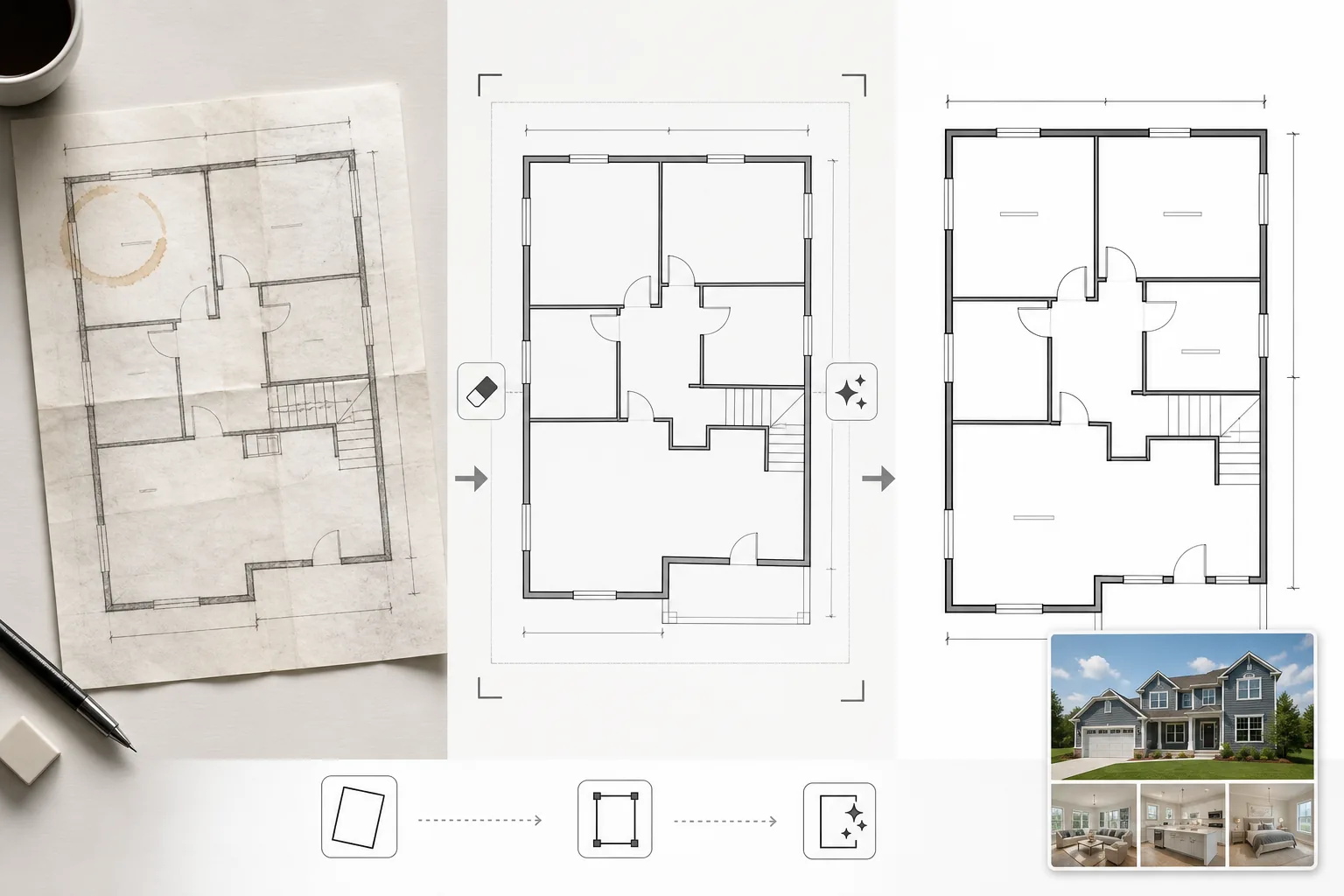
Apa yang dilakukan templat ini
Membersihkan gambar denah lantai yang difoto dari cetak biru kertas, diekspor dari perangkat lunak CAD usang, atau dipindai dengan kualitas rendah. Magic Eraser menghapus noda kopi, anotasi pensil, lipatan, dan artefak bayangan dari foto ponsel denah kertas. AI Enhance menajamkan garis dinding, ayunan pintu, dan teks dimensi sehingga tetap terbaca saat diperkecil untuk tampilan web atau dicetak di brosur. Perspektif dikoreksi untuk denah lantai yang difoto dengan sudut miring alih-alih dipindai datar. Warna latar belakang dinormalisasi menjadi putih bersih, dan garis dinding digelapkan ke ketebalan yang konsisten untuk tampilan seragam di semua denah dalam suatu listingan.
Pengaturan templat
| Pembersihan latar belakang | Hapus noda, lipatan, bayangan, dan normalisasi menjadi putih bersih |
| Peningkatan garis | Tajamkan dan gelapkan garis dinding ke ketebalan yang konsisten |
| Kejelasan teks | Tingkatkan label dimensi, nama ruangan, dan anotasi pengukuran |
| Koreksi perspektif | Luruskan denah yang difoto menjadi tampilan atas-ke-bawah yang sebenarnya |
| Resolusi keluaran | 3000×2000px (lanskap) atau khusus untuk mencocokkan rasio aspek asli |
Cara menggunakan templat ini
Unggah gambar denah lantai Anda
Unggah denah lantai yang dipindai, difoto, atau digital. Templat ini menangani denah kertas yang difoto dengan kamera ponsel, pindaian flatbed, ekspor PDF, dan tangkapan layar dari perangkat lunak arsitektur. Distorsi perspektif dari foto ponsel bersudut dikoreksi secara otomatis.
Hapus artefak dan noda
Magic Eraser mengidentifikasi dan menghapus noda kopi, bekas pensil, lipatan, garis-garis pemindai, dan gradien bayangan dari pencahayaan yang tidak merata. Latar belakang dinormalisasi menjadi putih bersih sambil mempertahankan semua garis dan anotasi arsitektur.
Tingkatkan garis dan teks
AI Enhance menajamkan garis luar dinding, lengkung pintu, simbol jendela, dan indikator tangga. Teks dimensi dan label ruangan ditingkatkan untuk keterbacaan. Ketebalan garis dinormalisasi sehingga dinding luar yang tebal dan sekat dalam yang lebih tipis memiliki hierarki visual yang konsisten.
Ekspor untuk listingan dan cetak
Unduh denah lantai yang sudah dibersihkan dengan resolusi tinggi untuk unggahan MLS, brosur properti, dan hamparan tur virtual. Gaya visual yang terstandarisasi memastikan semua denah lantai di seluruh listingan Anda terlihat profesional dan konsisten.
Tips profesional untuk hasil terbaik
- ✓Saat memfoto denah lantai kertas, letakkan pada permukaan datar dan ambil gambar langsung dari atas dengan pencahayaan merata. Koreksi perspektif menangani sudut sedang, tetapi titik awal yang hampir dari atas menghasilkan hasil paling tajam.
- ✓Lepaskan catatan tempel dan klip kertas dari denah sebelum memfotonya. AI dapat menghapusnya, tetapi residu perekat dan bayangan klip terkadang meninggalkan bekas samar yang memerlukan pembersihan tambahan.
- ✓Untuk properti bertingkat, proses setiap lantai secara terpisah dan gunakan pengaturan peningkatan yang sama. Ini memastikan ketebalan garis dinding, ukuran teks, dan nada latar belakang cocok di seluruh lantai untuk presentasi listingan yang kohesif.
Pertanyaan umum
Bisakah ini mengubah sketsa kasar menjadi denah lantai profesional?
+
Templat ini membersihkan dan meningkatkan gambar denah lantai yang ada — bukan menghasilkan denah arsitektur dari awal. Sketsa kasar dengan dinding dan bentuk ruangan yang digambar dengan jelas dapat dibersihkan dan ditajamkan, tetapi kurva yang digambar tangan dan garis yang tidak rata akan tetap berkarakter gambar tangan, hanya lebih bersih.
Apakah teks dimensi akan dipertahankan secara akurat?
+
Ya. Peningkatan menajamkan label dimensi yang ada tanpa mengubah angka. Jika teks asli terlalu buram untuk dibaca, AI berupaya memulihkan keterbacaan tetapi tidak dapat menjamin akurasi pada teks yang sangat rusak — selalu verifikasi dimensi terhadap dokumen sumber.
Bisakah saya menambahkan label ruangan setelah pemrosesan?
+
Ya. Latar belakang putih bersih dan garis tajam memudahkan untuk menumpangkan label ruangan, ikon furnitur, atau pengodean warna menggunakan editor gambar atau perangkat lunak listingan apa pun.
Tampilkan setiap listingan dengan denah lantai yang bersih dan profesional
Unggah denah lantai yang dipindai atau difoto dan dapatkan diagram yang bersih, tajam, dan siap listingan dalam hitungan detik.
Coba gratisRelated templates
More real estate templates for your workflow.
Templat foto real estat profesional untuk daftar MLS. Peningkatan seperti HDR, penggantian langit, penghapusan kekacauan, dan koreksi warna untuk foto properti yang terjual lebih cepat.
Tingkatkan foto eksterior arsitektur dengan koreksi garis vertikal, penggantian langit, penghapusan mobil dan pejalan kaki, serta gradasi warna golden hour untuk listing dan portofolio.
Ubah foto Airbnb dan persewaan liburan dengan penerangan ruangan, penghilangan kekacauan, Color correction, dan perbaikan distorsi lensa sudut lebar untuk tingkat pemesanan yang lebih tinggi.
Sempurnakan foto portofolio desain interior dengan kecerahan ruangan, penghilangan kekacauan, penajaman tekstur material, dan rendering warna pada finishing dan kain dengan akurat.
Sempurnakan fotografi udara drone dengan penggantian langit, penyorotan batas properti, kecerahan warna Boost, dan penghilangan gangguan untuk survei real estate dan lahan.
Tata ruangan kosong secara virtual dengan furnitur, dekorasi, dan pencahayaan yang realistis. Bantu pembeli memvisualisasikan ruang hunian tanpa biaya penataan fisik.